
BAAM AI Blog
Email Marketing Cleaned Mailchimp: What Cleaned Contacts Really Mean And How To Handle Them
A cleaned contact in Mailchimp is not just a messy database problem. It is a deliverability signal, a list quality warning, and sometimes a sign that your email marketing system is collecting the wrong addresses in...
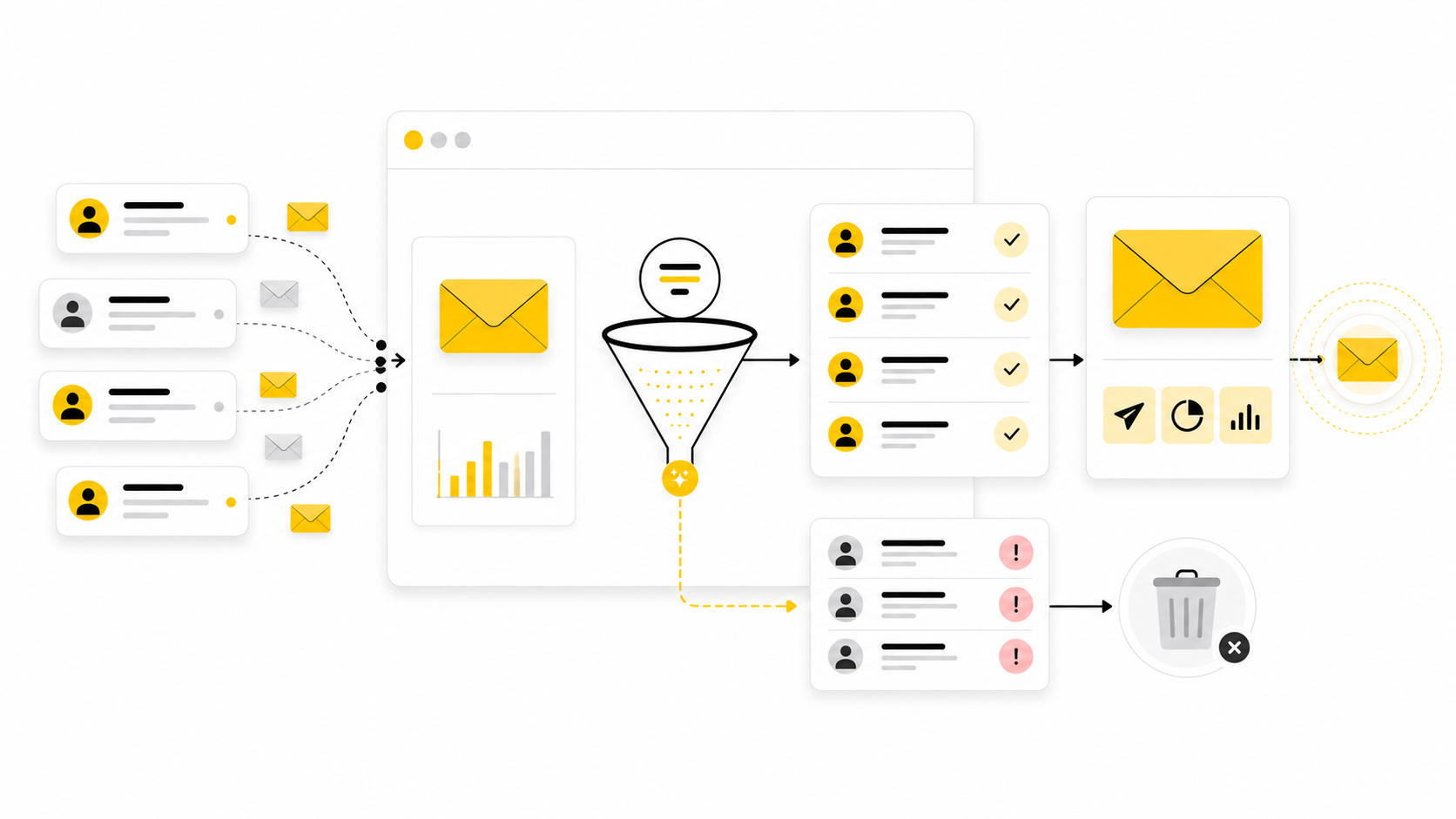
A cleaned contact in Mailchimp is not just a messy database problem. It is a deliverability signal, a list quality warning, and sometimes a sign that your email marketing system is collecting the wrong addresses in the first place.
Mailchimp defines cleaned contacts as email addresses that have hard bounced or repeatedly soft bounced, which means they are treated as invalid and cannot receive future email campaigns from that audience. That matters because a cleaned email is not the same thing as an unsubscribe, a non-subscribed contact, or an inactive subscriber. It is Mailchimp saying, in practical terms: this address is not safe to keep mailing.
This is where many businesses get email marketing cleaned Mailchimp completely wrong. They panic, try to “fix” cleaned contacts manually, or import the same bad addresses again somewhere else. The better move is to understand why the contacts were cleaned, what Mailchimp is protecting you from, and how to build a cleaner system before the next campaign goes out.
The full article will be split into six parts:
What Cleaned Contacts Mean In Mailchimp
Mailchimp uses the cleaned status when an email address has delivery problems serious enough that Mailchimp will no longer send to it. In Mailchimp’s own help documentation, cleaned contacts are addresses that have either hard bounced or repeatedly soft bounced, and Mailchimp considers them invalid. A hard bounce usually means a permanent delivery failure, while repeated soft bounces suggest an address that keeps failing even if the first issue looked temporary.
This distinction matters because marketers often confuse cleaned contacts with people who simply stopped engaging. An inactive subscriber may still be deliverable, even if they have not opened or clicked recently. A cleaned contact is different because the mailbox, domain, or delivery path has failed enough for Mailchimp to suppress future sends.
That is why trying to force cleaned contacts back into your active list is usually the wrong instinct. If the address is genuinely invalid, sending to it again can create more bounces, weaken sender reputation, and make future campaigns less likely to land in the inbox. The cleaner strategy is to treat cleaned contacts as feedback from your email system, not as a list segment you need to rescue.
Why Cleaned Contacts Matter For Deliverability
Email deliverability is no longer just about writing a good subject line. Gmail and Yahoo both tightened sender expectations for bulk email, including stronger authentication, easier unsubscribes, and low spam complaint rates. Google’s sender guidance says bulk senders should keep user-reported spam rates below 0.1% and avoid reaching 0.3% or higher, which shows how little tolerance inbox providers now have for poor sending behavior.
Cleaned contacts fit into that bigger picture because bounces are one of the clearest signals that a list is unhealthy. If you keep sending to addresses that do not exist, no longer accept mail, or were collected badly, mailbox providers have less reason to trust your campaigns. That trust affects whether your messages reach the inbox, land in promotions, get filtered into spam, or fail before the reader ever sees them.
This is also why a smaller list can outperform a larger one. A list of 8,000 real subscribers who recognize your brand is more valuable than 50,000 contacts filled with stale, scraped, mistyped, or abandoned addresses. Email marketing is not a contest to own the biggest audience. It is a system for reaching the right people reliably.
The Clean List Framework
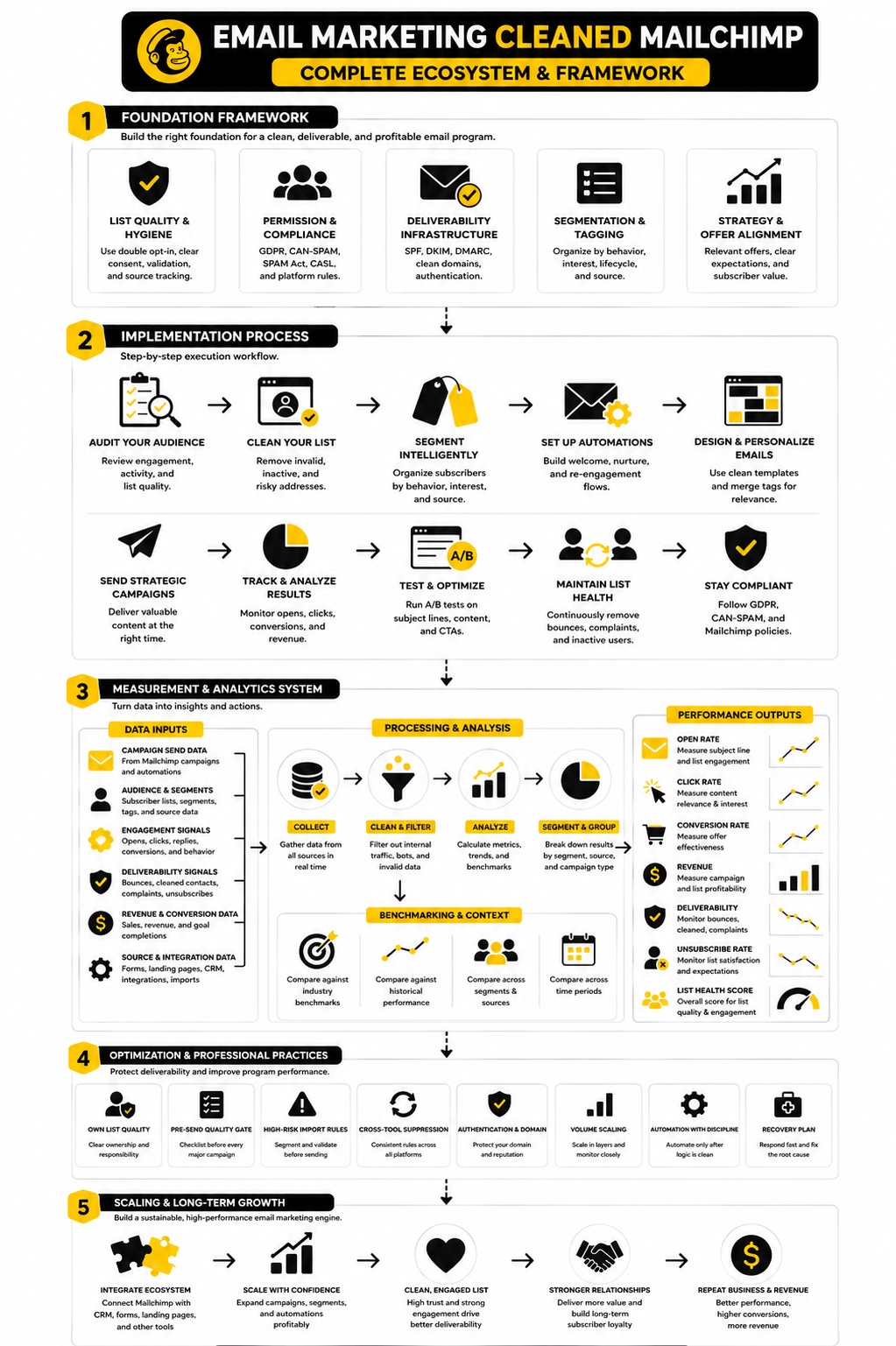
A clean Mailchimp audience comes from four connected layers: collection, validation, segmentation, and suppression. Collection controls how addresses enter your list. Validation catches obvious problems before they become bounces. Segmentation keeps your best contacts separate from risky ones. Suppression prevents bad addresses from being mailed again.
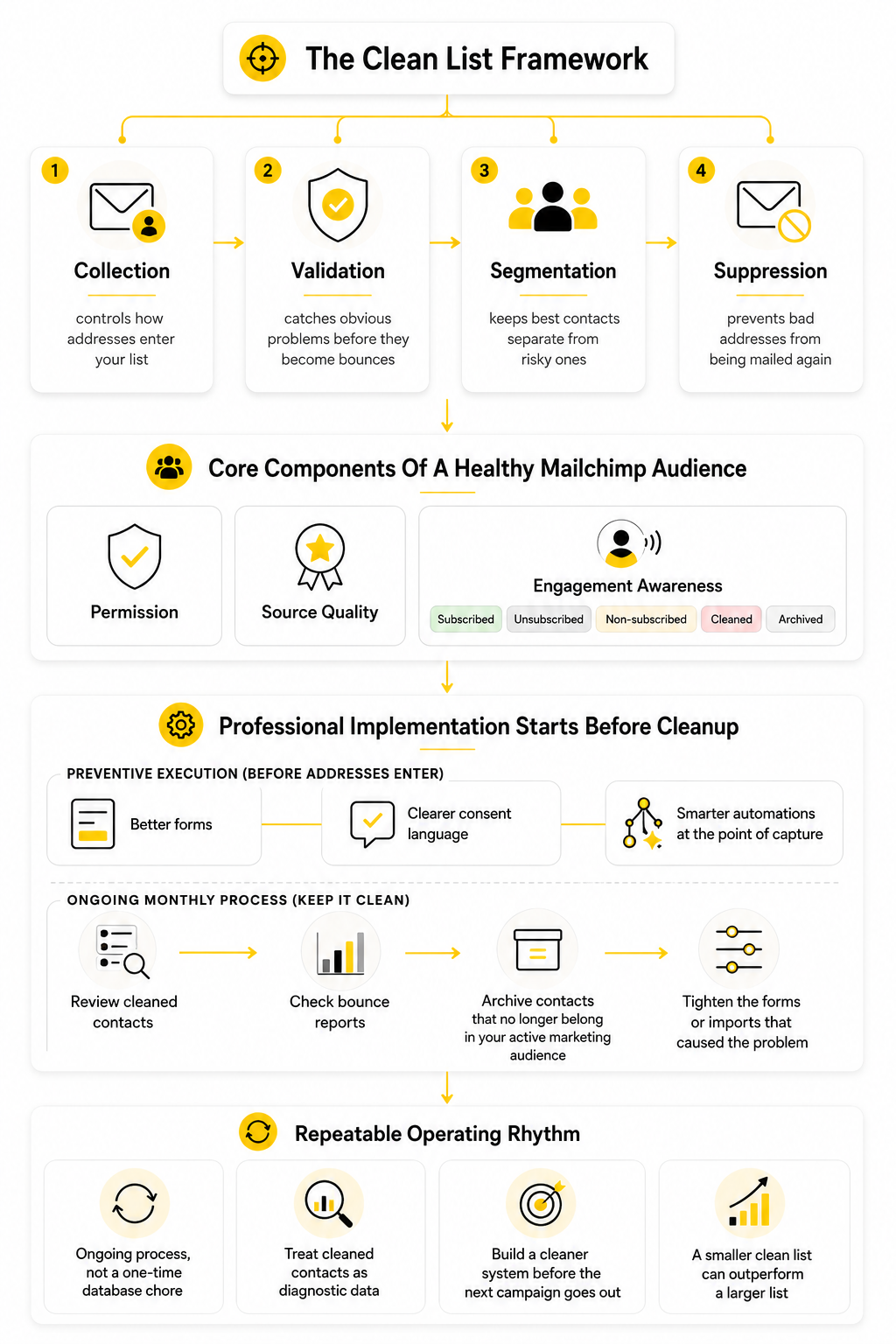
The mistake is treating cleanup as a one-time database chore. Real list hygiene is ongoing because people change jobs, abandon inboxes, mistype forms, use temporary emails, and lose interest. Even a perfectly clean list today will decay over time if no process protects it.
For a business using Mailchimp, the framework should be simple enough to run every month. Review cleaned contacts, check bounce reports, archive contacts that no longer belong in your active marketing audience, and tighten the forms or imports that caused the problem. If you use other funnel or CRM tools alongside Mailchimp, this is also where a platform like GoHighLevel can help centralize lead capture and follow-up logic so bad data does not keep spreading across disconnected systems.
Core Components Of A Healthy Mailchimp Audience
A healthy audience starts with permission. People should know what they signed up for, why they are getting emails, and how often they can expect to hear from you. Permission does not magically solve every deliverability problem, but it reduces complaints, improves engagement, and gives your campaigns a stronger foundation.
The second component is source quality. Addresses from checkout forms, webinar registrations, lead magnets, and customer accounts behave differently. A subscriber who typed their email into a form yesterday is not the same as a contact imported from an old spreadsheet that has not been mailed in two years.
The third component is engagement awareness. Mailchimp contacts can be subscribed, unsubscribed, non-subscribed, cleaned, or archived, and each status should be handled differently. A subscribed contact can receive marketing emails, an unsubscribed contact has opted out, a non-subscribed contact has interacted with you but did not opt into email marketing, and a cleaned contact should not be mailed.
Professional Implementation Starts Before Cleanup
The best cleanup process begins before a contact ever becomes cleaned. That means using better forms, clearer consent language, and more carefully automations at the point of capture. If your lead magnet promises one thing and your emails deliver something else, your list may technically grow, but your engagement and complaint signals can move in the wrong direction.
This is also where tool choice matters, but only when it supports the process. For example, Brevo can make sense for teams that want email and CRM-style communication in one place, while Moosend may fit marketers who want straightforward email automation without overcomplicating the stack. The tool is not the strategy, though. The strategy is keeping bad addresses out, sending useful emails to the right people, and removing risk before it damages deliverability.
For Mailchimp users, cleaned contacts should become part of a repeatable operating rhythm. Do not ignore them, do not obsess over them, and do not treat them like lost revenue by default. Treat them as diagnostic data. The cleaned status tells you where the list is breaking, and the rest of this guide will show how to fix the system around it.
Why Cleaned Contacts Matter For Deliverability
Cleaned contacts matter because inbox providers judge patterns, not excuses. One bad address does not destroy your email program, but a campaign that keeps hitting invalid addresses tells mailbox providers your list may be poorly maintained. Mailchimp marks cleaned contacts as invalid after a hard bounce or repeated soft bounces, and that status exists to stop future sends to addresses that are already creating delivery risk through that audience.
This is why email marketing cleaned Mailchimp work should not start with “How do I get these contacts back?” It should start with “Why did these addresses fail in the first place?” Sometimes the reason is harmless, like a typo in a form submission. Other times, it points to a deeper problem: old imports, weak lead magnets, scraped contacts, abandoned business inboxes, or forms that let fake addresses through.
The practical point is simple. Cleaned contacts are not just a Mailchimp label. They are a warning that part of your acquisition, validation, or list maintenance process needs attention.
Bounces Are A Reputation Signal
A bounce happens when an email cannot be delivered. Mailchimp separates bounces into soft and hard bounces, and it handles them differently because the risk is different. A hard bounce usually means a permanent problem, while a soft bounce may be temporary, such as a full mailbox, a server issue, or a message that was too large.
Mailchimp’s bounce rules are more specific than many marketers realize. A soft bounce can eventually become a cleaned contact if it keeps happening, with Mailchimp allowing up to 7 soft bounces for contacts with no subscriber activity and up to 15 soft bounces for contacts with previous subscriber activity before treating the address as a hard bounce. That is useful because it gives legitimate temporary problems some room, but it also prevents repeat failures from staying in your active sending pool forever.
This matters because mailbox providers are watching for senders who look careless. If your campaigns repeatedly hit dead addresses, spam traps, abandoned inboxes, or domains that reject your mail, your future campaigns can suffer even when the content is good. Deliverability is partly technical, partly behavioral, and partly about trust.
Cleaned Contacts Protect More Than One Campaign
A cleaned contact does not only affect the campaign where the bounce happened. It affects your list hygiene, your reporting, your segmentation, and your ability to make smart decisions later. If you ignore cleaned contacts, your campaign reports may still show the symptom, but you miss the business reason behind the failure.
For example, a spike in cleaned contacts after a new lead magnet usually means the problem is upstream. The form might be attracting low-intent users, the offer might be too broad, or the page might be getting traffic from a source that does not match your ideal customer. If the spike happens after importing an old spreadsheet, the issue is usually age and permission quality.
This is where cleaned contacts become useful. They tell you which acquisition sources deserve more scrutiny. They also help you separate genuine audience growth from fake growth that only looks good in a dashboard.
Gmail And Yahoo Raised The Bar
Email marketing has become less forgiving. Gmail’s sender guidance says senders should keep spam rates below 0.1% and avoid reaching 0.3% or higher, which makes poor list quality a real business risk rather than a small technical inconvenience: Google’s email sender guidance. Yahoo’s sender guidance also focuses on authenticated sending, responsible list practices, and clear unsubscribe handling for bulk senders: Yahoo Sender Hub requirements.
That does not mean every small business needs an enterprise deliverability team. It does mean you cannot treat your Mailchimp audience like a dumping ground for every contact you have ever collected. If people did not ask for marketing emails, do not force them into marketing emails. If addresses are old, questionable, or unverified, do not push them straight into a campaign and hope for the best.
The inbox is not neutral. It rewards senders who authenticate properly, respect consent, remove risk, and send wanted messages. It punishes senders who keep mailing bad data.
The Hidden Cost Of Keeping Bad Contacts
Bad contacts cost more than campaign performance. They waste reporting time, distort conversion metrics, and make your list look healthier than it really is. A business can think it has 20,000 reachable contacts when the useful audience is much smaller.
That false confidence leads to weak decisions. You may keep sending broad campaigns because the list looks large. You may delay list cleanup because the database feels valuable. You may blame the subject line, offer, or design when the real issue is that too many contacts should not be mailed at all.
Cleaned contacts cut through that illusion. They show you where reach is already broken. The right response is not panic; it is discipline.
Why “Just Delete Them” Is Too Simple
Deleting cleaned contacts may make your audience view look cleaner, but it can also remove useful diagnostic history. In Mailchimp, cleaned contacts do not count toward audience limits, so there is usually no immediate billing pressure to delete them only for the sake of reducing audience size: Mailchimp’s cleaned contact guidance. The more carefully move is to review them first, understand the source, and then decide whether archiving or exporting makes sense for your workflow.
This is especially important when you use more than one marketing tool. If the same bad addresses are also sitting in your CRM, funnel software, or sales outreach platform, deleting them from Mailchimp alone does not solve the root problem. The address can still reappear later through another sync, another import, or another automation.
If your email stack includes funnels, appointment flows, or lead capture pages, keep the cleanup logic connected to those systems too. Tools like GoHighLevel, ClickFunnels, or Systeme.io can support the front end of the customer journey, but they should not be allowed to push low-quality contacts into Mailchimp without rules.
Cleaned Contacts And Audience Quality
Audience quality is not just about whether an address exists. It is about whether the person recognizes you, expects your emails, and has a reason to engage. A technically valid email address can still be a poor marketing contact if it was collected without clear permission or through a vague offer.
That is why cleaned contacts should be reviewed alongside unsubscribes, spam complaints, low engagement, and source performance. Each metric tells a different part of the story. Cleaned contacts show delivery failure. Unsubscribes show a mismatch in expectations or timing. Spam complaints show irritation or lack of recognition. Low engagement shows weak relevance.
When you combine those signals, your next move becomes much clearer. You stop asking whether the list is big enough and start asking whether the list is trustworthy enough to scale. That shift is the foundation for the clean list framework that comes next.
The Clean List Framework
The clean list framework is how you turn cleaned contacts from a confusing Mailchimp status into a repeatable process. The goal is not to obsess over every failed address. The goal is to make sure bad data stops entering your email system, risky contacts are handled properly, and your best subscribers keep receiving campaigns without unnecessary deliverability drag.
For email marketing cleaned Mailchimp workflows, the framework has four stages: capture, verify, segment, and suppress. Each stage answers a different question. Where did the contact come from? Is the address usable? Should this person receive marketing emails? What should happen if delivery fails?
This structure keeps cleanup practical. You do not need a massive technical setup to improve list quality. You need a clear process that your team can follow every time a form, funnel, import, or automation adds people to your audience.
Start With Contact Capture
List quality starts before Mailchimp ever marks a contact as cleaned. If your forms allow fake addresses, role-based inboxes, old imports, and unclear consent to flow into your audience, Mailchimp will eventually expose the problem through bounces. The cleaned status is usually the visible symptom, not the original cause.
Every signup point should make the offer and email expectation obvious. A person should know whether they are signing up for a newsletter, a discount, a webinar, a download, or a product update. Vague forms may collect more addresses, but they usually collect weaker subscribers.
This is why source tracking matters. A contact from a checkout form should not be evaluated the same way as a contact from a cold CSV import. A lead from a clear opt-in page is different from a contact collected through a broad giveaway. If you do not know the source, you cannot diagnose the cleanup problem later.
Verify Before You Scale
Verification does not mean you need to create friction everywhere. It means you should add stronger checks where the risk is highest. New forms, paid traffic campaigns, giveaway funnels, partner imports, and old spreadsheets deserve more scrutiny than a small organic newsletter form that has been healthy for years.
Mailchimp’s own guidance explains that cleaned contacts are caused by hard bounces or repeated soft bounces, and hard bounces can come from typos, outdated addresses, or server-level delivery issues: Mailchimp cleaned contact guidance. That means some cleaned contacts are avoidable. A misspelled domain, a disposable inbox, or an old abandoned business email should ideally be caught before it becomes a campaign problem.
The practical rule is simple: do not send a large campaign to questionable contacts without a quality check first. If a list is old, imported, purchased, scraped, merged from another tool, or collected without clear marketing permission, pause before adding it to your main audience. That pause can save your sender reputation.
Segment Before You Send
Segmentation is where list hygiene becomes strategic. Instead of treating every subscribed contact as equally valuable, separate people by source, recency, engagement, and permission quality. This gives you control when something goes wrong.
For example, contacts added in the last 30 days can be watched separately from contacts imported two years ago. Customers can be separated from freebie seekers. Engaged subscribers can be protected from risky reactivation campaigns. This makes email marketing cleaned Mailchimp reporting much easier to interpret because you can see which segment is creating the problem.
Segmentation also prevents overreaction. If one imported group creates most of the cleaned contacts, you do not need to punish the whole audience. You need to isolate the risky source, clean that process, and keep your healthy segments moving.
Suppress What Should Not Be Mailed
Suppression is the part many marketers avoid because it feels like shrinking the list. In reality, suppression protects the list. If an address is cleaned, unsubscribed, unqualified, or repeatedly inactive, continuing to push it into campaigns is not ambition. It is carelessness.
Mailchimp already prevents sending campaigns to cleaned contacts in that audience, which is good. The bigger risk appears when the same contact exists in other systems and gets pushed back into Mailchimp through an integration, import, or automation. That is why suppression should exist at the system level, not only inside one campaign tool.
If your setup uses landing pages, forms, CRM stages, or funnel automations, make sure the suppression logic is respected across the stack. A tool like GoHighLevel can help teams centralize CRM and automation rules, while a funnel tool like ClickFunnels or Systeme.io should be configured so it does not keep reintroducing risky contacts into your email audience.
Turn The Framework Into A Monthly Process
A framework only works if it becomes a habit. The simplest version is a monthly cleanup review that looks at new cleaned contacts, recent bounces, source performance, unsubscribes, complaints, and inactive segments. This does not need to become a five-hour audit unless your list is already in bad shape.
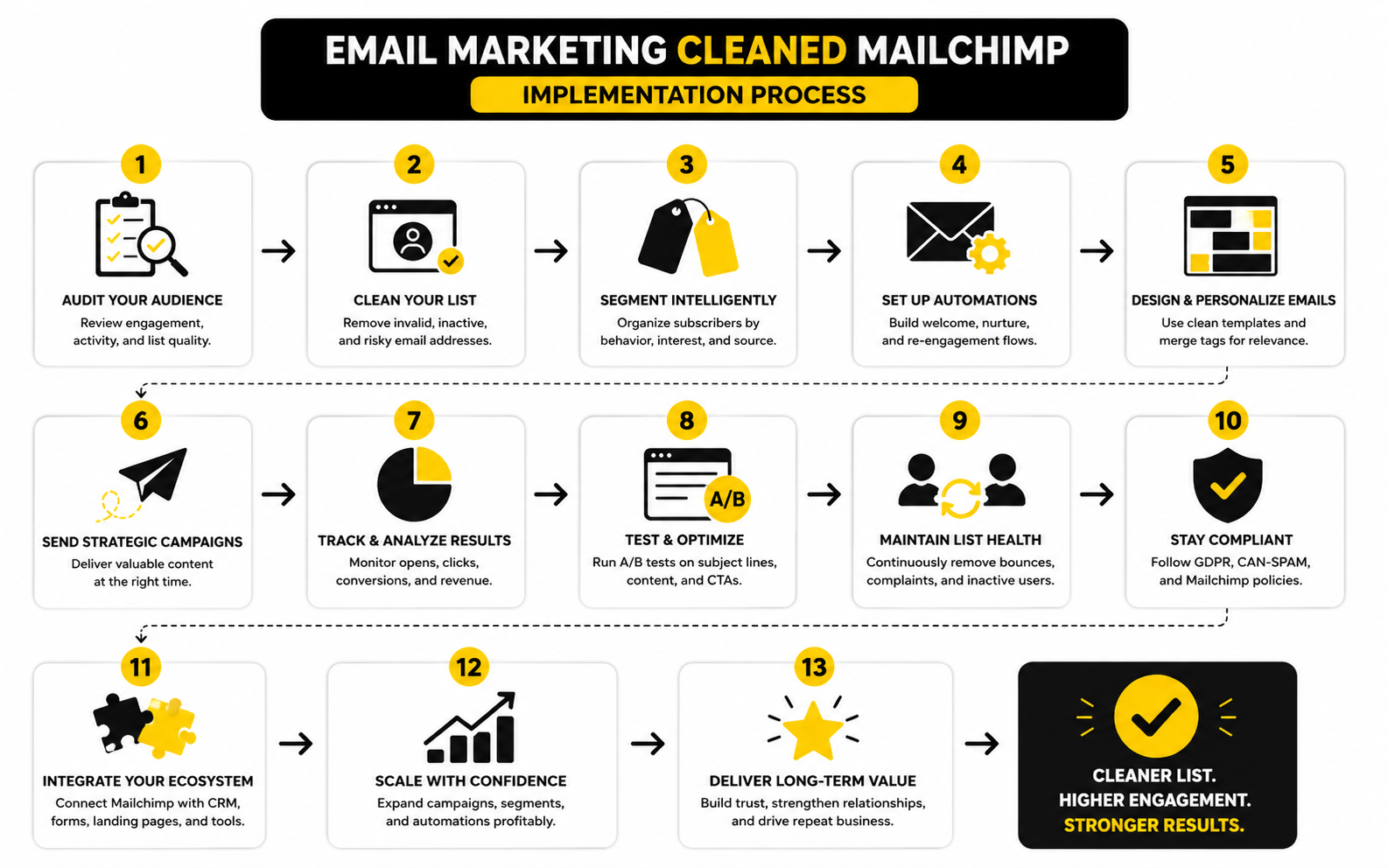
Run the process in this order:
This process is boring in the best possible way. It gives you a calm routine instead of a panic response after every campaign. More importantly, it turns cleaned contacts into operational feedback your business can actually use.
Handle Old Imports With Extra Care
Old imports are one of the easiest ways to create cleaned contacts in Mailchimp. People change jobs, abandon email addresses, rename companies, shut down domains, and forget brands they interacted with years ago. A list that looked valuable in a spreadsheet can become a deliverability problem the moment you send to it.
Before importing an old list, separate it from your normal audience workflow. Confirm permission, remove obvious invalid entries, and consider whether these people still have a reason to expect your emails. If the answer is weak, the list should not go straight into your main campaign schedule.
This matters even more if the old list came from another platform. Moving contacts from one system to another does not refresh consent or fix bad data. It only transfers the risk unless you clean the process before the import.
Use Re-Engagement Carefully
Re-engagement can be useful, but it should not be treated as a magic fix for a weak list. If someone is subscribed but inactive, a careful re-engagement campaign can help you identify who still wants to hear from you. If someone is cleaned, that is a delivery failure problem, not a normal engagement problem.
Mailchimp’s contact status guidance separates subscribed, unsubscribed, non-subscribed, cleaned, and archived contacts, and each status has a different role in audience management: Mailchimp contact status guidance. That distinction is important. You can re-engage a quiet subscriber, but you should not casually re-mail cleaned contacts.
The safer approach is to build re-engagement around deliverable but inactive subscribers. Ask a clear question, offer a real reason to stay, and remove people who still do not respond. Do not turn re-engagement into a desperate attempt to squeeze revenue from people who no longer recognize you.
Make Cleanup Part Of Campaign Planning
List hygiene should happen before the campaign calendar is locked. If you wait until the day of launch, you will either rush the cleanup or skip it completely. Neither option is good.
Before major promotions, launches, or seasonal campaigns, review the audience you plan to send to. Check whether the segment includes recent imports, low-engagement contacts, old leads, or sources with a history of cleaned contacts. If it does, tighten the segment instead of blasting everyone.
This is especially important for ecommerce, agencies, coaches, SaaS teams, and local businesses that rely on big promotional pushes. The campaign might only last a few days, but deliverability damage can last much longer. A clean send to the right segment usually beats a risky send to everyone.
Statistics And Data
The numbers around cleaned contacts only matter when they help you make a better decision. A bounce rate, open rate, click rate, unsubscribe rate, or spam complaint rate is not a trophy on its own. It is a signal that tells you whether your Mailchimp audience is healthy enough to keep scaling.
This is where email marketing cleaned Mailchimp analysis needs to become more disciplined. Do not stare at one campaign report and panic. Look at trends across campaigns, sources, segments, and time periods, then ask what changed before the numbers moved.
Start With Bounce Rate
Bounce rate is the first metric to watch when cleaned contacts start appearing. Mailchimp’s benchmark data includes bounce rate alongside open and click performance because it helps marketers understand whether delivery problems are distorting the rest of the campaign report: Mailchimp email marketing benchmarks. If your bounce rate suddenly climbs, the issue is usually not the subject line. It is more likely a list quality, import, source, or domain problem.
A low bounce rate does not automatically mean the list is perfect. It simply means most addresses accepted the email at the server level. A list can still have weak engagement, poor permission quality, or growing complaint risk even when bounces look fine.
That is why bounce rate should be read as an early warning metric, not the whole story. If cleaned contacts rise after a specific import, landing page, partnership, giveaway, or paid traffic source, treat that source as the first place to investigate. The data is pointing at the door where bad contacts are entering.
Compare Benchmarks Without Copying Them Blindly
Benchmarks are useful, but only when you use them as context. Mailchimp’s public benchmark table shows large differences between industries, which means there is no single “good” open rate or click rate that applies to everyone: Mailchimp benchmark data by industry. A nonprofit newsletter, a local service business, a SaaS onboarding email, and an ecommerce sale campaign should not be judged by the same standard.
The more carefully move is to build your own internal baseline. Look at your last 10 to 20 campaigns and calculate typical bounce rate, open rate, click rate, unsubscribe rate, and cleaned contact volume. That baseline tells you what normal looks like for your audience.
Once you know normal, abnormal becomes easier to spot. A bounce rate that is slightly above an industry average may not be alarming if your historical trend is stable and clean. A bounce rate that doubles after a new lead source is a problem even if it still looks “acceptable” compared with a generic benchmark.
Watch Spam Complaints Closely
Spam complaints are one of the most serious signals because they tell inbox providers that recipients do not want your mail. Google’s sender guidance says bulk senders should keep user-reported spam rates below 0.1% and avoid reaching 0.3% or higher: Google email sender guidelines FAQ. That is a tiny margin, which means list quality and expectation-setting matter a lot.
Cleaned contacts and spam complaints are different metrics, but they often come from the same weak system. If you collect low-intent contacts, import old addresses, or send to people who do not recognize your brand, some emails will bounce and some people will complain. Both outcomes tell you the list is not as strong as it looked.
Do not wait for complaints to become obvious. If unsubscribes, low engagement, and cleaned contacts are all rising, complaint risk is probably rising too. Fix the source before inbox providers make the decision for you.
Measure Cleaned Contacts By Source
The most useful cleaned contact report is not just a count. It is a source-level view. You want to know which forms, imports, automations, campaigns, and traffic channels produced the contacts that eventually became cleaned.
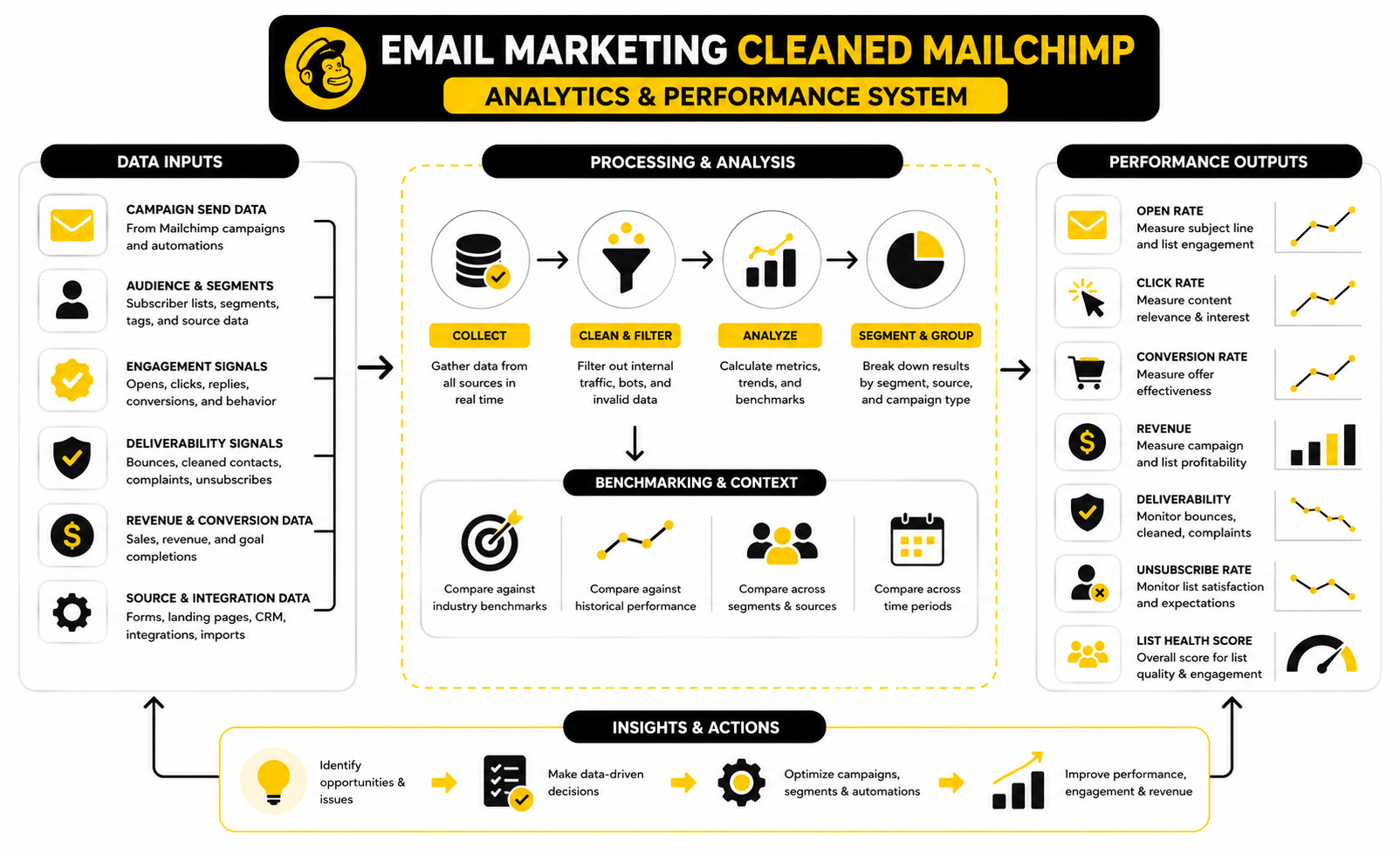
A simple measurement system can track:
This does not need to be complicated. Even a basic spreadsheet can reveal patterns that Mailchimp’s dashboard alone may not make obvious. The point is to stop treating cleaned contacts as random failures and start treating them as traceable outcomes.
Read Open Rates Carefully
Open rates can still be useful, but they are not as clean as they used to be. Apple’s Mail Privacy Protection can affect open tracking by preloading email content, which means opens may be inflated or less precise for some audiences: Apple Mail Privacy Protection overview. That does not make open rate worthless. It just means you should not rely on it alone.
For cleaned contact analysis, open rate is more useful when combined with bounce and click data. If open rates are stable but clicks are falling, the issue may be relevance or offer strength. If opens, clicks, and deliverability all weaken after a new import, the issue is more likely list quality.
Use open rate as a directional signal, not a final verdict. It can help you spot engagement trends, but it should not be the only number driving list cleanup decisions. Clicks, conversions, replies, unsubscribes, complaints, and cleaned contact patterns tell a fuller story.
Click Rate Shows Real Interest
Click rate is usually more useful than open rate because it requires the reader to do something. They saw enough value to leave the inbox and continue the journey. Salesforce’s email benchmark guidance frames click-through rate as a metric that should be evaluated by industry, business type, and historical performance rather than judged against one universal number: Salesforce email marketing benchmarks.
For email marketing cleaned Mailchimp decisions, click rate helps separate deliverability problems from content problems. If emails are delivered but nobody clicks, your list may be reachable but unmotivated. If clicks fall while bounces and cleaned contacts rise, your issue is probably both audience quality and message-market fit.
The action is different depending on the pattern. Low clicks with healthy delivery calls for better targeting, offers, and copy. Low clicks with rising cleaned contacts calls for stricter list hygiene before you even touch the creative.
Unsubscribes Are Not Always Bad
Unsubscribes can feel negative, but they are not always a problem. Sometimes an unsubscribe is healthier than silence, complaints, or repeated non-engagement. A clear unsubscribe process helps people leave without reporting you as spam.
Yahoo’s sender requirements emphasize responsible sending practices, authentication, and easy unsubscribe handling for bulk senders: Yahoo sender requirements. That matters because modern deliverability is built around recipient control. If people cannot easily leave, they may complain instead.
The key is interpretation. A normal unsubscribe rate after a campaign may simply mean the email reached people who are no longer interested. A sudden spike after a new lead source or promotional blast suggests the audience did not expect that message. That is a list quality problem, not just a copy problem.
Build A Practical Health Score
You do not need a complicated scoring model to manage Mailchimp audience health. A simple traffic-light system is enough for most businesses. Green means the segment is safe to send, yellow means it needs caution, and red means it should be paused or cleaned before more campaigns go out.
A practical health score can use five signals:
This score should guide action. Green segments can stay in normal campaign rotation. Yellow segments may need smaller sends, re-engagement, or source review. Red segments should not be pushed into major campaigns until the risk is fixed.
Use Revenue Metrics Without Ignoring Deliverability
Revenue per email, revenue per subscriber, and conversion rate matter because email is supposed to drive business outcomes. But revenue metrics can hide list damage if you only look at the short-term result. A campaign can make money today while weakening your sender reputation for the next one.
This is especially true during launches, holiday promos, or aggressive discount campaigns. A big send may produce sales, but if it also creates a spike in cleaned contacts, unsubscribes, complaints, and low engagement, you need to decide whether that revenue was worth the deliverability cost. Sometimes it is. Often, it is not.
For a cleaner stack, connect your campaign reporting to your lead capture and CRM data. Platforms like GoHighLevel, Brevo, or Moosend can support broader lifecycle tracking when they are used with clear tagging and suppression rules. The tool is useful only if the measurement discipline is already there.
Turn The Data Into Decisions
The point of measurement is action. If cleaned contacts rise, identify the source and stop feeding that source into campaigns unchecked. If spam complaints rise, tighten permission and expectations. If clicks fall while delivery stays healthy, improve the offer and segmentation.
Do not build reports nobody uses. A clean analytics process should answer three questions after every important send: what happened, why did it happen, and what will we change before the next campaign? Anything beyond that is optional.
This is where list hygiene becomes a growth advantage. Most businesses either ignore the data or drown in it. The winners use just enough measurement to protect deliverability, improve relevance, and keep their best subscribers reachable.
Professional Implementation And Cleanup Workflow
By this point, the lesson should be clear: cleaned contacts are not an isolated Mailchimp issue. They are part of a bigger email operations system. If capture, consent, segmentation, suppression, and reporting are disconnected, your list will keep producing the same problems under different labels.
Professional implementation is about making the cleanup process boring, visible, and repeatable. You want fewer surprises, fewer mystery imports, fewer risky sends, and fewer cases where someone on the team asks, “Why did this campaign suddenly create so many cleaned contacts?” That only happens when ownership is clear and the rules are written down.
This is where a business moves from reactive cleanup to controlled growth. Not slower growth. Cleaner growth.
Decide Who Owns List Quality
List quality needs an owner. If nobody owns it, everyone assumes someone else checked the import, reviewed the form, confirmed consent, or fixed the sync. That is how bad contacts end up in Mailchimp again and again.
For a small business, the owner might be the founder, marketing manager, or email specialist. For a larger team, it may sit between lifecycle marketing, CRM operations, sales operations, and compliance. The title matters less than the responsibility.
The owner should control the rules for imports, forms, segmentation, suppression, and campaign readiness. They do not need to write every email. They do need the authority to stop a risky send before it damages the list.
Create A Pre-Send Quality Gate
A pre-send quality gate is a simple checklist you run before any major campaign. It should not slow the team down with fake bureaucracy. It should prevent obvious mistakes from reaching thousands of inboxes.
The quality gate should answer a few practical questions:
This is not overkill. Gmail and Yahoo sender requirements have made authentication, low complaint rates, and responsible unsubscribe handling part of normal email operations, not advanced deliverability theory: Google email sender guidelines, Yahoo sender best practices. If you send at scale, these checks are basic protection.
Treat Imports As High-Risk Until Proven Otherwise
Imports deserve suspicion by default. Not because every import is bad, but because imports often hide context. A CSV rarely tells the full story of how the address was collected, when permission was given, whether the person still recognizes the brand, or whether the address is still active.
Before importing contacts into Mailchimp, separate them into risk groups. Recent customers with clear consent are different from old leads from a past campaign. Event attendees are different from purchased or scraped contacts. A partner list is different from people who directly opted in on your own site.
If permission is unclear, do not import the list into your main marketing audience. If the list is old, validate and segment it before sending. If the source cannot be explained confidently, the safest move is usually not to mail it.
Keep Suppression Rules Across Every Tool
One of the biggest scaling problems is tool fragmentation. Mailchimp may correctly clean an address, but your CRM, funnel builder, checkout tool, form app, webinar platform, or sales automation may still treat that address as active. Then a sync pushes it back into the workflow, and the same bad contact becomes a repeat problem.
Suppression needs to travel across the whole system. A cleaned contact in Mailchimp should trigger a review of where that address exists elsewhere. An unsubscribe should not keep receiving promotional sequences from another platform. A bounced sales lead should not be pushed into a marketing nurture without a check.
If you use a CRM and automation hub such as GoHighLevel, this is where centralized tags and workflows can be useful. If you use form tools or funnel builders such as Fillout, ClickFunnels, or Systeme.io, the key is making sure contact status and permission logic are not trapped inside one tool.
Be Careful With Re-Subscription
There are rare cases where a cleaned contact may become valid again. Someone may correct a typo, move to a new email address, or ask to be added again with a working inbox. That does not mean you should casually resubscribe cleaned contacts in bulk.
Mailchimp’s cleaned contact guidance is clear that cleaned addresses are considered invalid because they hard bounced or repeatedly soft bounced: Mailchimp cleaned contacts guidance. That status should be treated as a stop sign unless there is a specific correction and a clear reason to trust the new information.
The safest process is direct and conservative. If the person provides a corrected email address and gives permission, add the corrected address as a new subscribed contact. Do not re-import a batch of cleaned contacts because you “think they might work now.” That is how old list problems come back.
Separate Marketing Email From Transactional Communication
Not every email belongs in the same category. Marketing emails, transactional emails, sales follow-ups, account notices, invoices, and support updates have different expectations. Confusing them creates risk.
Mailchimp audiences are often used for marketing campaigns, but businesses may also have transactional systems sending order confirmations, password resets, receipts, or product notifications. A cleaned marketing contact should not automatically mean every operational communication stops forever, but it should trigger caution. The business needs to know whether the problem is the address itself, the marketing permission status, or a specific sending channel.
This is especially important as a company grows. More tools send more emails from more domains and subdomains. Without clear governance, one weak sender can damage trust around the broader brand.
Protect Your Primary Domain
Your sending domain is an asset. Treat it like one. If you send risky campaigns from the same domain that handles sales, support, customer success, and important business communication, you are taking unnecessary risk.
Many teams eventually separate marketing, transactional, and cold outreach infrastructure. That does not mean hiding bad behavior on a throwaway domain. It means organizing sending streams so each type of email has the right authentication, reputation, volume pattern, and monitoring.
For Mailchimp campaigns, make sure your authentication is set properly and that the domain you use has a clean sending pattern. Google’s sender rules emphasize authentication and alignment because inbox providers need to verify that you are allowed to send from the domain you claim to use: Google email sender guidelines. A clean list helps, but technical trust still matters.
Scale Volume Gradually
Scaling email volume too fast can create deliverability issues even with a decent list. If you suddenly increase send volume, add a large import, or launch a major promotion to a segment that has not heard from you in months, inbox providers may treat the pattern as suspicious. The risk gets worse when cleaned contacts, low engagement, and complaints rise at the same time.
A safer approach is to scale in layers. Start with the most engaged subscribers, then expand to recent subscribers, then carefully test older or less active segments. Watch bounces, cleaned contacts, complaints, clicks, unsubscribes, and revenue after each layer.
This gives you control. If a risky segment performs badly, you can stop before the whole campaign is affected. If the best segments respond well, you still capture the strongest revenue without dragging the entire audience into the send.
Do Not Confuse Automation With Discipline
Automation can make list hygiene easier, but it can also make bad decisions faster. A broken workflow can push invalid addresses into Mailchimp every day. A poor CRM sync can overwrite consent status. A badly designed reactivation sequence can keep emailing people who should have been removed from marketing sends.
The rule is simple: automate only after the logic is clean. First define the statuses, tags, exclusions, and source rules. Then automate the repeatable parts. Do not use automation to avoid thinking through permission and suppression.
If you use platforms like Brevo, Moosend, or ManyChat, make sure automations support the list policy rather than bypassing it. The software should enforce your standards, not quietly create exceptions.
Know When To Archive, Delete, Or Keep For Reference
Cleaned contacts do not all need the same treatment. Sometimes you keep them for reference because they help explain campaign history and source quality. Sometimes you archive contacts to remove clutter while preserving useful data. Sometimes deletion makes sense when there is no operational reason to retain the record.
Mailchimp’s archive guidance warns that deleted contact data cannot be recovered, while archived contacts can be restored later if needed: Mailchimp archive and unarchive contacts. That distinction matters when you care about historical reporting, compliance records, or diagnosing where a bad source came from.
A practical rule is this: archive when you want to remove a contact from active audience management while keeping context, delete only when you are confident the record has no future value, and never delete simply because you are trying to avoid understanding what went wrong. Cleanup should make your system clearer, not erase evidence.
Build A Recovery Plan Before You Need One
Sometimes a campaign goes badly. A new import creates too many cleaned contacts. A source produces fake signups. A reactivation campaign wakes up complaints instead of buyers. The worst time to invent a recovery plan is after the damage has already happened.
A basic recovery plan should include:
This is not dramatic. It is professional. Good email teams do not avoid every issue forever; they respond quickly, protect the best parts of the audience, and make sure the same failure does not repeat.
The Strategic Tradeoff: Growth Versus Trust
The hard part is that list hygiene often feels like saying no to growth. You reject an import. You suppress a segment. You remove inactive contacts. You avoid mailing people who might technically be reachable but clearly do not expect your emails.
That restraint can feel painful when the business wants more leads, more campaigns, and more revenue now. But email works because inbox providers and subscribers trust you enough to let you in. Once that trust weakens, every future campaign becomes harder.
The better tradeoff is not “small clean list” versus “large profitable list.” The better tradeoff is building a list that can grow without collapsing under bad data. Cleaned contacts are one of the signals that show whether you are growing responsibly or just inflating the database.
What does cleaned mean in Mailchimp?
A cleaned contact in Mailchimp is an email address that Mailchimp considers invalid because it hard bounced or repeatedly soft bounced. In practical terms, Mailchimp will not send marketing campaigns to that address from the affected audience anymore. This protects your deliverability because repeated failed sends can create reputation problems.
Is a cleaned contact the same as an unsubscribed contact?
No, a cleaned contact and an unsubscribed contact are different. An unsubscribed contact opted out of marketing emails, while a cleaned contact failed delivery badly enough that Mailchimp marked the address as invalid. Both should be excluded from normal marketing sends, but the reason behind each status is different.
Can I email cleaned contacts again in Mailchimp?
You should not try to email cleaned contacts again unless there is a legitimate correction, such as a subscriber giving you a fixed email address after a typo. Mailchimp marks cleaned contacts to prevent future sends to invalid addresses. Re-importing cleaned contacts in bulk is a bad idea because it can recreate the same bounce problem and weaken your sender reputation.
Should I delete cleaned contacts from Mailchimp?
Deleting cleaned contacts is not always the best move. Cleaned contacts usually do not count toward Mailchimp audience limits, and they can help you understand where bad data came from. If you want a cleaner audience view, archiving is often safer than deleting because it preserves more context for future troubleshooting.
Why did Mailchimp clean a contact that used to work?
An address can work for months or years and then fail later. People leave jobs, companies shut down domains, mailboxes get abandoned, inboxes fill up, and servers change their mail rules. That is why list hygiene is ongoing, not something you do once and forget.
Do cleaned contacts hurt my email marketing performance?
Cleaned contacts are usually Mailchimp’s way of preventing further damage, not the damage itself. The bigger problem is what caused them: old imports, weak opt-ins, fake addresses, unclear consent, or poor source quality. If cleaned contacts are rising, treat that as a sign to inspect your list sources before the next send.
What is a normal number of cleaned contacts?
There is no universal number that fits every business. A few cleaned contacts in a large, healthy campaign may be normal, especially if your list includes older subscribers. A sudden spike after a new form, import, promotion, or partner campaign is more important than the raw number because it points to a specific source problem.
How do I reduce cleaned contacts in Mailchimp?
Start by improving how contacts enter your list. Use clear opt-in language, avoid old or unverified imports, track every source, and separate risky contacts before sending to them. Then review cleaned contacts by source so you can fix the form, funnel, sync, or import process that created the issue.
Are cleaned contacts bad for deliverability?
Cleaned contacts are a deliverability warning, but Mailchimp cleaning them is part of the protection. The real danger is continuing to feed low-quality addresses into your audience. If bounces, complaints, unsubscribes, and low engagement rise together, your deliverability risk is much higher than if you see an occasional cleaned contact.
Can I fix a cleaned contact if the email address has a typo?
Yes, but do it carefully. If the person clearly gave you the corrected address and permission to receive emails, add the corrected email as the subscribed contact. Do not simply reactivate the cleaned version or bulk-edit a group of addresses based on guesses.
Should I use double opt-in to prevent cleaned contacts?
Double opt-in can help because it confirms that the person can access the inbox before they join your marketing list. It may reduce fake or mistyped signups, but it can also lower the number of people who complete the subscription process. The tradeoff is worth considering when list quality matters more than raw signup volume, especially for paid traffic, giveaways, webinars, and broad lead magnets.
Do cleaned contacts affect Mailchimp billing?
Cleaned contacts generally do not count toward Mailchimp audience limits. That is one reason deleting them immediately is not always necessary. It is usually better to understand why they were cleaned first, then decide whether to archive, keep for reference, or remove them from your workflow.
What should I check after a campaign creates many cleaned contacts?
Look at the source of the contacts first. Check whether the cleaned addresses came from a recent import, a specific signup form, an old segment, a webinar list, a partner campaign, or a CRM sync. Then pause that source until you understand whether the problem was age, consent, validation, traffic quality, or a technical issue.
Can cleaned contacts come back through integrations?
Yes, and this is one of the most annoying problems in a messy stack. Mailchimp may clean an address, but another tool may still treat the same contact as active and push it back through an integration or CSV import. To prevent this, suppression rules need to exist across your CRM, forms, funnels, automations, and email platform.
What tools help manage cleaner email workflows?
The tool depends on your system, but the principle is the same: source tracking, consent clarity, segmentation, suppression, and reporting must work together. A CRM and automation platform like GoHighLevel can help centralize contact rules, while Brevo, Moosend, ClickFunnels, Systeme.io, and Fillout can support different parts of capture, automation, and follow-up. The important part is not adding more software. It is making sure every tool respects the same list hygiene rules.
What is the best long-term approach to email marketing cleaned Mailchimp issues?
The best long-term approach is to treat cleaned contacts as operational feedback. Review where they came from, fix the entry point, keep invalid addresses suppressed, and protect your best subscribers from risky sends. Over time, this creates a healthier audience, cleaner reporting, and a more reliable email program.
Build a stronger local presence with BAAM AI
Turn your website, Google profile, social channels, and AI visibility into one growth engine
Most businesses do not need more random marketing activity. They need a consistent presence system that helps the right people find them, trust them, and take action. BAAM AI brings strategy, local SEO, website updates, Google Maps visibility, social content, AI-search readiness, media production, and reporting into one practical monthly engine.
If you want your marketing to keep working after the campaign ends, start with a free BAAM AI presence audit. See how your business shows up today and where the fastest visibility wins are at BAAM AI.