
BAAM AI Blog
Email Deliverability Service: The Practical Guide To Reaching More Inboxes
An email deliverability service helps businesses get legitimate emails into the inbox instead of the spam folder, promotions limbo, or outright rejection. That sounds simple, but inbox placement now depends on a...
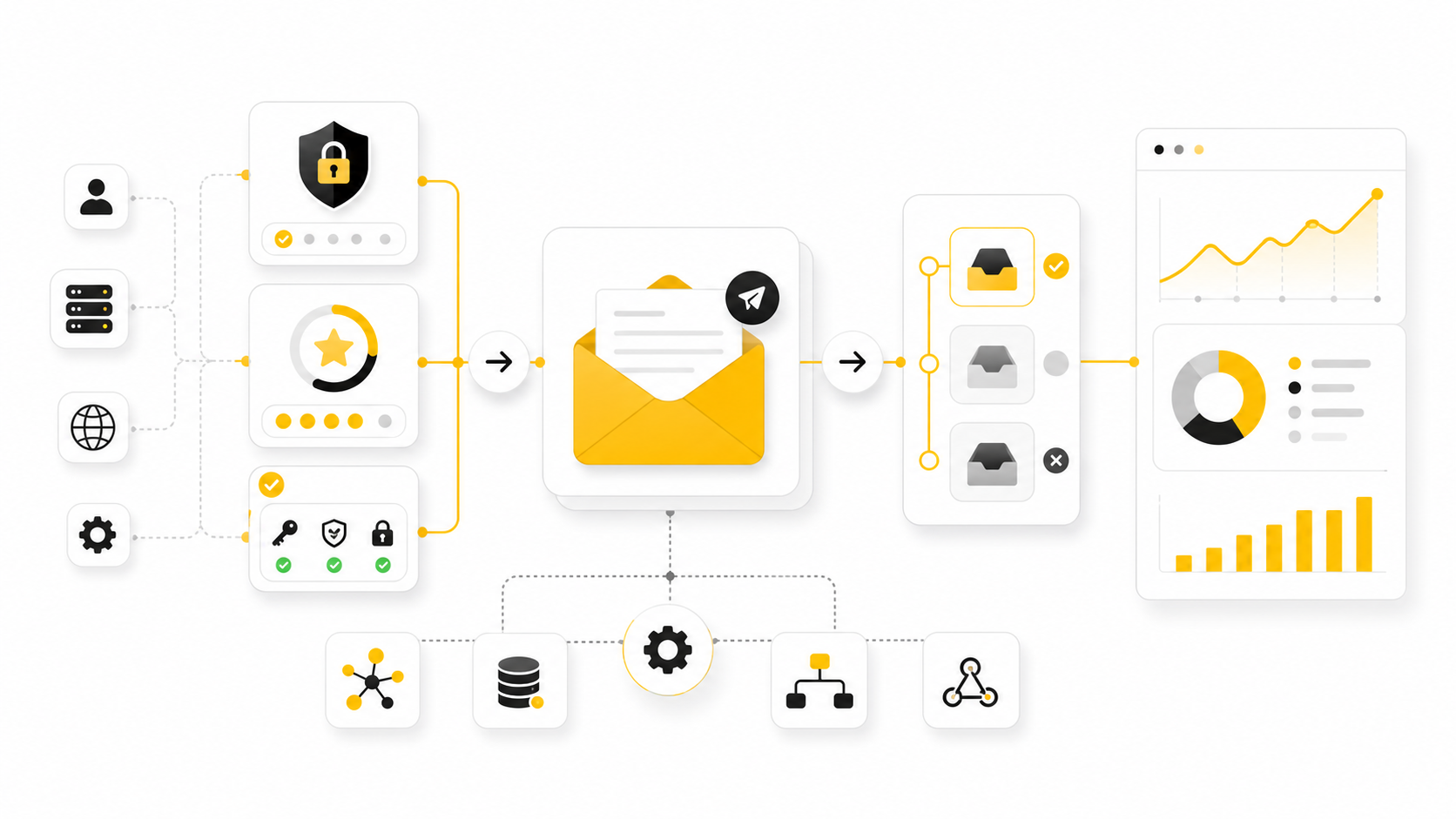
An email deliverability service helps businesses get legitimate emails into the inbox instead of the spam folder, promotions limbo, or outright rejection. That sounds simple, but inbox placement now depends on a stack of technical, behavioral, and compliance signals that most teams do not see inside their normal email platform.
The stakes are real. Sinch Mailgun’s 2026 Email Impact Report found that nearly 18% of emails fail to reach the inbox, based on more than 400 billion emails sent in 2025 and a global survey of more than 1,200 senders. That means a brand can have strong copy, a great offer, and a clean-looking campaign dashboard while quietly losing a meaningful share of its revenue before the message is even seen.
This guide breaks down what an email deliverability service actually does, when you need one, how the core framework works, and how to choose a provider without getting distracted by vanity metrics. The goal is not to obsess over technical jargon. The goal is to build a sending system that mailbox providers trust and customers actually want to engage with.
The full article will continue across these six parts:
Why Email Deliverability Services Matter Now
Email used to be treated as a channel where “sent” was good enough. That is no longer true. Gmail, Yahoo, Microsoft, and other mailbox providers now judge senders through authentication, complaint rates, engagement patterns, list quality, infrastructure reputation, and whether recipients behave like they actually want the mail.
The compliance bar also moved higher. Gmail’s sender guidelines require all senders to authenticate mail, support easy unsubscribe, and keep spam rates low, while bulk senders face additional requirements such as DMARC alignment and one-click unsubscribe support under Google’s sender rules. Yahoo’s sender guidance also tells senders to authenticate mail and keep spam complaint rates below 0.3% in its published best practices.
This is where an email deliverability service becomes useful. It gives you visibility into the parts of email performance that your ESP dashboard usually simplifies or hides. A normal platform may show opens, clicks, bounces, and unsubscribes, but a deliverability service can help diagnose whether Gmail is filtering you, whether DMARC is failing, whether a blocklist is affecting your domain, or whether your sending behavior is training mailbox providers to distrust you.
Framework Overview
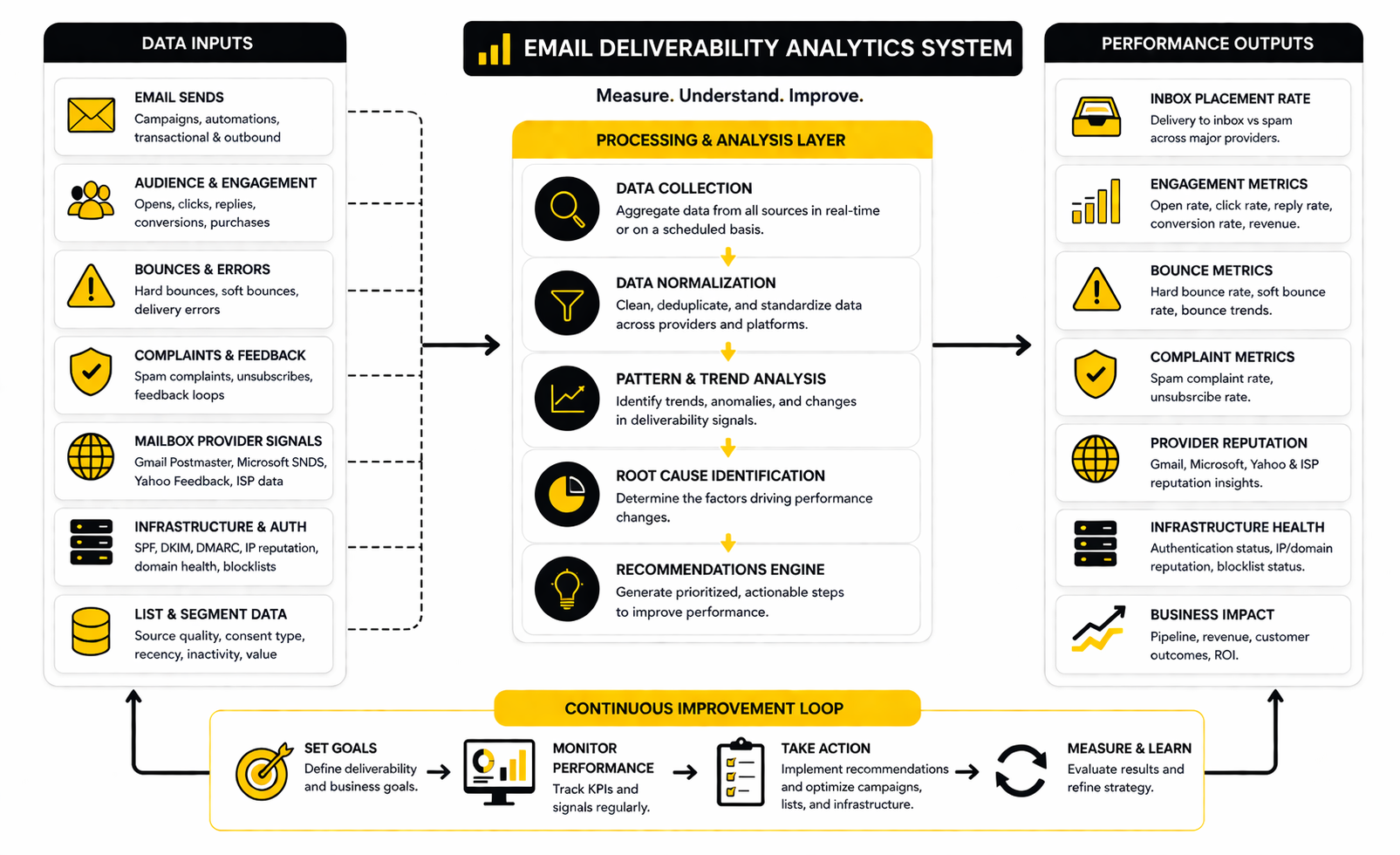
A strong deliverability framework has four layers: technical identity, sender reputation, audience quality, and ongoing monitoring. Technical identity proves that your domain is allowed to send the message. Sender reputation reflects how mailbox providers judge your recent and historical behavior.
Audience quality is about who receives your emails and how they respond. A smaller list of people who open, click, reply, and rarely complain is usually stronger than a bloated list that ignores you. Ongoing monitoring ties the system together because deliverability is not something you fix once; it changes as your list grows, your campaigns shift, your sending volume changes, and mailbox providers update their filtering models.
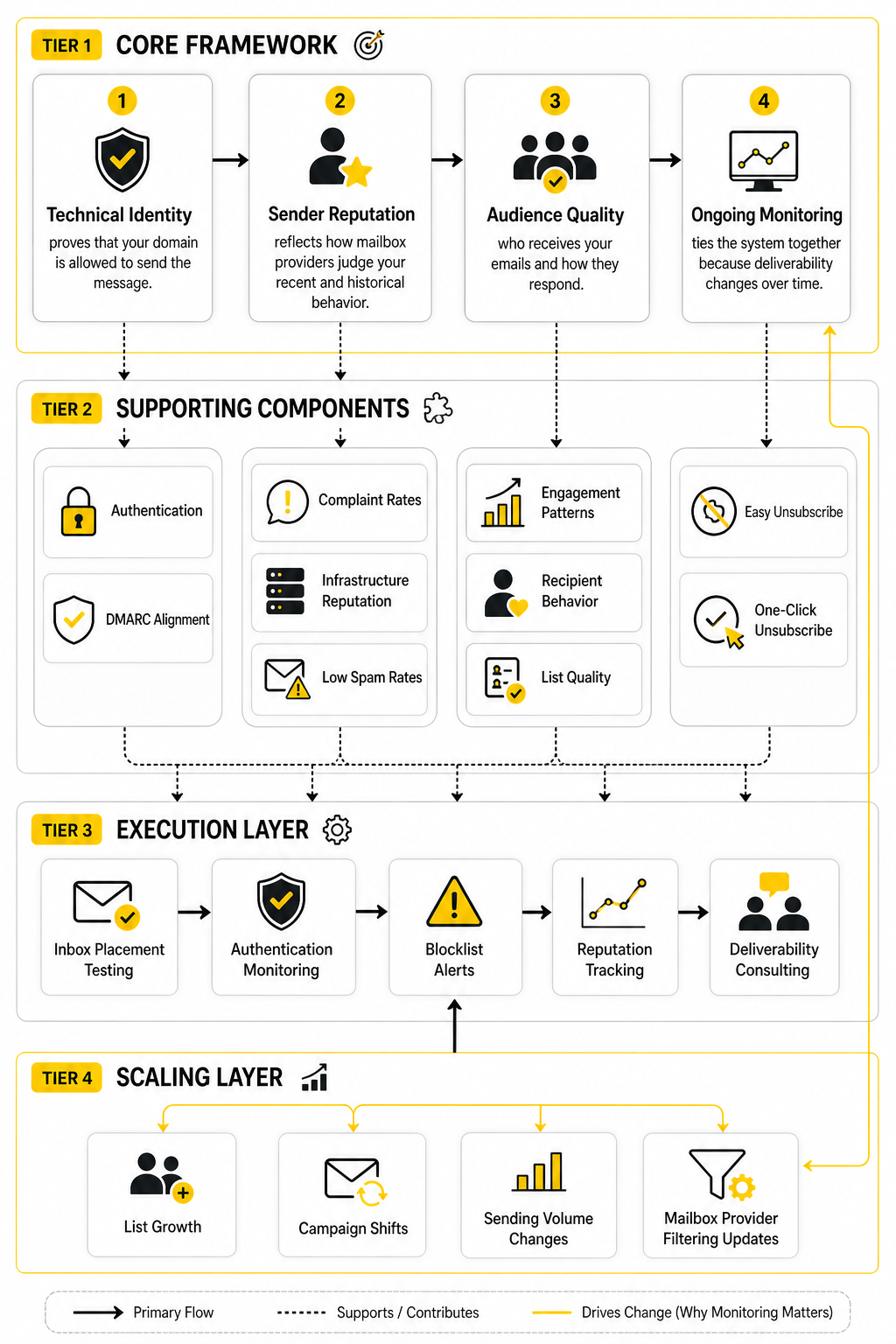
The best email deliverability service does not replace good email strategy. It supports it. Tools such as inbox placement testing, authentication monitoring, blocklist alerts, reputation tracking, and deliverability consulting help you catch problems earlier and make more carefully decisions before revenue drops.
For example, a service like ScaledMail may fit teams looking for deliverability support around sending infrastructure and scaling campaigns. A platform like Brevo can make sense when the team also needs email marketing and automation in one system. The right choice depends on whether your biggest problem is technical setup, cold outreach infrastructure, marketing automation, transactional email, or reputation recovery.
The practical way to think about this is simple: deliverability is not one feature. It is a system. If one part breaks, the whole program can underperform even when the campaign itself looks fine.
What An Email Deliverability Service Actually Does
An email deliverability service helps you understand why your emails are not reaching the inbox and what to fix next. It sits between your email strategy, your sending infrastructure, and the mailbox providers that decide whether your messages look trustworthy. That matters because “delivered” and “inboxed” are not the same thing.
A message can be accepted by the receiving server and still land in spam, promotions, quarantine, or a low-visibility tab. That is why a basic delivery rate can be misleading. A proper email deliverability service looks deeper than whether the email technically left your platform.
The best services usually combine software, diagnostics, monitoring, and human expertise. Some focus heavily on authentication and infrastructure. Others focus on inbox placement testing, reputation analysis, and consulting. The right fit depends on the type of email you send, the scale of your list, and how much revenue depends on reliable inbox placement.
It Checks Whether Your Email Identity Is Trusted
Mailbox providers want to know whether your emails really come from you. That starts with authentication. SPF, DKIM, and DMARC help prove that your domain is authorized to send the message and that the message was not changed in transit.
This is not optional anymore for serious senders. Gmail requires bulk senders to authenticate email and meet additional requirements when sending more than 5,000 messages per day to Gmail accounts, including DMARC alignment and one-click unsubscribe for marketing mail under its sender guidelines. Yahoo also tells senders to authenticate mail, keep spam complaint rates low, and maintain valid DNS records in its sender best practices.
An email deliverability service can audit those records and show whether your setup is actually aligned. That last word matters. It is possible to have SPF, DKIM, and DMARC published but still have messages fail alignment because different platforms, subdomains, or tracking domains are not configured properly.
It Measures Inbox Placement, Not Just Delivery
Most email platforms report delivery as a technical event. If the receiving server accepts the message, it often counts as delivered. That does not tell you whether the email landed in the primary inbox, promotions tab, spam folder, or somewhere your customer will never notice it.
Inbox placement testing gives you a more useful view. A deliverability service sends test campaigns to seed mailboxes across major providers and reports where the message appears. This is not perfect because seed tests cannot fully represent every real subscriber, but they are useful for spotting provider-specific issues before they become expensive.
This is especially important when performance drops without an obvious reason. Your open rate may fall because of weak subject lines, but it may also fall because Gmail started filtering more of your campaigns. Without inbox placement data, both problems can look similar from the outside.
It Monitors Sender Reputation
Sender reputation is the trust score mailbox providers build around your domain, IP address, and sending behavior. It is influenced by complaints, bounces, engagement, spam trap hits, authentication failures, list quality, volume spikes, and historical patterns. You do not control every signal directly, but you do control many of the behaviors that create them.
A deliverability service helps you monitor those signals instead of guessing. That can include domain reputation checks, IP reputation analysis, blocklist monitoring, bounce pattern review, and complaint tracking. It can also help you separate a temporary campaign issue from a deeper reputation problem.
This is where teams often make the wrong move. They see weaker campaign performance and immediately rewrite copy, change offers, or blame the email platform. Sometimes the real issue is that their sender reputation has been slowly damaged for months by unengaged subscribers, purchased data, inconsistent volume, or poor unsubscribe handling.
It Finds Problems In Your List Quality
List quality is one of the biggest deliverability levers because mailbox providers watch how recipients interact with your mail. If people open, click, reply, move messages out of spam, and keep receiving your emails, those are positive signals. If they ignore you, bounce, unsubscribe aggressively, or mark you as spam, the system learns something else.
An email deliverability service can help identify risky segments before they hurt the whole program. That may include old inactive subscribers, role-based addresses, hard bounces, suspicious signups, or contacts collected through forms that do not confirm intent clearly enough. The point is not to delete people randomly. The point is to stop treating every address as equally valuable.
This is also why list growth tactics matter. A smaller list built from clear consent will usually outperform a larger list filled with weak intent. If you use a marketing platform such as Brevo, the platform can help with campaign sending and automation, but you still need a list strategy that protects reputation over time.
It Reviews Your Sending Patterns
Mailbox providers do not only judge what you send. They also judge how you send. Sudden volume spikes, inconsistent cadence, aggressive reactivation campaigns, and poorly warmed domains can all create risk.
A deliverability service can review your sending patterns and recommend safer volume changes. This is especially useful when launching a new domain, moving platforms, adding a dedicated IP, or scaling cold outreach. If you go too fast, you can damage reputation before you have enough positive engagement to support the volume.
For teams scaling outbound or multi-domain campaigns, infrastructure-focused support can be useful. A service like ScaledMail may fit better when the main challenge is sending setup and deliverability infrastructure rather than newsletter design or lifecycle automation. The key is to match the tool to the actual bottleneck, not the flashiest feature list.
It Helps You Interpret Bounces And Blocks
Bounces are not all the same. A hard bounce usually means the address is invalid or cannot receive mail permanently. A soft bounce may point to a temporary issue, mailbox limits, rate limiting, reputation problems, or receiving server restrictions.
A deliverability service helps decode these signals. That matters because the wrong response can make the problem worse. If you keep mailing invalid addresses, you train mailbox providers to distrust your list quality. If you panic over temporary deferrals and change too many things at once, you can make troubleshooting harder.
Block messages can be even more confusing. Some receiving servers provide clear error codes, while others give vague rejection messages. A strong service can help connect those errors to likely causes, such as authentication failure, spam complaints, IP reputation, content patterns, or policy violations.
It Supports Compliance Without Making It Complicated
Deliverability and compliance are now tightly connected. Easy unsubscribe, proper consent, accurate sender identity, and responsible data handling are not just legal hygiene. They also influence whether recipients complain and whether mailbox providers continue to trust your messages.
One-click unsubscribe is a good example. The RFC 8058 standard defines a way for senders to signal one-click unsubscribe functionality through email headers in the official specification. Gmail specifically requires one-click unsubscribe for marketing and subscribed messages from senders above its bulk threshold in its sender guidelines.
A deliverability service can check whether these pieces are present and functioning correctly. This is practical, not theoretical. When unsubscribing is difficult, some people will use the spam button instead, and spam complaints are one of the fastest ways to weaken reputation.
It Turns Deliverability Into An Operating System
The real value of an email deliverability service is not one audit. It is the operating rhythm it creates. You get a way to monitor issues, investigate drops, maintain authentication, clean lists intelligently, and make sending decisions with evidence instead of emotion.
This matters more as email programs become more complex. Many businesses now send marketing campaigns, transactional alerts, sales outreach, product updates, onboarding sequences, and support notifications from different tools. Each tool can affect the same brand reputation if domains and subdomains are not managed carefully.
That is why deliverability should not live only with one marketer or one technical person. Marketing, sales, customer success, operations, and IT all touch email in different ways. A good service helps bring those moving parts into one system so your domain does not pay the price for scattered sending habits.
Core Components Of A Strong Deliverability System
Once you understand what an email deliverability service does, the next step is turning that into a working process. This is where a lot of teams overcomplicate things. They jump into tools, dashboards, and tests before they understand the system they are trying to improve.
A strong deliverability setup has five practical components: identity, infrastructure, list quality, sending behavior, and measurement. Each component affects the others. If your authentication is broken, good copy will not save you. If your list is weak, a clean technical setup will only carry you so far. If your sending volume jumps too fast, even a healthy domain can run into filtering problems.
Start With Domain Identity
Your domain identity is the foundation of deliverability. Mailbox providers need to see that your domain is authenticated, consistent, and aligned with the platform sending your email. This usually means checking SPF, DKIM, DMARC, tracking domains, return-path settings, and the domains used inside your links.
This is not just a technical cleanup task. It is the part of the system that tells Gmail, Yahoo, Microsoft, and other mailbox providers that your messages are legitimate. Gmail’s sender requirements make authentication a baseline expectation for anyone sending to Gmail accounts, and bulk senders have even stricter requirements around DMARC alignment and unsubscribe handling through Google’s official sender guidelines.
A good email deliverability service should help you audit this layer before anything else. If it only gives you generic advice like “improve engagement” but does not verify authentication and alignment, it is skipping the first checkpoint. You want clear answers, not vague deliverability theater.
Separate Sending Streams
Not every email should be treated the same way. Transactional emails, marketing newsletters, lifecycle sequences, sales outreach, password resets, invoices, and support updates all have different urgency, engagement patterns, and risk levels. Mixing everything together can make troubleshooting harder and can expose critical mail to the reputation problems caused by lower-quality campaigns.
A practical setup usually separates sending streams by purpose. For example, transactional mail may use one subdomain, marketing mail another, and outbound sales a separate domain or infrastructure path. This gives you cleaner reputation boundaries and makes it easier to identify which part of the program is causing friction.
This does not mean every business needs a complicated infrastructure map from day one. It means your setup should match the risk of the emails you send. If email drives revenue, customer access, onboarding, or billing, separation is not a luxury. It is basic protection.
Build A Clean Consent And List Quality Process
List quality is where deliverability becomes brutally honest. If people did not clearly ask to hear from you, they are more likely to ignore, unsubscribe, or complain. Those signals can drag down performance even when your email platform says the campaign was successfully delivered.
A strong list quality process includes clear opt-in forms, accurate source tracking, bounce removal, suppression management, and regular review of inactive segments. It also includes restraint. You do not need to email every address forever just because it exists in your database.
This is where many teams need to change their mindset. A large list is not an asset if it damages sender reputation. A smaller, cleaner list with real engagement will usually give you better inbox placement, better reporting, and better business outcomes.
Create A Sending Volume Plan
Mailbox providers look at sending patterns. A sudden jump from small, occasional campaigns to large daily sends can create suspicion, especially on a new domain, new IP, or newly configured platform. That is why warming and volume planning matter.
A proper sending volume plan starts with your most engaged audience. From there, you increase volume gradually while watching bounce rates, complaint rates, inbox placement, and engagement. The goal is to build a positive sending history before you expose the domain to colder or riskier segments.
This is especially important for teams scaling outbound or high-volume campaigns. If your main challenge is infrastructure and sending scale, a service like ScaledMail can be more relevant than a general newsletter tool. The point is simple: scale only works when the sending system can support it.
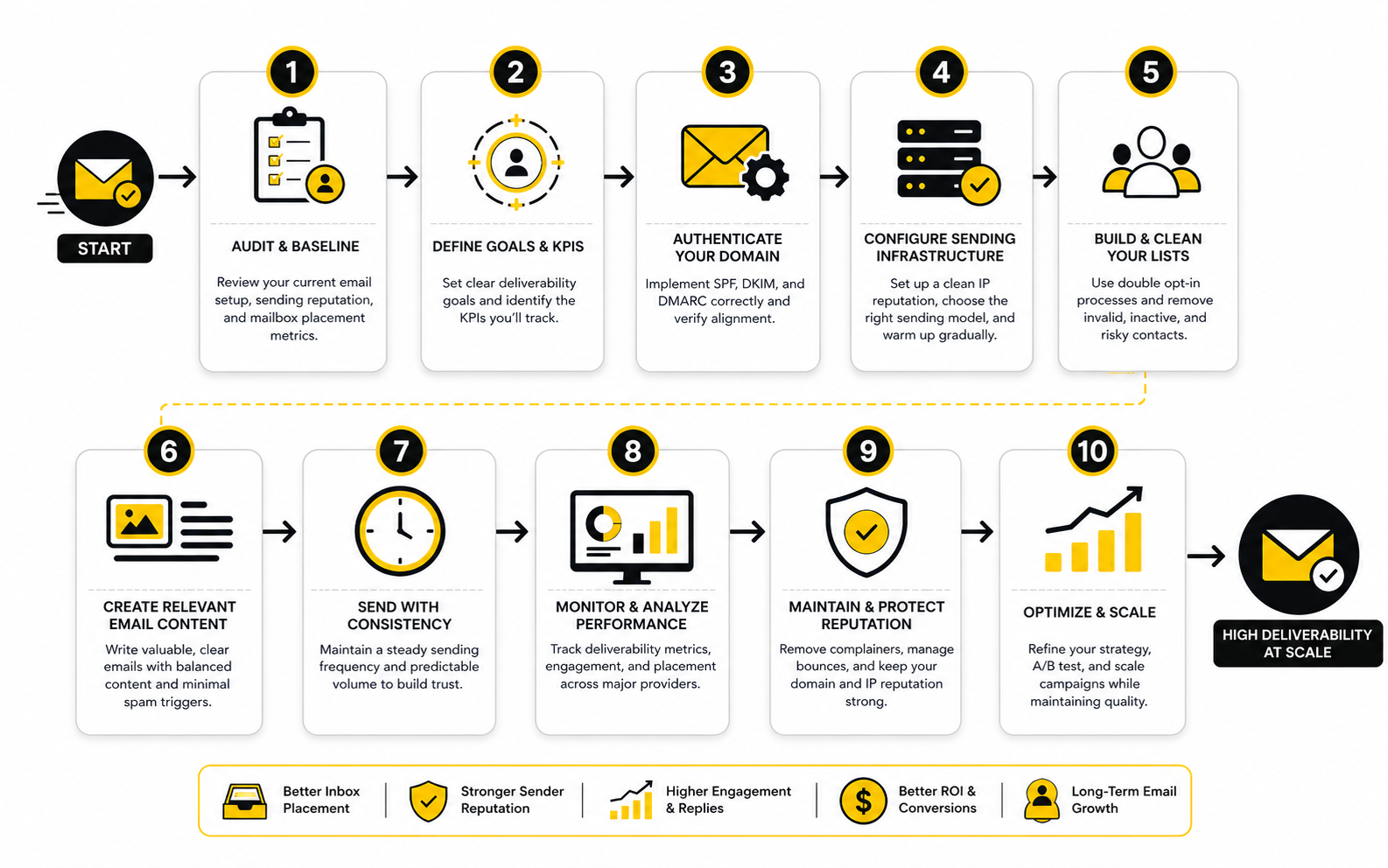
Set Up Monitoring Before You Need It
Deliverability monitoring should be in place before performance drops. If you only start looking after revenue falls, you are already behind. Monitoring gives you a baseline, and that baseline helps you spot unusual changes quickly.
The core monitoring stack should include authentication checks, domain reputation review, blocklist alerts, bounce analysis, spam complaint tracking, inbox placement testing, and engagement trend analysis. Mailgun’s 2026 Email Impact research found that 56% of senders use specific deliverability monitoring tools, while others still rely mainly on ESP analytics, spam filter tests, or seed mailbox tests through its deliverability impact findings. That gap matters because ESP analytics alone rarely show the full inbox placement picture.
A good email deliverability service should make monitoring understandable. You do not need ten dashboards that nobody reads. You need a small set of signals that tell you whether your sender reputation is stable, improving, or drifting into trouble.
Make Unsubscribe Easy And Fast
Unsubscribe experience is part of deliverability. When people cannot leave easily, some of them will hit the spam button instead. That hurts reputation far more than a normal unsubscribe.
Modern sender requirements make this even clearer. Gmail requires one-click unsubscribe for marketing and subscribed messages from bulk senders, and Yahoo’s guidance also emphasizes low complaint rates and responsible sender behavior through Yahoo’s sender best practices. The RFC 8058 standard also defines one-click functionality for list email headers in the official specification.
This is not something to fight. Let people leave cleanly. The subscribers who stay will be more valuable, and your sender reputation will be healthier because you are not forcing uninterested recipients to complain.
Connect Deliverability To Revenue Metrics
Deliverability should not live in a technical silo. It affects revenue, pipeline, retention, product usage, customer experience, and support load. If important emails fail to reach the inbox, the business impact can show up in many places before anyone says the word “deliverability.”
This is why your reporting should connect inbox health to real business outcomes. For ecommerce, that may mean campaign revenue, abandoned cart recovery, and customer retention. For SaaS, it may mean trial activation, onboarding completion, password reset success, and product usage. For agencies and sales teams, it may mean reply rate, booked calls, and pipeline quality.
A platform such as GoHighLevel can make sense when email is part of a broader CRM, automation, and funnel system. A tool like Brevo may fit teams that need email marketing and automation in one place. But whichever platform you use, the deliverability question stays the same: are the right messages reaching the right people at the right time?
Use A Simple Weekly Deliverability Workflow
A strong implementation does not need to be dramatic. It needs to be consistent. The best teams treat deliverability like a weekly operating habit, not a panic project.
A simple workflow can look like this:
This process makes deliverability tangible. Instead of guessing why performance changed, you build a record of signals and actions. That is how an email deliverability service becomes more than a tool; it becomes part of how your email program is managed.
Statistics And Data
Measurement is where deliverability becomes real. Without data, every problem feels like a guessing game. With the right data, you can see whether the issue is technical, reputational, list-related, content-related, or tied to a specific mailbox provider.
The mistake is looking at one number in isolation. A high delivery rate can still hide poor inbox placement. A low open rate can point to weak subject lines, but it can also point to Gmail filtering, poor list quality, or Apple Mail Privacy Protection changing how opens are recorded. A useful email deliverability service helps you connect the numbers instead of reacting to whichever metric looks scariest that day.
The Difference Between Delivery And Inbox Placement
Delivery rate tells you whether the receiving server accepted the message. Inbox placement tells you where the message actually landed after acceptance. That difference is massive because a technically delivered email can still end up in spam, promotions, quarantine, or a folder the recipient never checks.
This is why “99% delivered” is not enough. It may mean your infrastructure is not being rejected outright, but it does not prove people are seeing your campaigns. Sinch Mailgun’s 2026 Email Impact research found that nearly 18% of marketing emails fail to reach the inbox, which is the kind of hidden leakage most teams will miss if they only watch delivery rate.
The action here is clear. Track delivery rate, but do not treat it as the final answer. Pair it with inbox placement testing, mailbox-provider-level reporting, bounce analysis, and engagement trends so you know whether the email is actually reaching a visible place.
The Metrics That Matter Most
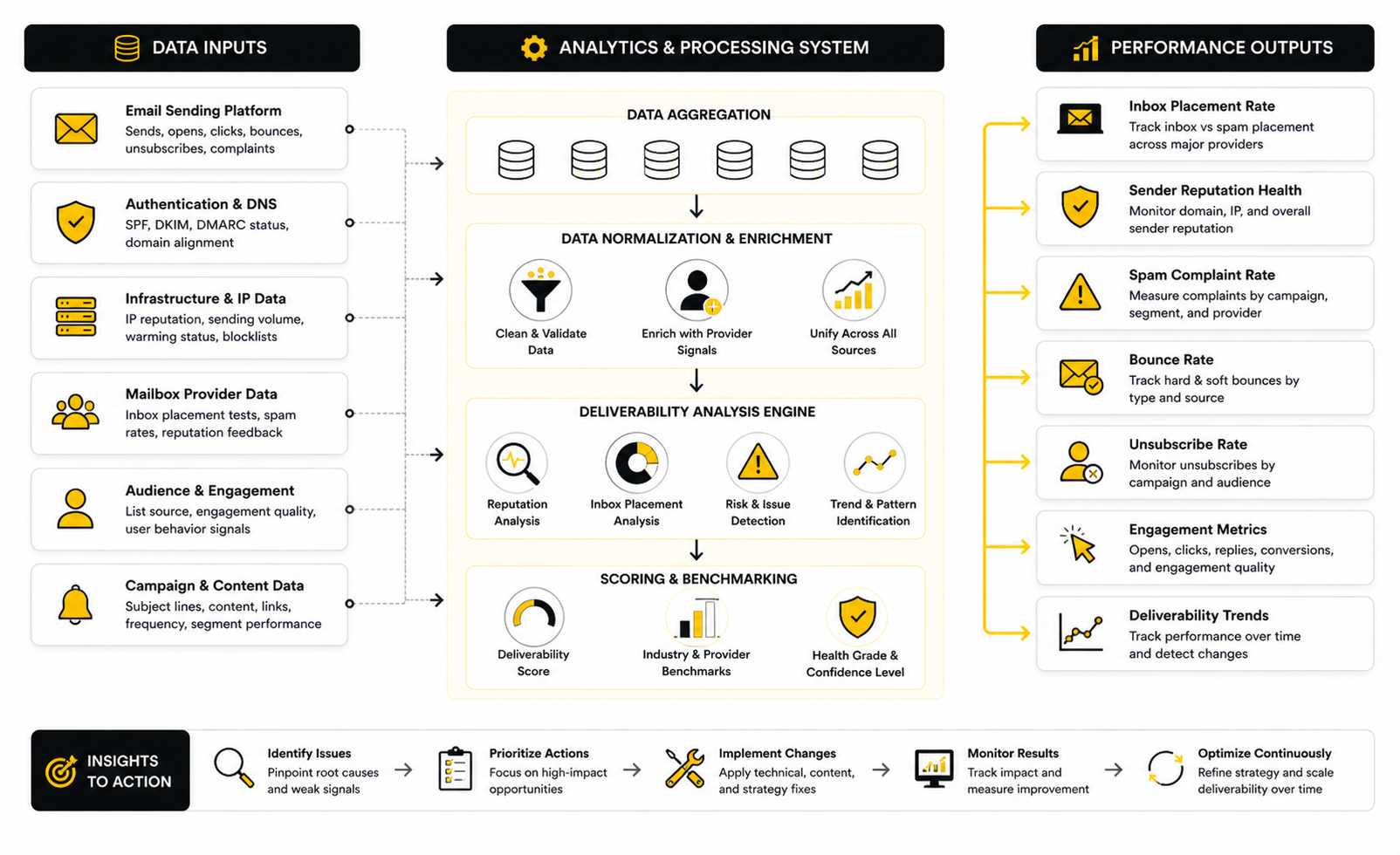
A good analytics system should separate health metrics from business metrics. Health metrics tell you whether your sending system is trusted. Business metrics tell you whether your email program is producing outcomes.
The core health metrics are:
The core business metrics are different. They include revenue per send, reply rate, booked calls, trial activation, onboarding completion, password reset success, retention impact, and customer support reduction. This is where deliverability stops being a technical topic and becomes a business topic.
Spam Complaint Rate Is A Serious Warning Signal
Spam complaints deserve special attention because they are one of the clearest negative signals a mailbox provider can receive. When a real user clicks “report spam,” they are not just ignoring your email. They are telling the mailbox provider that your message was unwanted.
Gmail’s guidance says bulk senders should keep spam rates below 0.10% and avoid ever reaching 0.30%, while its FAQ says bulk senders with a user-reported spam rate above 0.30% are not eligible for mitigation until they stay below that level for seven consecutive days through Google’s sender guidance and its sender FAQ. Yahoo also tells bulk senders to use its Complaint Feedback Loop to stay below 0.30% through Yahoo’s sender best practices.
The practical takeaway is not “stay barely under 0.30%.” That is too close to the edge. A safer operating target is to treat 0.10% as the warning zone and investigate quickly when complaints start climbing.
Bounce Rate Shows List And Infrastructure Quality
Bounces tell you whether your list and sending setup are healthy. Hard bounces often point to invalid addresses, expired mailboxes, fake signups, or old data. Soft bounces can point to temporary mailbox issues, rate limits, deferrals, server policies, or reputation problems.
The action depends on the pattern. A small number of hard bounces after a normal campaign is expected, especially if the list has not been mailed recently. A sudden spike in bounces after importing new leads is a list quality problem. Repeated soft bounces at one mailbox provider may indicate throttling or filtering rather than bad addresses.
This is where an email deliverability service earns its keep. It can help you interpret the bounce language instead of treating every bounce as the same issue. That prevents overreacting, but it also prevents the bigger mistake: continuing to mail addresses that are clearly hurting your sender reputation.
Opens And Clicks Need Context
Open rates are useful, but they are not clean truth. Apple’s Mail Privacy Protection can inflate opens because it preloads email content, which makes opens less reliable as a pure human engagement signal. That does not make open rate useless, but it does mean you should not use it alone to judge deliverability.
Clicks are usually stronger than opens because they show a clearer action. Replies, conversions, booked calls, purchases, product logins, and completed onboarding steps are even stronger. The further the metric gets from passive tracking and closer to real behavior, the more useful it becomes.
So when opens drop, do not instantly rewrite your subject lines. Check whether the drop is concentrated in one mailbox provider, one segment, one domain, one campaign type, or one recent infrastructure change. Good measurement turns a vague “performance is down” problem into a specific investigation.
Benchmarks Are Useful, But Your Baseline Matters More
Benchmarks can help you spot obvious problems, but they should not replace your own baseline. Different industries, audiences, regions, list sources, and sending types produce different numbers. A newsletter to loyal customers should not be judged the same way as cold outbound to executives.
A practical benchmark system compares three things: your current performance, your recent historical baseline, and a reasonable external range. For example, if your complaint rate rises from 0.03% to 0.12%, that matters even if you are still below the formal 0.30% danger line. The change in trend is the signal.
This is also why you should segment your reporting. Campaign averages can hide serious problems. Your best subscribers may be highly engaged while a cold segment damages reputation in the background.
Provider-Level Reporting Is Non-Negotiable
Email deliverability is not always uniform across mailbox providers. Gmail may treat your mail differently from Yahoo, Outlook, corporate Microsoft 365 domains, or regional providers. If you only look at total campaign performance, you can miss the provider where the real problem is happening.
Provider-level reporting helps you isolate issues. If Gmail engagement drops but Yahoo remains stable, the investigation should focus on Gmail-specific filtering, Postmaster Tools data, complaint trends, engagement signals, and authentication alignment. If one corporate domain rejects your mail, the problem may be a policy block rather than a broad sender reputation issue.
This is another reason generic analytics are not enough. An email deliverability service should help you see patterns by mailbox provider, domain, campaign type, and sending stream. The more specific the data, the faster you can fix the real cause.
A Practical Deliverability Scorecard
The simplest way to manage measurement is to build a weekly scorecard. It should not be complicated. It should be clear enough that marketing, sales, operations, and leadership can understand what is healthy and what needs attention.
A practical weekly scorecard can include:
This scorecard turns data into decisions. If complaints rise, you adjust targeting, consent, frequency, or offer relevance. If bounces rise, you inspect the list source and suppress invalid contacts. If inbox placement drops at one provider, you investigate reputation, authentication, recent volume changes, and engagement patterns before changing random campaign elements.
The Data Should Drive Better Decisions
Good deliverability data should make your email program calmer. You should not need to panic every time one campaign underperforms. You should know which signals matter, which numbers are noisy, and which patterns require immediate action.
This is why the right email deliverability service is not just a dashboard. It is a decision system. It helps you decide when to pause a segment, when to slow volume, when to clean a list, when to fix authentication, when to separate sending streams, and when the issue is actually the offer or content.
For teams using broader marketing platforms, the same principle applies. GoHighLevel can support funnels, CRM workflows, and automation, while Brevo can support email marketing and automation. But the measurement discipline has to come from your operating process, because no platform can protect your reputation if the team ignores the signals.
Professional Implementation And Common Mistakes
At this stage, the question is no longer whether deliverability matters. It clearly does. The harder question is how to improve it without creating new problems, wasting budget, or chasing shallow fixes that look productive but do not change inbox placement.
This is where professional implementation matters. A serious email deliverability service should help you make better tradeoffs, not just hand you a checklist. The goal is to protect sender reputation while still letting the business grow, sell, nurture, onboard, and retain customers.
Do Not Treat Deliverability As A One-Time Fix
The biggest mistake is treating deliverability like a broken setting. Teams run an audit, fix a few DNS records, clean a list once, and assume the problem is solved. That may help, but it does not create a durable system.
Deliverability changes as your sending behavior changes. A new lead source, a bigger campaign, a platform migration, a reactivation push, or a change in unsubscribe behavior can all affect reputation. Gmail also calculates spam rates and related data points daily inside Postmaster Tools, and bulk senders with user-reported spam rates above 0.30% remain ineligible for mitigation until they stay below that level for seven consecutive days through Google’s sender FAQ.
So the operating rhythm matters more than the initial cleanup. A good team checks signals regularly, documents changes, and understands what changed before performance moved. That is how you avoid the classic panic loop where every weak campaign triggers random edits.
Know When To Use Shared Or Dedicated Infrastructure
Shared infrastructure can be the right choice for many senders. It is usually easier to manage, less technically demanding, and supported by the email platform’s existing reputation systems. For smaller or moderate senders with healthy lists, shared infrastructure may perform perfectly well.
Dedicated infrastructure gives you more control, but it also gives you more responsibility. If you use a dedicated IP or custom sending setup, you need proper warming, consistent volume, strong authentication, and ongoing monitoring. Control is useful only when the team has the discipline to manage it.
This is one of the most important tradeoffs an email deliverability service can help with. Dedicated does not automatically mean better. Shared does not automatically mean amateur. The right choice depends on your volume, sending consistency, risk profile, technical maturity, and how separated your email streams need to be.
Be Careful With Platform Migrations
Moving email platforms can be good for the business, but it can also disrupt deliverability if handled poorly. A migration changes technical settings, tracking domains, sending IPs, templates, automations, unsubscribe handling, and sometimes the way engagement is measured. If you move everything at once and performance drops, it becomes difficult to isolate the cause.
A professional migration plan protects reputation first. That means auditing authentication before the switch, mapping every sending domain and subdomain, preserving suppression lists, warming new infrastructure carefully, and testing critical automations before full volume moves. It also means watching mailbox-provider-level performance during the transition.
The dangerous version is the rushed migration. A team exports contacts, imports everything into a new platform, sends a large campaign immediately, and then wonders why engagement drops. That is not a platform problem by default. Often, it is a process problem.
Do Not Confuse More Sending With More Revenue
Email is powerful because it scales, but scale can become a trap. When revenue pressure rises, teams often send more campaigns, mail colder segments, shorten reactivation windows, or push more aggressive offers. That can create a short-term lift while quietly damaging reputation.
The better approach is to scale based on engagement quality. Start with people who recently opened, clicked, replied, purchased, booked, logged in, or otherwise showed intent. Expand carefully into colder segments only when the health metrics stay stable. If complaints, bounces, or deferrals rise, slow down before the mailbox providers slow you down for you.
This matters even more for agencies and outbound-heavy teams. A tool like ScaledMail can support sending infrastructure, but infrastructure is not a license to blast weak lists. The best infrastructure still needs good targeting, clean data, and restrained volume growth.
Protect Your Main Brand Domain
Your main brand domain is one of your most valuable digital assets. It is tied to customer trust, support communication, billing, security notifications, sales conversations, and executive communication. Damaging it because of risky campaigns is a bad trade.
That is why advanced senders often separate risky or experimental email from critical communication. Marketing, transactional, lifecycle, and outbound streams may use different subdomains or carefully managed domains. The goal is not to hide bad sending. The goal is to create clear boundaries so one stream does not harm everything else.
This is especially important when multiple teams send email. Sales may run outbound. Marketing may send newsletters. Product may send lifecycle messages. Support may send customer updates. Without governance, each team can accidentally affect the others.
Watch The Hidden Risk Of Automation
Automation is useful, but it can quietly create deliverability problems. A workflow that made sense when the list was small can become risky when volume grows. A reactivation sequence can become too aggressive. A lead magnet funnel can keep sending to people who never had strong intent.
This is why automated email needs review, not just setup. Check who enters each workflow, how often they receive messages, when they exit, and what happens when they stop engaging. The more automated your system becomes, the more important suppression logic and engagement rules become.
Platforms such as GoHighLevel, Brevo, and Moosend can support automation, but the responsibility stays with the sender. Automation should make your email program more carefully, not louder.
Handle Reactivation Campaigns With Discipline
Reactivation campaigns can be valuable, but they are also risky. You are intentionally contacting people who have shown weak or no recent engagement. That means the audience is more likely to ignore, unsubscribe, or complain.
The safest approach is to segment inactive contacts by recency, source, value, and prior engagement. Someone who purchased six months ago is different from someone who downloaded one checklist three years ago and never clicked again. Treating those people the same is lazy, and mailbox providers are not kind to lazy sending.
A strong email deliverability service can help define safe reactivation limits. It can also help decide when a segment should be suppressed instead of “won back.” Sometimes the most profitable deliverability move is not sending the email.
Avoid Deliverability Myths
Deliverability advice is full of myths because everyone wants a simple lever. Some people think plain-text emails always inbox better. Others think removing every link solves spam filtering. Others believe a new domain instantly resets reputation.
Reality is messier. Content matters, but sender behavior usually matters more. Links matter, but trust, alignment, reputation, and recipient behavior matter too. A new domain can help separate risk, but if you repeat the same bad list and volume habits, you can damage the new setup quickly.
This is why expert guidance is useful. A real email deliverability service should explain cause and effect. It should help you understand whether the problem is authentication, infrastructure, complaints, bounces, list source, segmentation, volume, or content. If the answer is always “warm up more” or “change the subject line,” the analysis is too shallow.
Build A Deliverability Governance Model
As email grows, governance becomes essential. Someone needs to own sending rules, domain usage, list imports, suppression logic, consent standards, campaign approval, and performance monitoring. Without ownership, deliverability becomes everyone’s problem and nobody’s job.
A simple governance model can define:
This does not need to become bureaucracy. It needs to prevent avoidable damage. The more revenue depends on email, the more important these rules become.
Know When To Bring In A Specialist
Some deliverability problems can be fixed internally. Basic DNS issues, obvious list hygiene problems, broken unsubscribe links, and poorly segmented campaigns are often straightforward once identified. But deeper issues need specialist help.
You should consider outside support when inbox placement drops across major providers, when a critical domain has reputation damage, when Gmail or Yahoo filtering becomes persistent, when transactional mail is affected, when you are scaling sending infrastructure, or when your team cannot explain why performance changed. That is where a dedicated email deliverability service can save time and prevent expensive guesswork.
The key is to bring in help before the problem becomes a crisis. Deliverability recovery is usually slower than prevention. If email is tied to revenue, access, onboarding, or sales pipeline, waiting until the damage is obvious is the expensive move.
Choosing The Right Service, Final Checklist, And FAQ
By now, the pattern should be obvious. Deliverability is not one tool, one DNS record, one warmup sequence, or one clever subject line. It is the combined result of trust, infrastructure, consent, sending behavior, monitoring, and business discipline.
The right email deliverability service should make that system easier to manage. It should help you see what is happening, understand why it is happening, and decide what to do next. If a provider only gives you a score without explaining the cause, be careful. Scores are useful, but decisions are what protect revenue.
How To Choose The Right Email Deliverability Service
Start with the problem you actually need to solve. If your issue is authentication, you need technical auditing and domain alignment support. If your issue is inbox placement, you need seed testing, provider-level reporting, reputation analysis, and expert interpretation. If your issue is scale, you need infrastructure guidance, volume planning, and monitoring that can handle higher sending complexity.
Do not choose based only on the biggest dashboard or the most aggressive promises. Deliverability is probabilistic because mailbox providers make filtering decisions using many private signals. A trustworthy service will help you improve the signals you control, but it will not guarantee magical inbox placement for poor lists, unclear consent, or reckless sending.
A good provider should be able to answer these questions clearly:
Match The Service To Your Business Model
Different businesses need different deliverability support. An ecommerce brand sending promotions and lifecycle campaigns has different needs from a SaaS company sending onboarding and product emails. A sales team running outbound has different risk patterns from a publisher sending a daily newsletter.
If you need broad marketing automation and CRM workflows, GoHighLevel may fit the wider system. If you want email marketing and automation in a more traditional campaign environment, Brevo may be more natural. If your priority is sending infrastructure and scale, ScaledMail may be closer to the problem.
The mistake is buying a tool for a problem you do not have. A simple newsletter program may not need heavy infrastructure work. A high-volume outbound operation should not rely only on basic campaign analytics. A company with critical transactional emails should protect those messages separately from risky promotional sends.
Final Deliverability Checklist
Use this checklist before hiring an email deliverability service, moving platforms, scaling volume, or running a major campaign. It gives you a practical snapshot of whether your system is ready. It also helps you avoid paying for outside help before the basics are visible.
The Final Way To Think About Deliverability
A strong email program earns trust before it asks for attention. That trust is built through clear consent, relevant messages, clean data, stable infrastructure, and a sending rhythm that respects the recipient. This is simple in theory and difficult in practice, which is exactly why deliverability becomes a competitive advantage.
Most teams only notice deliverability when something breaks. Better teams use it as a growth discipline. They know that better inbox placement makes every campaign, automation, funnel, and follow-up more valuable because more of the right people actually see the message.
That is the real role of an email deliverability service. It helps you protect the channel before the numbers fall apart. It turns hidden technical and behavioral signals into clear decisions the business can act on.
What is an email deliverability service?
An email deliverability service helps businesses improve the chances that legitimate emails reach the inbox instead of spam, quarantine, or low-visibility folders. It usually provides authentication checks, inbox placement testing, reputation monitoring, bounce analysis, blocklist alerts, and expert recommendations. The best services do not just show metrics; they help you decide what to fix first.
Is email deliverability the same as email delivery?
No, and this distinction matters. Email delivery means the receiving server accepted the message. Email deliverability is about whether the accepted message reaches a useful place, such as the inbox or another visible tab, instead of spam or filtering.
When should I hire an email deliverability service?
You should consider hiring help when inbox placement drops, open and click trends fall without a clear content reason, Gmail or Yahoo filtering becomes persistent, spam complaints rise, bounces increase, transactional emails are affected, or you are preparing to scale sending volume. It is also smart to get help before a major platform migration. Prevention is usually cheaper than recovery.
Can a deliverability service guarantee inbox placement?
No serious provider should guarantee inbox placement. Mailbox providers use private filtering systems and recipient-level behavior that no outside service fully controls. A good service can improve the signals you control, reduce obvious risk, and help you recover from problems, but it cannot turn poor data, weak consent, or reckless sending into guaranteed inbox results.
What are the most important deliverability signals?
The most important signals include authentication, spam complaints, hard bounces, engagement quality, sender reputation, list source, unsubscribe behavior, sending consistency, and provider-level filtering patterns. These signals work together. That is why fixing one technical setting may not solve the problem if the list or sending behavior is still weak.
Do I need SPF, DKIM, and DMARC?
Yes, serious senders should use SPF, DKIM, and DMARC. SPF helps show which servers can send mail for your domain, DKIM helps prove the message was not altered, and DMARC tells mailbox providers how to handle messages that fail authentication checks. More importantly, these records need to be correctly aligned with the platforms you actually use.
How often should I check deliverability metrics?
Weekly review is a practical baseline for most active senders. High-volume senders, outbound-heavy teams, and businesses with critical transactional email may need more frequent monitoring. The point is to spot changes early before they become reputation damage.
What is a good spam complaint rate?
Lower is always better, but the practical goal is to stay well below the danger zone. Treat complaint movement as an early warning signal, not just a compliance threshold. If complaints begin rising, review audience source, targeting, frequency, offer relevance, and unsubscribe friction immediately.
Should I use a dedicated IP for better deliverability?
Not automatically. A dedicated IP gives you more control, but it also requires consistent volume, careful warming, and active monitoring. Many businesses perform well on shared infrastructure when their list quality and sending behavior are strong.
Can changing email platforms fix deliverability?
Sometimes, but not by itself. A new platform may improve technical setup, automation, reporting, or sending infrastructure. But if the same weak list, poor consent, risky segmentation, and aggressive volume move with you, the deliverability problem can follow you too.
How does list cleaning affect deliverability?
List cleaning helps when it removes invalid, risky, or repeatedly unengaged contacts from future campaigns. It can reduce bounces, complaints, and negative engagement signals. The mistake is treating cleaning as a one-time event instead of part of an ongoing list quality process.
Are cold emails bad for deliverability?
Cold email is higher risk because recipients did not actively subscribe to your marketing list. That does not mean every outbound program fails, but it does mean targeting, relevance, volume control, infrastructure separation, and complaint prevention matter a lot more. Cold outreach should not be mixed carelessly with critical customer or transactional email.
What should I ask a deliverability consultant before hiring them?
Ask how they diagnose problems, what data they need, which mailbox providers they can analyze, how they handle authentication and reputation issues, and what they recommend when list quality is the root cause. Also ask what they will not promise. A trustworthy consultant should be direct about limits instead of selling guaranteed inbox placement.
What is the fastest way to improve deliverability?
The fastest useful move is usually to stop making the problem worse. Pause risky sends, suppress invalid or inactive contacts, confirm authentication, check complaint rates, and review recent changes to volume, domains, platforms, or list sources. After that, improvement depends on the cause, because a technical failure and a reputation issue require different fixes.
How do I know if my deliverability problem is serious?
It is serious when filtering affects major mailbox providers, complaints or bounces rise, transactional messages fail, revenue drops without a clear campaign reason, or multiple campaigns underperform across engaged audiences. It is also serious when nobody on the team can explain what changed. That is the moment to investigate with structure instead of guessing.
Build a stronger local presence with BAAM AI
Turn your website, Google profile, social channels, and AI visibility into one growth engine
Most businesses do not need more random marketing activity. They need a consistent presence system that helps the right people find them, trust them, and take action. BAAM AI brings strategy, local SEO, website updates, Google Maps visibility, social content, AI-search readiness, media production, and reporting into one practical monthly engine.
If you want your marketing to keep working after the campaign ends, start with a free BAAM AI presence audit. See how your business shows up today and where the fastest visibility wins are at BAAM AI.