
BAAM AI Blog
Email Deliverability Course: A Practical Guide To Reaching The Inbox
Most email advice starts in the wrong place.

Most email advice starts in the wrong place.
It talks about subject lines, clever copy, automation flows, and campaign calendars before answering the question that decides whether any of that work matters: will the email actually reach the inbox?
That is why an email deliverability course should not be treated like a tiny technical add-on to email marketing. Deliverability is the foundation underneath every newsletter, cold outreach sequence, product launch, onboarding flow, abandoned cart campaign, and client follow-up. If the foundation is weak, better copy only helps the emails that survive the filters.
The rules have also changed. Gmail’s current sender guidelines require senders to authenticate mail, keep spam complaints low, support easy unsubscribe, and meet stricter requirements for bulk sending to personal Gmail accounts through Google’s email sender guidelines. Yahoo’s sender guidance follows the same direction, with authentication, complaint control, and unsubscribe experience treated as core requirements rather than optional best practices in Yahoo Sender Hub.
So this course is built around the real workflow: understand how inbox providers judge you, set up the technical base correctly, build sending behavior that earns trust, monitor the signals that matter, and fix problems before they turn into lost revenue.
Here is the full article structure we will follow across all six parts:
Why Email Deliverability Matters And How This Course Works
Email deliverability is the difference between sending an email and earning a real chance to be seen. Delivery only means the receiving server accepted the message, while deliverability is about whether that message lands in the inbox, promotions tab, spam folder, quarantine, or nowhere useful at all. That distinction matters because many teams celebrate “sent” and “delivered” numbers while ignoring the silent loss happening after the handoff.
Recent market data keeps pointing to the same problem. Sinch Mailgun’s 2026 Email Impact Report analyzed more than 400 billion emails sent in 2025 and reported that nearly 18% of emails fail to reach the inbox. Validity’s 2025 benchmark also shows that inbox placement is not automatic, with global placement affected by mailbox provider differences and Microsoft listed as especially difficult in the 2025 Email Deliverability Benchmark Report.
That is the business case for learning this properly. A company can have a great offer, a clean landing page, and a smart automation setup, but if a meaningful share of messages never reaches the inbox, the whole funnel becomes harder to measure. This is especially painful for teams using email as part of a larger customer acquisition system with tools like GoHighLevel, ClickFunnels, Brevo, or Moosend, because every missed inbox placement can distort campaign data and reduce follow-up performance.
The Course Framework At A Glance
A useful email deliverability course needs a framework, not a pile of disconnected tips. You do not fix deliverability by changing one subject line, adding one DNS record, or warming up one mailbox for a week. You fix it by managing the whole system: identity, infrastructure, consent, engagement, content, sending patterns, monitoring, and recovery.
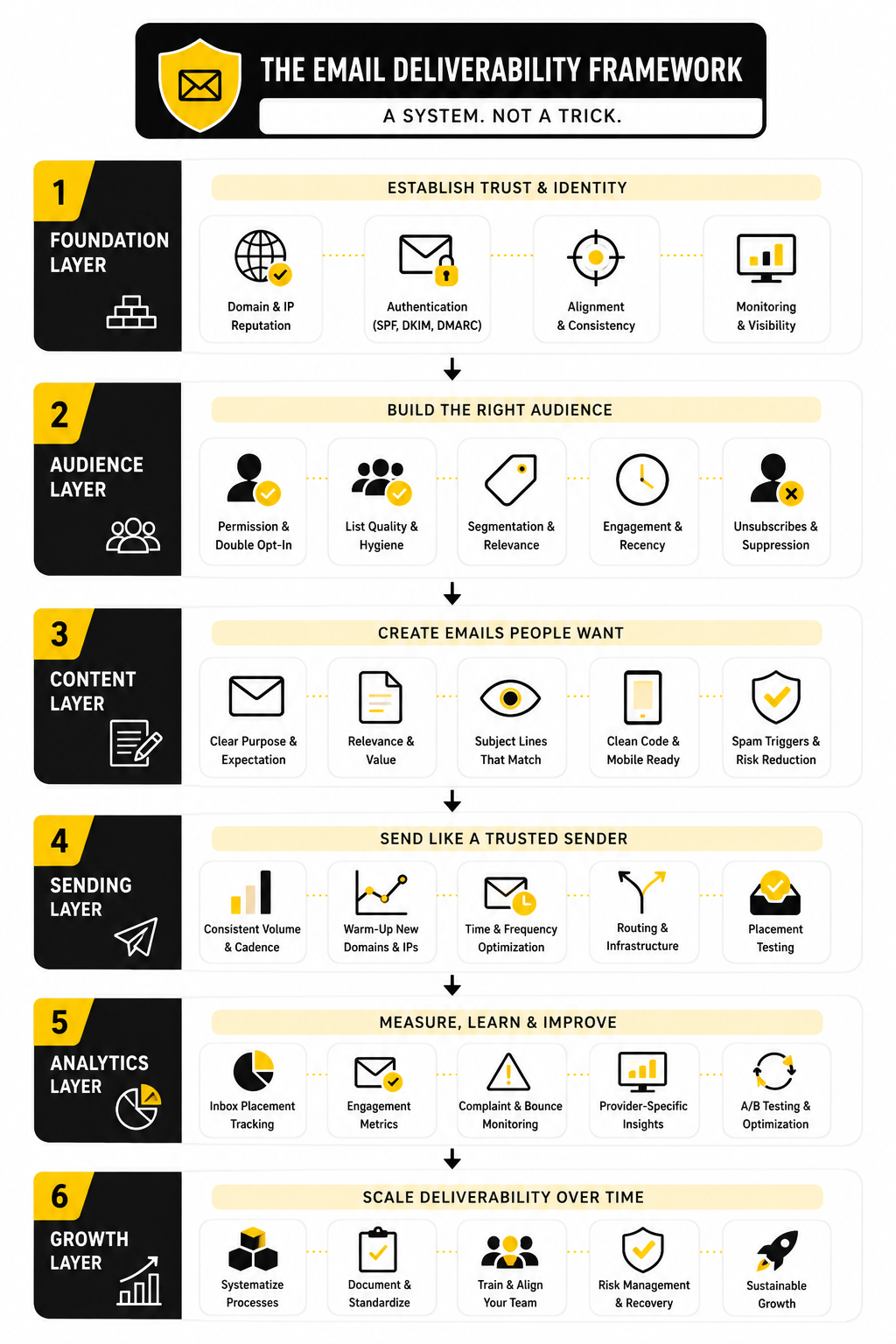
The framework here uses four layers. First, you set the technical foundation so mailbox providers can verify who you are. Second, you protect your sender reputation by sending wanted email to the right people at the right pace. Third, you monitor performance with signals that reveal inboxing problems early. Fourth, you build professional operating habits so deliverability does not collapse every time a campaign volume changes.
This matters because inbox providers do not judge emails in isolation. Gmail, Yahoo, Microsoft, and other providers look at patterns over time, including authentication, complaint behavior, engagement, bounce rates, and whether users seem to want your messages. The Messaging, Malware and Mobile Anti-Abuse Working Group has long treated authentication as a reputation and abuse-prevention foundation in its email authentication recommended best practices, and the newer Gmail and Yahoo requirements have made that foundation even more visible.
Core Components You Will Learn
The first core component is authentication. That means SPF, DKIM, and DMARC, but not as random acronyms you copy from a help article and forget. In this course structure, authentication becomes your sender identity system: it helps mailbox providers confirm that your domain is allowed to send the mail it is sending.
The second core component is reputation. Reputation is built from the way recipients and mailbox providers respond to your email over time. If people open, click, reply, move emails to the inbox, and rarely complain, you are sending positive signals; if they ignore, delete, bounce, or mark messages as spam, the system learns something very different.
The third core component is list quality. A clean list is not just a list with fewer invalid addresses. It is a list built around consent, relevance, recency, and realistic expectations, because inbox providers are increasingly good at spotting mail that recipients do not appear to want.
The fourth core component is operational discipline. This includes sending cadence, segmentation, suppression rules, unsubscribe processing, bounce handling, testing, and monitoring. It is the less glamorous part of email marketing, but it is often where the biggest deliverability gains come from.
Professional Implementation Starts With The Right Mental Model
Professional deliverability work is not about tricking spam filters. That mindset is outdated, risky, and usually counterproductive. The better mental model is simple: make it easy for mailbox providers to trust your identity, and make it obvious from recipient behavior that your emails are wanted.
That is why one-click unsubscribe is not a weakness. It is a pressure release valve. RFC 8058 defines a standardized way to support one-click unsubscribe through email headers in the official RFC 8058 specification, and Gmail and Yahoo now treat easy unsubscribe as part of responsible bulk sending.
This is also why deliverability cannot live only with the “technical person.” DNS setup matters, but so do offer relevance, list source, signup expectations, segmentation, copy, frequency, and customer experience. A good email deliverability course connects those pieces so marketing, sales, operations, and technical teams stop solving the same problem from separate corners.
Statistics And Data
Measurement is where deliverability becomes manageable. Without data, people argue from screenshots, seed tests, gut feelings, and one angry reply from a subscriber. With the right numbers, you can see whether the problem is technical, audience-related, mailbox-provider-specific, campaign-specific, or simply a normal fluctuation.
The goal is not to collect every metric your platform offers. The goal is to connect each number to a decision. If a metric does not help you decide whether to keep sending, pause, segment, clean, investigate, or change the campaign, it is probably noise.
This is why a serious email deliverability course should teach interpretation, not just reporting. A dashboard can show a bounce rate, complaint rate, open rate, and click rate, but it cannot automatically explain what changed, why it changed, and what you should do next. That judgment comes from looking at the numbers together.
The Metrics That Actually Matter
The first metric to watch is inbox placement. This is the closest measurement to the thing you actually care about: whether emails reach a useful inbox location. Sinch Mailgun’s 2026 Email Impact Report analyzed more than 400 billion emails sent in 2025 and found that nearly 18% of emails fail to reach the inbox. That number matters because it shows how easily a campaign can look “sent” while a meaningful share of potential revenue never gets a real chance.
The second metric is complaint rate. Gmail’s sender guidance tells senders to keep spam rates reported in Postmaster Tools below 0.10% and avoid reaching 0.30% or higher in Google’s email sender guidelines. This is not just a compliance detail. A rising complaint rate is one of the clearest signs that your audience does not recognize, want, or trust what you are sending.
The third metric is bounce rate. Hard bounces point to invalid addresses, old lists, poor collection practices, or bad imports. Soft bounces can point to temporary delivery issues, full mailboxes, throttling, or reputation problems. Either way, bounces tell you whether your list and infrastructure are behaving like a healthy sending system.
The fourth metric is engagement. Clicks, replies, conversions, saves, and direct responses are usually more useful than opens alone. Open tracking is still directionally useful in some contexts, but privacy protections and automated image loading mean it should not be treated as a perfect measurement of human attention.
Benchmarks Are Context, Not Targets
Benchmarks are useful, but only when you treat them as context. Validity’s 2025 Email Deliverability Benchmark Report showed that global inbox placement declined slightly, with Europe performing better than other regions and Microsoft showing notably weaker placement than several other mailbox providers in the 2025 Email Deliverability Benchmark Report. That does not mean every sender should panic if Microsoft performs differently. It means provider-level reporting matters.
A single “average deliverability rate” can hide the real issue. You might have strong Gmail performance, weak Outlook performance, stable Yahoo performance, and poor results only for inactive subscribers. If you only look at the blended average, you miss the pattern that points to the fix.
This is why benchmarks should trigger better questions. Which mailbox provider is dragging down performance? Which segment is causing complaints? Which campaign type creates the most bounces? Which sending source has the weakest authentication or alignment?
Build A Deliverability Dashboard Around Decisions
A good deliverability dashboard should answer a few practical questions quickly. Are emails being accepted? Are they landing where we want them to land? Are recipients reacting positively or negatively? Are problems concentrated in one mailbox provider, one segment, one sending stream, or one campaign?
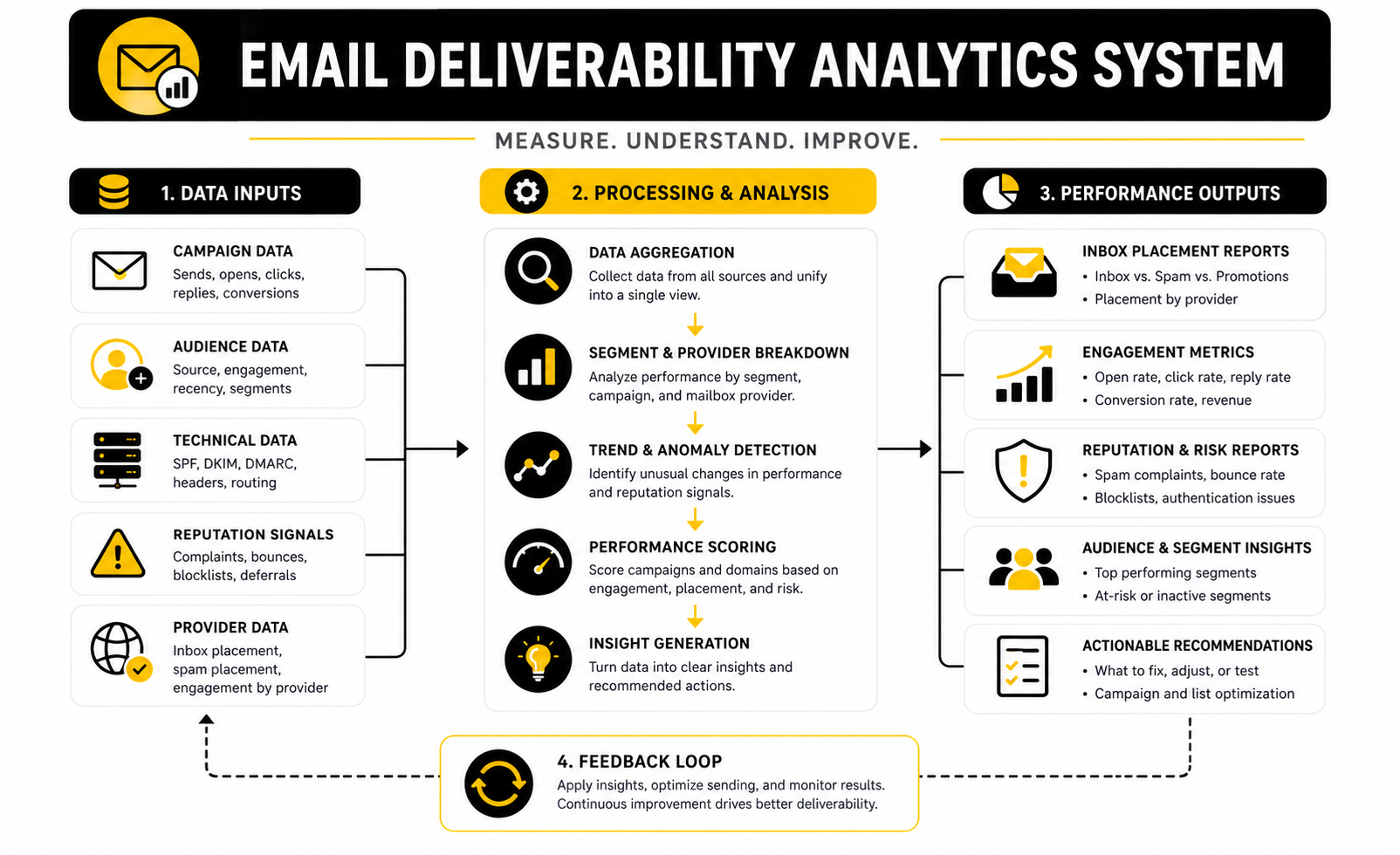
The best dashboard is simple enough to use every week. It should separate metrics by mailbox provider, campaign type, audience segment, sending domain, and sending platform. If everything is blended together, the dashboard may look clean, but it will not help you diagnose anything.
At a minimum, track:
None of these numbers should live in isolation. A low click rate with normal inbox placement is usually a content or offer problem. A falling click rate with rising spam placement is more likely a deliverability problem. A rising unsubscribe rate with low complaints may simply mean people are leaving cleanly, which is far better than pushing them toward the spam button.
How To Interpret Complaint Rate
Complaint rate deserves special attention because it can damage sender reputation quickly. A low complaint rate usually means your audience recognizes the sender and understands why they are receiving the email. A rising complaint rate means expectation and reality are drifting apart.
Do not look at complaints only after big campaigns. Look at them by source, segment, and message type. If one lead magnet audience complains more than another, the problem may be expectation-setting on the opt-in page. If older subscribers complain more than recent ones, the problem may be list age or reactivation strategy.
The action is straightforward. Suppress complainers immediately, reduce volume to risky segments, tighten targeting, and make unsubscribe easier to find. Do not fight the signal. Complaints are recipients telling mailbox providers that your email does not belong in their inbox.
How To Interpret Bounce Rate
Bounce rate tells you whether your list acquisition and hygiene are working. Hard bounces should be removed quickly because they show invalid or permanently unreachable addresses. Keeping them on the list tells mailbox providers that you are not maintaining your database properly.
Soft bounces need more interpretation. One soft bounce is not automatically a crisis, but repeated soft bounces from the same provider can point to throttling, temporary blocks, reputation problems, or infrastructure issues. This is where provider-level reporting becomes useful again.
The practical action depends on the pattern. If hard bounces rise after importing a list, stop sending to that source and review collection quality. If soft bounces spike at one mailbox provider, check reputation, volume changes, authentication, and recent complaint behavior for that provider.
How To Interpret Engagement
Engagement is not just a marketing metric. It is a deliverability signal because it shows whether people appear to want your messages. High engagement from a smaller segment is often more valuable than weak engagement from a large list.
Clicks and replies are especially useful because they show active interest. Conversions are even better because they connect deliverability to revenue. If your engaged segment produces most of the clicks and sales, sending the same campaign to the entire database may hurt reputation without adding much value.
This is where segmentation becomes practical. Send more often to people who engage, less often to people who do not, and build reactivation campaigns carefully instead of blasting inactive contacts. The goal is not to punish inactive subscribers. The goal is to avoid letting disengagement define your sender reputation.
How To Interpret Unsubscribes
Unsubscribes are not automatically bad. In many cases, they are healthy. They let people leave without complaining, which protects your sender reputation and keeps your list more accurate.
A sudden unsubscribe spike still deserves investigation. It may mean the offer was misaligned, the campaign frequency changed too aggressively, or the audience did not expect that type of message. But a visible unsubscribe link is still better than making people search for a way out.
Yahoo’s sender guidance encourages senders to process complaints quickly, remove invalid recipients, and use feedback loops to maintain clean lists in Yahoo Sender Hub best practices. The broader lesson is simple: negative signals become less damaging when you process them quickly and respect recipient intent.
What Good Measurement Changes In Practice
Good measurement changes how you send. Instead of asking whether the full list should get the next campaign, you ask which segment has earned it. Instead of asking whether email “works,” you ask which mailbox providers, offers, and audiences are producing healthy performance.
It also changes how you choose tools. If your platform makes it hard to see provider-level performance, segment engagement, automation-level results, or conversion data, you are flying with partial visibility. Tools like Brevo, Moosend, and GoHighLevel can fit different workflows, but the deciding factor should be whether the setup helps you understand what is actually happening after you send.
Most importantly, measurement keeps you honest. If inbox placement drops, complaints rise, and conversions fall, the answer is not “send more.” The answer is to stop, diagnose, and fix the weakest part of the system before scaling the damage.
Testing, Monitoring, And Troubleshooting Deliverability Problems
At this stage, the work becomes more strategic. The foundation is in place, the sending sources are mapped, the core metrics are visible, and the team has enough data to make better decisions. Now the question is how to scale without damaging the reputation you have worked to build.
This is where many email programs get reckless. They see one strong campaign and immediately increase volume. They reactivate a cold list because the calendar needs revenue. They add a new sending tool without checking alignment. Then deliverability dips, and everyone starts looking for a quick fix.
A good email deliverability course should make you more disciplined than that. Scaling email is not about sending more because the platform allows it. It is about increasing volume only when the trust signals support it.
The Scaling Tradeoff
Every email program faces the same tradeoff: reach more people or protect reputation more aggressively. Sending to a larger audience can produce more revenue in the short term, but it can also expose weak segments, old contacts, low-intent subscribers, and mailbox providers that react differently to volume. Sending to a smaller engaged audience may feel conservative, but it often protects long-term inbox access.
The smart answer is not always “send less.” The smart answer is to scale in controlled layers. Start with the most engaged segment, measure the response, expand to the next strongest segment, and keep watching complaints, bounces, clicks, and provider-level placement.
This approach is slower than blasting the whole database. It is also safer. If the campaign performs poorly, you catch the problem before it touches every contact and every mailbox provider at once.
Segment Risk Before You Segment Revenue
Most teams segment by revenue potential first. That makes sense commercially, but deliverability needs another lens: risk. A high-value segment that has not engaged in a year may be commercially tempting and deliverability-risky at the same time.
Risk-based segmentation looks at recency, source, engagement, domain type, complaint history, bounce history, and consent quality. A recent subscriber who clicked last week is very different from a contact imported from an old webinar list. Treating them the same is lazy sending.
A practical risk model can be simple:
This model gives you a better sending order. Low-risk segments can receive normal campaigns. Medium-risk segments should get lower frequency and more relevant offers. High-risk segments should be cleaned, suppressed, reconfirmed, or handled with extreme caution.
Test Like A Deliverability Professional
Testing is not just sending yourself a preview and checking whether the subject line looks good. A proper test checks the technical setup, the audience, the links, the unsubscribe path, the message content, and early performance. It also asks whether the campaign should be sent at this volume in the first place.
Before a high-volume send, test authentication and headers. Check SPF, DKIM, DMARC alignment, List-Unsubscribe headers, branded tracking links, and the final destination of every important link. If the campaign is coming from a new platform or domain, test more carefully because the mailbox provider has less history to rely on.
Then test the audience. Send first to a small engaged segment, watch early bounces and complaints, and compare performance by mailbox provider. If Gmail looks healthy but Outlook starts deferring or filtering, you have a provider-specific issue, not a general copywriting problem.
Provider-Level Differences Matter
Mailbox providers do not behave the same way. Gmail, Yahoo, Microsoft, Apple, corporate gateways, and privacy-focused providers all evaluate mail through their own systems. That means one campaign can perform well overall while quietly failing in one provider environment.
Validity’s 2025 benchmark showed meaningful differences by mailbox provider, with Microsoft placement creating more difficulty for many senders in the 2025 Email Deliverability Benchmark Report. The point is not to obsess over one benchmark. The point is to stop treating deliverability as one blended score.
When troubleshooting, split performance by mailbox provider first. If the issue is concentrated, investigate provider-specific reputation, deferrals, spam placement, authentication, content patterns, and recent volume changes. If the issue is broad across providers, look harder at list quality, sending source, authentication failure, or campaign relevance.
Dedicated Versus Shared Infrastructure
One advanced decision is whether to use shared or dedicated sending infrastructure. Shared infrastructure can be easier for smaller senders because the provider manages much of the environment, and reputable platforms work hard to protect the shared pool. Dedicated infrastructure gives more control, but it also gives you more responsibility.
A dedicated IP is not automatically better. If your volume is too low or inconsistent, a dedicated IP can look unstable because mailbox providers do not see enough regular sending history. If your practices are weak, dedicated infrastructure simply isolates your bad habits instead of fixing them.
The better question is operational readiness. Do you have consistent volume, strong authentication, clean lists, clear segmentation, and someone responsible for monitoring? If not, moving to dedicated infrastructure is not an upgrade. It is just a more expensive way to expose the same problems.
Cold Outreach Needs A Separate Strategy
Cold outreach is a different risk profile from permission-based marketing. Recipients may not recognize the sender, engagement is less predictable, and complaints can rise quickly if targeting or messaging is poor. Mixing cold outreach with your main marketing domain is one of the fastest ways to create avoidable reputation risk.
This does not mean every business must avoid outbound. It means outbound needs separation, restraint, and a clear understanding of legal and mailbox-provider expectations. The strategy should use separate domains or subdomains, conservative volume, accurate targeting, clean suppression rules, and messaging that is specific enough to justify the interruption.
Do not use the same domain identity for customer receipts, newsletter campaigns, and aggressive cold prospecting. That is not efficient. It is fragile.
Reactivation Is Not A Blast
Reactivation campaigns are useful, but they are also risky. Inactive subscribers are inactive for a reason: they may have lost interest, changed jobs, abandoned the inbox, forgotten the brand, or never wanted ongoing emails in the first place. Sending a big “we miss you” campaign to every inactive contact can create the very complaint spike you were trying to avoid.
A safer reactivation process starts small. Choose a recent inactive segment first, use a clear and honest message, make the unsubscribe option easy, and stop sending if the signals are poor. If a contact ignores multiple reactivation attempts, suppress them from regular marketing instead of dragging them into every future campaign.
Yahoo’s best practices encourage prompt removal of invalid recipients and recommend reconfirmation for inactive subscribers in Yahoo Sender Hub. That principle is practical beyond Yahoo. Old lists do not become more valuable because you keep emailing them.
AI And Automation Can Scale Mistakes Faster
Automation is powerful, but it can multiply deliverability problems quickly. A broken trigger can send too many emails. A poorly designed follow-up sequence can annoy new leads. An AI-generated campaign can sound polished while still being irrelevant to the audience.
This matters more when email is connected to broader funnel systems. If you use GoHighLevel, ClickFunnels, Systeme.io, or ManyChat, your automations should be reviewed as part of the deliverability system. The issue is rarely the tool itself. The issue is sending too much, too soon, to people who did not expect it.
Use automation with guardrails. Add exit rules, frequency limits, suppression logic, engagement checks, and manual review for high-volume campaigns. The more automated your system becomes, the more important your controls become.
When To Pause Sending
One of the hardest expert-level decisions is knowing when to stop. Marketers often want to push through a bad send because the campaign is tied to a launch, promotion, or revenue target. But if the signals are bad, continuing can turn a campaign problem into a reputation problem.
Pause sending when spam complaints rise sharply, hard bounces spike, authentication fails, provider-level deferrals increase, or inbox placement drops across an important mailbox provider. Google tells senders to keep spam rates below 0.10% and avoid reaching 0.30% or higher in its sender guideline FAQ. If you are moving toward those danger zones, the answer is not bravery. The answer is restraint.
A pause is not failure. It is damage control. The team that pauses, diagnoses, and resumes carefully will usually recover faster than the team that keeps sending because the calendar says so.
How To Troubleshoot Without Guessing
Troubleshooting should follow a clear order. Start with the timeline. Identify exactly when performance changed, which campaign or sending source changed first, which mailbox providers were affected, and whether the change coincided with volume, list, content, platform, or DNS updates.
Then isolate the problem. If only one provider is affected, focus there. If only one campaign type is affected, compare it with healthier sends. If only one segment is affected, investigate list source and engagement quality. If all mail is affected, check authentication, domain reputation, blocklists, DNS, and major infrastructure changes.
A practical troubleshooting flow looks like this:
This is not glamorous, but it works. Deliverability problems get worse when teams guess, change five things at once, and then cannot tell which change helped.
The Professional Standard
The professional standard is not perfect inbox placement. Nobody controls every mailbox provider, recipient behavior, corporate gateway, or filtering rule. The professional standard is a system that earns trust, catches problems early, and avoids reckless decisions when pressure rises.
That is the real difference between casual email marketing and serious deliverability work. Casual senders react after damage appears. Serious senders build controls before the damage spreads.
By this point in the email deliverability course, the pattern should be clear. Authentication gives you identity. Infrastructure gives you control. Permission gives you legitimacy. Measurement gives you visibility. Strategy gives you restraint. Together, they create a sending program that can scale without constantly gambling with the inbox.
Build a stronger local presence with BAAM AI
Turn your website, Google profile, social channels, and AI visibility into one growth engine
Most businesses do not need more random marketing activity. They need a consistent presence system that helps the right people find them, trust them, and take action. BAAM AI brings strategy, local SEO, website updates, Google Maps visibility, social content, AI-search readiness, media production, and reporting into one practical monthly engine.
If you want your marketing to keep working after the campaign ends, start with a free BAAM AI presence audit. See how your business shows up today and where the fastest visibility wins are at BAAM AI.