
BAAM AI Blog
Email Campaigns Squarespace: A Practical Guide To Building Emails That Actually Support Your Website
Squarespace makes email marketing feel approachable because it sits close to the website, store, blog, scheduling pages, forms, and customer touchpoints you already use. That is the main appeal of email campaigns...
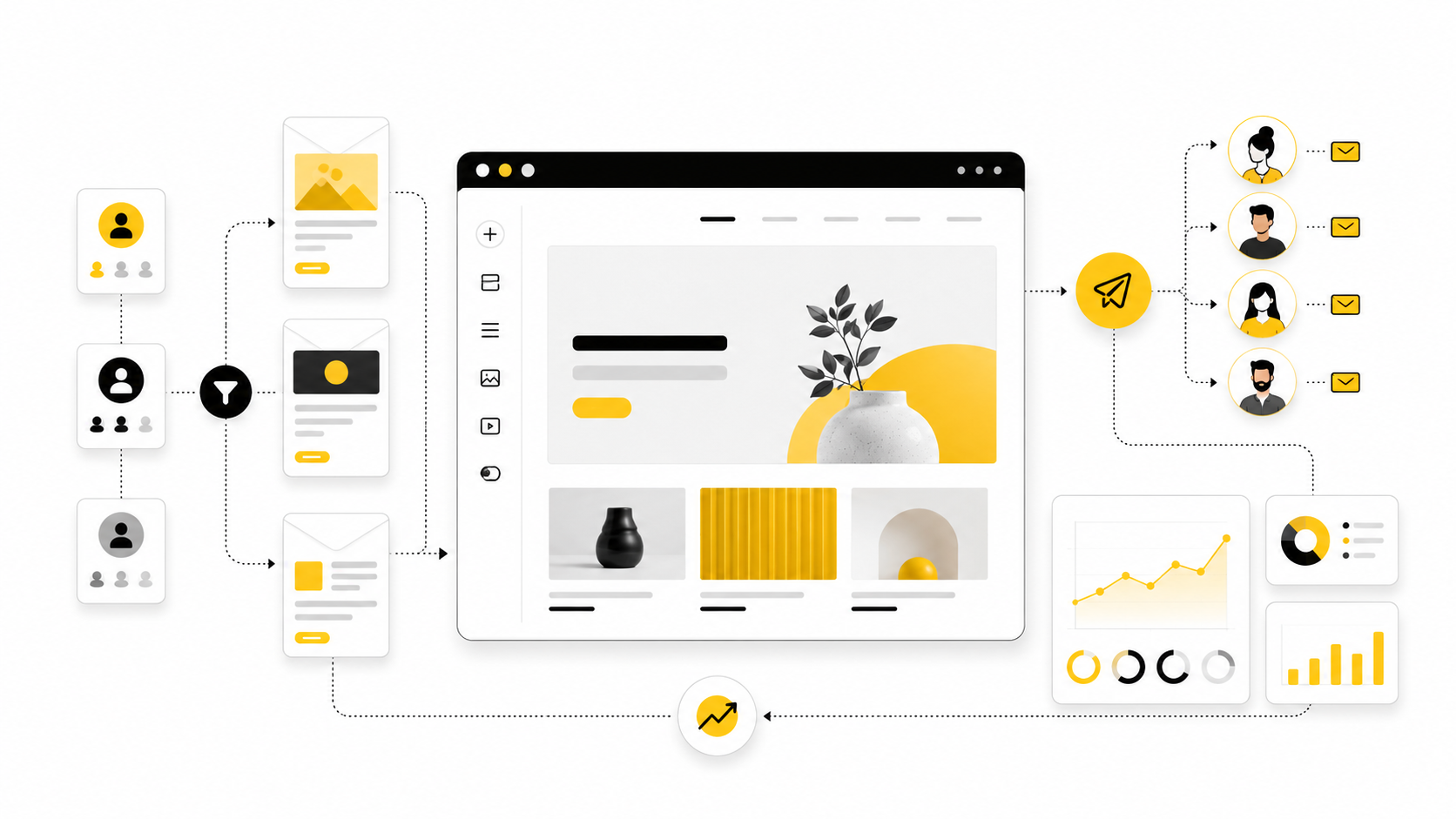
Squarespace makes email marketing feel approachable because it sits close to the website, store, blog, scheduling pages, forms, and customer touchpoints you already use. That is the main appeal of email campaigns Squarespace users care about: less tool-hopping, faster setup, and a visual style that can match the site without rebuilding the brand from scratch.
But convenience does not automatically create a strong email program. A campaign still needs a clear audience, a reason to send, a useful offer, a strong landing page, and a way to measure what happened after the click. If those pieces are missing, even a beautiful email becomes another announcement people ignore.
This guide treats Squarespace Email Campaigns as part of a bigger growth system, not just a newsletter editor. The goal is to help you decide what to send, when to send it, how to structure campaigns, and where Squarespace is enough versus where you may need a dedicated automation tool like Brevo, Moosend, or GoHighLevel as your operation gets more advanced.
Why Email Campaigns Matter For Squarespace Websites
Email matters because your website visitors are rarely ready to buy, book, donate, subscribe, or inquire on the first visit. A Squarespace site can make the first impression, but email gives you a second, third, and fourth chance to build trust after someone leaves. That matters even more for creators, consultants, service providers, local businesses, and ecommerce brands where the buying decision often takes time.
The practical value is simple: email turns anonymous traffic into an owned audience. Social platforms can change reach overnight, paid ads can become expensive, and search rankings can move, but a permission-based email list gives you a more direct channel to people who already showed interest. This is why many brands still treat email as a core retention channel rather than a dusty newsletter tactic.
Squarespace is especially useful here because the website and email workflow can stay close together. A visitor can read a blog post, join a list through a form or newsletter block, receive a branded campaign, and return to a product, service, booking, or sales page without feeling like they moved between disconnected systems. That continuity is the reason email campaigns Squarespace users build can work well for smaller businesses that need simplicity before complexity.
The Squarespace Email Campaigns Framework
A strong Squarespace email system starts with one question: what should happen after someone joins the list? Many beginners start by asking what template looks best, but the better question is what journey the subscriber should experience. Design helps, but sequence, relevance, and timing usually do more of the heavy lifting.
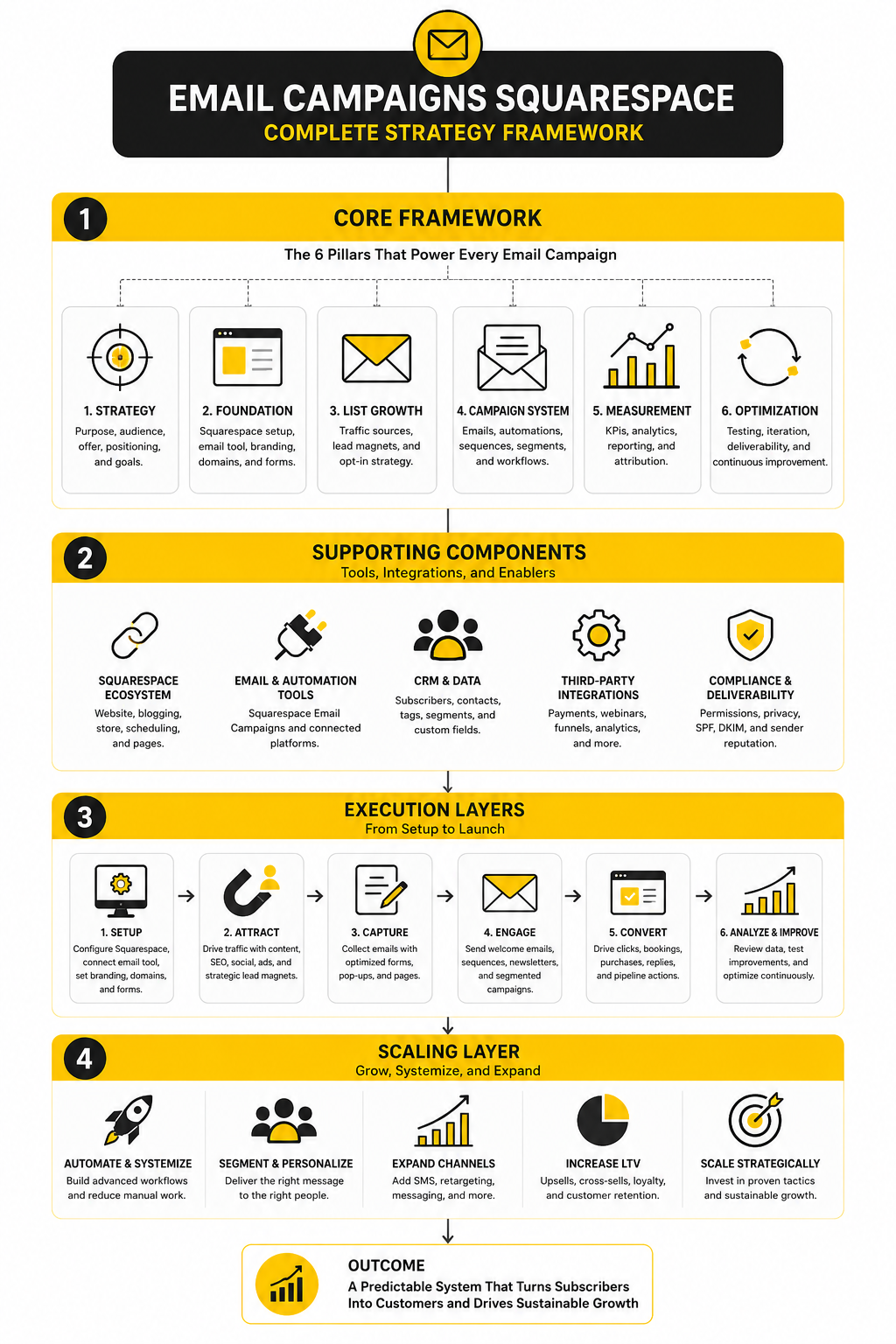
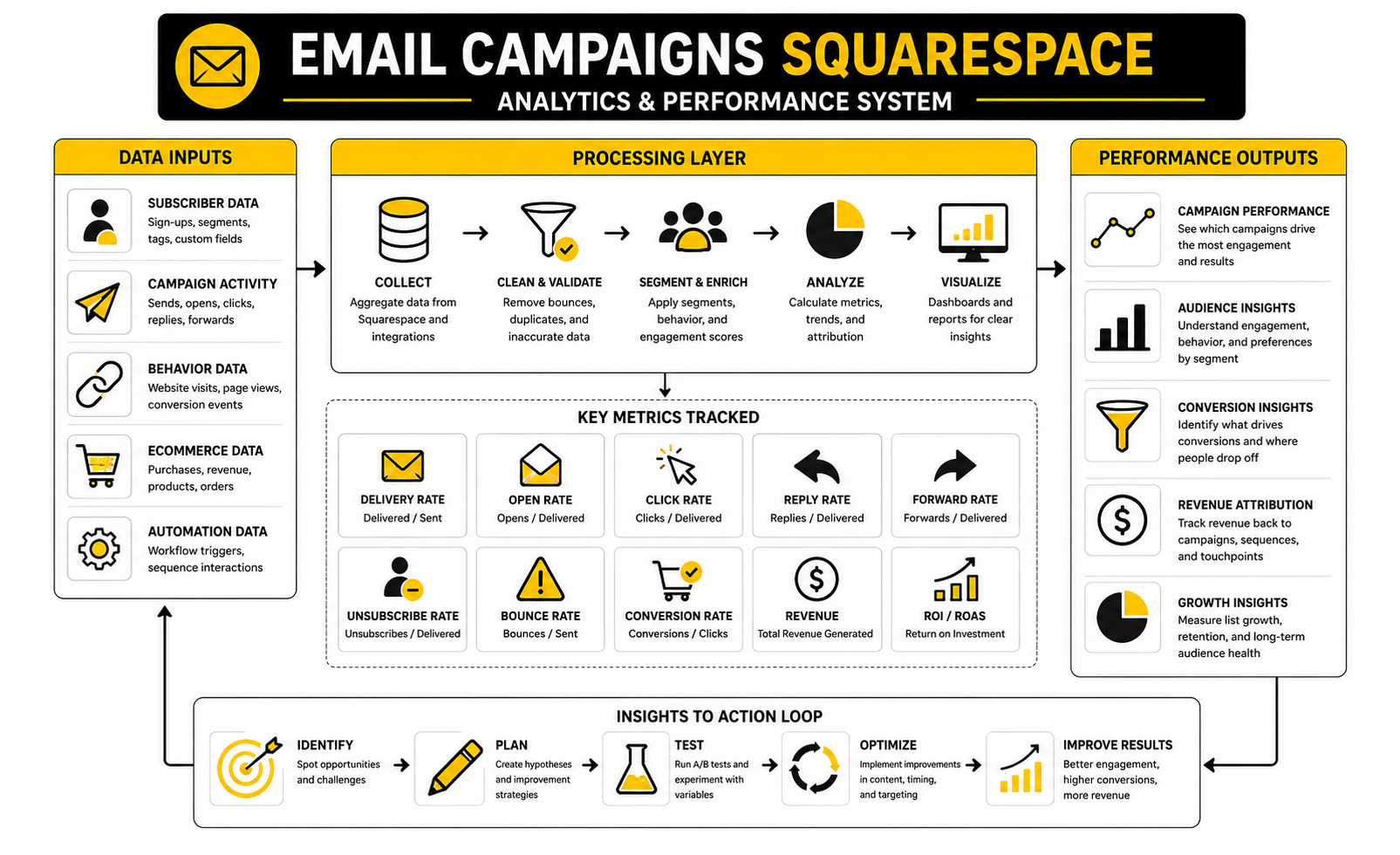
The framework is built around four layers: capture, segment, send, and measure. Capture means collecting the right subscribers in the right places on your site. Segment means separating people by intent, interest, purchase behavior, service need, or stage of awareness instead of treating everyone the same.
Send means creating campaigns that have a clear job, not random updates stitched together because it has been a while since the last email. Measure means looking beyond opens and asking whether the email drove the action you actually wanted. That action might be a product sale, consultation booking, class registration, donation, reply, download, or repeat visit.
Core Components Of A Strong Squarespace Email System
The first component is the signup path. Your form should not simply say “subscribe” unless the audience already has a strong reason to care. A better signup path explains what the person gets, how often they will hear from you, and why joining is useful right now.
The second component is message intent. Every email should have one main purpose, even if it contains supporting content. If the email is meant to sell, sell clearly; if it is meant to educate, make the lesson useful; if it is meant to bring people back to a page, make the next click obvious.
The third component is the destination after the click. This is where Squarespace can be powerful because the email can point directly to polished pages, products, appointment pages, event pages, or blog content inside the same brand environment. The campaign should not carry the whole burden; the page it sends people to must finish the job.
Professional Implementation Starts With Restraint
The biggest mistake is trying to build a complex email machine before the offer, audience, and website path are clear. A professional setup usually starts smaller: one valuable signup reason, one clean list structure, one welcome email or short journey, and one repeatable campaign format. That gives you something you can improve instead of a tangled system you cannot diagnose.
For many Squarespace users, the first useful campaign types are simple: a welcome email, a product or service announcement, a seasonal promotion, a new blog or resource email, and a re-engagement message for people who have gone quiet. These are not flashy, but they match real business needs. Once those basics work, automation and deeper segmentation become much easier to justify.
This is also where tool choice becomes important. Squarespace Email Campaigns can be a good fit when your priority is brand consistency, ease of use, and keeping marketing close to the website. If you later need heavier CRM workflows, multi-channel follow-up, lead pipelines, SMS, or advanced sales automation, then a platform like GoHighLevel may make more sense alongside or beyond Squarespace.
Core Components Of A Strong Squarespace Email System
A good email setup is not built around “sending newsletters.” That is too vague. A good setup is built around specific business moments where a subscriber needs a useful next step, and that is where email campaigns Squarespace users can build start to become more strategic.
The simplest way to think about it is this: your website creates intent, and your email system follows up on that intent. Someone who joins from a blog post may need education. Someone who joins from a product page may need reassurance. Someone who buys once may need onboarding, care instructions, related products, or a reason to come back.
Squarespace can support that flow because Email Campaigns connects closely with your site content, commerce activity, forms, and mailing lists. That does not mean every business should stay inside one platform forever. It means you should understand the core pieces first, then decide whether Squarespace is enough or whether a more advanced system like Brevo or Moosend belongs in the stack later.
Mailing Lists And Signup Points
Your mailing list is not just a container for email addresses. It is the beginning of a relationship, so the way people join tells you a lot about what they expect next. A generic footer signup can work for loyal visitors, but it usually will not convert as well as a specific reason to subscribe.
Place signup points where the visitor already has intent. A service page can invite people to get a checklist, consultation prep guide, or short educational sequence. A shop page can invite people to product updates, launch notices, sizing guidance, or restock alerts. A blog post can offer a related resource that helps the reader take the next step without forcing a sale too early.
The key is relevance. One signup form across the entire site may be easier to manage, but it usually gives you weaker context. Multiple focused signup paths help you send better campaigns because the subscriber’s entry point already tells you what they care about.
Campaign Types That Make Sense For Squarespace Users
Not every campaign needs to be complex. In fact, most Squarespace businesses are better off starting with a small set of repeatable campaign types that are easy to plan and easy to improve. Simple beats scattered, especially when you are still learning what your audience responds to.
The most useful campaign types are usually:
Each campaign should have one clear job. A welcome email should orient the subscriber and set expectations. A promotional email should make the offer clear and reduce hesitation. An educational email should help the reader understand a problem better, then guide them toward the next useful action.
Design Consistency And Brand Trust
One advantage of using email campaigns Squarespace provides is visual continuity. Your emails can feel connected to your website instead of looking like they came from a completely separate tool. That matters because small trust signals add up when someone is deciding whether to click, buy, book, or reply.
Design consistency does not mean every email has to be heavily designed. It means the logo, typography, colors, spacing, tone, and call-to-action style should feel familiar. A subscriber should land on your Squarespace page after clicking and feel like they are still in the same brand experience.
Keep the design clean. One strong header, a clear message, a focused call to action, and a relevant destination are usually better than a crowded email full of competing blocks. The goal is not to impress people with layout options. The goal is to make the next step feel obvious.
Segmentation And Subscriber Intent
Segmentation sounds technical, but the idea is simple: do not send every message to every person. A past buyer should not always get the same email as a brand-new subscriber. A lead interested in one service does not always need updates about a different service.
Start with practical segments you can actually use. For example, separate customers from non-customers, local subscribers from remote subscribers, product buyers from service leads, and active readers from people who have not engaged in a while. You do not need dozens of segments on day one. You need enough separation to avoid obvious mismatches.
This becomes more important as the list grows. A small list can survive broad updates because the relationship is often more personal. A larger list needs better targeting, or your emails start feeling irrelevant. Relevance protects engagement, and engagement is what keeps the channel useful over time.
Landing Pages After The Click
The email is only half the system. The page after the click is where the subscriber decides whether to act. This is where Squarespace can be especially useful because campaign traffic can move directly into pages that already match your site’s structure and brand.
A campaign landing page should continue the same promise made in the email. If the email promotes a service, the page should explain the service clearly and make the booking or inquiry step easy. If the email promotes a product, the product page should answer the questions that might stop someone from buying. If the email shares educational content, the destination should deliver real value before asking for more commitment.
Do not treat the call to action as an afterthought. Button text, page headline, pricing clarity, proof, and friction all affect whether the campaign works. A weak page can make a strong email look like a failure, so always judge campaign performance together with the destination page.
Professional Implementation: From List Growth To Launch
Implementation is where the whole system becomes real. This is the point where you stop thinking about email as a vague marketing channel and turn it into a repeatable process your business can actually use. For email campaigns Squarespace users build, the goal is not to create the most complicated setup possible; the goal is to create a clean path from signup to send to result.
Start with the business outcome, not the email editor. Decide whether the campaign is meant to generate bookings, sell a product, drive repeat purchases, promote an event, educate leads, or reactivate older subscribers. Once the outcome is clear, every part of the campaign becomes easier to judge because you know what the email is supposed to do.
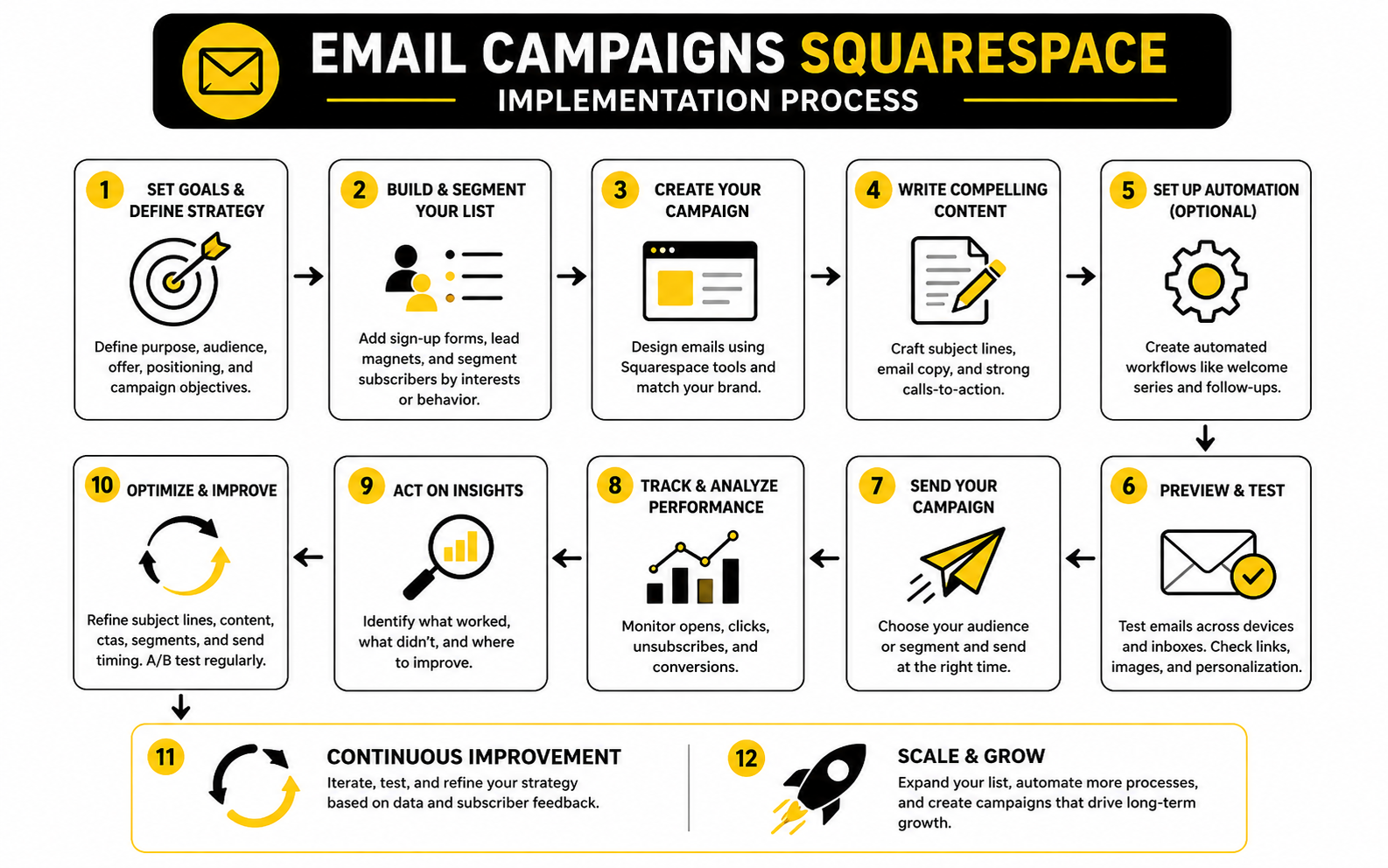
The practical process has five stages: plan the offer, prepare the list, build the campaign, connect the destination page, and review the results. That sequence keeps you from writing beautiful emails that point to weak pages or sending strong offers to the wrong people. It also makes improvement easier because you can see which stage needs work instead of blaming the whole campaign.
Step 1: Define The Campaign Goal
The first step is deciding what action you want the reader to take. This sounds obvious, but it is where many campaigns go soft. If the goal is not clear to you, it will not be clear to the subscriber.
A strong goal is specific enough to shape the email. “Get more sales” is too broad, but “send subscribers to the new product page and drive first-week purchases” gives the campaign a job. “Increase bookings” is vague, but “move warm leads to a consultation page” tells you what the copy, button, and landing page need to support.
Keep the goal simple enough that one email can carry it. If you try to promote a product, share three blog posts, announce an event, and ask for replies in the same campaign, the reader has too many choices. One primary action almost always performs better than a pile of competing options.
Step 2: Match The Audience To The Message
After the goal comes the audience. This is where your mailing lists and segments matter. Sending a campaign to everyone may feel efficient, but it often weakens relevance because different subscribers joined for different reasons.
For example, a new subscriber who joined from a beginner guide may need education before seeing an offer. A repeat customer may need a product update or loyalty incentive. A service lead who downloaded a resource may need proof, clarity, and a low-friction booking path.
This is also where businesses start to outgrow basic blasting. If you need more advanced customer journeys, pipeline stages, follow-up logic, or multi-step automations, a CRM-focused platform like GoHighLevel can become useful. But do not add complexity just because it exists. Add it when your audience and follow-up process actually require it.
Step 3: Build The Email Around One Promise
The email itself should be built around one clear promise. The subject line gets attention, the opening confirms relevance, the body explains the value, and the call to action tells the reader what to do next. That structure is simple, but it works because it respects the reader’s time.
A good Squarespace email does not need to sound like a corporate announcement. It should sound like a helpful message from a real business with a clear point of view. Be direct, make the benefit easy to understand, and avoid stuffing the email with every detail you could possibly include.
Use the website page to handle the depth. The email should create enough interest to earn the click, then the page should answer the bigger questions. This keeps the email focused and prevents the campaign from becoming a wall of text.
Step 4: Prepare The Destination Page Before You Send
Never send a campaign until the destination page is ready. This is one of the most important implementation habits. The email can create momentum, but the page has to convert that momentum into action.
Check the headline, offer clarity, mobile layout, button placement, pricing information, booking flow, product details, and any proof elements before the campaign goes out. If the email promises a simple next step but the page feels confusing, people will leave. If the button is buried or the page asks for too much too soon, the campaign will underperform even if the email copy is strong.
For sales-focused funnels that need more structured landing pages, checkout flows, upsells, and campaign-specific pages, tools like ClickFunnels or Systeme.io may fit better than a standard site page. For Squarespace users, the decision depends on how complex the selling path needs to be. A simple service page may be enough, but a full promotional funnel may need a more specialized tool.
Step 5: Run A Pre-Send Quality Check
A pre-send check protects you from avoidable mistakes. Review the email on desktop and mobile, click every link, test the signup or checkout path, and make sure the sender name feels recognizable. This is basic, but it matters.
Check the subject line and preview text together because they work as a pair in the inbox. The subject should create interest, while the preview text should add context instead of repeating the same idea. A strong opening also helps because many readers decide quickly whether the email is worth their attention.
You should also review the list you are sending to. Make sure the campaign is going to the right audience and that the message matches what those subscribers reasonably expect. Permission and relevance are not small details; they are the foundation of a healthy email channel.
Step 6: Send, Watch, And Learn
After sending, do not judge the campaign from one metric alone. Opens can be useful directional signals, but clicks, replies, bookings, sales, unsubscribes, and page behavior tell you more about whether the campaign did its job. The real question is not “did people see it?” The real question is “did the right people take the right next step?”
Give the campaign enough time to gather meaningful engagement, then review the full path. If opens were weak, the issue may be the subject line, sender recognition, timing, or list quality. If clicks were weak, the email message or offer may not have created enough reason to act. If clicks were strong but conversions were weak, the destination page probably needs attention.
This is where email campaigns Squarespace users build can become a steady improvement loop. You send, learn, adjust, and send again with better judgment. That is the professional way to use email: not as random promotion, but as a repeatable system that gets sharper every time.
Statistics And Data That Actually Matter
Measurement is not about collecting impressive numbers. It is about knowing what to fix next. With email campaigns Squarespace users send, the mistake is usually either ignoring analytics completely or staring at open rates without connecting the campaign to clicks, sales, bookings, replies, and page behavior.
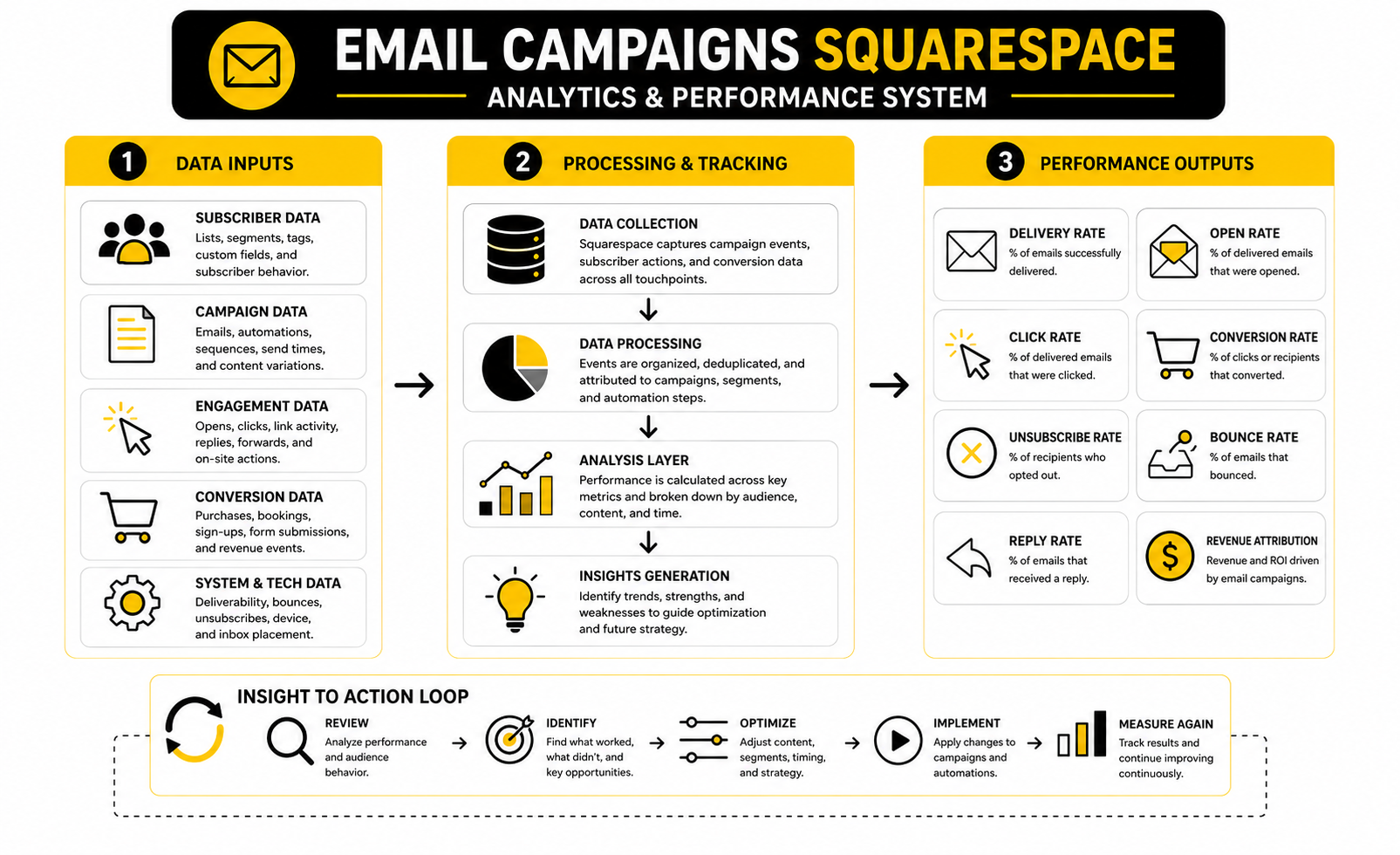
The most useful data tells a story in stages. Delivery shows whether the email reached people. Opens suggest whether the sender name, subject line, and timing created enough interest. Clicks show whether the message and offer were strong enough to move people toward action. Conversions show whether the destination page finished the job.
That sequence matters because every metric has a different job. A low open rate does not automatically mean the offer is bad. A high open rate with weak clicks does not mean the campaign worked. A strong click rate with weak sales usually points to a landing page, pricing, checkout, booking, or trust problem.
The Email Metrics You Should Track First
Start with the basics before you try to build a giant dashboard. Squarespace lets you review campaign analytics for sent campaigns and automated campaigns, so the first habit is simply checking performance after every send instead of guessing. The point is not to obsess over every number; the point is to build a feedback loop.
Track these metrics first:
Delivery rate is the foundation because a campaign cannot perform if it never reaches the inbox. The UK DMA’s 2025 email benchmarking report found that delivery rates reached 98% in 2024, which gives a useful reference point for healthy list quality. If your delivery is far below that, your first job is not better copy; it is list hygiene, permission quality, and sender reputation.
How To Read Open Rates Without Overreacting
Open rate is useful, but it is not the final truth. Privacy changes, image loading, inbox behavior, and different email clients can all affect how opens are recorded. Treat open rate as a directional signal, not a perfect measurement of attention.
Still, open rates can help you diagnose the top of the campaign. If opens are weak across multiple sends, look at your sender name, subject line, preview text, send timing, list source, and whether subscribers still remember why they joined. If opens are strong but clicks are weak, the subject line did its job but the email body or offer did not.
Industry benchmarks can help you avoid panic. The DMA report showed open rates at 35.9%, while MailerLite’s 2026 benchmark data shows large differences by category, including ecommerce around 32.67% and consulting above that. The action is not to chase someone else’s exact number. The action is to compare your campaigns against your own past performance and then use industry data as a sanity check.
Click Rate Is The Cleaner Signal
Click rate is usually more useful than open rate because it shows intent. A person who clicks has moved from passive attention to active interest. That is why click rate deserves more weight when judging whether your message, offer, and call to action are working.
A 2025 benchmark summary from ActiveCampaign places average click-through rates around 2.62% across industries, while the DMA report showed unique click rates reaching 2.3%. Those numbers are not universal rules, but they help you understand what normal can look like. If your email campaigns are consistently below your own baseline, something in the message-to-offer connection needs attention.
Do not immediately assume the button color is the problem. First ask whether the email made one clear promise, whether the CTA matched that promise, and whether the audience was right for the message. A weak click rate is often a relevance problem before it is a design problem.
Conversion Data Shows Whether The Business Result Happened
Clicks are not the finish line. For a business, the real question is whether the campaign produced the intended outcome. That might be orders, booking requests, form submissions, calls, event registrations, donations, or qualified replies.
This is where Squarespace analytics and campaign analytics need to be read together. If the email generated traffic but the page did not convert, the campaign may have done its part. The problem may be the offer presentation, page clarity, product details, checkout flow, booking friction, or lack of proof.
Email ROI can be strong, but only when the business actually tracks the full path. Litmus’ 2025 State of Email data shows that many marketing leaders report meaningful returns from email, while 21% still do not measure ROI. That is the gap to avoid. If you are sending campaigns without tracking what they produce, you are not really running email marketing; you are publishing into the inbox and hoping.
Benchmarks Are Useful, But Context Wins
Benchmarks can guide you, but they can also mislead you if you treat them like commandments. A tiny, loyal list can outperform a large cold list. A niche service business may get fewer clicks but higher-value inquiries. An ecommerce store may see lower campaign click rates but meaningful revenue from automated post-purchase and abandoned-cart style flows.
Compare campaigns by type, not just in one big pile. A welcome email should not be judged the same way as a broad monthly newsletter. A launch announcement should not be judged the same way as a re-engagement email. Each campaign type has a different job, so the data should be interpreted against that job.
This is why the best benchmark is your own trend line. Look at the last five to ten sends and ask what is improving, what is declining, and what stays flat. External benchmarks tell you what is possible in the market, but your own data tells you what is true for your audience.
What To Do When The Numbers Are Weak
Weak numbers are not a failure. They are instructions. The only real failure is seeing the same problem again and again without changing the system.
Use this diagnosis pattern:
This keeps optimization practical. You are not randomly rewriting everything after one disappointing send. You are locating the bottleneck and fixing the part of the system most likely to matter.
What To Do When The Numbers Are Strong
Strong numbers deserve analysis too. When a campaign works, do not just celebrate and move on. Save the subject line, offer angle, audience segment, CTA, layout, send timing, and landing page structure so you can understand what created the lift.
Look for patterns across winners. Maybe educational emails drive more clicks than promotional ones. Maybe short emails outperform longer ones for your audience. Maybe a specific segment responds better when the CTA points to a booking page instead of a general services page.
That is how email campaigns Squarespace users send become an asset instead of a recurring chore. The data helps you build a repeatable playbook. Over time, your campaigns stop depending on guesswork and start reflecting what your audience has already shown you they care about.
Optimization, Automation, And Tool Decisions
Once the basics are working, the next question is not “how do we send more?” The better question is “where does more carefully follow-up create a better customer experience?” That shift matters because scaling email campaigns Squarespace users rely on can either make the business feel more helpful or make the audience feel like they are being pushed through a machine.
Advanced email marketing is not about adding complexity for fun. It is about using timing, behavior, segmentation, and intent to send fewer irrelevant emails and more useful ones. If you keep that principle in place, automation becomes a service to the subscriber instead of a shortcut for blasting the list.
This is where the tradeoffs become real. Squarespace gives you a clean, connected environment for website-led campaigns, but every growing business eventually has to decide how much automation, CRM depth, personalization, and reporting it actually needs. The right answer depends on your sales process, not on which tool has the longest feature list.
When Squarespace Is Enough
Squarespace can be enough when your email strategy is closely tied to your site and the campaigns are relatively straightforward. If you mostly send announcements, newsletters, product updates, blog roundups, event reminders, or simple promotional campaigns, staying inside the Squarespace ecosystem can keep the workflow clean. That simplicity is valuable because the easiest system to maintain is often the one that actually gets used.
It is also a strong fit when visual consistency matters and your team is small. You can keep your website, store content, blog content, products, and campaign design close together without forcing a heavy marketing stack into a simple business. For many creators, consultants, studios, local businesses, and early ecommerce brands, that is enough to build momentum.
The danger is pretending “enough” means “perfect forever.” A simple setup is a strength only while it matches the business model. Once your follow-up logic, lead pipeline, customer stages, and reporting needs become more complex, forcing everything into a basic workflow can start costing more than a separate tool would.
When You Need More Than Basic Campaigns
You probably need a more advanced email or CRM setup when follow-up depends on behavior across multiple steps. For example, a lead who fills out a consultation form may need a different journey from someone who downloads a guide, attends a webinar, clicks a pricing page, or abandons a purchase. At that point, the email system has to understand more than “subscriber joined list.”
You may also need more power when your sales process involves pipeline stages, staff handoffs, SMS reminders, appointment workflows, missed-call follow-up, reputation requests, or long nurture sequences. That is where a platform like GoHighLevel can make sense because the email is part of a wider customer management system. For a simpler newsletter or store campaign, that may be overkill; for an agency, local service business, or high-ticket offer, it can be the missing layer.
Dedicated email platforms can also fit when you want deeper automation without building a full CRM stack. Brevo and Moosend are more natural options when your priority is email marketing automation, segmentation, and campaign management rather than full sales pipeline operations. The practical move is to choose based on the workflow you actually need, not the brand name that sounds most advanced.
Deliverability Becomes A Scaling Issue
At low volume, deliverability problems can hide. At higher volume, they become expensive because weak list quality, poor engagement, authentication gaps, and careless sending patterns start affecting inbox placement. This is not the glamorous part of email marketing, but it is the part that protects the whole channel.
The basics are non-negotiable: use permission-based lists, remove hard bounces, make unsubscribing easy, avoid misleading subject lines, and do not keep hammering inactive subscribers forever. Gmail’s sender rules place clear emphasis on authentication through SPF, DKIM, and DMARC, especially for senders operating at bulk volume. Even if your list is smaller, treating authentication seriously is smart because it supports trust and reduces avoidable deliverability risk.
This is one reason buying lists is a bad idea. It gives you volume without relationship, and volume without relationship is usually poison for engagement. A smaller list of people who asked to hear from you is almost always more valuable than a bloated list of people who barely recognize your brand.
Frequency Is A Strategy, Not A Guess
Sending too rarely makes the list go cold. Sending too often without value trains people to ignore you. The right cadence sits between those two problems, and it should be shaped by audience expectation, business model, and campaign type.
A service business may only need a useful weekly or biweekly email to stay top of mind. An ecommerce store may send more often during launches, seasonal windows, and promotions, then slow down during quieter periods. A creator or content-led brand may build a consistent rhythm around new essays, videos, resources, or curated recommendations.
The important thing is to set expectations and then honor them. If someone joins for occasional product updates, do not suddenly flood them with daily broad promotions. If someone joins a short educational sequence, make sure the sequence delivers the promised value before asking for a bigger commitment.
Personalization Should Feel Helpful, Not Creepy
Personalization is powerful when it reflects useful context. A subscriber who clicked a service page can receive a relevant follow-up. A customer who bought a product can receive care guidance or a related recommendation. A booking lead can receive preparation details before the call.
But personalization gets weird when it feels like surveillance. You do not need to mention every tracked behavior or make the subscriber feel watched. Use the data to make the message better, not to show off that you have the data.
This is a good rule: personalization should reduce friction. If it helps the person find the right page, understand the right offer, get the right reminder, or avoid irrelevant messages, it belongs. If it only exists to sound clever, cut it.
Content Systems Make Campaigns Easier To Sustain
The harder email feels, the less consistently most businesses send. That is why you need a content system, not just bursts of inspiration. A content system gives you reusable campaign angles, recurring formats, and a predictable way to turn website assets into email topics.
For Squarespace users, the easiest source material is usually already on the site. Blog posts can become educational campaigns. Product pages can become buying guides. Service pages can become objection-handling emails. FAQs can become short teaching emails. Customer questions can become campaign ideas.
You can also pair email with social scheduling so campaigns are not created in isolation. A tool like Buffer can help plan social distribution around launches, newsletters, and content drops, while email handles the more direct relationship with subscribers. The point is not to duplicate every message everywhere. The point is to make the campaign part of a coordinated content rhythm.
The Biggest Risks As You Scale
The first risk is list decay. People change interests, inboxes, jobs, budgets, and priorities, so every list naturally loses freshness over time. If you never clean inactive contacts or run re-engagement campaigns, your list may look bigger while becoming less responsive.
The second risk is automation drift. This happens when old sequences keep running even though the offer, pricing, service, brand voice, or website path has changed. A broken automation can quietly create confusion for months because nobody checks it after launch.
The third risk is tool sprawl. Adding more tools can solve real problems, but it can also create disconnected data, duplicate work, and messy attribution. Before adding another platform, ask whether it removes friction from a real workflow or just adds another dashboard to check.
A Practical Scaling Path
The best scaling path is boring in the right way. Start with a clean list, useful signup points, focused campaigns, and a simple welcome experience. Then add segmentation based on real subscriber behavior. Then add automation where repeated manual follow-up is slowing the business down.
From there, improve reporting and decide whether your current tool can support the next stage. If Squarespace still handles the job cleanly, stay with it. If you need stronger automation, move into a dedicated email platform. If your business needs CRM, pipeline, appointments, SMS, and multi-step follow-up, consider a broader system like GoHighLevel.
That is the expert move: match the system to the business model. Do not underbuild so badly that you leave money on the table, but do not overbuild so early that the system becomes heavier than the business it is supposed to support.
FAQ And Final Recommendations
At this stage, the main idea should be clear: email campaigns Squarespace users build should not be treated as isolated broadcasts. They work best as part of a full website ecosystem where the signup point, message, audience, destination page, analytics, and follow-up all support the same business goal. When those pieces connect, email becomes less random and much more useful.
The final system is simple to understand, even if it takes time to refine. Your site attracts the visitor, your form captures the relationship, your email builds trust, your page drives the action, and your analytics show what to improve. That loop is the real asset.
Is Squarespace good for email campaigns?
Yes, Squarespace can be good for email campaigns when your website is already built there and you want a simple, visually consistent way to email subscribers. It is especially useful for newsletters, announcements, product updates, blog promotion, event reminders, and simple promotional campaigns. The biggest advantage is that the email experience can stay close to your site, store, content, and brand design.
What are Squarespace Email Campaigns?
Squarespace Email Campaigns is Squarespace’s built-in email marketing tool for creating and sending branded emails to your mailing lists. It lets you design campaigns that match your website and use content from your Squarespace site more easily than you could with a disconnected tool. For many small businesses, that makes the first version of email marketing much easier to launch.
Do I need a Squarespace website to use Email Campaigns?
Squarespace has positioned Email Campaigns as closely tied to its website ecosystem, and the strongest use case is clearly for people already using Squarespace for their site, store, blog, or services. The real value comes from keeping the website and email workflow connected. If your site is somewhere else, a dedicated email platform may be a cleaner choice.
Can I automate emails in Squarespace?
Yes, Squarespace supports automated email workflows, and automation is one of the main reasons to use email beyond one-off newsletters. The best starting point is usually a welcome email or simple welcome sequence for new subscribers. As your business grows, you can decide whether Squarespace automation is enough or whether you need a deeper system like GoHighLevel, Brevo, or Moosend.
What should my first Squarespace email campaign be?
Your first campaign should be tied to a clear business goal. If you have a service business, send a helpful welcome email that explains who you help, what problem you solve, and where readers should go next. If you run a store, start with a product-focused campaign that highlights one clear offer and sends people to a strong product or collection page.
How often should I send email campaigns?
The right sending frequency depends on your audience and business model. A service business may do well with weekly or biweekly educational emails, while an ecommerce brand may send more often during launches, seasonal promotions, or product drops. The important rule is consistency with value; do not disappear for months, then suddenly flood subscribers with sales emails.
What metrics should I track in Squarespace Email Campaigns?
Track delivery, opens, clicks, unsubscribes, and the business result after the click. The business result matters most because an email campaign is supposed to create action, not just activity. For email campaigns Squarespace users send, that action may be a purchase, booking, inquiry, registration, reply, or visit to an important page.
Are open rates still reliable?
Open rates are useful as a directional signal, but they are not perfect. Privacy features and email client behavior can affect how opens are tracked, so you should not judge a campaign by open rate alone. Clicks, conversions, replies, bookings, sales, and unsubscribe patterns usually tell you more about whether the campaign worked.
Why are my email campaign clicks low?
Low clicks usually mean the message, audience, offer, or call to action is not aligned. The subject line may get people to open, but the email body still has to create enough reason to act. Before changing tiny design details, check whether the email has one clear promise, one obvious next step, and a destination page that matches the message.
Can I use Squarespace for ecommerce email marketing?
Yes, Squarespace can work for ecommerce email marketing, especially for smaller stores that want branded product announcements, seasonal campaigns, discount-driven promotions, and customer updates. It becomes more limited if you need very advanced lifecycle automation, deep segmentation, or complex revenue attribution. In that case, a dedicated email or CRM tool may eventually become worth adding.
Should I use Squarespace or a separate email marketing tool?
Use Squarespace if you want simplicity, brand consistency, and a direct connection between your site and emails. Use a separate platform when you need more advanced automation, segmentation, CRM workflows, SMS, pipeline management, or deeper reporting. The smart move is not choosing the most powerful tool by default; it is choosing the tool that fits the actual follow-up your business needs.
Can I connect Squarespace with funnels or landing page tools?
Yes, you can use Squarespace alongside dedicated funnel or landing page tools when the campaign needs a more structured sales path. For example, ClickFunnels or Systeme.io can make sense when you need campaign-specific funnels, checkout flows, upsells, or lead capture paths beyond a standard website page. Squarespace can still remain the main brand site while another tool handles a specific conversion flow.
How do I grow my Squarespace email list?
Grow your list by placing relevant signup opportunities where visitors already show intent. A blog reader may want a related guide, a store visitor may want launch or restock updates, and a service lead may want a checklist or consultation prep resource. The more specific the reason to subscribe, the stronger the list quality usually becomes.
What is the biggest mistake with email campaigns on Squarespace?
The biggest mistake is sending emails without a system. A campaign should not be created just because you feel like you “should send something.” It should connect to a clear audience, a clear promise, a clear page, and a clear result you can measure.
What is the best way to improve future campaigns?
Review each campaign as part of the full path. Look at who received it, what the email promised, where the click went, and what happened on the destination page. Then improve the weakest link instead of rewriting everything randomly.
Build a stronger local presence with BAAM AI
Turn your website, Google profile, social channels, and AI visibility into one growth engine
Most businesses do not need more random marketing activity. They need a consistent presence system that helps the right people find them, trust them, and take action. BAAM AI brings strategy, local SEO, website updates, Google Maps visibility, social content, AI-search readiness, media production, and reporting into one practical monthly engine.
If you want your marketing to keep working after the campaign ends, start with a free BAAM AI presence audit. See how your business shows up today and where the fastest visibility wins are at BAAM AI.