
BAAM AI Blog
Drip Campaign HubSpot: A Practical Framework For Building Automated Email Sequences That Actually Convert
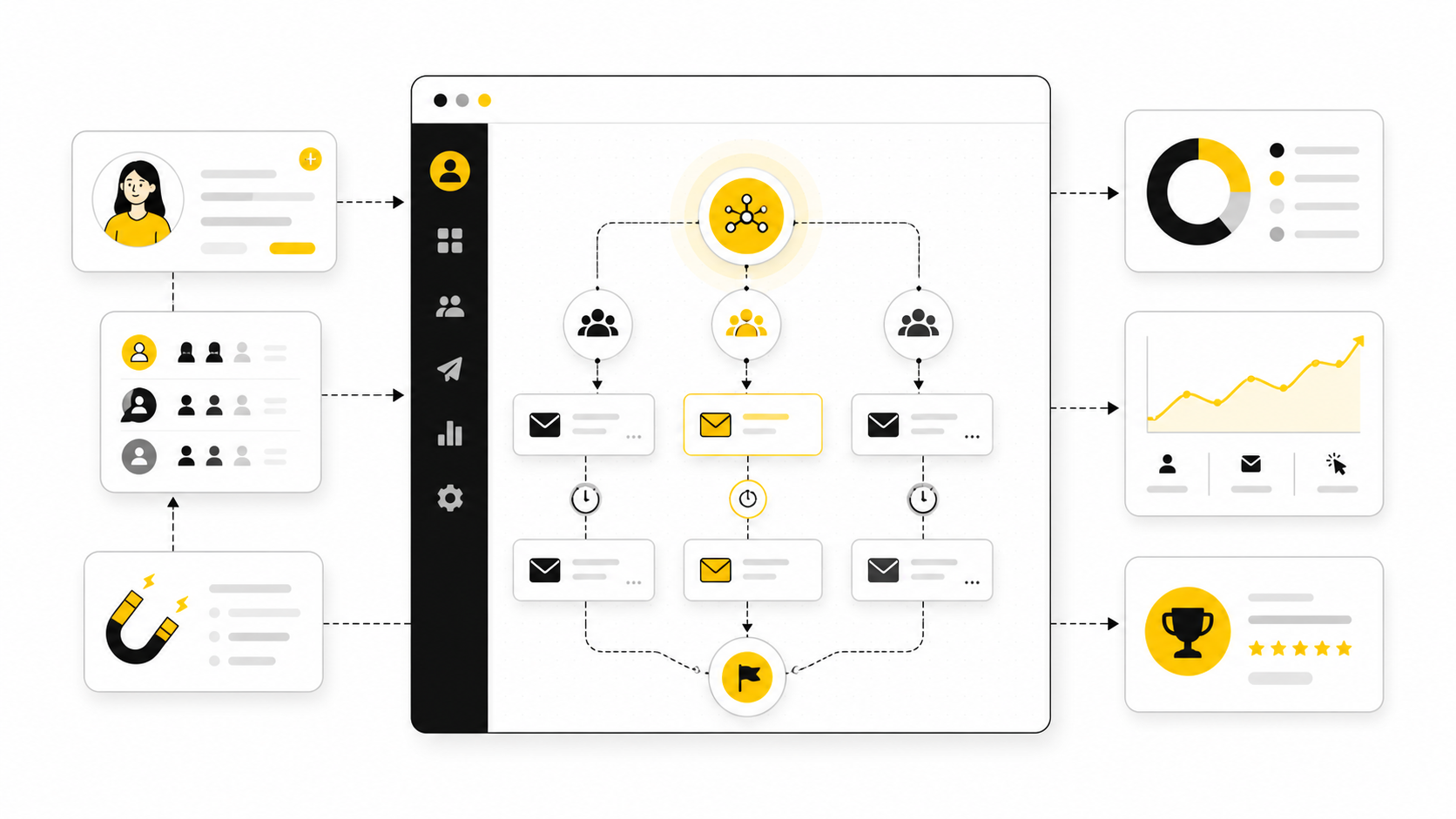
A drip campaign in HubSpot is not just a chain of emails. It is a structured customer journey that uses timing, behavior, segmentation, and automation rules to move a contact from one stage of intent to the next...
Affiliate disclosure: this article may include compensated links. Recommendations should still be evaluated against your use case, budget, and current provider terms.
Should you choose HubSpot?
HubSpot is worth considering when the use case, budget, and implementation effort match what you actually need to do next.
teams that want a practical tool decision without reading another generic feature list
Check HubSpotA drip campaign in HubSpot is not just a chain of emails. It is a structured customer journey that uses timing, behavior, segmentation, and automation rules to move a contact from one stage of intent to the next. When it is built well, it feels helpful. When it is built badly, it feels like a robot shouting into someone’s inbox.
That difference matters because most HubSpot drip campaigns fail for simple reasons. The audience is too broad. The emails are too generic. The workflow logic is too shallow. The team builds the sequence around what they want to say instead of what the contact needs to understand before taking the next step.
This guide breaks the topic into a six-part framework you can use to plan, build, optimize, and manage a professional drip campaign HubSpot setup. The goal is not to create more automation for the sake of it. The goal is to build a campaign that improves timing, increases relevance, and gives your sales or marketing team a cleaner system to work from.
What A HubSpot Drip Campaign Is And Why It Matters
A HubSpot drip campaign is an automated sequence of messages sent to contacts based on a defined trigger, schedule, or behavior. In practical terms, this usually means a contact fills out a form, downloads a resource, requests a demo, joins a list, visits a key page, or reaches a lifecycle stage that starts a workflow. HubSpot then sends emails, waits for specific periods, checks conditions, updates properties, creates tasks, or routes contacts based on how they engage.
The important word here is sequence. A single email can create attention, but a drip campaign creates progression. Each message should answer a question, remove friction, build trust, or make the next action feel obvious.
This is why a drip campaign HubSpot strategy should never start inside the email editor. It should start with the journey. Who is entering the campaign, what do they already know, what do they need next, and what action should they be ready to take by the end?
Why It Matters
HubSpot gives teams powerful automation tools, but power without structure creates messy workflows fast. You can trigger emails from forms, lists, lifecycle stages, page views, deal properties, and custom conditions. That flexibility is useful, but it also means one rushed campaign can become a confusing mix of overlapping messages, duplicate enrollments, poor exclusions, and unclear reporting.
A strong drip campaign keeps your follow-up consistent without making it feel impersonal. It helps leads get useful information at the right time, gives sales teams better context, and reduces the manual chasing that usually happens after someone enters the funnel. Done properly, it becomes part of your revenue system, not just another marketing asset.
The biggest benefit is timing. People rarely convert the first moment they hear about you. A well-built HubSpot drip campaign keeps the conversation moving while the contact is still evaluating, comparing, hesitating, or waiting for internal approval.
The Strategic Role Of Drip Campaigns In HubSpot
A drip campaign can support many different goals, but it should never try to support all of them at once. One campaign might nurture new leads after a content download. Another might educate trial users. Another might re-engage cold contacts. Another might help new customers adopt a product after onboarding.
The mistake is treating all of these as the same type of automation. They are not. A lead nurture campaign, a sales follow-up sequence, a reactivation campaign, and a customer onboarding campaign all require different logic, different messaging, and different success metrics.
In HubSpot, this distinction matters because your campaign structure affects everything downstream. It affects enrollment criteria, suppression lists, email timing, personalization, lead scoring, sales notifications, reporting, and when someone should exit the workflow.
Framework Overview
A professional drip campaign HubSpot framework has four layers. First, you define the audience and the reason they are entering the campaign. Second, you map the decision path they need to move through. Third, you build the automation logic that supports that path. Fourth, you measure whether the sequence is creating the behavior you wanted.
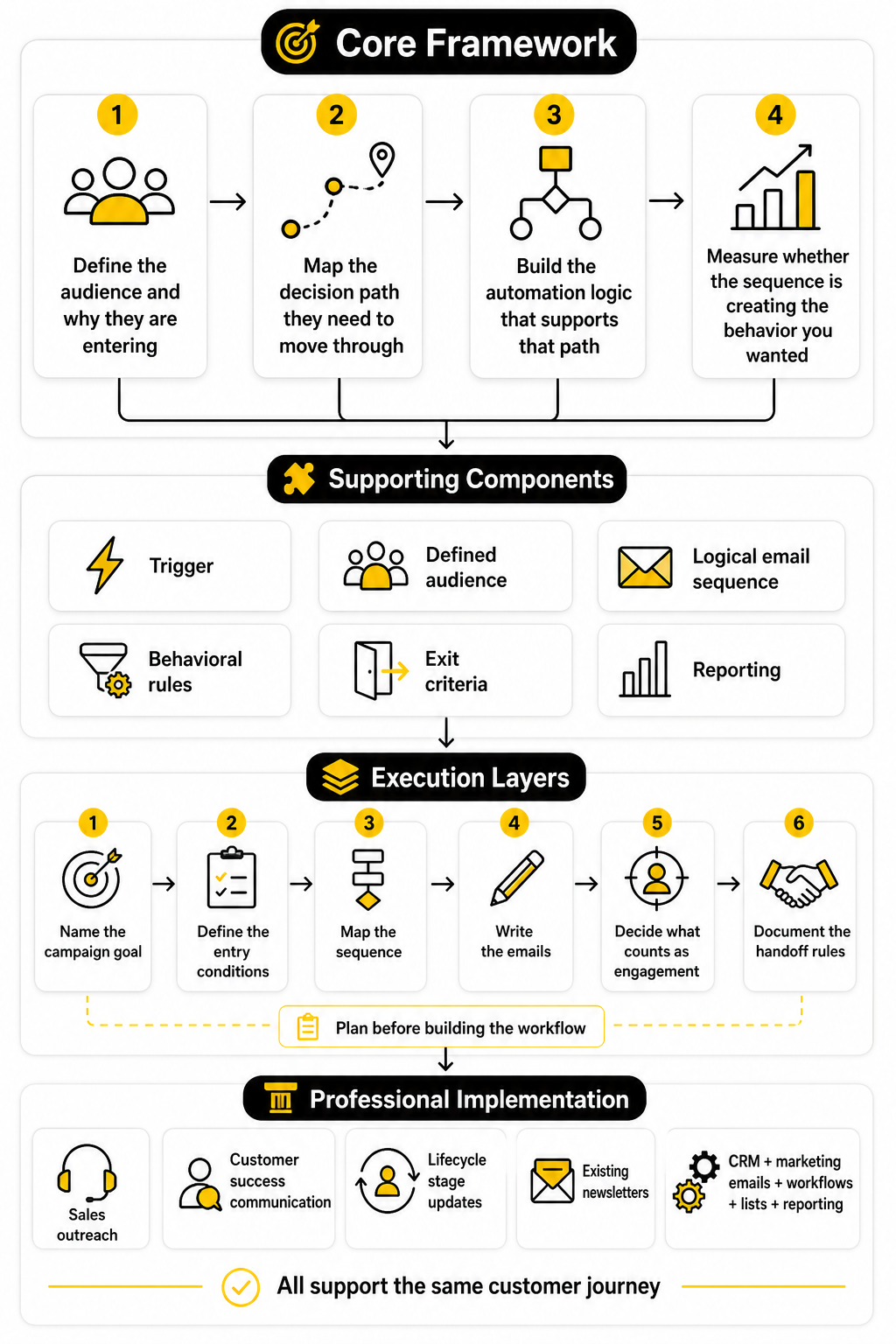
This framework keeps the campaign from becoming a random email series. Every email has a job. Every delay has a reason. Every branch exists because the contact’s behavior tells you something useful.
The simplest way to think about it is this: HubSpot handles the automation, but you are responsible for the thinking. The tool can send, wait, branch, score, and notify. It cannot decide what your audience needs to believe before they are ready to act.
Core Components Of A HubSpot Drip Campaign
Every strong HubSpot drip campaign includes a clear trigger, a defined audience, a logical email sequence, behavioral rules, exit criteria, and reporting. These components sound basic, but they are where most campaigns either become scalable or fall apart. If one piece is unclear, the whole workflow becomes harder to manage.
The trigger answers the question, “Why is this person entering now?” The audience definition answers, “Who should be included, and who should be excluded?” The email sequence answers, “What needs to be communicated, in what order?” The workflow rules answer, “How should HubSpot react when the contact engages or does not engage?”
Exit criteria are especially important. A contact should not keep receiving nurture emails after they book a meeting, become a customer, unsubscribe, or move into a sales-owned process. Without clean exits, even a good campaign can create a bad experience.
Professional Implementation Starts Before The Workflow
The best HubSpot drip campaigns are planned before they are built. That means naming the campaign goal, defining the entry conditions, mapping the sequence, writing the emails, deciding what counts as engagement, and documenting the handoff rules before anyone touches automation settings. This upfront work prevents the classic problem where a campaign technically functions but no one can explain what it is supposed to accomplish.
A professional implementation also respects the rest of the CRM. Your drip campaign should not conflict with sales outreach, customer success communication, lifecycle stage updates, or existing newsletters. HubSpot is most valuable when the CRM, marketing emails, workflows, lists, and reporting all support the same customer journey.
Part 2 continues with the actual framework: how to map the campaign from audience intent to workflow logic, so the automation feels structured instead of improvised.
The HubSpot Drip Campaign Framework
A good drip campaign HubSpot setup starts with one simple question: what should happen after this person shows intent? That sounds obvious, but it forces you to stop thinking in emails and start thinking in movement. The sequence is not the strategy. The sequence is only the delivery system for the strategy.
The framework is built around five decisions: audience, trigger, message path, automation logic, and exit point. If those five decisions are clear, the workflow becomes easier to build and easier to diagnose later. If they are vague, the campaign usually becomes a pile of delays, emails, and branches that no one wants to touch six months from now.
HubSpot’s workflow tools can handle enrollment triggers, timing rules, suppression lists, unenrollment settings, and workflow goals, which makes the platform flexible enough for simple nurturing or more advanced lifecycle automation. The danger is that flexibility can hide weak planning. Before you build anything, define the campaign like a system, not a newsletter series.
Start With The Campaign Objective
The objective should describe the business outcome, not just the activity. “Send five emails to new leads” is not an objective. “Move qualified guide-download leads toward a demo request” is much stronger because it tells you who the campaign is for, what stage they are in, and what action should happen next.
This also affects what you measure. If the campaign exists to drive demo requests, open rate is useful but secondary. Clicks, meeting bookings, lifecycle progression, sales replies, and workflow goal completion matter more because they show whether the automation is actually moving people forward.
HubSpot supports workflow goals for contact-based workflows, and contacts who meet the goal can be automatically unenrolled from the workflow. That matters because a drip campaign should stop once it has done its job. You can review HubSpot’s own explanation of this in its guide to workflow goals.
Define The Entry Trigger
The entry trigger is the moment that qualifies someone for the campaign. It might be a form submission, list membership, lifecycle stage change, deal stage update, page visit, email interaction, or property value. The trigger should be specific enough that every enrolled contact has a shared context.
For example, a contact who downloaded a beginner checklist should not enter the same drip as someone who viewed pricing three times. Those actions show different levels of intent. One person may need education, while the other may need proof, comparison, urgency, or a clean path to speak with sales.
HubSpot’s enrollment trigger settings are designed for this kind of control. You can enroll records when they meet specific criteria, and you can manage re-enrollment depending on whether someone should repeat the workflow later. For a drip campaign HubSpot workflow, that re-enrollment decision is critical because the same contact should not keep restarting a sequence unless there is a clear reason.
Segment Before You Write
Segmentation should happen before copywriting because the audience determines the message. If you write the emails first, you will usually create broad messaging that sounds acceptable to everyone and valuable to no one. A strong segment lets you write with more precision.
Useful segmentation can include lifecycle stage, lead source, product interest, company size, industry, geography, role, engagement level, or previous conversion behavior. The right criteria depend on the campaign goal. A SaaS onboarding drip might segment by plan type or product usage, while a B2B lead nurture drip might segment by content topic and sales readiness.
This is where many campaigns quietly lose performance. Teams often think personalization means adding a first name token. Real personalization is about sending the right message because the contact’s behavior, profile, or stage gives you a reason to send it.
Map The Message Path
The message path is the order of ideas the contact needs to understand. It is not just a calendar. It is the progression from current awareness to the next desired action.
A simple nurture path might look like this:
That structure works because each email earns the next one. The first email meets the reader where they are. The middle emails build confidence and reduce friction. The final email makes the next step feel natural instead of forced.
Build Around Behavior, Not Just Time
A basic drip campaign sends Email 1, waits two days, sends Email 2, waits three days, and continues until the sequence ends. That can work for simple education, but HubSpot becomes much more useful when the workflow responds to behavior. The campaign should treat an engaged contact differently from someone who has ignored every message.
Behavior-based logic can change the path when someone clicks a key link, visits a pricing page, books a meeting, replies to sales, becomes a customer, or stops engaging. This makes the campaign feel more relevant because contacts are not all pushed through the same rigid path. The automation adapts to what they actually do.
This is also where suppression and unenrollment rules become important. HubSpot lets you manage workflow settings that control when actions run, when records should be suppressed, and when contacts should leave the workflow. For professional campaigns, these rules are not optional cleanup. They are part of the customer experience.
Decide The Sales Handoff Rules
A drip campaign should not compete with sales. It should support sales by identifying when a contact becomes more ready for a direct conversation. That means you need handoff rules before the campaign goes live.
A handoff can be triggered by high-intent actions such as visiting the pricing page, clicking a demo link, submitting a contact form, reaching a lead score threshold, or matching a target account profile. When that happens, HubSpot can create a task, notify the owner, update a lifecycle stage, or move the contact into a sales-owned process. The point is to avoid letting warm intent sit inside an automated sequence with no human follow-up.
The handoff should also include an exit rule. Once sales takes over, the contact may need to leave the nurture campaign to avoid mixed messages. Nothing makes a brand feel less organized than a prospect receiving a generic nurture email right after they have started a serious sales conversation.
Set Exit Criteria Before Launch
Exit criteria define when the campaign should stop. This is one of the most overlooked parts of a drip campaign HubSpot workflow, and it is also one of the most important. Without exit criteria, contacts can keep receiving messages after the campaign is no longer relevant.
Common exit criteria include booking a meeting, becoming a customer, unsubscribing, reaching a workflow goal, joining a suppression list, changing lifecycle stage, or entering a more relevant campaign. These rules protect the user experience and keep your reporting cleaner. They also reduce the risk of contacts receiving duplicate or conflicting messages from different workflows.
A clean exit is a sign of a mature automation system. It shows that the campaign was built around the contact’s journey, not just the team’s desire to keep sending emails. In practice, this is what separates a professional HubSpot workflow from a sequence that was built in a hurry.
Choose Metrics That Match The Journey
Every drip campaign needs metrics, but not every metric deserves the same attention. Opens can help diagnose subject lines and deliverability, but they do not prove business impact. Clicks, conversions, goal completion, meeting bookings, sales acceptance, pipeline influence, and unsubscribe rate usually tell a more useful story.
The metrics should match the campaign’s role. A top-of-funnel education drip may focus on content engagement and return visits. A middle-of-funnel nurture campaign may focus on demo intent, comparison-page clicks, or lead score movement. A customer onboarding campaign may focus on activation milestones, product usage, or support reduction.
This is why the framework starts with the objective. If you know what the campaign is supposed to change, the reporting becomes much easier. You are not asking, “Did people interact with these emails?” You are asking, “Did this automation help the right people take the next step?”
Core Components Of A High-Performing HubSpot Drip Campaign
Once the strategy is clear, the next step is turning it into a campaign structure that can actually run inside HubSpot. This is where most teams either create a reliable automation system or build something that becomes painful to maintain. The difference comes down to how well the campaign components work together.
A strong drip campaign HubSpot setup is not only about writing good emails. It also needs clean data, clear rules, smart timing, useful segmentation, relevant content, and reporting that tells you what is working. Each component has a specific job, and the campaign only performs well when those jobs are defined before launch.
Think of this section as the campaign parts list. Before you build the workflow, you need to know what each part does, why it exists, and how it connects to the next part. That makes the actual implementation much easier.
The Contact Segment
The contact segment is the group of people who should receive the campaign. It sounds simple, but it controls everything that follows. A campaign for early-stage blog subscribers should not sound like a campaign for demo-ready prospects, even if both groups are interested in the same product category.
In HubSpot, the segment can be based on lists, properties, form submissions, lifecycle stages, page views, product interest, email engagement, or CRM activity. The best segment is specific enough to make the message feel relevant, but not so narrow that the campaign has no meaningful volume. That balance matters because a sequence needs enough focus to be useful and enough reach to be worth maintaining.
A practical segment definition should answer three questions. Who should enter? Who should be excluded? What must be true before the first email is sent? If those answers are not clear, the workflow will usually need messy fixes later.
The Enrollment Trigger
The enrollment trigger is the event or condition that starts the workflow. It should match a meaningful change in the contact’s relationship with your business. A form submission, content download, pricing-page visit, abandoned booking form, lifecycle stage update, or new deal association can all work, depending on the campaign goal.
The key is to avoid weak triggers. A broad trigger like “contact is on newsletter list” may be fine for a general broadcast, but it is usually too vague for a targeted drip campaign. A stronger trigger gives context, which lets the first email feel timely instead of random.
For a drip campaign HubSpot workflow, the trigger also affects re-enrollment. If someone downloads a new resource six months later, should they enter again? If they revisit a pricing page after talking to sales, should the campaign restart? These decisions should be made before activation, not after contacts begin looping through the wrong sequence.
The Campaign Promise
Every drip campaign needs a promise. This is the reason the contact should keep paying attention after the first email. Without a clear promise, the sequence becomes a set of disconnected messages that feel like generic follow-up.
The promise does not have to be dramatic. It can be as simple as helping the reader understand a problem, compare options, prepare for a purchase, set up a tool, or make a better decision. What matters is that every email delivers on the same direction.
For example, a campaign triggered by a guide download might promise practical education. A campaign triggered by a demo request might promise buying clarity. A campaign triggered by customer signup might promise faster implementation. Different intent, different promise, different sequence.
The Email Sequence
The email sequence is where the campaign becomes visible to the contact. Each email should have one main job, one clear angle, and one natural next step. If one email tries to educate, sell, compare, overcome objections, and push a meeting all at once, it usually becomes weaker.
A clean sequence usually moves from context to value to proof to action. The first email confirms why the contact is receiving the message. The next emails help them understand the problem or opportunity more clearly. The later emails reduce hesitation and point toward a relevant conversion.
The number of emails should follow the complexity of the decision. A simple resource follow-up may only need three emails. A considered B2B buying journey may need a longer nurture path with branching, sales alerts, and different content based on engagement.
The Timing Logic
Timing is not just the delay between emails. It is the rhythm of the campaign. If the timing is too aggressive, the sequence feels pushy. If it is too slow, the contact may forget why they entered the campaign in the first place.
For most campaigns, the first follow-up should happen quickly because the original action is still fresh. After that, the timing can slow down as the campaign shifts from confirmation to education, comparison, and decision support. The right cadence depends on buying urgency, sales cycle length, and the type of action that triggered enrollment.
HubSpot makes it easy to add delays, but that convenience can lead to lazy timing. Do not add a three-day wait because it feels normal. Add it because the contact needs time to consume the previous message, visit a page, compare options, or take the next step.
The Step-By-Step Execution Process
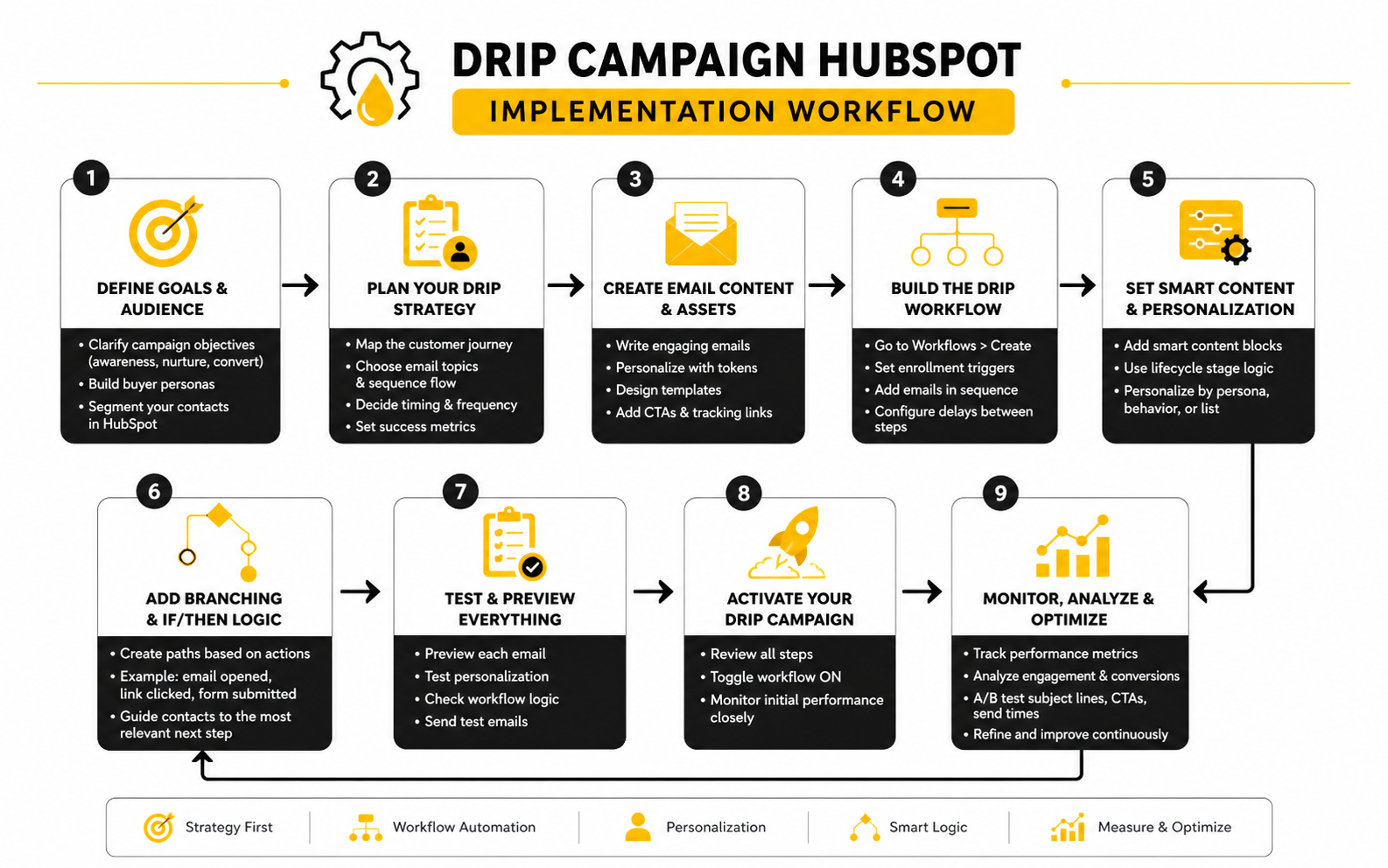
A practical implementation process keeps the campaign organized from the first planning session to the final workflow test. This does not need to be complicated, but it does need to be disciplined. The goal is to make sure the workflow logic, email copy, CRM data, and reporting all support the same outcome.
A reliable process looks like this:
This process gives you a simple quality-control system. If one step is missing, the campaign may still run, but it will be harder to trust. A professional drip campaign HubSpot build should be easy to explain, easy to audit, and easy to improve.
The Content Assets
A drip campaign does not have to rely only on emails. The emails are the delivery layer, but the content assets often do the heavy lifting. These assets can include guides, comparison pages, product pages, demo pages, calculators, case studies, checklists, webinars, onboarding resources, or booking pages.
The important thing is that each asset matches the contact’s stage. Early-stage contacts usually need education and clarity. Mid-stage contacts need frameworks, proof, and comparison. Late-stage contacts need confidence, pricing context, implementation details, and a clear next step.
If you are using extra landing pages, forms, or funnels outside HubSpot, make sure the tools connect cleanly with your CRM and tracking setup. A page builder such as Replo can be useful when the campaign needs a dedicated conversion page, while a broader funnel platform like ClickFunnels may fit teams that want a separate funnel experience around a specific offer. The tool matters less than the handoff: the contact’s behavior should still feed your campaign logic.
The Personalization Rules
Personalization should make the campaign more useful, not just more decorative. Adding a first name is fine, but it does not make a weak message relevant. Better personalization comes from using context the contact has already given you.
That context can include the resource they downloaded, their lifecycle stage, their product interest, their company type, or the pages they visited. A contact interested in implementation should not receive the same angle as someone still trying to understand the category. The more specific the context, the easier it is to write emails that feel helpful.
Be careful not to overdo it. Too much personalization can feel strange if the contact does not understand how you know something. Use personalization to create relevance, not to show off how much data is inside the CRM.
The Suppression Rules
Suppression rules protect contacts from receiving the wrong messages. They also protect your team from creating automation conflicts. A campaign can have strong copy and smart timing, but if it keeps emailing customers, active sales opportunities, unsubscribed contacts, or people in another more relevant workflow, it creates friction.
Common suppression groups include current customers, open opportunities, recently contacted sales leads, competitors, internal emails, unsubscribed contacts, and contacts already enrolled in a conflicting campaign. These rules should be defined before launch because they are much harder to clean up after the campaign has already created confusion.
This is not just a technical detail. It is part of the experience. The reader should feel like your communication matches their relationship with your business.
The Sales And CRM Actions
A drip campaign becomes more powerful when it updates the CRM instead of only sending emails. HubSpot can support actions like updating properties, creating tasks, notifying owners, changing lifecycle stages, adding list memberships, or moving contacts into another process. These actions help the campaign become part of the wider revenue system.
For example, a high-intent click can create a sales task. A demo booking can update lifecycle stage and remove the contact from nurture. A lack of engagement can move the contact into a slower re-engagement path instead of continuing the same sequence.
This is where marketing automation becomes operationally useful. The campaign does not just communicate with contacts. It helps the team know what to do next.
The Reporting Setup
Reporting should be planned before launch because you need to know what success looks like. If the campaign goal is vague, reporting becomes a collection of disconnected email metrics. If the goal is specific, the dashboard can show whether the campaign is doing its job.
A useful reporting setup should track email engagement, click behavior, conversion actions, workflow goal completion, unsubscribe rate, sales handoff activity, and lifecycle movement. You do not need to obsess over every number, but you do need enough visibility to understand where contacts drop off. The best reports help you make decisions, not just admire charts.
This also makes optimization easier later. If Email 1 gets engagement but Email 2 loses people, the issue may be the transition. If clicks are strong but conversions are weak, the landing page or offer may need work. If the campaign creates leads but sales ignores them, the handoff process needs attention.
Statistics And Data
Measurement is where a drip campaign Hubspot workflow stops being a nice idea and becomes a real business asset. Without data, you are guessing whether the sequence is helping people move forward. With the right data, you can see where attention drops, where intent increases, and where the campaign needs a sharper next step.
The mistake is treating benchmarks like a scoreboard. A 35% open rate can be good or bad depending on the audience, list quality, subject line, sender reputation, and campaign stage. A lower open rate from a cold re-engagement list might still be acceptable, while the same number from a high-intent demo follow-up sequence would be a warning sign.
Use benchmarks as context, not commandments. The real question is not, “Are we above average?” The better question is, “Is this campaign creating the behavior it was built to create?”
The Metrics That Actually Matter
A professional HubSpot drip campaign should track more than opens and clicks. Opens tell you whether the subject line, sender, and timing are earning attention. Clicks tell you whether the message created enough interest for the reader to take a small action.
But the deeper signals matter more. Demo bookings, form submissions, lifecycle stage movement, reply rate, meeting creation, sales task completion, opportunity creation, and workflow goal completion show whether the campaign is influencing the customer journey. These metrics connect the email sequence to the CRM, which is the whole point of building the campaign in HubSpot instead of sending isolated emails from a basic newsletter tool.
Unsubscribes and spam complaints also deserve attention. If they rise after a specific email, the issue may be targeting, timing, tone, or offer mismatch. Do not ignore negative signals just because the campaign is producing some conversions.
How To Read Open Rates
Open rate is useful, but it is not the final measure of success. It mainly tells you whether the contact recognized the sender, trusted the subject line, and found the timing relevant enough to open the email. It does not prove that the message persuaded anyone.
Industry benchmark data can help you sanity-check performance, but numbers vary widely by industry and list type. Recent email marketing benchmark data from Brevo shows that open and click performance changes significantly by sector, which is why a single universal benchmark can be misleading. A campaign sent to warm inbound leads should usually outperform a broad newsletter list because the contact has shown stronger intent.
If open rates are weak, start with the basics. Check whether the segment is relevant, the sender name is recognizable, the subject line is specific, and the first email arrives soon enough after the trigger. Do not rewrite the entire workflow before checking whether the campaign is simply reaching the wrong people at the wrong time.
How To Read Click Rates
Click rate shows whether the email created enough motivation for the reader to act. This is often more useful than open rate because it reflects message relevance, offer strength, and call-to-action clarity. If people open but do not click, the subject line may be doing its job while the email body is not.
For a drip campaign HubSpot sequence, click quality matters more than click quantity. A click to a pricing page, comparison page, demo page, onboarding checklist, or product activation step is more valuable than a casual click to a generic blog post. The metric should be interpreted based on where the click sends the contact and what that action means in the journey.
If click rates are low, look at the offer before blaming the design. The email may be too broad, the CTA may be buried, or the next step may feel too aggressive for the contact’s stage. A strong email usually gives the reader one obvious action, not five competing options.
How To Read Conversion Rates
Conversion rate tells you whether the campaign is producing the action it was designed to produce. That action might be booking a meeting, starting a trial, completing onboarding, submitting a form, requesting pricing, or moving into a sales-qualified stage. This is where your campaign either proves its value or exposes a gap.
A low conversion rate does not always mean the emails are bad. Sometimes the landing page is weak. Sometimes the offer is unclear. Sometimes the campaign is attracting the right clicks but sending people to a page that does not match the promise made in the email.
This is why you should measure the full path. Email open, email click, landing page view, form completion, CRM update, and sales follow-up should be connected. If one step breaks, the data should show you where the friction starts.
Build A Simple Analytics System
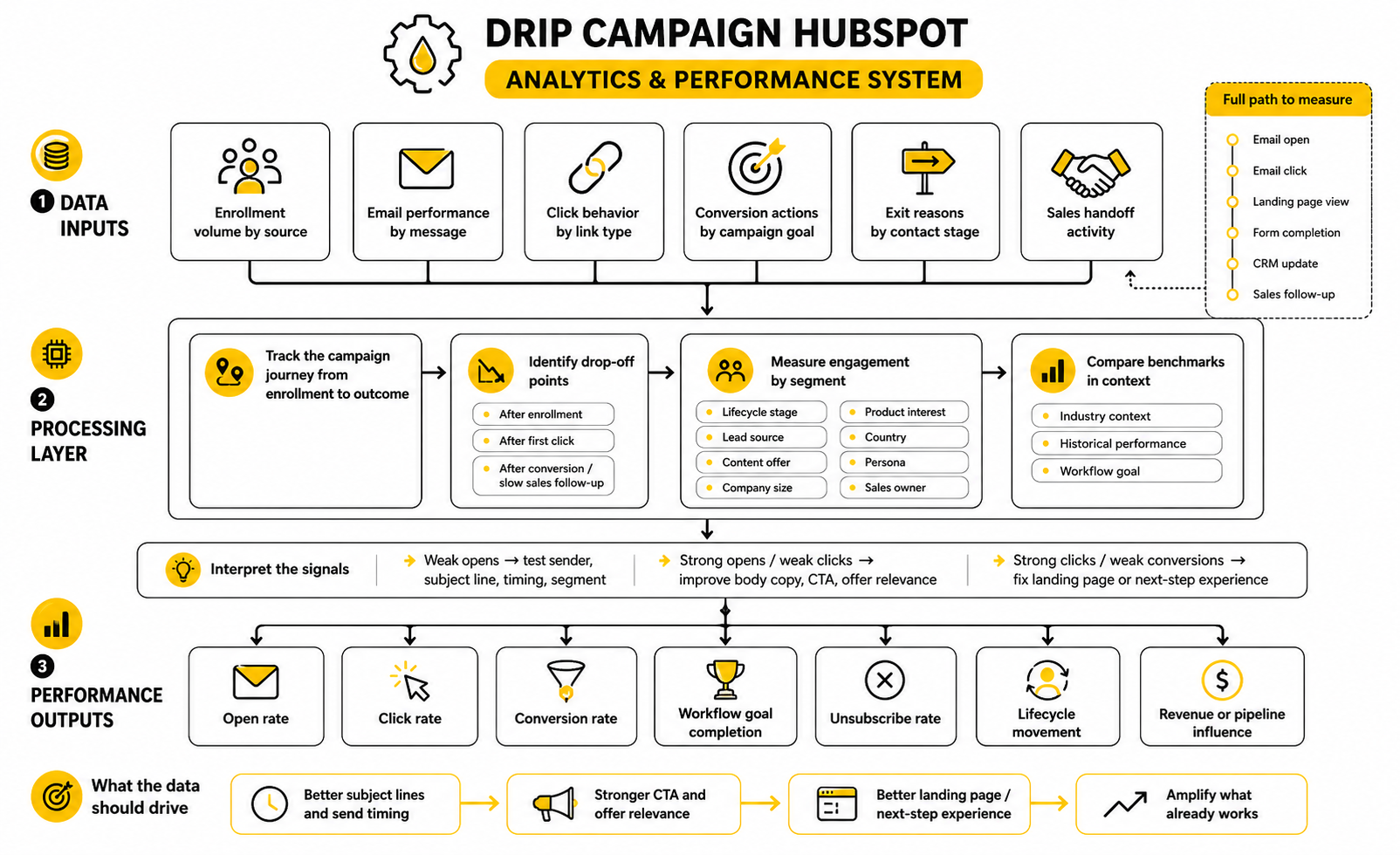
A clean analytics system should show the campaign journey from enrollment to outcome. You do not need a complicated dashboard to start. You need a reliable view of how many contacts enter, how many engage, how many take meaningful action, and how many should leave the workflow.
A practical measurement setup includes these layers:
This structure helps you avoid surface-level reporting. Instead of only seeing that Email 3 had a low click rate, you can ask whether the problem is the email, the segment, the offer, or the stage of the journey. That is the kind of reporting that leads to better decisions.
Watch The Drop-Off Points
Every drip campaign has friction points. Some contacts will never open. Some will open but never click. Some will click but never convert. Some will convert but never receive proper sales follow-up.
The job of analytics is to locate those points clearly. If the largest drop-off happens after enrollment, the trigger or first email may be weak. If the drop-off happens after the first click, the landing page or offer may not match the email. If conversions happen but sales activity is slow, the automation may need stronger task creation, owner notifications, or lifecycle updates.
Do not treat drop-off as failure by default. Drop-off is information. It shows you where the campaign needs tighter alignment between message, page, timing, and next step.
Measure Engagement By Segment
Average campaign performance can hide what is really happening. A drip campaign may look average overall while performing extremely well for one segment and poorly for another. That is why segment-level reporting is so important.
Break performance down by lifecycle stage, lead source, content offer, company size, product interest, country, persona, or sales owner when the data is available. You may find that one segment is ready for a direct booking CTA while another needs more education before converting. That insight is much more useful than simply saying the campaign needs a better subject line.
This is especially important when a HubSpot workflow has multiple enrollment paths. If contacts enter from different forms, pages, or lists, their intent may not be equal. Your analytics should help you see those differences instead of blending them into one misleading average.
Use Benchmarks Without Becoming Controlled By Them
Benchmarks are useful when they help you ask better questions. They are dangerous when they become the only standard for success. A campaign can beat email benchmarks and still fail commercially if it does not create pipeline, activation, retention, or the intended customer action.
For example, a nurture campaign with modest click rates may still be valuable if it consistently pushes qualified contacts toward sales conversations. On the other hand, a campaign with strong opens and clicks may be weak if those clicks come from curiosity instead of buying intent. The numbers need context.
The best way to use benchmarks is to compare three things at once: industry context, your historical performance, and the specific goal of the workflow. If your current drip campaign improves on your past campaigns and creates better CRM outcomes, that matters more than chasing a generic average.
Turn Data Into Action
Data only matters if it changes what you do next. If an email has low opens, test the subject line, sender, timing, or segment. If it has strong opens but weak clicks, improve the body copy, CTA, or offer relevance. If clicks are strong but conversions are weak, fix the landing page or next-step experience.
You should also look for positive signals. If one email drives the most qualified clicks, study why it works. The angle, CTA, timing, or asset may deserve to appear earlier in the sequence. Optimization is not only about repairing weak points; it is also about amplifying what already works.
A strong drip campaign HubSpot system becomes better over time because every round of data teaches you something. The first version should be clean and strategic. The next version should be sharper because the audience has shown you what they actually respond to.
Testing, Optimization, And Common Mistakes
A drip campaign HubSpot workflow should never be treated as finished the moment it goes live. Launch is only the first version. The real improvement happens after contacts move through the sequence and the data shows where the campaign is too slow, too broad, too aggressive, or too unclear.
This is where advanced teams separate themselves. They do not keep adding more emails just because performance is not where they want it. They inspect the journey, isolate the problem, and adjust the specific part of the system that is creating friction.
The goal is not constant tinkering. The goal is controlled improvement. A campaign should be stable enough to measure, but flexible enough to improve when the evidence is clear.
Test The Workflow Before Testing The Copy
Before you test subject lines, CTAs, or email angles, test whether the workflow itself behaves correctly. This means checking enrollment triggers, suppression rules, re-enrollment settings, branch logic, delays, internal notifications, property updates, and exit criteria. If the workflow logic is broken, copy tests will not give you clean answers.
HubSpot’s workflow settings let teams manage enrollment, re-enrollment, unenrollment, suppression lists, and timing rules, which makes testing especially important before real contacts enter the sequence. HubSpot also notes that records are only enrolled the first time they meet enrollment triggers unless re-enrollment is specifically configured in the workflow. That detail matters because many campaign problems come from contacts entering too often, not entering at all, or staying enrolled after the campaign is no longer relevant.
A clean pre-launch test should follow every major path a contact can take. Test the engaged path, the inactive path, the sales handoff path, the customer exclusion path, and the unsubscribe or suppression path. If the campaign has branches, make sure each branch creates the expected outcome instead of simply looking correct on the workflow canvas.
Avoid Over-Branching
Branching is powerful, but it can make a campaign fragile if every small behavior creates a new path. HubSpot supports if/then branches that route records based on specific conditions, which is useful for personalization, qualification, and sales handoff. The problem starts when the workflow becomes so detailed that no one can understand it without a full audit.
Over-branching usually comes from trying to solve strategy problems with automation logic. If the audience is too broad, the team adds branches. If the message is unclear, the team adds branches. If the offer does not match intent, the team adds branches.
Use branches when they change the next best action. Do not use them just to make the workflow look sophisticated. A simple campaign with three meaningful paths is usually better than a complicated campaign with twelve paths nobody maintains properly.
Protect Deliverability As You Scale
Scaling a drip campaign is not just about sending more emails. It is also about protecting sender reputation, authentication, engagement quality, unsubscribe behavior, and complaint rates. If deliverability weakens, even strong copy and strong offers lose impact because fewer people see the messages.
This became more important after mailbox providers tightened bulk sender requirements. Google and Yahoo began enforcing authentication and sender requirements for bulk senders in 2024, including SPF, DKIM, DMARC alignment, low spam complaint rates, and easier unsubscribe experiences. Microsoft also moved toward stricter sender requirements in 2025, which means deliverability is now a core operating issue, not a technical afterthought.
For a drip campaign HubSpot setup, this means you should avoid dumping old, cold, unverified contacts into automated sequences. Start with engaged segments, maintain clean suppression rules, remove contacts who consistently ignore messages, and make sure your sending domain is properly authenticated. Growth is not useful if it damages the inbox placement your entire campaign depends on.
Watch For Automation Collisions
Automation collisions happen when multiple workflows act on the same contact in conflicting ways. One campaign may be nurturing a lead while another pushes a sales offer. One workflow may update lifecycle stage while another reverts it. One sequence may invite someone to book a demo right after they already became a customer.
These collisions are easy to miss because each workflow may look reasonable by itself. The problem appears only when you look at the contact experience across the whole CRM. That is why scaling HubSpot automation requires workflow governance, not just individual campaign optimization.
A practical way to prevent collisions is to document campaign ownership, active workflow purpose, enrollment criteria, suppression lists, and exit rules. You do not need a huge operating manual. You need enough structure that a marketer, sales manager, or RevOps person can understand what each workflow is allowed to do.
Do Not Confuse Lead Nurturing With Sales Pressure
A nurture campaign should help someone become more ready. It should not pretend every contact is ready now. This is a major strategic tradeoff because aggressive CTAs can create short-term meetings while hurting long-term trust.
There is a place for direct sales CTAs, especially when the trigger shows strong intent. A pricing-page visitor, demo-form abandoner, or repeat product-page visitor may deserve a faster sales path. A top-of-funnel guide downloader usually needs more context before being pushed into a meeting.
The campaign should match the contact’s intent. If the contact is learning, teach. If they are comparing, clarify. If they are deciding, make the next step easy. That is how a drip campaign feels relevant instead of pushy.
Maintain Data Hygiene
A drip campaign depends on CRM data, so bad data creates bad automation. Incorrect lifecycle stages, missing owners, outdated lists, duplicate records, broken properties, and inconsistent lead sources can all send contacts down the wrong path. Once that happens, the issue is no longer just technical. It becomes a messaging problem.
Data hygiene should be part of campaign maintenance. Review the fields that control enrollment, branching, personalization, and reporting. If a property is unreliable, do not build mission-critical logic around it until the data quality improves.
This is especially important for teams that import leads from multiple sources. Paid ads, forms, webinars, third-party tools, sales imports, and partner lists can all create different data standards. If those records enter the same workflow without normalization, campaign performance will look confusing because the inputs were inconsistent from the start.
Know When To Split A Campaign
Not every campaign should become more complex. Sometimes the better move is to split one overloaded workflow into two or three cleaner campaigns. This usually happens when the audience, offer, or intent level becomes too different to handle well inside one sequence.
A split makes sense when contacts need different promises, different timing, different CTAs, or different success metrics. For example, a post-webinar follow-up and a cold reactivation campaign should not live inside the same logic just because both are email sequences. They serve different moments in the journey.
The tradeoff is maintenance. More campaigns mean more assets to manage, more reporting views, and more governance. But clean separation is often better than one giant workflow that technically handles everything and practically explains nothing.
Optimize One Variable At A Time
Optimization should be disciplined. If you change the subject line, offer, CTA, timing, segment, and landing page at the same time, you may improve performance without knowing why. That makes the next decision harder.
Start with the biggest constraint. If opens are weak, test sender, subject line, timing, or segment. If clicks are weak, test email angle, CTA clarity, or content asset. If conversions are weak, test the landing page, form, offer, or sales handoff.
This does not mean you need to move slowly forever. It means you need clean learning. A drip campaign HubSpot system becomes valuable when every optimization teaches you something you can apply to the next campaign.
Build For Maintainability
The most underrated part of advanced HubSpot automation is maintainability. A workflow can be clever and still be a liability if only one person understands it. That is risky because campaigns live inside changing teams, changing offers, changing lifecycle rules, and changing CRM structures.
Use clear workflow names, simple internal descriptions, consistent property naming, and documented assumptions. Add notes where logic may not be obvious. Keep campaign assets organized so future updates do not require detective work.
Maintainability is not boring. It is what lets you scale without breaking the customer experience. The best campaign is not the most complicated one; it is the one that keeps working when your list grows, your team changes, and your funnel becomes more complex.
Tools, Examples, And Final Recommendations
At this stage, a drip campaign HubSpot system should feel less like an email sequence and more like a controlled customer journey. The campaign has a clear entry point, relevant segmentation, useful emails, behavior-based logic, exit rules, reporting, and maintenance standards. That is the difference between automation that simply sends messages and automation that actually supports growth.
The final layer is the ecosystem around the campaign. HubSpot may be the CRM and automation center, but your campaign may also rely on landing pages, booking tools, forms, chat, sales enablement, analytics, and content production. The cleaner those tools connect, the easier it becomes to manage the full journey from first touch to qualified action.
Do not build a huge stack just because tools exist. Start with the campaign goal, then choose the tools that remove friction from that goal. The right system should make the contact journey smoother and make your team’s work easier to manage.
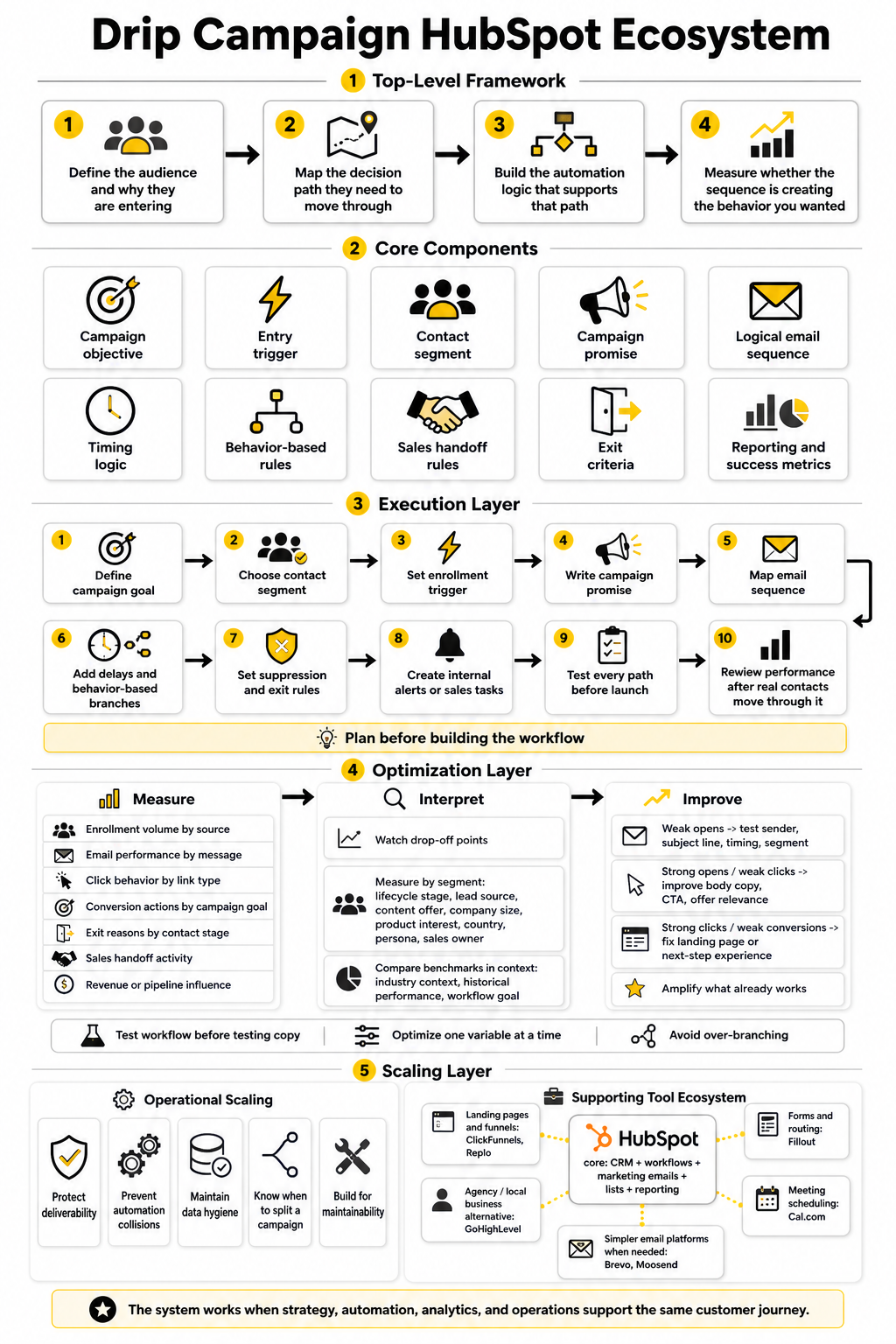
Choosing The Right Supporting Tools
HubSpot can handle the core workflow, email automation, CRM updates, and reporting, but some campaigns need extra tools around the edges. A dedicated landing page builder can help when the campaign needs a tighter conversion experience than a standard site page. A booking tool can reduce friction when the goal is a sales call or consultation.
For landing pages and funnels, a tool like ClickFunnels can work when you want a focused offer path outside the main website. If the campaign needs ecommerce-style page control, Replo can support more flexible landing page experiences. For teams that want an all-in-one CRM and automation alternative around agencies or local business funnels, GoHighLevel may be worth comparing against a HubSpot-based setup.
For forms, routing, and intake, Fillout can be useful when you need cleaner forms that pass structured data into your follow-up process. For meeting scheduling, Cal.com can help reduce booking friction. The important thing is not the tool name; it is whether the tool sends clean signals back into your CRM or campaign logic.
When HubSpot Is Enough
HubSpot is enough when your campaign depends mainly on CRM properties, lists, email automation, lifecycle stages, sales tasks, and standard reporting. For many B2B teams, that covers the majority of lead nurturing, demo follow-up, re-engagement, and customer onboarding campaigns. Keeping the system inside HubSpot can also make governance easier because the team is not chasing data across too many disconnected tools.
This is especially true when sales and marketing already work inside the same HubSpot portal. If the emails, contact records, deal activity, task ownership, and reporting all live together, the handoff becomes cleaner. The campaign can update the CRM in real time instead of relying on manual exports or delayed integrations.
The tradeoff is flexibility. If your campaign needs highly customized landing pages, advanced funnel flows, external checkout behavior, or complex product events, HubSpot may need support from other tools. That is fine, but the CRM should still remain the source of truth for contact status and campaign decisions.
When To Use A Simpler Email Platform
Not every team needs a full HubSpot drip campaign. If the goal is a basic newsletter, a simple educational sequence, or a small list nurture without sales handoff, a lighter email tool can be enough. In that case, forcing everything into a complex CRM workflow may create more overhead than value.
A platform like Brevo can make sense for teams that need email marketing and automation without the full HubSpot operating model. Moosend can also fit straightforward email automation needs where the CRM layer is less central. The decision should come down to complexity, not hype.
If sales follow-up, lifecycle tracking, deal creation, and attribution matter, HubSpot becomes more valuable. If the campaign is mostly about sending a clean sequence to a simple list, a leaner platform may be more practical. Choose the system based on the job it needs to do.
Final Recommendations Before You Build
Before building another drip campaign HubSpot workflow, write down the campaign goal in one sentence. Then define the exact audience, trigger, sequence promise, primary CTA, exit criteria, and success metric. If you cannot explain those pieces clearly, the campaign is not ready for automation yet.
Keep the first version focused. A smaller campaign with clean logic will usually outperform a large campaign with unclear paths. You can always add branches, extra emails, and deeper segmentation once the first version proves where the real opportunities are.
Most importantly, remember that automation does not fix weak strategy. It amplifies whatever you put into it. If the audience, message, offer, and timing are strong, HubSpot can help you scale that experience. If they are weak, HubSpot will simply help you send weak communication faster.
What is a drip campaign in HubSpot?
A drip campaign in HubSpot is an automated sequence of emails and workflow actions that starts when a contact meets specific criteria. That criteria might be a form submission, list membership, lifecycle stage change, page visit, or other CRM-based trigger. The goal is to guide the contact toward a specific next step with relevant messages over time.
How is a HubSpot drip campaign different from a regular email campaign?
A regular email campaign is usually a one-time send to a selected audience. A HubSpot drip campaign runs automatically after a trigger and can respond to contact behavior, CRM updates, and engagement signals. That makes it better for lead nurturing, onboarding, re-engagement, and sales follow-up where timing and context matter.
How many emails should a HubSpot drip campaign include?
There is no perfect number. A simple follow-up campaign may only need three emails, while a longer B2B nurture campaign may need six to ten messages across a longer buying cycle. The right length depends on the contact’s intent, the complexity of the decision, and the action you want them to take.
What is the best trigger for a drip campaign HubSpot workflow?
The best trigger is a meaningful action that reveals intent. A form submission, demo request, pricing-page visit, content download, webinar registration, or lifecycle stage change can all work well. Weak triggers create weak campaigns because the message has less context.
Should I use HubSpot lists or workflow triggers for drip campaigns?
Use lists when you need to group contacts based on shared criteria. Use workflow triggers when you want automation to begin after a specific event or condition. In many campaigns, you will use both because lists help define the audience while workflow triggers control when the campaign starts.
What metrics should I track in a HubSpot drip campaign?
Track email opens, clicks, conversion actions, workflow goal completion, unsubscribe rate, sales handoffs, lifecycle movement, and pipeline influence when available. Opens and clicks are useful, but they do not tell the full story. The best metric is the one connected to the campaign’s actual goal.
How do I stop contacts from receiving the wrong drip campaign?
Use suppression lists, unenrollment criteria, lifecycle stage rules, and workflow goals. Exclude customers, active opportunities, unsubscribed contacts, competitors, internal contacts, and people already enrolled in conflicting campaigns. This protects the contact experience and keeps your reporting cleaner.
Can I run A/B tests inside HubSpot drip campaigns?
Yes, HubSpot supports A/B testing for marketing emails, including automated emails used in workflows. The important part is to test one meaningful variable at a time, such as subject line, CTA, offer angle, or email structure. If you change too many things at once, you may improve performance without knowing what caused the improvement.
How often should I optimize a drip campaign?
Review early performance after enough contacts have completed the workflow, then optimize based on the biggest friction point. Do not make changes every day just because one metric moves. Let the campaign collect enough data to show patterns, then adjust the segment, message, offer, timing, or handoff rules with intention.
What is the biggest mistake in HubSpot drip campaigns?
The biggest mistake is building the workflow before defining the strategy. Teams often jump into automation, add emails, create delays, and then wonder why the campaign feels generic. The campaign should start with audience intent, not with the email editor.
Can HubSpot drip campaigns be used for customers, not just leads?
Yes, and they often should be. Customer onboarding, product education, renewal reminders, upsell education, event follow-up, and adoption campaigns can all work well inside HubSpot. The key is to separate customer communication from lead nurturing so the message matches the relationship.
When should a contact leave a drip campaign?
A contact should leave when the campaign has achieved its goal or is no longer relevant. That might happen when they book a meeting, become a customer, unsubscribe, move to a sales-owned stage, enter a better-fit workflow, or meet a defined workflow goal. Exit rules are what keep automation from becoming annoying.
Do I need a landing page for every drip campaign?
No, but many campaigns benefit from one focused next step. If the campaign points to a demo, guide, checklist, pricing request, webinar, or consultation, a dedicated landing page can reduce distraction. The page should match the promise made in the email, otherwise clicks will not turn into meaningful conversions.
Is HubSpot better than GoHighLevel for drip campaigns?
HubSpot is usually stronger when the campaign needs CRM depth, lifecycle tracking, sales alignment, reporting, and complex marketing operations. GoHighLevel can be attractive for agencies, local business funnels, and teams that want an all-in-one sales and marketing platform with a different operating model. The better choice depends on your business model, team workflow, and how much CRM structure you need.
What should I do before launching my first HubSpot drip campaign?
Define the goal, audience, trigger, message path, CTA, exit criteria, suppression rules, and success metric before you build anything. Then test every workflow path before real contacts enter. A clean first launch is much easier to improve than a messy campaign that needs to be untangled later.
Build a stronger local presence with BAAM AI
Turn your website, Google profile, social channels, and AI visibility into one growth engine
Most businesses do not need more random marketing activity. They need a consistent presence system that helps the right people find them, trust them, and take action. BAAM AI brings strategy, local SEO, website updates, Google Maps visibility, social content, AI-search readiness, media production, and reporting into one practical monthly engine.
If you want your marketing to keep working after the campaign ends, start with a free BAAM AI presence audit. See how your business shows up today and where the fastest visibility wins are at BAAM AI.