
BAAM AI Blog
Cold Email Marketing Tools: The Practical Guide To Choosing The Right Stack
Cold email is not dead. Lazy cold email is dead, and bad tooling makes it die faster.
Cold email is not dead. Lazy cold email is dead, and bad tooling makes it die faster.
The market for cold email marketing tools has changed a lot because inbox providers are stricter, buyers are more skeptical, and AI has made generic outreach easier to produce at scale. Gmail now requires senders to authenticate email with SPF or DKIM, while bulk senders need SPF, DKIM, and DMARC, plus easier unsubscribe handling and low spam complaints through its email sender guidelines. That means the tool you choose is no longer just a convenience decision. It directly affects whether your messages land, get read, and create real pipeline.
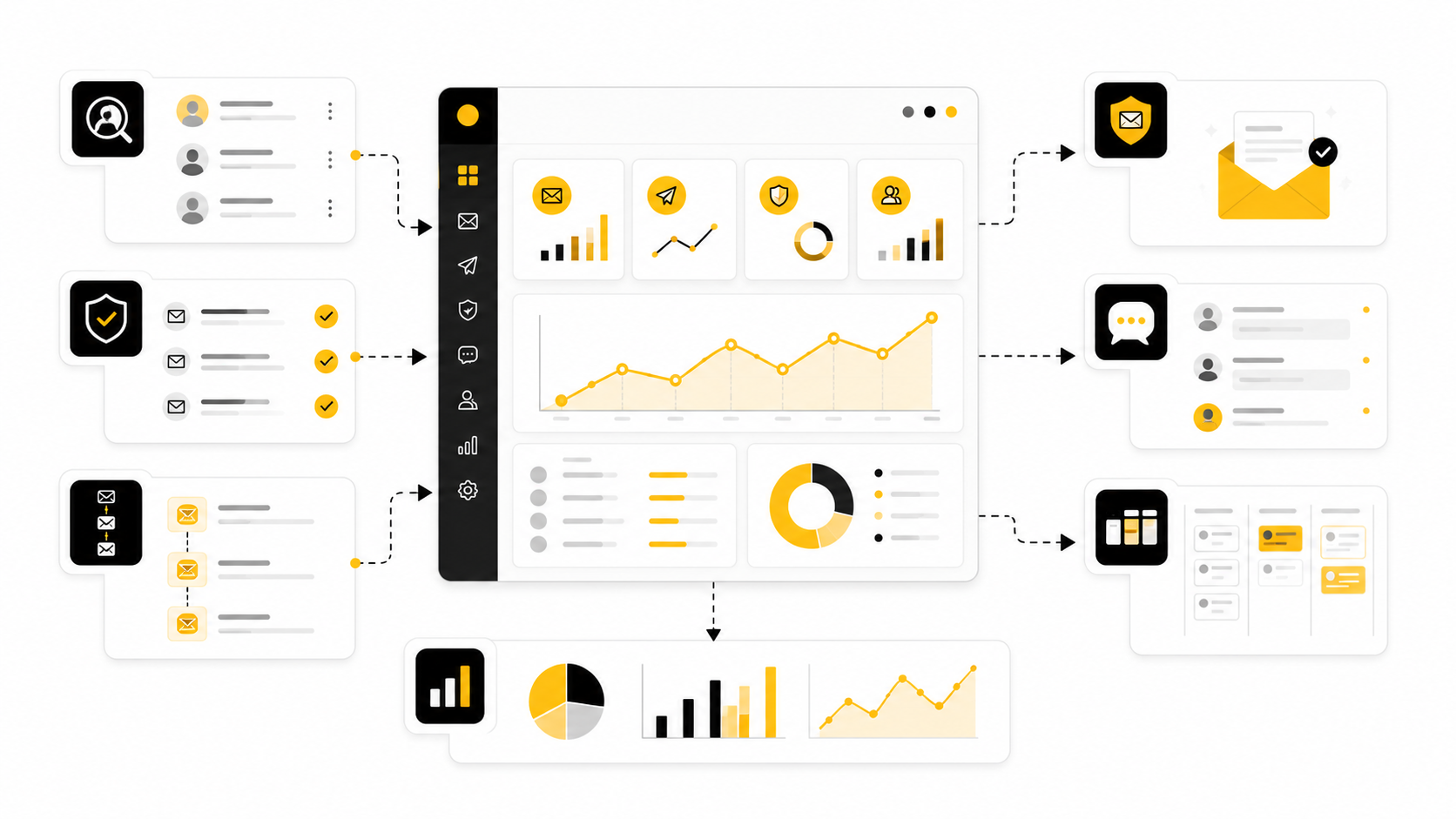
The right tool helps you build targeted lists, verify addresses, personalize emails, manage follow-ups, protect sender reputation, and measure replies without turning your outreach into spam. The wrong tool helps you send more emails faster, which sounds attractive until your domain reputation drops and your replies disappear. This guide is built to help you choose cold email marketing tools like an operator, not like someone shopping from a feature checklist.
Why Cold Email Marketing Tools Matter Now
Cold email used to be mostly about volume, copywriting, and follow-up timing. Those things still matter, but they are no longer enough. Today, outreach performance depends on a chain of technical and strategic decisions: data quality, domain setup, mailbox health, segmentation, personalization, sending behavior, reply tracking, CRM hygiene, and compliance.
That is why cold email marketing tools have become a stack rather than a single app. A founder might only need a lightweight sender, a verifier, and a CRM. An agency or sales team might need multiple inboxes, deliverability monitoring, lead enrichment, AI-assisted personalization, shared inboxes, task routing, and reporting. Bigger teams often need sales engagement software that connects email with calls, LinkedIn touches, CRM updates, and revenue attribution.
The pressure is coming from both sides. Buyers ignore generic messages because their inboxes are flooded, while mailbox providers filter aggressively because unwanted email is a real security and user-experience problem. Google’s sender requirements make authentication and complaint control unavoidable, and market benchmarks from sources like Validity’s 2025 Email Deliverability Benchmark Report show why inbox placement has become a board-level issue for serious marketing and sales teams.
The Cold Email Tool Framework
A cold email tool should not be judged by how many emails it can send. It should be judged by how safely and intelligently it can help you start relevant conversations with the right people. That is a different standard, and it changes the buying decision completely.
The simplest way to think about the framework is this: cold email performance comes from fit, trust, relevance, timing, and follow-through. Fit means you are contacting people who plausibly need what you offer. Trust means the email infrastructure and sender identity look legitimate. Relevance means the message connects to something specific about the recipient. Timing means your campaign reaches them when the problem is active. Follow-through means replies, objections, meetings, and CRM updates do not get lost.
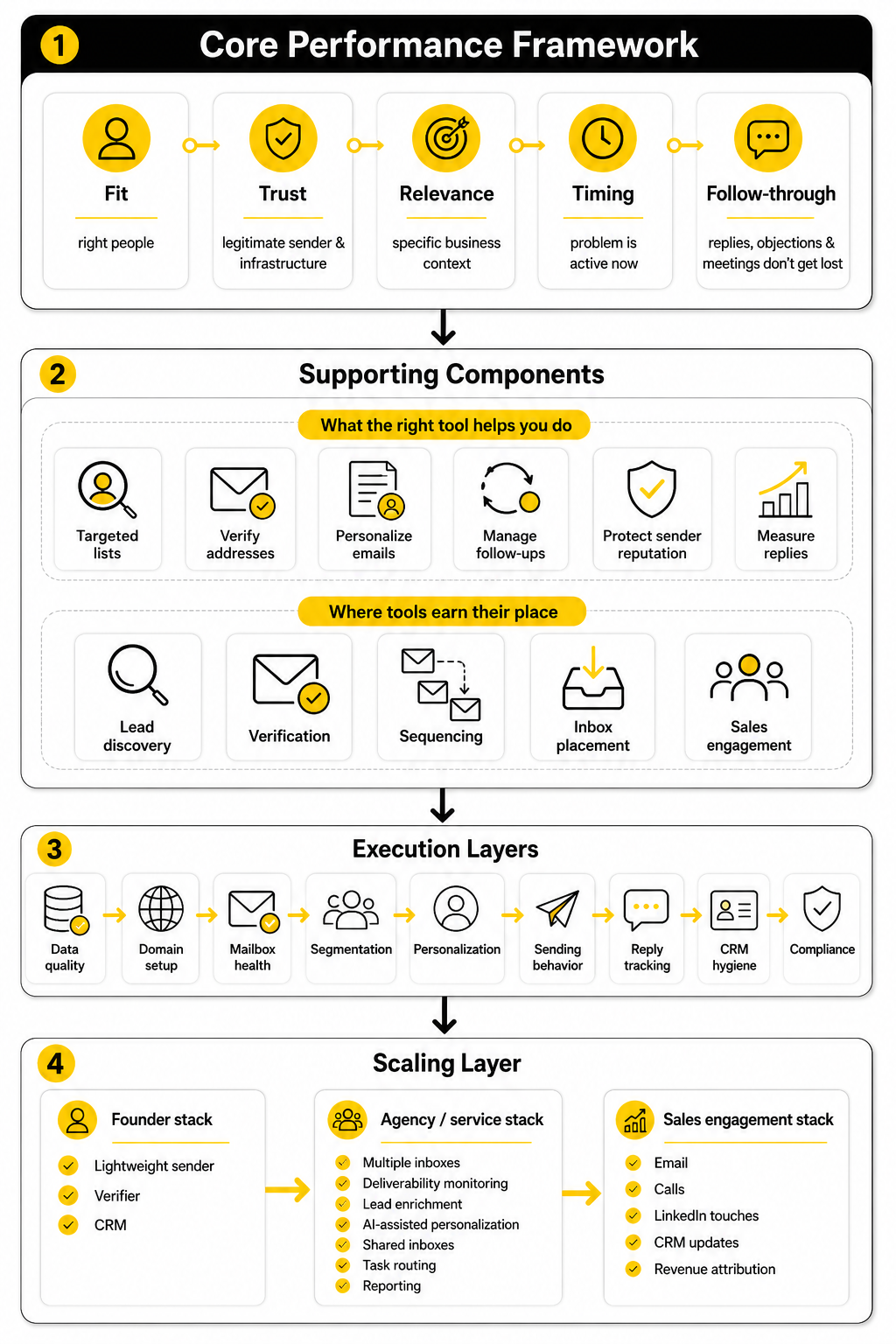
This is where tools earn their place. Some tools are built for lead discovery, some for verification, some for sequencing, some for inbox placement, and some for full sales engagement. A platform like GoHighLevel can make sense when cold email is part of a broader agency or client acquisition system with funnels, CRM, automation, and follow-up workflows. A platform like Brevo fits better when email marketing, transactional messaging, and customer communication are central to the business. The right answer depends on the job, not on which tool has the loudest landing page.
How The Rest Of This Guide Will Help You Decide
The goal is not to crown one universal winner. That would be lazy because cold email marketing tools serve different users, budgets, risks, and workflows. A solo consultant, a SaaS founder, a lead generation agency, and a 30-person SDR team should not buy the same stack just because a comparison article says a platform is “best.”
Instead, the rest of this guide will help you map tools to the way you actually sell. We will separate must-have features from nice-to-have features, show where deliverability fits, explain how verification and enrichment affect campaign quality, and cover how to build a workflow that does not collapse once replies start coming in. We will also look at where all-in-one platforms make sense and where a specialized tool stack gives you more control.
By the end, you should be able to look at any cold email platform and quickly answer the practical questions that matter. Can it protect your domains? Can it support real personalization without slowing your team down? Can it integrate with your CRM and calendar? Can it help you learn from replies instead of just reporting vanity metrics? Those are the questions that separate a tool that sends emails from a system that creates pipeline.
Core Components Of A Strong Cold Email Stack
A strong cold email stack is not built around one shiny feature. It is built around a sequence of jobs that need to happen in the right order. When those jobs are handled properly, cold email marketing tools become a system for finding relevant people, reaching them safely, and turning replies into sales conversations.
The mistake is buying a sender first and figuring out the rest later. That usually leads to messy lists, weak personalization, poor mailbox setup, and campaigns that look active but produce very little. A better approach is to build the stack from the ground up: data, verification, infrastructure, messaging, sequencing, reply handling, and CRM follow-through.
Lead Sourcing And List Building
Lead sourcing is where campaign quality starts. If the list is wrong, the best subject line in the world will not save the campaign. Cold email marketing tools can help you find companies, roles, industries, technologies, funding events, hiring signals, and other buying triggers, but the tool should support your targeting logic instead of replacing it.
A useful list is more than a pile of email addresses. It should show why each person is worth contacting, what account they belong to, what problem might be relevant, and what angle makes sense for the first message. This is where teams often separate account research from contact discovery because the company-level signal matters just as much as the individual email address.
The practical standard is simple. Before a contact enters a campaign, you should know who they are, why they fit, and what makes the timing plausible. If your tool cannot help you keep that context attached to the lead, you will end up sending vague emails that feel automated even when they include a first name and company name.
Email Verification And Data Hygiene
Email verification is not optional anymore. Bad addresses create bounces, bounces hurt sender reputation, and damaged reputation reduces inbox placement. Once your domain starts looking careless to mailbox providers, every campaign becomes harder.
Most teams should verify addresses before sending and clean older lists before reusing them. A healthy cold outreach process also removes role-based inboxes when they do not fit the campaign, suppresses unsubscribed contacts, and avoids repeatedly contacting people who never engage. That sounds basic, but basic discipline is exactly what protects your sending system.
This is also where you need to be honest about list sources. Scraped or outdated databases may look cheap at the start, but they can become expensive when they trigger high bounce rates or spam complaints. A smaller clean list will usually beat a larger questionable one because deliverability is a compounding asset.
Sending Infrastructure And Domain Protection
Your sending infrastructure is the part of the stack most beginners underestimate. It includes domains, inboxes, authentication, sending limits, warm-up behavior, tracking setup, unsubscribe handling, and reputation monitoring. If this layer is weak, your campaign can fail before the recipient ever sees the email.
Modern outreach needs properly configured SPF, DKIM, and DMARC because mailbox providers use authentication to decide whether a sender looks legitimate. Gmail also expects senders to keep spam rates low, and its sender guidance says spam rates should stay below 0.10% and avoid reaching 0.30% or higher through Google Postmaster Tools standards. That is a tiny margin for error, especially if your list quality or messaging is poor.
Do not treat technical setup as a one-time checkbox. Your tool should help you monitor sending health, pause risky campaigns, manage inbox rotation carefully, and avoid sudden volume spikes. Cold email is a reputation game, and reputation is easier to protect than repair.
Sequencing And Follow-Up Logic
The sequence builder is the part most people think of first when they compare cold email marketing tools. It controls when emails go out, how many follow-ups are sent, what happens after a reply, and how contacts move between steps. This matters because timing and restraint are just as important as persistence.
A good sequence does not hammer the same prospect with endless “just bumping this” messages. It gives the recipient a few thoughtful chances to respond, changes the angle when appropriate, and stops automatically when someone replies or opts out. The tool should make that easy because manual follow-up logic breaks quickly once volume increases.
The best follow-up systems also support segmentation. A CEO, revenue leader, technical buyer, and agency owner should not all receive the same sequence just because they are in the same spreadsheet. The more specific the audience, the more useful the follow-up can become.
Personalization And Relevance
Personalization is not the same as inserting a custom first line. Real personalization changes the reason for the email. It connects your offer to a business context the recipient might actually care about.
Cold email marketing tools increasingly include AI writing features, enrichment data, and dynamic variables, but the output still needs human judgment. AI can help draft, summarize, classify, and adapt messages, but it can also produce bland compliments and fake-sounding relevance at scale. That is dangerous because buyers can smell lazy automation immediately.
A practical personalization system should answer three questions before the email is sent. Why this company? Why this person? Why now? If the message cannot answer those questions clearly, the campaign is probably relying on volume instead of relevance.
Reply Management And Pipeline Handoff
Replies are where cold email becomes sales work. This is also where many campaigns fall apart. Teams obsess over sending, then lose opportunities because replies sit in inboxes, positive responses are not routed quickly, objections are not tagged, and follow-up tasks are not created.
Your tool should make reply handling clean. Positive replies should move into a CRM or pipeline, questions should trigger a response workflow, out-of-office replies should be handled intelligently, and negative replies should be suppressed. The goal is not just to generate responses. The goal is to convert the right responses into booked conversations and revenue.
This is where platforms with CRM and automation depth can be useful. For example, GoHighLevel can fit agencies and service businesses that want cold outreach connected to pipelines, calendars, automations, and client follow-up in one operating system. If your sales process already depends on forms, bookings, reminders, nurturing, and pipeline stages, connecting outreach to the rest of the customer journey becomes a real advantage.
Reporting And Campaign Learning
Reporting should help you make better decisions, not just admire activity. Opens are less reliable than they used to be because privacy features and image loading behavior can distort tracking. Replies, positive replies, meetings booked, opportunities created, and revenue influenced are much more useful.
A cold email tool should show performance by audience, message angle, sender inbox, domain, sequence step, and campaign. Without that breakdown, you cannot tell whether the issue is the list, the offer, the copy, the sender reputation, or the follow-up timing. You just see a bad average and start guessing.
This is where disciplined teams improve faster. They do not change ten variables at once. They test one audience, one offer angle, one sequence structure, or one call to action, then use the data to decide what deserves more volume. Cold email marketing tools are most valuable when they help you learn, not just send.
Professional Implementation And Workflow Design
Once the core stack is clear, implementation becomes the real test. Many teams buy cold email marketing tools, connect a mailbox, upload a list, and start sending within the same afternoon. That is fast, but it is not professional.
Professional implementation means building a workflow that protects deliverability, keeps data clean, supports useful personalization, and makes every reply easy to handle. It also means setting rules before volume increases. The worst time to define your unsubscribe process, bounce limits, handoff logic, or CRM fields is after a campaign has already created a mess.
The process below is the practical version. It is not glamorous, but it is what keeps cold email from turning into random activity.
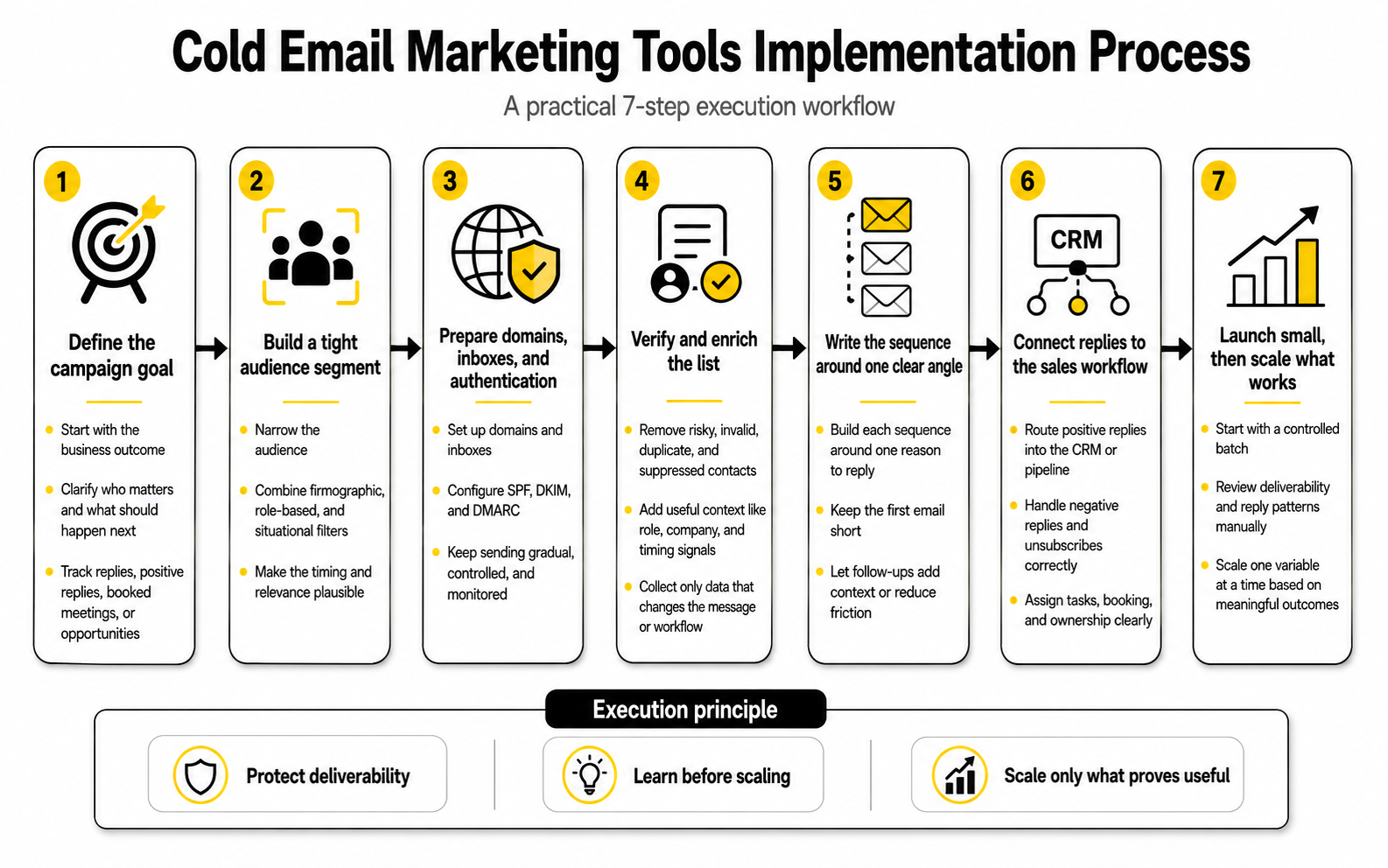
Step 1: Define The Campaign Goal
Start with the business outcome, not the tool. A campaign built to book demos needs different targeting, copy, follow-up, and reporting than a campaign built to validate an offer or start partner conversations. If the goal is vague, every metric becomes vague too.
A good campaign goal should be specific enough to shape the workflow. For example, “book qualified calls with operations leaders at mid-market logistics companies” is useful because it tells you who matters and what should happen next. “Get more leads” is not useful because it gives your cold email marketing tools no strategic direction.
This also prevents the classic reporting trap. Opens and clicks can be interesting, but they are not the finish line. The tool should help you track the action that matters most: replies, positive replies, booked meetings, qualified opportunities, or closed revenue.
Step 2: Build A Tight Audience Segment
Cold email gets easier when the audience is narrow. A tight segment lets you write sharper copy, use stronger relevance signals, and spot patterns faster. Broad targeting forces you into generic language, which is exactly what inboxes and buyers are tired of seeing.
The best segment usually combines firmographic, role-based, and situational filters. Firmographic filters define the account type, role-based filters identify the decision-maker or influencer, and situational filters explain why now might be the right time. That last layer is important because timing often separates a cold interruption from a useful message.
Do not rush this step. If you cannot explain why a specific group should care about your offer, the campaign is not ready for scale. Cold email marketing tools can speed up list building, but they cannot fix a weak market thesis.
Step 3: Prepare Domains, Inboxes, And Authentication
Before sending, your email infrastructure needs to be ready. That means using appropriate domains or subdomains, setting up inboxes, configuring SPF, DKIM, and DMARC, and confirming that tracking settings do not create unnecessary reputation risk. Gmail’s sender guidance makes authentication and low spam complaints central to deliverability, and its FAQ states that bulk senders can become ineligible for mitigation when user-reported spam rates are above 0.3%.
This is where shortcuts become expensive. Sending from your main company domain without a plan can put everyday business communication at risk if reputation drops. Sending too much too soon from new inboxes can also create patterns that mailbox providers do not trust.
A safer workflow is gradual, controlled, and monitored. Use modest sending volumes, watch bounce and complaint signals, and pause when the data looks unhealthy. The goal is not to “beat” spam filters. The goal is to behave like a legitimate sender.
Step 4: Verify And Enrich The List
Verification should happen before contacts enter a live sequence. You want to remove risky addresses, obvious invalid records, duplicate contacts, and people who should be suppressed. This keeps bounce rates lower and protects the infrastructure you just set up.
Enrichment comes next because good messaging needs context. Useful enrichment might include job title, company size, industry, tech stack, hiring activity, funding stage, location, or recent company changes. You do not need every possible data point, but you do need enough to write a message that feels tied to the recipient’s world.
Keep enrichment practical. If a data point does not change the email, the offer, or the routing logic, it may not be worth collecting. More data is not always better. Better data is better.
Step 5: Write The Sequence Around One Clear Angle
A cold email sequence should be built around one clear reason to reply. Not five benefits. Not a full company pitch. One relevant angle that makes the recipient think, “This might be worth a quick look.”
Keep the first email short enough to respect the inbox. Recent cold outreach benchmarks from Belkins found average reply rates around 5.8% in its 2025 study, which is a useful reminder that most campaigns are fighting for very limited attention. If the message takes too long to understand, the reader is gone.
Follow-ups should not repeat the same email with different wording. Each step should add a new piece of context, reduce friction, or offer a simpler response path. When in doubt, make the call to action easier rather than louder.
Step 6: Connect Replies To The Sales Workflow
Before launch, decide exactly what happens when someone replies. A positive reply should create a task, update the CRM, notify the right person, and move the contact out of the sequence. A negative reply should be respected immediately. An unsubscribe request should be handled without debate.
This is where integrated systems can save a lot of operational drag. If your process includes booking pages, reminders, pipeline stages, client follow-up, and nurture sequences, an all-in-one platform like GoHighLevel can help connect outreach to the rest of the sales machine. If your process is simpler, a lean sender plus a clean CRM may be enough.
The key is that replies should never disappear into a shared inbox with no owner. Cold email creates value only when conversations are handled quickly and professionally. Slow response time kills momentum.
Step 7: Launch Small, Then Scale What Works
A professional launch starts small. Send to a controlled batch, review deliverability signals, read replies manually, and look for patterns before increasing volume. This protects your domains and gives you cleaner learning.
Do not scale a campaign just because the open rate looks high. Open tracking can be distorted by privacy tools and automated systems, so it should not be the main decision point. Scale based on meaningful outcomes: positive replies, booked calls, qualified opportunities, and the quality of conversations created.
When the campaign works, scale one variable at a time. Add another segment, another inbox, another message angle, or another channel, but do not change everything at once. Cold email marketing tools are powerful when they give you controlled execution. They are dangerous when they help you scale confusion.
Statistics And Data That Actually Matter
Cold email data is useful only when it changes what you do next. Random benchmarks can make a campaign look better or worse than it really is, especially when they mix industries, list sources, email types, and buyer intent. A cold campaign sent to CFOs at enterprise companies should not be judged the same way as a campaign sent to founders of small agencies.
The job of analytics is to diagnose the weakest point in the system. If deliverability is broken, better copy will not fix it. If the list is wrong, more follow-ups will not fix it. If the offer is unclear, a prettier dashboard will not fix it either.
Good cold email marketing tools should help you separate signal from noise. The numbers should tell you whether to improve infrastructure, tighten targeting, rewrite the message, change the offer, adjust the follow-up, or stop the campaign completely.
Start With Deliverability Before You Judge Copy
Deliverability is the first measurement layer because it decides whether the rest of your data can be trusted. If emails are not reaching the inbox, open rates, reply rates, and click rates become weak evidence. You might think the offer is bad when the real problem is that the message never had a fair chance.
The baseline metrics to watch are delivery rate, bounce rate, spam complaint rate, inbox placement, and sender reputation. Gmail’s sender rules make complaint control especially important because bulk senders can lose mitigation eligibility when user-reported spam rates are above 0.3%. That number matters because it turns reputation from a vague concept into a hard operating limit.
This is why smart teams do not wait until performance drops to check sender health. They monitor campaign risk early, especially after changing domains, increasing volume, importing new lists, or testing a new audience. If your cold email marketing tools do not surface deliverability problems quickly, you are operating with a blindfold on.
Understand What Benchmarks Can And Cannot Tell You
Benchmarks are useful for orientation, not for excuses. Belkins’ 2025 cold email study reported an average reply rate of 5.8%, which gives you a rough market reference. But that does not mean every campaign below 5.8% is broken or every campaign above it is healthy.
A low reply rate can mean the list is too broad, the message is too generic, the offer is weak, the sender reputation is poor, or the call to action asks for too much too soon. A high reply rate can also be misleading if most replies are negative, unqualified, or from people who were never likely to buy. That is why reply quality matters more than raw reply volume.
Use benchmarks as a warning light, not a verdict. If your reply rate is far below common ranges, investigate the campaign. If it is above average, look deeper before scaling. The best cold email marketing tools make this easier by showing performance by segment, sender, step, and reply type instead of hiding everything inside one average.
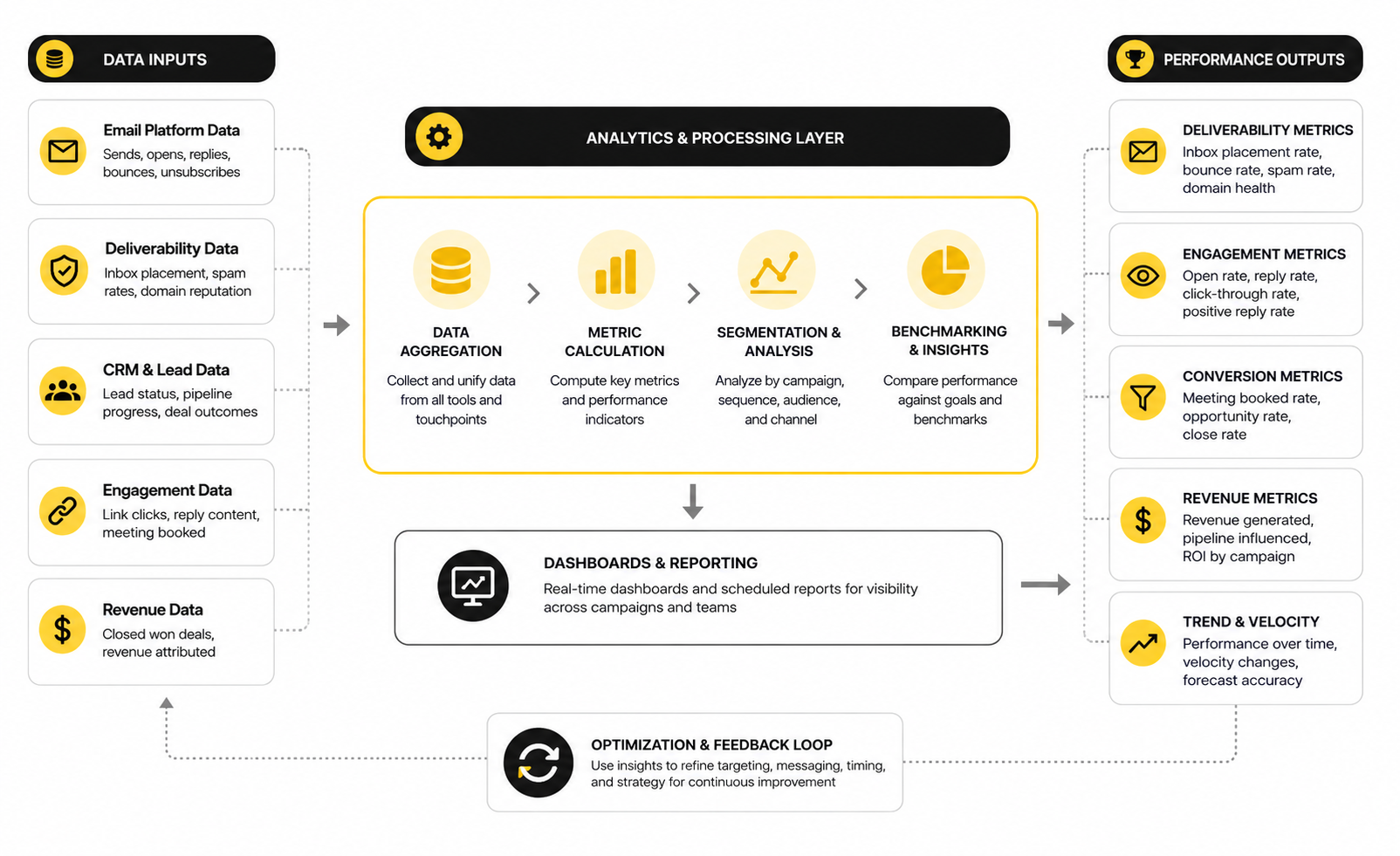
Measure The Full Funnel, Not Just The Inbox
The most important cold email dashboard is not only an email dashboard. It should connect campaign activity to sales outcomes. That means tracking the journey from sent emails to delivered emails, replies, positive replies, booked meetings, qualified opportunities, and revenue.
This matters because different problems appear at different stages. If delivery is strong but replies are weak, the issue is likely targeting, relevance, or copy. If replies are strong but meetings are weak, the call to action or sales handoff may be the problem. If meetings happen but opportunities do not progress, the campaign may be attracting curiosity rather than real buying intent.
A practical measurement flow looks like this:
This is where CRM-connected systems become valuable. If outreach, calendars, reminders, pipelines, and follow-up automations live in one place, it becomes easier to see what happens after the first reply. For agencies and service businesses, GoHighLevel can make sense when the goal is to connect outbound campaigns with booking workflows, pipeline stages, and client follow-up instead of tracking everything manually.
Treat Opens And Clicks Carefully
Open rates are not useless, but they are not as reliable as many people think. Privacy features, image proxying, automated scanners, and tracking blockers can make opens look higher or lower than real human attention. If your campaign decisions depend mainly on opens, you can end up optimizing for a noisy metric.
Clicks can be helpful, but cold email click tracking has trade-offs. Tracking links may affect trust, and a click does not always mean buying intent. In some cold outreach campaigns, a plain text email with no tracked links can be safer and more natural than a message packed with tracking.
Use opens and clicks as supporting signals. A very low open pattern may suggest subject line or deliverability issues. A high click rate with no replies may suggest curiosity without urgency. But the main decision should still come from replies, meetings, and pipeline movement.
Watch Positive Replies Separately From Total Replies
Total replies can flatter a campaign. A message that annoys people may generate plenty of responses, but those responses do not create pipeline. You need to separate positive, neutral, negative, referral, out-of-office, unsubscribe, and objection-based replies.
Positive reply rate is one of the cleanest early indicators of campaign quality. It tells you whether the audience and message are creating commercially useful conversations. If total replies are high but positive replies are low, the campaign may be too provocative, too vague, or aimed at the wrong people.
Your cold email marketing tools should make reply classification easy. Manual tagging works at small volume, but it becomes inconsistent as campaigns grow. AI-assisted categorization can help, but it still needs review because misclassifying replies can break follow-up logic and reporting.
Use Segment-Level Data To Decide What To Scale
Averages hide the truth. One segment might be producing most of the positive replies while another segment quietly damages performance. If you only look at campaign-level data, you may scale the whole thing and accidentally increase the worst part.
Break performance down by audience, company size, job title, industry, region, pain point, sender inbox, subject line, and sequence step. You are looking for patterns that repeat, not one lucky batch. When a specific segment consistently produces better positive replies and meetings, that is where scale should go first.
This is also how you avoid emotional decision-making. Instead of arguing whether the copy is “good,” you can see which audience responds to which angle. Cold email marketing tools are at their best when they turn campaign feedback into sharper targeting and cleaner execution.
Know When The Data Says To Pause
Not every campaign deserves another follow-up. Sometimes the correct move is to stop. If bounce rates climb, spam complaints appear, negative replies increase, or positive replies stay flat after meaningful tests, continuing to send is not persistence. It is damage.
A pause does not mean the whole channel has failed. It means one part of the system needs work. You may need a cleaner list, better segmentation, a different offer, safer infrastructure, or a softer call to action.
The discipline is simple but hard: protect the asset before chasing the metric. Your domains, inboxes, and brand reputation are more valuable than one campaign. The best operators know when to scale, but they also know when to slow down.
How To Compare Cold Email Marketing Tools
At this stage, the question is no longer “Which tool has the most features?” That is the wrong buying lens. The better question is, “Which tool fits the way we source leads, protect domains, personalize outreach, handle replies, and measure revenue?”
Cold email marketing tools sit on a spectrum. Some are lightweight campaign senders. Some are sales engagement platforms. Some are CRM-first systems with automation layered on top. Some are data tools that only solve one part of the workflow, like finding contacts or verifying emails.
The best choice depends on your operating model. A solo founder needs speed and simplicity. A lead generation agency needs repeatable client workflows, reporting, and pipeline visibility. An SDR team needs governance, CRM syncing, permissions, coaching, and clean handoffs. Buying the wrong category creates friction even when the software itself is good.
Specialized Tools Versus All-In-One Platforms
Specialized tools are usually better when you want depth in one part of the workflow. A dedicated verification tool may give you more control over list hygiene. A dedicated cold email sender may offer stronger inbox rotation, sequence testing, and deliverability controls. A dedicated enrichment tool may give you better data coverage for a specific market.
All-in-one platforms are better when the biggest problem is operational continuity. If your outreach needs to connect with funnels, calendars, forms, SMS, pipelines, reputation management, client accounts, and automated follow-up, using disconnected tools can slow the team down. In that case, a platform like GoHighLevel can be attractive because the campaign does not stop at the reply.
The tradeoff is control versus simplicity. A specialized stack can be more flexible, but it also creates more integration work. An all-in-one platform can reduce tool switching, but you need to confirm that its outbound, CRM, and automation features match your exact workflow before committing.
CRM Integration Is Not A Nice-To-Have
Cold email becomes much more valuable when it connects to a CRM cleanly. Without CRM integration, your team has to manually copy replies, update contact stages, create tasks, and remember who needs follow-up. That is where good conversations get lost.
The integration should do more than push contacts into a database. It should preserve campaign source, sequence name, reply status, owner, meeting outcome, and opportunity value. Otherwise, you will struggle to connect outreach activity to revenue later.
This matters even for small teams. A founder may think they can manage replies manually, and sometimes they can at the beginning. But once multiple campaigns, inboxes, and segments are running, CRM discipline becomes the difference between a real sales system and a busy inbox.
Compliance And Consent Need To Be Built Into The Workflow
Cold outreach exists inside legal and platform rules, so the tool should help you operate responsibly. You need unsubscribe handling, suppression lists, data accuracy, sender identification, and a clear reason for contacting each prospect. This is not just legal hygiene. It is also good marketing.
The EU and UK environment requires extra care because personal data processing needs a lawful basis, and legitimate interests must be assessed rather than assumed. The UK ICO explains legitimate interests as a flexible lawful basis that requires a purpose test, necessity test, and balancing test through its legitimate interests guidance. That should push you toward tighter targeting, clearer relevance, and cleaner opt-out handling.
Do not buy cold email marketing tools that make compliance feel like an afterthought. The system should make it easy to suppress contacts, honor opt-outs, track source data, and avoid contacting people who should not be contacted again. If the workflow depends on someone remembering to update a spreadsheet, it will eventually fail.
AI Can Help, But It Can Also Damage Trust
AI has made cold email faster. It can summarize company pages, generate first drafts, classify replies, suggest personalization, and help with campaign variations. Used properly, that is useful.
The problem is that AI can also make outreach sound fake at industrial scale. Prospects are already seeing emails full of exaggerated compliments, awkward personalization, and sentences that feel copied from the same prompt. When every sender has access to AI, generic AI copy stops being an advantage and starts becoming a fingerprint.
Use AI for leverage, not laziness. Let it speed up research, structure drafts, and classify responses, but keep human judgment in charge of the angle, offer, and final message. Cold email marketing tools that include AI should help you become more relevant, not just more prolific.
Scaling Requires Governance, Not Just More Inboxes
Scaling cold email is not simply adding more inboxes and increasing sending volume. That is how teams create deliverability problems, inconsistent messaging, and chaotic follow-up. Real scaling requires rules.
You need clear ownership over domains, inboxes, list sources, suppression files, campaign approvals, CRM stages, and reply handling. You also need volume limits, quality checks, and a process for pausing campaigns when risk signals appear. Gmail’s sender guidance says spam rates should stay below 0.3%, which means volume without control can quickly become expensive.
The more people involved, the more important governance becomes. A one-person campaign can be adjusted informally. A multi-person outreach motion needs documentation, permissions, naming conventions, dashboards, and review cycles. Boring? Yes. Necessary? Absolutely.
Tool Cost Should Be Judged Against Pipeline Quality
The cheapest cold email tool is not always the cheapest system. If it creates messy data, weak deliverability, manual handoffs, or poor reporting, the hidden cost shows up in lost opportunities and wasted time. Software price is only one part of the real cost.
The better calculation is cost per qualified conversation and cost per opportunity. A tool that costs more but improves targeting, reply handling, and CRM accuracy may be cheaper in practice than a low-cost sender that creates operational drag. This is especially true when your average deal size is high.
Do not overbuy either. A small team does not need enterprise complexity before it has proven the channel. Start with the minimum stack that protects deliverability, supports real personalization, and connects replies to follow-up. Then upgrade when the bottleneck is truly the tool, not the strategy.
When A Funnel Platform Belongs In The Stack
Cold email usually starts the conversation, but it rarely closes the deal by itself. Prospects may need a booking page, a short diagnostic form, a landing page, a case study, a nurture sequence, or a simple offer page before they feel ready to talk. That is where funnel and conversion tools can support the outreach motion.
A platform like ClickFunnels can make sense when the cold email call to action points to a funnel, webinar, lead magnet, or offer page instead of a direct reply. Systeme.io can fit smaller teams that want funnels, email marketing, and simple automation without building a complex stack. These are not replacements for cold outreach tools, but they can improve what happens after a prospect shows interest.
The key is intent. Do not send cold prospects to a funnel because you want to avoid conversations. Use a funnel when it genuinely reduces friction, explains the offer better, or qualifies interest before a call. If the funnel adds steps without adding clarity, it will hurt conversion.
The Expert Filter: What Would Break At 10x Volume?
A simple way to evaluate any cold email setup is to ask what would break if volume increased tenfold. Would reply handling collapse? Would the CRM become messy? Would domains get risky? Would personalization become fake? Would reporting become too vague to guide decisions?
This question exposes weak systems quickly. A workflow can look fine at 100 contacts per month and completely fail at 5,000. The right cold email marketing tools should help you scale the parts that are working without multiplying the parts that are broken.
Think of tool selection as infrastructure, not decoration. You are not buying software to look sophisticated. You are building a controlled outbound machine that can find the right people, contact them respectfully, learn from the market, and turn genuine interest into pipeline.
Final Recommendations, Mistakes To Avoid, And FAQ
By now, the pattern should be clear. Cold email marketing tools are not magic buttons. They are operating systems for outreach, and they only work when the strategy underneath them is clean.
The best stack is the one that protects your sending reputation, supports precise targeting, helps you personalize without faking relevance, routes replies into a real sales process, and shows which campaigns deserve more investment. That does not always mean buying the most expensive platform. It means choosing tools that remove the bottlenecks that actually exist in your workflow.
If you are early, start lean. If you are scaling, add governance. If you are managing clients, prioritize repeatability and reporting. If you are running a mature sales motion, make sure your cold email marketing tools connect cleanly with CRM, calendars, compliance processes, and revenue reporting.
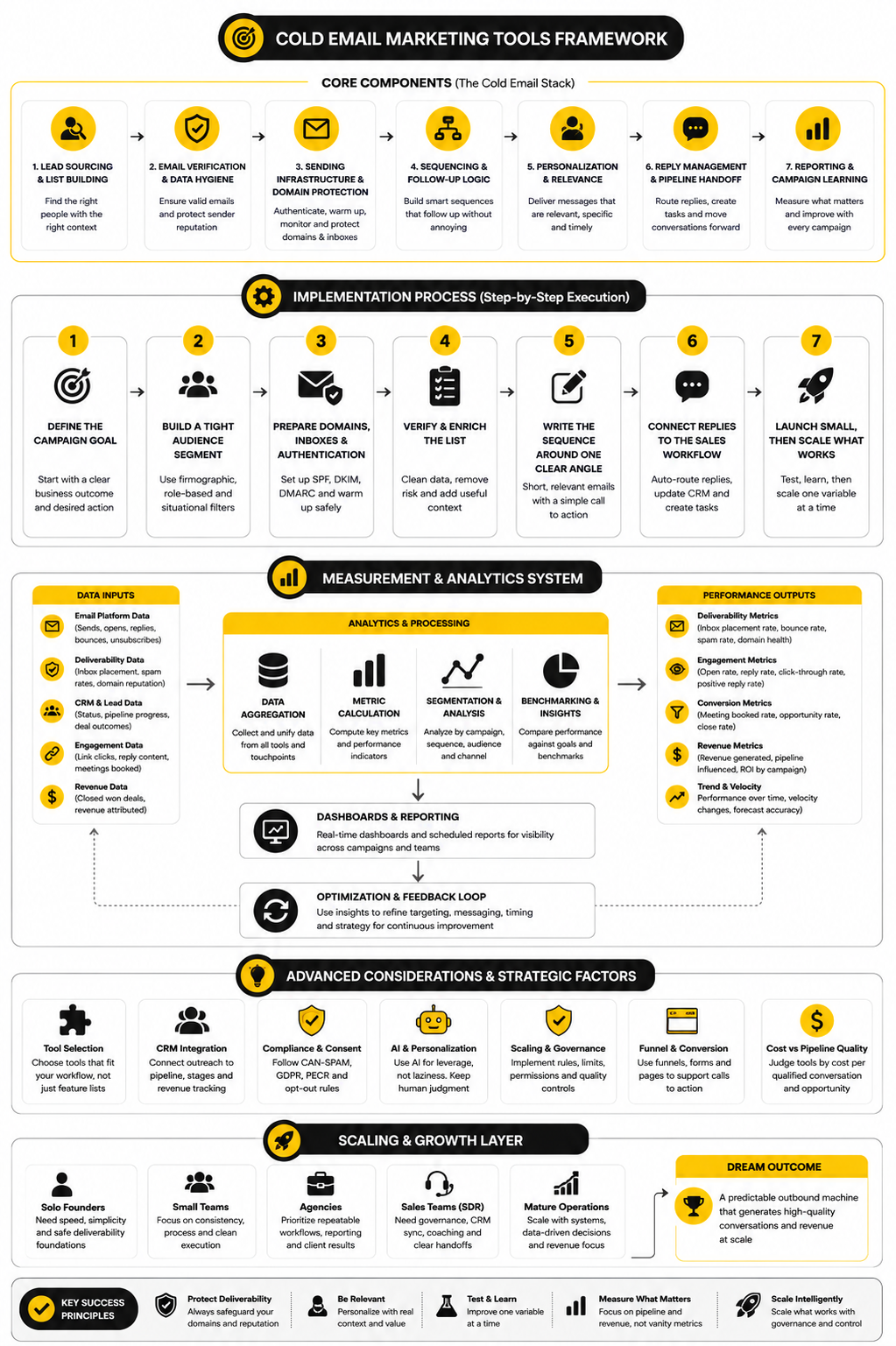
The Practical Buying Checklist
Before choosing a tool, write down the job it must perform. A lot of software demos look impressive because they show everything the platform can do. Your job is to ignore the noise and focus on what your team will actually use every week.
A practical buying checklist should cover the full workflow. You need list sourcing or importing, verification, sending control, authentication support, sequence logic, personalization fields, reply classification, suppression management, CRM syncing, reporting, and support quality. If one of those areas is weak, decide whether another tool will cover it or whether the gap creates too much risk.
Use this simple filter:
The last question matters more than people admit. A powerful tool that nobody uses correctly is not powerful. It is expensive decoration.
Common Mistakes That Break Cold Email Campaigns
The first big mistake is scaling too early. A campaign that has not proven positive replies at small volume should not be pushed harder. More volume only makes weak targeting, vague messaging, and risky infrastructure fail faster.
The second mistake is treating compliance as a footer problem. The FTC’s CAN-SPAM guidance says commercial email needs accurate header information, non-deceptive subject lines, a clear way to opt out, and prompt honoring of opt-out requests through its business compliance guide. In the UK and EU, B2B outreach can also involve personal data, and the ICO makes clear that UK GDPR can apply when a message uses an identifiable business contact through its B2B marketing guidance.
The third mistake is confusing automation with strategy. Cold email marketing tools can automate sending, follow-ups, routing, tagging, and reporting. They cannot create product-market fit, invent a compelling offer, or make a weak list care. That work still belongs to you.
What are cold email marketing tools?
Cold email marketing tools are software platforms that help businesses send, manage, and measure outbound email campaigns to people who have not previously contacted them. They usually include features for sequences, follow-ups, personalization, inbox management, and campaign analytics. Some tools focus only on sending, while others include CRM, automation, enrichment, verification, or booking workflows.
Are cold email marketing tools legal?
Cold email can be legal, but it depends on the country, the data used, the message content, and how opt-outs are handled. In the United States, commercial email must follow CAN-SPAM requirements, including truthful sender information, non-deceptive subject lines, and a working opt-out process. In the UK and EU, B2B email can involve personal data, so teams need to consider GDPR, PECR, lawful basis, relevance, and suppression rules.
What is the most important feature in a cold email tool?
The most important feature is not a single button. It is the tool’s ability to protect the full outreach workflow from bad data, bad sending behavior, missed replies, and poor reporting. If forced to choose one area, deliverability control is usually the most critical because no campaign can perform if messages do not reach the inbox.
How many cold emails should I send per day?
There is no universal safe number because it depends on the age of the domain, mailbox reputation, list quality, audience, and sending pattern. New inboxes should start carefully, and established systems should still avoid sudden volume spikes. The better question is not “How many can I send?” but “How many can I send while keeping bounces, complaints, and negative replies under control?”
What reply rate should I expect from cold email?
Reply rates vary widely by industry, audience, offer, personalization quality, and sender reputation. Belkins reported that average cold email reply rates dropped from 6.8% in 2023 to 5.8% in 2024, which is a useful reference point but not a universal target. A campaign with fewer replies but stronger buying intent can outperform a campaign with more replies and no qualified opportunities.
Should I use an all-in-one platform or separate tools?
Use an all-in-one platform when your biggest problem is operational flow across outreach, CRM, booking, automation, and follow-up. Use separate tools when you need deeper control over specific jobs like verification, enrichment, sending, or sales engagement. For agencies and service businesses, GoHighLevel can be useful when outbound needs to connect with pipelines, calendars, automations, and client workflows.
Do I need email verification software?
Yes, if you are sending cold campaigns from sourced or imported lists. Verification helps reduce invalid addresses, lower bounce risk, and protect sender reputation. It does not guarantee deliverability, but it removes one of the easiest ways to damage a campaign before the first message is even read.
Should cold email include links?
Cold emails can include links, but they should be used carefully. Links can create friction, trigger scanning, or make a message feel more promotional than conversational. In many outbound campaigns, asking for a reply first is cleaner than pushing a prospect to click immediately.
Can AI write cold emails for me?
AI can help draft emails, summarize research, create variations, and classify replies. It should not replace human strategy because generic AI personalization is easy to spot and easy to ignore. Use AI to speed up thoughtful work, not to mass-produce fake relevance.
How do I know if my cold email tool is hurting deliverability?
Watch for rising bounce rates, falling replies, increased spam complaints, poor inbox placement, and weaker performance across multiple campaigns. Google says bulk senders remain ineligible for mitigation when user-reported spam rates are above 0.3%, so complaint monitoring should be part of the workflow. If your tool does not make sender health visible, you may not notice problems until damage has already happened.
What is the best cold email tool for beginners?
The best tool for beginners is one that is simple enough to use consistently and safe enough to protect sending reputation. Beginners usually need basic sequencing, list import, personalization fields, unsubscribe handling, bounce tracking, and clear reporting. Avoid complex enterprise platforms until the channel has proven that it can create qualified conversations.
What is the best cold email tool for agencies?
Agencies usually need repeatable workflows, client reporting, pipeline tracking, automation, and easy handoff from replies to booked appointments. That is why CRM-connected platforms can be more useful than standalone senders for agency work. If an agency also manages funnels, forms, calendars, reminders, and follow-up, an integrated system like GoHighLevel may fit better than a loose collection of tools.
Can cold email work without a CRM?
Cold email can work without a CRM at very small volume, but it becomes risky as campaigns grow. Without a CRM, replies, follow-ups, objections, meeting outcomes, and opportunities can get scattered across inboxes and spreadsheets. A CRM gives the campaign memory, which is essential if you want outreach to create pipeline instead of just activity.
What should I measure besides open rates?
Measure delivery rate, bounce rate, spam complaint signals, reply rate, positive reply rate, meeting rate, opportunity rate, and revenue influenced. Open rates can be distorted by privacy features and automated systems, so they should not drive major decisions alone. The best metrics are the ones that show whether the campaign is creating real sales conversations.
When should I stop a cold email campaign?
Stop or pause a campaign when deliverability signals worsen, negative replies increase, bounce rates rise, or positive replies stay weak after meaningful tests. Pausing is not failure. It is how you protect domains, inboxes, and brand reputation while you fix the list, message, offer, or workflow.
Build a stronger local presence with BAAM AI
Turn your website, Google profile, social channels, and AI visibility into one growth engine
Most businesses do not need more random marketing activity. They need a consistent presence system that helps the right people find them, trust them, and take action. BAAM AI brings strategy, local SEO, website updates, Google Maps visibility, social content, AI-search readiness, media production, and reporting into one practical monthly engine.
If you want your marketing to keep working after the campaign ends, start with a free BAAM AI presence audit. See how your business shows up today and where the fastest visibility wins are at BAAM AI.