
BAAM AI Blog
Campaign Monitor Email: The Practical Guide To Building Campaigns That Actually Convert
Campaign Monitor email can be a solid choice when you want clean email design, list segmentation, automation, and reporting without turning your marketing stack into a full-time job. The real value is not just...
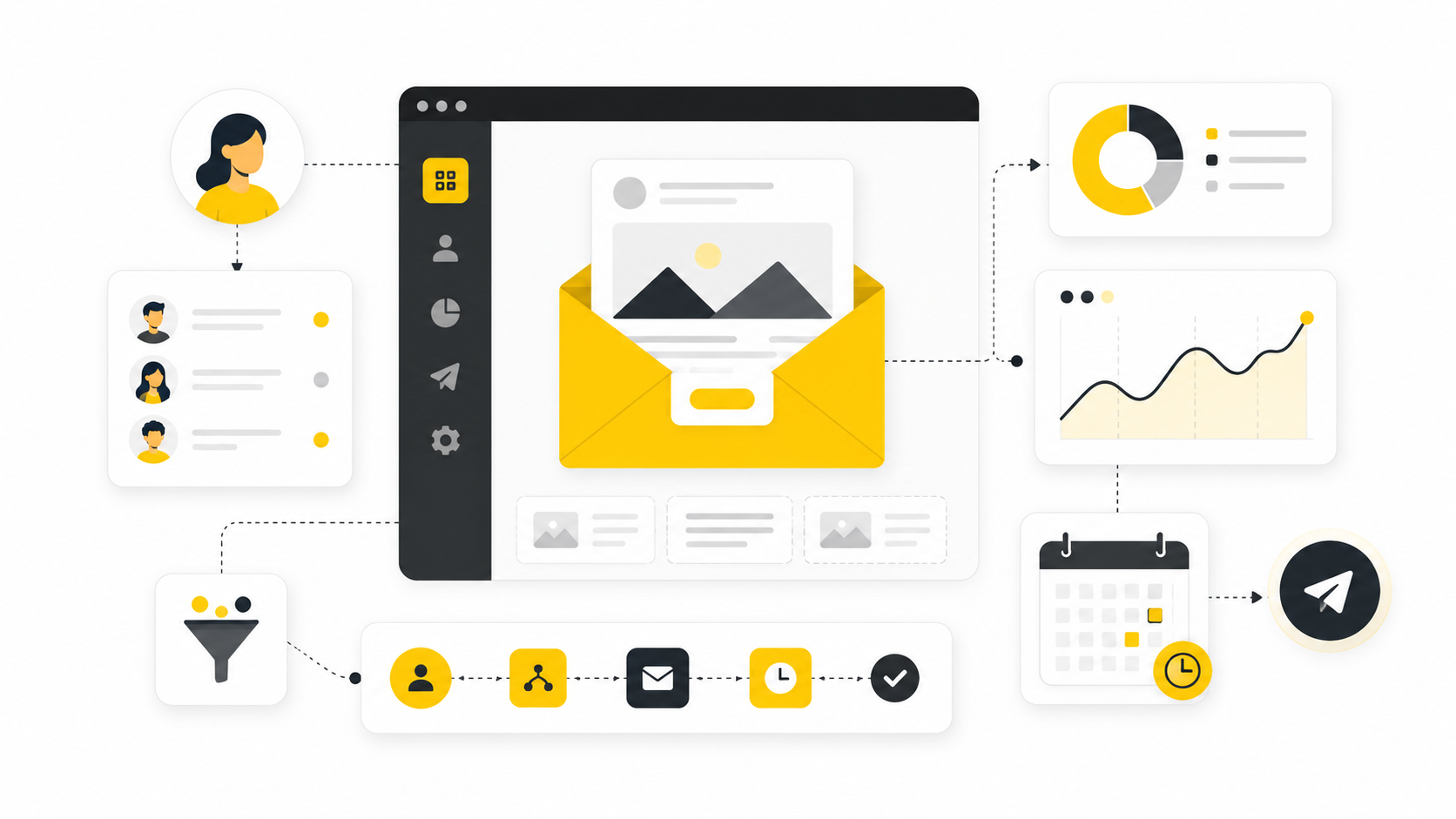
Campaign Monitor email can be a solid choice when you want clean email design, list segmentation, automation, and reporting without turning your marketing stack into a full-time job. The real value is not just sending newsletters. It is building a repeatable email system that helps you capture attention, guide subscribers, and turn campaigns into measurable revenue.
Most businesses do not have an email problem because they lack another template or another subject line trick. They have an email problem because the whole system is loose. The audience is not segmented clearly, the offer is not framed well, the automation is too basic, and the reporting is treated like an afterthought.
That is why this guide is structured around Campaign Monitor as a working email marketing system, not just a software review. You will learn where it fits, how to think about campaigns before you build them, which features matter most, and how to implement it professionally so your emails feel intentional instead of random.
Why Campaign Monitor Email Still Matters
Campaign Monitor email matters because email is still one of the few marketing channels where you can build a direct relationship with your audience. Social platforms can change reach overnight, paid ads can get expensive fast, and search traffic can fluctuate with every algorithm update. Your email list gives you a more stable asset, but only when you treat it like a relationship channel instead of a broadcast tool.
The strength of Campaign Monitor is that it keeps the core email marketing workflow relatively focused. You can create campaigns, manage lists, segment subscribers, personalize content, build automated journeys, and review performance without needing an overly complex enterprise setup. That makes it especially useful for teams that want professional execution but do not want to spend weeks configuring a system before sending a useful campaign.
The mistake is assuming the tool will create the strategy for you. It will not. Campaign Monitor can help you send better emails, but the results still depend on your audience, message, offer, timing, segmentation, and follow-up process.
The Campaign Monitor Email Framework
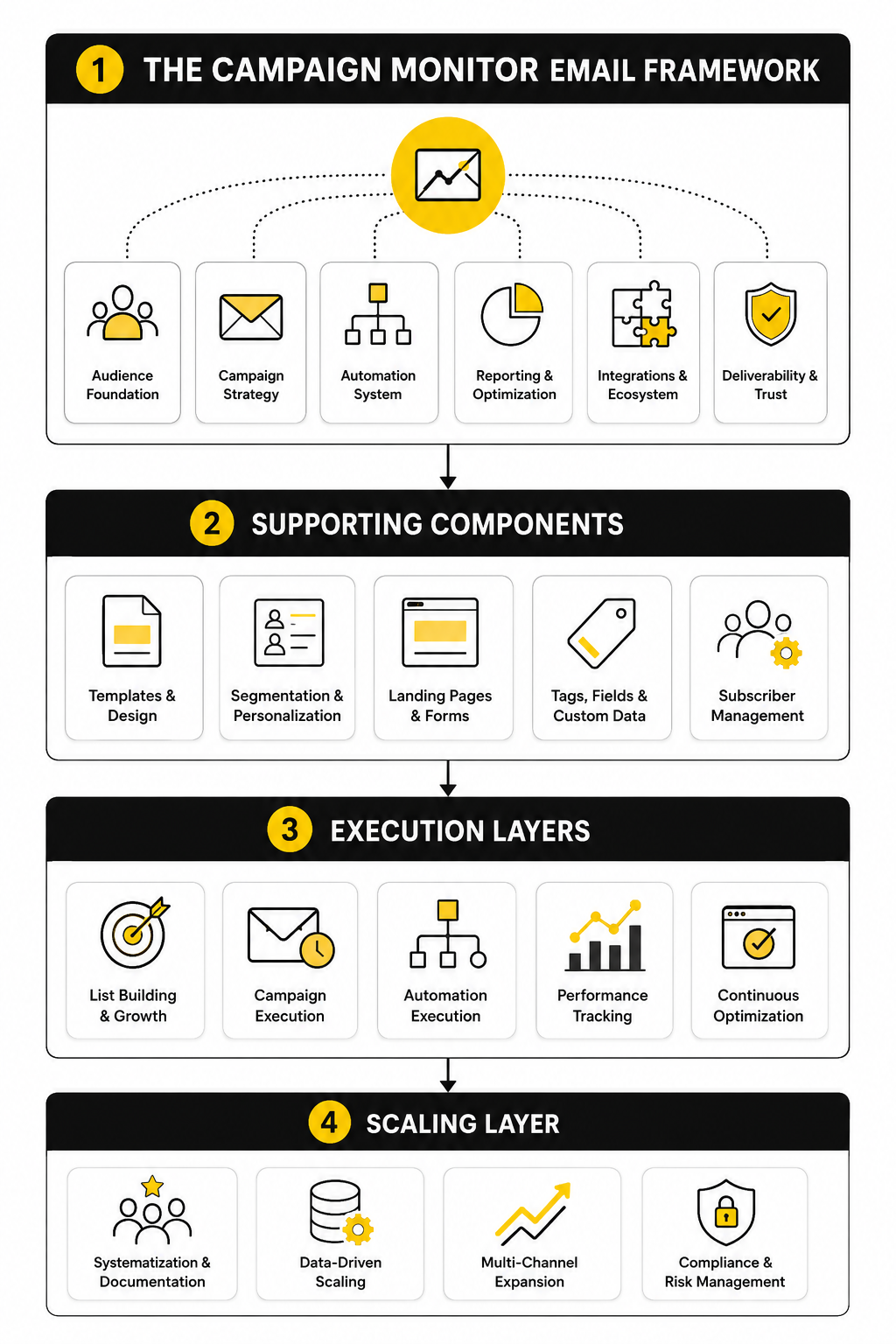
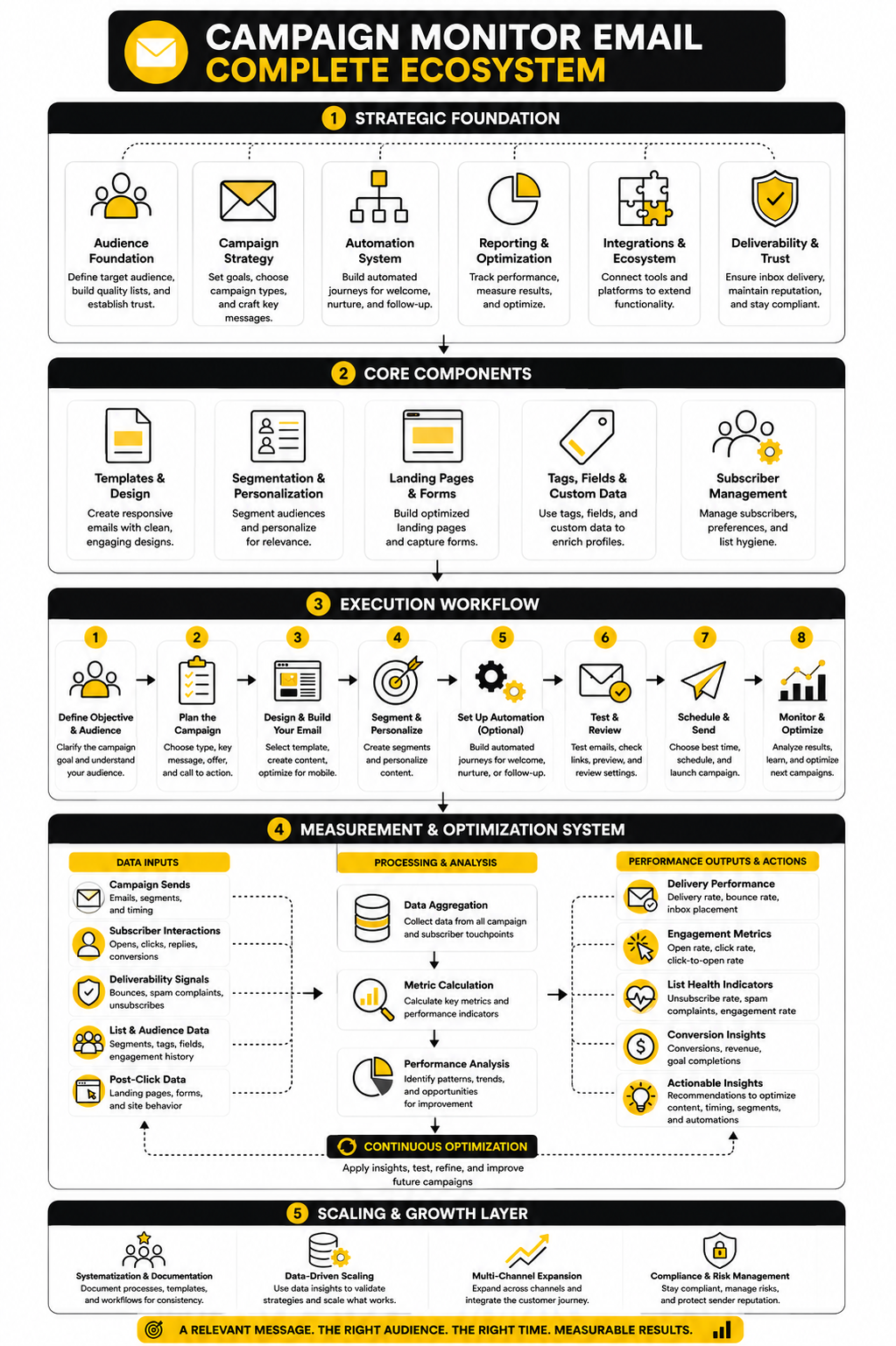
A strong Campaign Monitor email strategy has four layers. First, you need a clear audience structure so subscribers are grouped by intent, behavior, source, or lifecycle stage. Second, you need campaign planning so every email has a job instead of existing because “we should send something this week.”
Third, you need automation that supports the customer journey. Welcome emails, nurture sequences, re-engagement flows, event follow-ups, and post-purchase messages should all reduce manual work while making the subscriber experience feel more relevant. Fourth, you need reporting that turns campaign data into better decisions, not just a quick glance at opens and clicks.
This framework matters because email performance rarely improves from one isolated tweak. Better results usually come from fixing the chain. The list, message, offer, automation, and reporting all need to work together.
Core Components Of A Strong Campaign Monitor Setup
A good Campaign Monitor email setup starts with the parts most people rush through. The platform can help you design and send campaigns, but the structure underneath decides whether those campaigns become useful or messy. Before you write another subject line, you need to know who is on the list, why they joined, what they expect, and what action you want them to take next.
The core components are simple, but they need to be handled deliberately. You need clean subscriber data, useful segments, campaign templates, automation paths, sending rules, and a reporting rhythm. When those pieces are in place, Campaign Monitor becomes more than a newsletter tool; it becomes a system for communicating with the right people at the right time.
Subscriber Lists And Data Quality
Your list is not just a storage place for email addresses. It is the foundation of every campaign decision you make. If the list is full of old contacts, unclear consent, duplicate records, or vague tags, every campaign becomes harder to trust.
Start by separating list growth from list quality. A bigger list is not automatically better if the wrong people are joining or if subscribers do not understand what they signed up for. Campaign Monitor email campaigns work best when subscribers enter through clear forms, receive relevant expectations, and are grouped based on meaningful data from the beginning.
The practical move is to define the minimum data you actually need. For many businesses, that means email address, name, signup source, consent status, customer type, and one or two intent signals. Do not collect twenty fields just because you can. Collect what you will actually use.
Segmentation That Matches Buyer Intent
Segmentation is where email starts feeling personal without needing to fake intimacy. Instead of sending the same message to everyone, you can group subscribers by behavior, interest, source, purchase stage, or engagement level. That lets your campaigns become more specific without making the workflow impossible to manage.
For example, a new subscriber from a lead magnet should not always receive the same message as a repeat customer. Someone who clicked a product link last week is showing different intent than someone who has ignored the last ten campaigns. Campaign Monitor email segmentation gives you a cleaner way to respect those differences.
The key is to avoid building segments that sound clever but never get used. Keep the structure practical. A strong starting point is to segment by new subscribers, engaged subscribers, inactive subscribers, customers, prospects, and high-intent contacts.
Campaign Templates And Brand Consistency
Templates save time, but their real job is consistency. When every campaign has a different layout, tone, and call-to-action style, subscribers have to relearn your emails every time. That friction is subtle, but it matters.
A clean Campaign Monitor email template should make the message easier to understand. The design should support the offer, not compete with it. Strong hierarchy, readable spacing, mobile-friendly formatting, and one primary action usually beat overdesigned layouts with too many blocks.
Build templates around campaign types, not decoration. You might have one for newsletters, one for product announcements, one for educational nurture emails, and one for sales campaigns. That gives your team enough flexibility without turning every send into a custom design project.
Automation Journeys
Automation is where Campaign Monitor can reduce manual work and improve timing. A welcome sequence can introduce your brand, explain the value of staying subscribed, and guide the reader toward the next logical action. A re-engagement journey can help you identify subscribers who still care before you keep sending to people who are no longer interested.
The point is not to automate everything. The point is to automate moments where timing and relevance matter. Welcome emails, post-signup education, event reminders, customer onboarding, review requests, and win-back campaigns are usually better handled with structured journeys than one-off manual sends.
Good automation feels helpful because it follows the subscriber’s context. Bad automation feels robotic because it ignores what the subscriber has already done. That difference matters more than the number of emails in the sequence.
Calls To Action And Conversion Paths
Every campaign needs a clear next step. That step might be reading a guide, booking a call, viewing a product, joining a webinar, replying to the email, or completing a checkout. If the email has no obvious action, the reader has to do the work, and most people will not.
This is where many Campaign Monitor email campaigns lose performance. The email may look polished, but the call to action is vague, buried, or competing with five other links. A campaign should make the next step feel natural, specific, and low-friction.
If the goal is lead generation, connect the email to a focused landing page or form. Tools like Fillout can help when you need simple forms that support cleaner capture flows, while ClickFunnels can fit better when the email is driving into a fuller sales funnel. The email does not need to do the entire selling job by itself; it needs to move the right person to the right next step.
Reporting That Leads To Better Decisions
Reporting is not just about checking whether a campaign “did well.” It is how you learn what your audience responds to, where interest drops, and which campaigns deserve more attention. Without a reporting rhythm, you end up making decisions based on mood instead of evidence.
The basic metrics still matter, but they should not be treated equally. Delivery and bounce data tell you whether the email reached people. Clicks and conversions tell you whether the message created action. Unsubscribes and spam complaints tell you whether the promise, frequency, or targeting may be off.
The best habit is to review campaigns by purpose. A newsletter should not be judged the same way as a launch email, and a re-engagement campaign should not be judged the same way as a warm sales sequence. Once you compare each campaign against its actual job, optimization becomes much more practical.
How To Plan Campaigns Before You Build Them
Planning is where most Campaign Monitor email work either becomes sharp or turns into noise. The easiest thing is to open the editor, pick a template, and start writing. The better move is to slow down long enough to define the campaign’s job, the audience, the offer, and the next step before you touch the design.
A campaign should never exist just because the calendar says Tuesday. It should support a clear business goal, such as warming new leads, moving trial users toward activation, announcing a product, driving event registrations, collecting feedback, or reactivating dormant subscribers. Once the goal is clear, every decision becomes easier because you are not guessing your way through the email.
The planning process also protects the reader. When you know why you are sending, who should receive it, and what they should do next, the email feels more relevant. That is the difference between a campaign that gets ignored and a campaign that earns attention.
Define The Campaign Objective
Start with one primary objective. Not three. Not a vague mix of awareness, clicks, sales, and engagement. One clear objective gives the email a spine.
For a Campaign Monitor email campaign, the objective should be specific enough that you can judge performance after the send. “Promote the new offer” is too loose. “Get existing customers to view the new upgrade page” is much better because it tells you who the audience is, what the message should focus on, and which action matters.
This does not mean the email can only create one benefit. It means the campaign needs one main job. When the main job is clear, the subject line, preview text, body copy, design, and call to action all point in the same direction.
Match The Audience To The Message
The next step is deciding who should receive the campaign. This is where your earlier segmentation work starts paying off. Instead of sending every email to the full list, you can choose the segment that actually matches the message.
A product education email may fit new subscribers who have not purchased yet. A loyalty offer may fit existing customers. A re-engagement campaign may fit subscribers who have not opened or clicked recently. Each audience has a different context, and context changes how the email should be written.
Do not overcomplicate this. You do not need twenty micro-segments for every send. You need enough audience discipline to avoid sending irrelevant messages to people who clearly are not ready for them.
Build The Offer Before The Email
The offer is not just the discount, product, webinar, guide, or page you are promoting. It is the reason someone should care now. A weak offer cannot be rescued by a pretty template.
Before building the email, write the offer in one sentence. For example, “Join the workshop to learn how to fix your abandoned lead follow-up process.” That sentence gives you a practical filter. If the email copy does not support that promise, it probably does not belong.
This is especially important when the campaign leads into a funnel or form. If you are using a tool like ClickFunnels for the conversion path, the email and landing page should feel like one continuous experience. If the email promises one thing and the page emphasizes something else, you create friction right at the moment you need momentum.
Turn The Plan Into A Step-By-Step Workflow
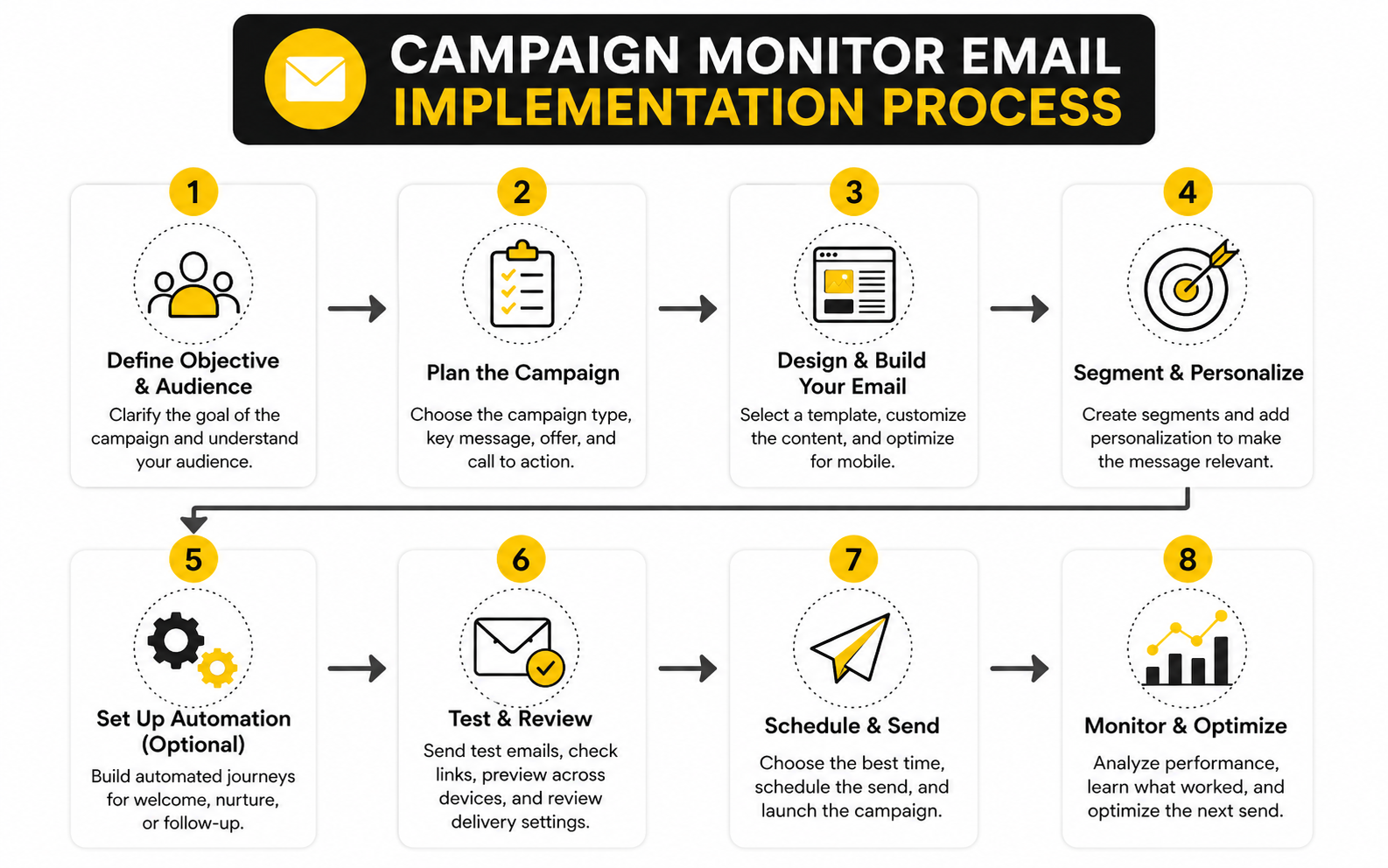
Once the goal, audience, and offer are clear, execution becomes much simpler. You are no longer staring at a blank campaign. You are turning a defined plan into a send-ready workflow.
A practical Campaign Monitor email workflow looks like this:
This process is not complicated, but it prevents expensive mistakes. Broken links, unclear offers, wrong segments, and weak calls to action usually happen when the campaign moves too quickly from idea to send. A repeatable workflow gives you speed without chaos.
Write The Email Around One Reader Problem
Good email copy starts with the reader’s problem, not your announcement. Even when you are promoting something, the message should make the reader feel like the email connects to a need they already recognize. That is what makes the campaign feel useful instead of pushy.
For a Campaign Monitor email campaign, keep the opening direct. Show the reader why the message matters, explain the benefit, remove one or two objections, and then guide them toward the next step. You do not need to over-explain everything inside the email.
The goal is not to impress the reader with how much you can say. The goal is to make the next action feel obvious. If the reader understands the value quickly, your email has done its job.
Prepare The Landing Path
The campaign does not end when someone clicks. The landing path matters just as much as the email itself. A strong email can still underperform if the destination page is slow, confusing, too broad, or disconnected from the promise in the campaign.
Before sending, click through the full path like a subscriber would. Read the email, click the call to action, review the page, test the form, and confirm the confirmation message or next step. This is basic, but it is where a lot of revenue leaks happen.
If the campaign depends on lead capture, tools like Fillout can help you keep the form experience focused. If the campaign supports a broader marketing funnel with upsells, webinars, or checkout steps, GoHighLevel can make sense when you want email, CRM, automations, and pipeline follow-up closer together. The important thing is not the tool itself; it is making sure the path after the click supports the promise before the click.
Set The Review Standard Before You Send
Every campaign should have a pre-send review standard. Not a vague “looks good” check. A real review that confirms the message, audience, tracking, design, compliance basics, and destination path are ready.
The review should include the sender name, reply-to address, subject line, preview text, segment logic, personalization fields, links, mobile layout, unsubscribe access, and tracking setup. If the campaign includes time-sensitive details, check the dates and time zones carefully. Small errors can make a polished campaign feel careless.
This step is not about slowing the team down. It is about protecting trust. Once a Campaign Monitor email is sent, you cannot pull it back from every inbox, so the review process needs to happen before the mistake becomes public.
Optimization, Reporting, And FAQ
A Campaign Monitor email strategy becomes more valuable when you stop treating reporting as a scoreboard and start treating it as a decision system. The point is not to collect numbers for a dashboard. The point is to understand what your subscribers are doing, where the campaign is losing momentum, and what you should improve before the next send.
This is where a lot of teams get stuck. They see open rates, click rates, unsubscribes, and bounces, but they do not connect those numbers to a specific action. Good reporting should tell you whether to improve the subject line, tighten the offer, change the segment, clean the list, fix the landing page, or rethink the whole campaign.
Statistics And Data
Email still earns its place in the marketing stack because it can connect audience, timing, message, and conversion in a measurable way. The strongest programs do not just send more email; they measure the right signals and improve the system around them. That distinction matters because a high-performing Campaign Monitor email program is usually built through repeated learning, not one perfect campaign.
Recent benchmark data shows why interpretation matters. Campaign Monitor’s own guidance places a typical “good” open rate around 17% to 28%, depending on the industry, while MailerLite’s 2025 benchmark data reported an average open rate of 43.46% and an average click rate of 2.09%. Those numbers are not contradictions you should blindly average together. They show that benchmarks vary by platform, audience type, sender behavior, industry, geography, and tracking methodology.
That is why you should use benchmarks as a rough reference, not a verdict. If your email open rate is below a public benchmark but your conversion rate is strong, you may have a smaller but more qualified audience. If your open rate looks excellent but nobody clicks or buys, the campaign is creating curiosity without enough action.
Why Open Rates Need Context
Open rates are useful, but they are not as clean as they used to be. Apple’s Mail Privacy Protection can download remote email content in the background, which means senders may not know whether a person truly engaged with the email in the way older open tracking implied. Apple explains that Mail Privacy Protection helps prevent senders from learning information about a user’s Mail activity by downloading remote content in the background in certain situations through Protect Mail Activity.
That does not mean open rates are worthless. They can still help you compare campaigns sent to the same type of audience under similar conditions. They can also flag obvious problems, such as a sudden drop after a sender name change or a subject line that clearly missed the mark.
The key is to stop making big decisions from open rate alone. A Campaign Monitor email with a strong open rate but weak click behavior needs a different fix than a campaign with low opens and strong post-click conversion. Opens tell you something about attention, but they do not prove business impact.
Clicks Show Intent More Clearly
Clicks are usually a stronger signal than opens because they show the subscriber did something beyond loading the email. A click means the message, offer, and call to action created enough interest for the reader to leave the inbox. That makes click-through rate one of the most practical metrics for campaign improvement.
Still, clicks need context too. A low click rate might mean the offer was weak, the audience was wrong, the email had too many competing links, or the call to action was buried. It does not automatically mean the copy was bad.
Look at click behavior by campaign type. A newsletter may naturally spread clicks across several links, while a sales email should usually focus attention on one primary destination. If your Campaign Monitor email has one clear goal, the click data becomes much easier to interpret.
The Measurement System That Actually Works
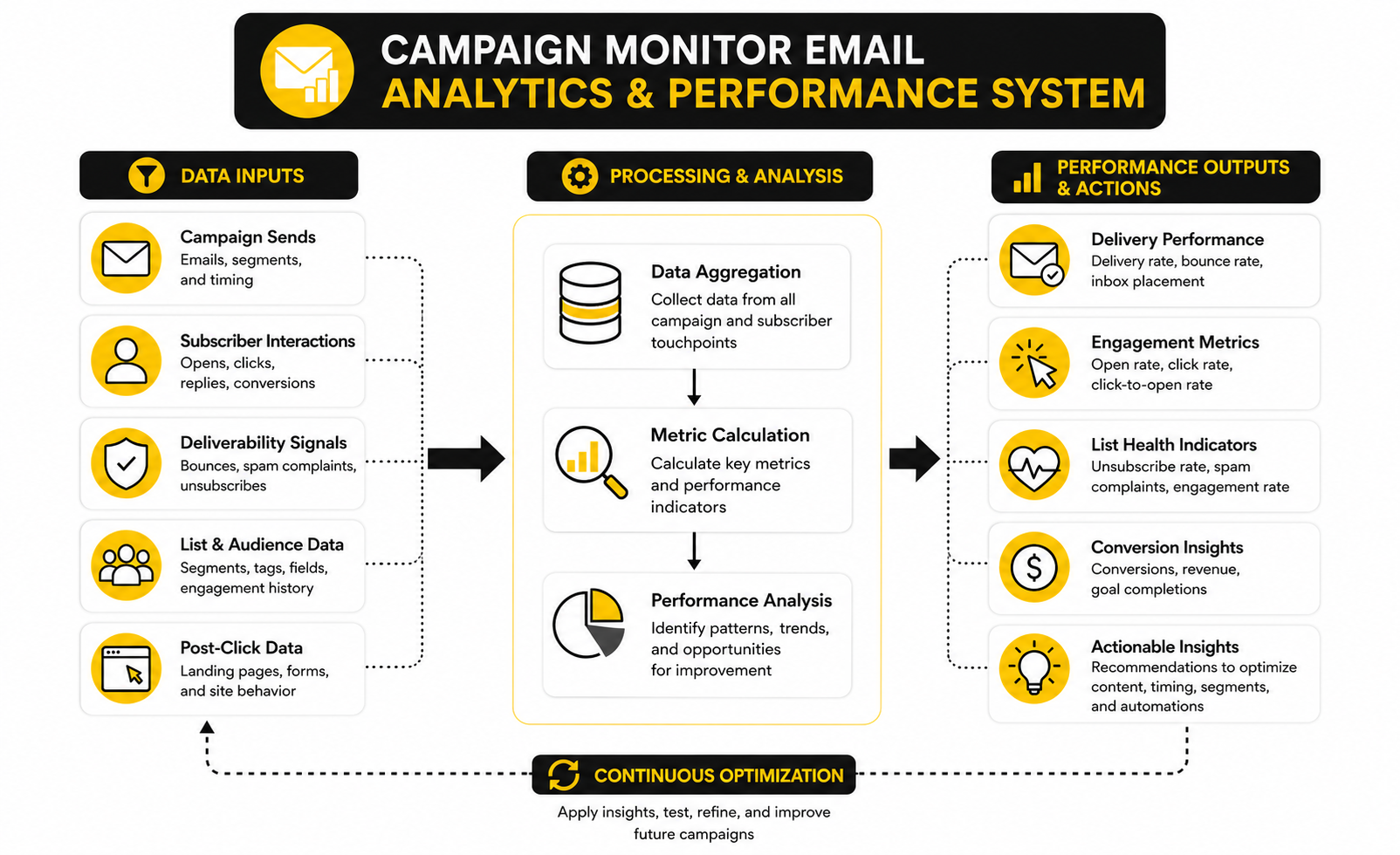
A useful analytics system should follow the subscriber journey from send to outcome. Start with delivery, because nothing else matters if the email does not reach the inbox. Then review opens cautiously, clicks seriously, landing page behavior carefully, and conversions honestly.
The practical measurement flow looks like this:
This system keeps you from blaming the wrong part of the campaign. If delivery is weak, rewriting the body copy will not fix the real problem. If clicks are strong but conversions are weak, the landing path may need work more than the email itself.
Deliverability Metrics Protect The Whole Program
Deliverability is not exciting, but it is brutally important. If your emails do not reach inboxes, your creative work, offer strategy, and automation setup are all fighting from behind. Bounce rates, spam complaints, list quality, authentication, and unsubscribe behavior are not technical side issues; they directly affect whether future campaigns get seen.
Google’s sender guidelines require senders to follow authentication and sending practices designed to reduce spam and help messages reach Gmail users properly, with requirements that began applying broadly from February 1, 2024. Yahoo’s sender guidance also emphasizes authentication, valid DNS records, easy unsubscribe behavior, and keeping spam complaint rates below 0.3%. These are not small details anymore.
For a Campaign Monitor email setup, the practical takeaway is simple: protect your sender reputation before you chase more volume. Clean inactive contacts, avoid purchased lists, make unsubscribing easy, authenticate your domain, and pay attention when complaint or bounce patterns change. Deliverability is the part of email marketing you notice most when you have already damaged it.
Revenue And ROI Are The Metrics That Keep You Honest
Clicks are helpful, but revenue and qualified pipeline tell the clearer business story. If the campaign is meant to sell, book calls, generate leads, or move customers toward a paid action, the final measurement should connect back to that goal. Otherwise, you are optimizing activity instead of outcomes.
The channel still has strong potential when measurement is done properly. Litmus reported that 35% of companies see email ROI of 36:1 or more, and its 2025 ROI data shows that many marketing leaders report returns between $10 and $50 for every $1 spent. That is exactly why weak measurement is such a problem: the upside is real, but you only capture it when you know which campaigns are actually producing value.
Do not force every email to produce direct revenue immediately. Educational campaigns, onboarding emails, and retention messages can support long-term value without acting like a one-click sales campaign. Just be clear about the role each campaign plays, then measure it against that role.
What To Do When The Numbers Are Weak
Weak numbers are not a reason to panic. They are a reason to diagnose. The worst response is changing everything at once because then you cannot tell what fixed the problem.
If opens are weak, review the audience, sender name, subject line, preview text, timing, and deliverability. If clicks are weak, review the offer, message clarity, email structure, CTA placement, and whether the campaign had too many distractions. If conversions are weak after strong clicks, review the landing page, form, checkout, page speed, offer match, and follow-up sequence.
This is also where connected tools can help. If your Campaign Monitor email campaigns are driving leads into a broader sales process, GoHighLevel can help teams manage CRM follow-up, pipelines, and automation after the click. If your main gap is turning campaign traffic into clearer opt-ins or applications, Fillout can help simplify the capture step. The goal is not to add more tools for the sake of it; the goal is to close the measurement gaps that hide what is really happening.
Build A Simple Reporting Rhythm
You do not need a massive reporting process to improve. You need a rhythm that your team can actually follow. After each campaign, review the metrics tied to the original objective and write down one decision for the next send.
For weekly or frequent campaigns, keep the review short. Look at delivery, clicks, conversions, unsubscribes, and any unusual segment behavior. For larger launches or automated journeys, go deeper and compare performance across emails, audience groups, landing pages, and time windows.
The most important habit is documenting what changed. If you test a new subject line style, segment, CTA, template, or offer angle, record the result. Over time, your Campaign Monitor email reporting becomes a practical playbook instead of a pile of disconnected campaign reports.
Advanced Campaign Monitor Email Strategy
Once the basics are working, the next challenge is control. A small list can survive messy processes for a while because the risk is limited. As the list grows, every weak spot gets louder: poor tagging creates irrelevant sends, weak consent practices damage trust, vague automations overlap, and reporting becomes harder to interpret.
This is where Campaign Monitor email strategy needs to become more intentional. You are no longer just sending campaigns. You are managing an audience asset, a communication calendar, and a conversion system at the same time.
The Tradeoff Between Simplicity And Flexibility
Campaign Monitor is strongest when you want clean campaign creation, segmentation, automation, and reporting without building an overly complex marketing operations machine. That simplicity is useful. It helps smaller teams move faster and keeps the workflow approachable for marketers who do not want every campaign to require technical support.
The tradeoff is that simplicity has limits. If your business needs deep sales pipeline automation, heavy CRM customization, multi-channel follow-up, or complex lead routing, you may eventually need tools around Campaign Monitor to handle the work after the email click. That does not make Campaign Monitor weak; it means you should be clear about what role it plays in the stack.
The practical decision is simple. Use Campaign Monitor email for clean subscriber communication and campaign execution, then connect it to the right downstream systems when the customer journey becomes more complex. For teams that need CRM, pipeline, and follow-up automation closer together, GoHighLevel can make sense as the operational layer around the lead journey.
When Segmentation Becomes Too Complicated
Segmentation is powerful until it becomes a maintenance problem. Many teams start with useful audience groups, then keep adding tags, fields, and conditions until nobody knows what anything means. At that point, segmentation stops improving relevance and starts creating confusion.
The fix is to use fewer, stronger segments. Focus on segments that affect what you actually send: lifecycle stage, product interest, engagement level, customer status, and source quality. If a segment does not change the message, offer, timing, or follow-up, it probably does not need to exist.
A practical Campaign Monitor email system should be easy to explain. If someone new joins the team and cannot understand your segmentation logic in a short walkthrough, the structure is probably too complicated. Clarity beats cleverness here.
Consent, Compliance, And Subscriber Trust
Email marketing is permission-based, and that permission is not a technical checkbox. It is the reason subscribers let you into their inbox. If people do not remember signing up, do not understand what they will receive, or cannot easily opt out, the campaign may create short-term reach while damaging long-term trust.
This matters even more as inbox providers keep tightening expectations around authentication, unsubscribe access, and complaint rates. Google’s sender guidelines emphasize authentication, easy unsubscribe, and sending wanted mail, while Yahoo’s sender guidance sets a clear expectation around complaint control and responsible sending. The practical takeaway is that subscriber trust and deliverability are now tied together very tightly.
For Campaign Monitor email campaigns, keep consent clean from the beginning. Use clear signup language, avoid imported lists with unclear permission, honor unsubscribes quickly, and make preference management simple where it fits. You do not need to make this dramatic; you need to make it reliable.
Scaling Without Sending More Noise
Scaling email does not mean sending more campaigns to more people. That is the lazy version. Real scaling means increasing relevance, improving timing, and making the system more useful without burning out the list.
A mature email program usually grows in three ways. It creates better entry points for new subscribers, improves automated journeys for common lifecycle moments, and uses campaign data to send fewer irrelevant messages. That is how you grow impact without training subscribers to ignore you.
The risk is frequency creep. One newsletter becomes two promotions, then a launch sequence, then event reminders, then partner messages, and suddenly the audience hears from you constantly. Before increasing frequency, ask whether the added email creates new value or just fills a slot on the calendar.
The Role Of Personalization
Personalization should make the email more relevant, not just insert a first name at the top. Real personalization uses context. It changes the message based on what the subscriber cares about, how they joined, what they clicked, what they bought, or where they are in the journey.
Campaign Monitor email personalization works best when the data behind it is clean and meaningful. If the data is incomplete or unreliable, personalization can backfire quickly. Nothing makes an email feel automated in the worst way faster than incorrect names, irrelevant recommendations, or messages that ignore obvious behavior.
Start with simple personalization that you can trust. Segment by source, interest, customer status, or engagement before chasing overly complex dynamic content. The goal is not to prove how much data you have; the goal is to make the email feel more useful to the person reading it.
Automation Overlap And Journey Conflicts
As automation grows, overlap becomes a real risk. A subscriber might enter a welcome sequence, receive a newsletter, trigger a re-engagement flow, and get a product promotion in the same week. Individually, each email may make sense. Together, they can feel chaotic.
This is where journey governance matters. You need rules for who can enter which automation, when people should exit a sequence, and which messages should pause during launches or major promotions. Without those rules, your Campaign Monitor email automation can accidentally compete with itself.
A simple governance system is enough for most teams. Document active journeys, define entry and exit conditions, review overlap before campaign sends, and suppress people who are already receiving high-priority messages. This keeps automation helpful instead of overwhelming.
Choosing The Right Stack Around Campaign Monitor
Campaign Monitor does not need to do everything. In fact, trying to force one tool to handle every marketing and sales function can create more friction than it solves. The more carefully approach is to decide what Campaign Monitor owns and what the surrounding stack should handle.
For example, Campaign Monitor can own campaign sends, subscriber segments, and email journeys. A landing page or funnel tool can own conversion pages. A CRM can own sales follow-up. A form tool can own structured data capture. That separation keeps each part of the system focused.
If your email campaigns drive traffic into application forms, Fillout can support cleaner lead capture. If you need full funnel pages and offers, ClickFunnels is a more natural fit. If you want a lighter all-in-one funnel and email setup for simpler projects, Systeme.io may be worth comparing before you commit to a larger stack.
The Biggest Risks To Watch
The biggest risks in a Campaign Monitor email program are usually not dramatic. They are small operational issues that compound over time. A few unclear tags, a few rushed sends, a few weak landing pages, and a few ignored deliverability warnings can quietly drag down the whole system.
The main risks are easy to name:
The solution is not perfection. The solution is discipline. Keep the list clean, keep the message relevant, keep the workflow documented, and keep improving based on what subscribers actually do.
The Final Campaign Monitor Email System
At this point, the goal is not to make Campaign Monitor feel complicated. The goal is to make the whole email system feel controlled. You want clear list entry points, useful subscriber data, focused campaigns, clean automations, reliable reporting, and a post-click path that actually supports the promise made in the inbox.
A strong Campaign Monitor email system has a simple rhythm. People join the list for a clear reason, receive messages that match their stage and intent, click into relevant pages or forms, and move into follow-up that fits their behavior. The more connected that rhythm becomes, the less you need to rely on random sends, last-minute promotions, or “just checking in” emails that do not create value.
This is also where your stack should feel intentional. Campaign Monitor can handle campaign communication, segmentation, automation, analytics, and list health. The surrounding tools should support the next step after the click, whether that means booking, lead capture, funnel pages, CRM follow-up, or sales pipeline management.
What is Campaign Monitor email used for?
Campaign Monitor email is used for creating, sending, automating, and measuring email marketing campaigns. Businesses use it for newsletters, product announcements, welcome sequences, customer updates, event promotion, lead nurturing, and re-engagement campaigns. The platform is strongest when you want a clean email marketing workflow with segmentation, templates, automation, and reporting in one place.
Is Campaign Monitor good for beginners?
Yes, Campaign Monitor can work well for beginners because the campaign creation process is relatively straightforward. You can start with templates, build lists, create basic segments, and send campaigns without needing a complex technical setup. The important thing is to learn the strategy behind the tool, because simple software can still produce weak results if the audience, offer, and follow-up are not clear.
Is Campaign Monitor only for newsletters?
No, Campaign Monitor is not only for newsletters. Newsletters are one use case, but the platform can also support automated journeys, promotional campaigns, lifecycle emails, event campaigns, and transactional-style communication depending on the setup. A better way to think about it is as an email communication system, not just a weekly update tool.
How often should I send Campaign Monitor email campaigns?
The right sending frequency depends on your audience, offer, industry, and campaign purpose. A weekly newsletter may work for one business, while another may only need two strong campaigns per month plus automated journeys. The real question is whether each email creates enough value to justify its place in the inbox.
What metrics matter most in Campaign Monitor?
The most useful metrics are delivery, bounce rate, open activity, click rate, unsubscribe rate, spam complaints, landing page behavior, and conversions. Opens can help you compare attention across similar campaigns, but they should not be treated as the final measure of success. Clicks, conversions, list health, and complaint behavior usually tell a more useful story.
What is a good open rate for Campaign Monitor email?
A “good” open rate depends heavily on your industry, list quality, sender reputation, and audience relationship. Campaign Monitor’s own guidance places a typical good open rate around 17% to 28% depending on the industry, but that should be treated as a reference point rather than a rule. Your best benchmark is your own performance over time across similar segments and campaign types.
How do I improve click rates in Campaign Monitor?
Improve click rates by tightening the offer, reducing distractions, making the call to action obvious, and matching the message to the right segment. If an email has too many links, too many ideas, or a vague next step, people may read without acting. A strong Campaign Monitor email usually has one clear promise and one primary action.
How do I avoid Campaign Monitor emails going to spam?
Start with permission-based lists, clean old or inactive subscribers, authenticate your sending domain, avoid misleading subject lines, and make unsubscribing easy. Google’s sender guidance emphasizes authentication and responsible sending practices through its email sender guidelines, while Yahoo’s sender guidance highlights authentication, valid DNS records, and keeping complaint rates below 0.3%. Deliverability is not a one-time setup task; it is an ongoing trust signal.
Should I use Campaign Monitor with a CRM?
You should use Campaign Monitor with a CRM if your email campaigns create leads, sales conversations, bookings, or pipeline opportunities that need structured follow-up. Campaign Monitor can handle the campaign communication, but a CRM can help sales or service teams track what happens after someone clicks, replies, books, or becomes qualified. For teams that want CRM, automation, and pipeline follow-up in one place, GoHighLevel can be useful around the broader customer journey.
What should I connect to Campaign Monitor?
Connect tools that improve the subscriber journey after the email click. That might include landing pages, forms, analytics, CRM, booking tools, ecommerce platforms, or sales automation. For example, Fillout can support cleaner form-based lead capture, while ClickFunnels can help when the campaign is driving into a full funnel or offer path.
Is Campaign Monitor better than Mailchimp?
Campaign Monitor and Mailchimp can both work, but the better choice depends on what you need. Campaign Monitor is often attractive for teams that want clean email design, campaign management, segmentation, and client-friendly workflows. Mailchimp may be more familiar to beginners and has a broader small-business ecosystem, but the right decision should come down to your list size, automation needs, reporting needs, budget, and how your team prefers to work.
Is Campaign Monitor enough for ecommerce?
Campaign Monitor can support ecommerce email marketing, especially for campaigns, customer segments, announcements, and lifecycle communication. The question is how complex your ecommerce operation is. If you need advanced product recommendations, deep store behavior triggers, SMS, loyalty flows, and detailed revenue attribution, you may need additional tools or a more specialized ecommerce email platform.
How should agencies use Campaign Monitor email?
Agencies should use Campaign Monitor email with repeatable systems. That means standard onboarding questions, approved templates, list hygiene rules, segmentation frameworks, campaign calendars, review checklists, and reporting summaries that clients can understand. Campaign Monitor’s agency-oriented resources highlight branded logins, multi-account management, flexible billing, automation, segmentation, and analytics for teams managing email across multiple clients.
What is the biggest mistake people make with Campaign Monitor?
The biggest mistake is treating Campaign Monitor as a sending tool instead of a marketing system. Sending is only one part of the process. The real performance comes from list quality, message relevance, offer strength, automation logic, deliverability, and what happens after someone clicks.
How do I know when my Campaign Monitor setup is working?
Your setup is working when campaigns become easier to plan, subscribers receive more relevant messages, reporting leads to clear decisions, and the post-click path produces measurable outcomes. You should also see fewer rushed sends, fewer list quality issues, cleaner segmentation, and better alignment between email campaigns and business goals. The system does not need to be perfect, but it should keep getting easier to improve.
Build a stronger local presence with BAAM AI
Turn your website, Google profile, social channels, and AI visibility into one growth engine
Most businesses do not need more random marketing activity. They need a consistent presence system that helps the right people find them, trust them, and take action. BAAM AI brings strategy, local SEO, website updates, Google Maps visibility, social content, AI-search readiness, media production, and reporting into one practical monthly engine.
If you want your marketing to keep working after the campaign ends, start with a free BAAM AI presence audit. See how your business shows up today and where the fastest visibility wins are at BAAM AI.