
BAAM AI Blog
Bulk Email Companies: How to Choose the Right Platform Without Wrecking Deliverability
Choosing between bulk email companies used to be simple: upload a list, write a campaign, press send. That version of email marketing is gone.
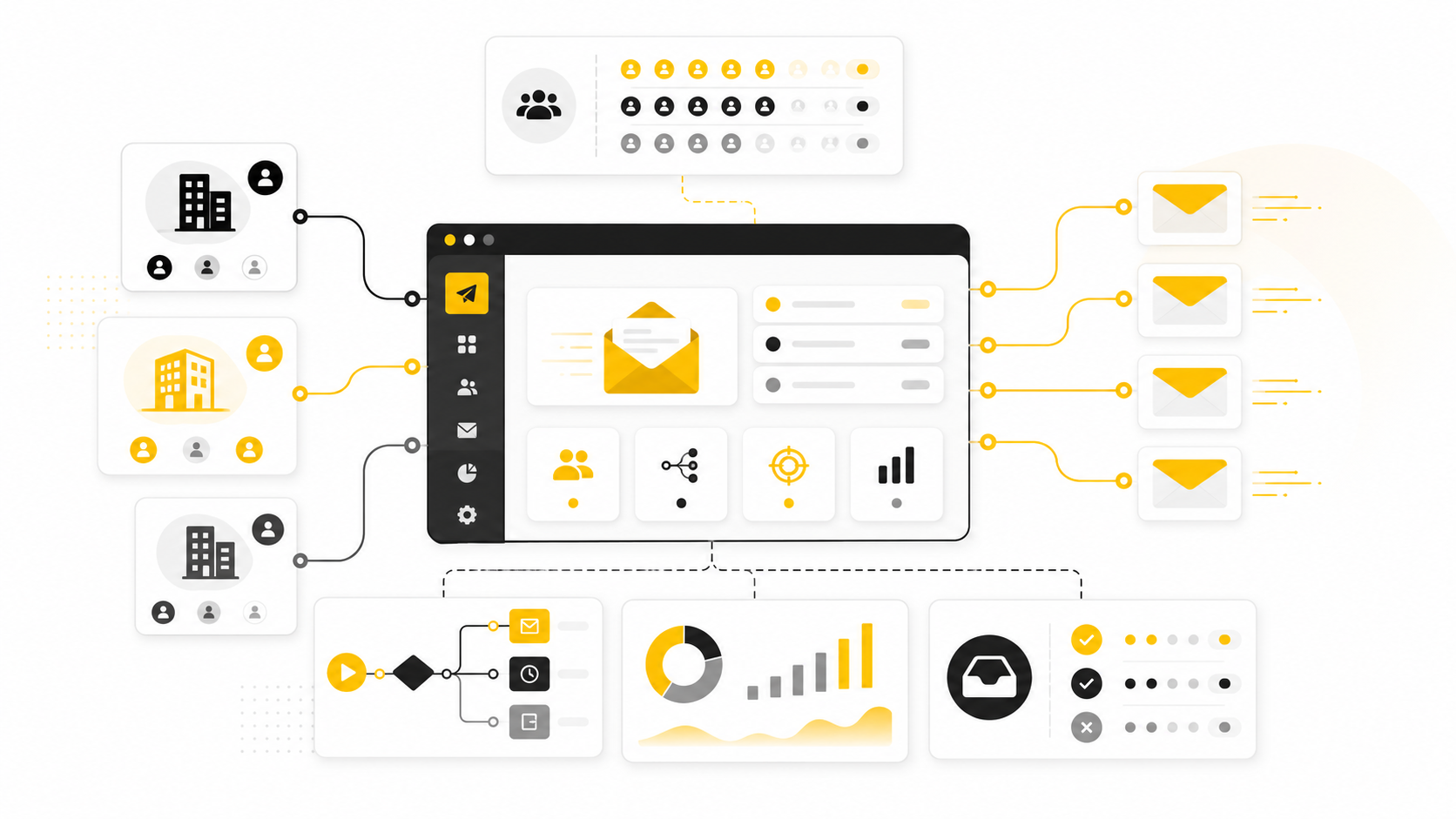
Choosing between bulk email companies used to be simple: upload a list, write a campaign, press send. That version of email marketing is gone.
Today, the platform you choose affects much more than campaign design. It influences inbox placement, authentication, unsubscribe handling, segmentation, reporting, automation, compliance, and how safely your business can scale. Gmail and Yahoo now expect bulk senders to authenticate properly, keep spam complaints low, and make unsubscribing easy, with Google telling senders to keep spam rates below 0.10% and avoid ever reaching 0.30% or higher in Postmaster Tools Google’s sender guidelines. Yahoo also lists authentication, low complaint rates, DNS alignment, and RFC compliance as sender best practices Yahoo sender best practices.
That matters because bulk email is not just a “send more messages” game. The best bulk email companies help you send the right messages to the right people, with the right permission trail, from infrastructure that mailbox providers can trust. The wrong platform can make your list look bigger while quietly shrinking your reach.
this guide is built for business owners, marketers, agencies, ecommerce teams, creators, and operators who need a practical way to compare email platforms without getting buried in feature checklists. Some readers need a simple newsletter tool. Others need CRM automation, sales funnels, SMS follow-up, forms, landing pages, or agency-level client management. The point is not to crown one universal winner. The point is to match the company to the job.
Email still earns its place in the stack because it gives businesses a direct audience channel. Industry benchmarks continue to show meaningful engagement across sectors, with Brevo’s 2025 benchmark analysis covering more than 44 billion emails and reporting overall open, click, unsubscribe, and bounce benchmarks across regions and industries Brevo email marketing benchmarks. Mailchimp’s benchmark data also shows that performance varies sharply by industry, which is why platform fit and list quality matter more than generic averages Mailchimp email marketing benchmarks.
The trap is treating “bulk email” as one category. A cold outreach tool, a newsletter platform, an ecommerce automation system, and an agency CRM may all send high-volume email, but they solve different problems. A company sending product launches to opted-in customers needs a different setup than an agency managing multiple local business clients. A creator selling digital products needs different automation than a SaaS team nurturing leads through a long buying cycle.
Why Bulk Email Companies Matter More Than Ever
Bulk email companies matter because inbox access is now an operational asset. You are not only paying for templates, automation, or a contact database. You are paying for the systems that help your emails look legitimate to mailbox providers, useful to subscribers, and measurable to your team.
The compliance side is also unavoidable. In the United States, the CAN-SPAM Act sets rules for commercial email, gives recipients the right to stop future messages, and is enforced by the FTC FTC CAN-SPAM compliance guide. In the UK, the ICO says marketing emails to individuals generally require specific consent, with a limited “soft opt-in” exception for previous customers ICO electronic mail marketing guidance. A good platform will not replace legal advice, but it should make the basics easier: consent capture, unsubscribe links, suppression lists, sender details, and records of subscriber activity.
Deliverability has become the other pressure point. Validity’s 2025 deliverability benchmark report focuses on how inbox placement changed in 2024 and why senders need stronger authentication, list hygiene, and engagement practices to stay visible Validity 2025 deliverability benchmark report. That is the part many businesses miss. You can have beautiful emails, persuasive copy, and a strong offer, but none of it matters if the campaign lands in spam or never reaches the inbox.
This is why serious businesses should evaluate bulk email companies like infrastructure, not like design software. The platform should help your team send consistently, segment intelligently, remove risky contacts, monitor performance, and automate follow-up without creating a compliance mess. Cheap sending volume is tempting, but cheap volume without reputation control can become expensive fast.
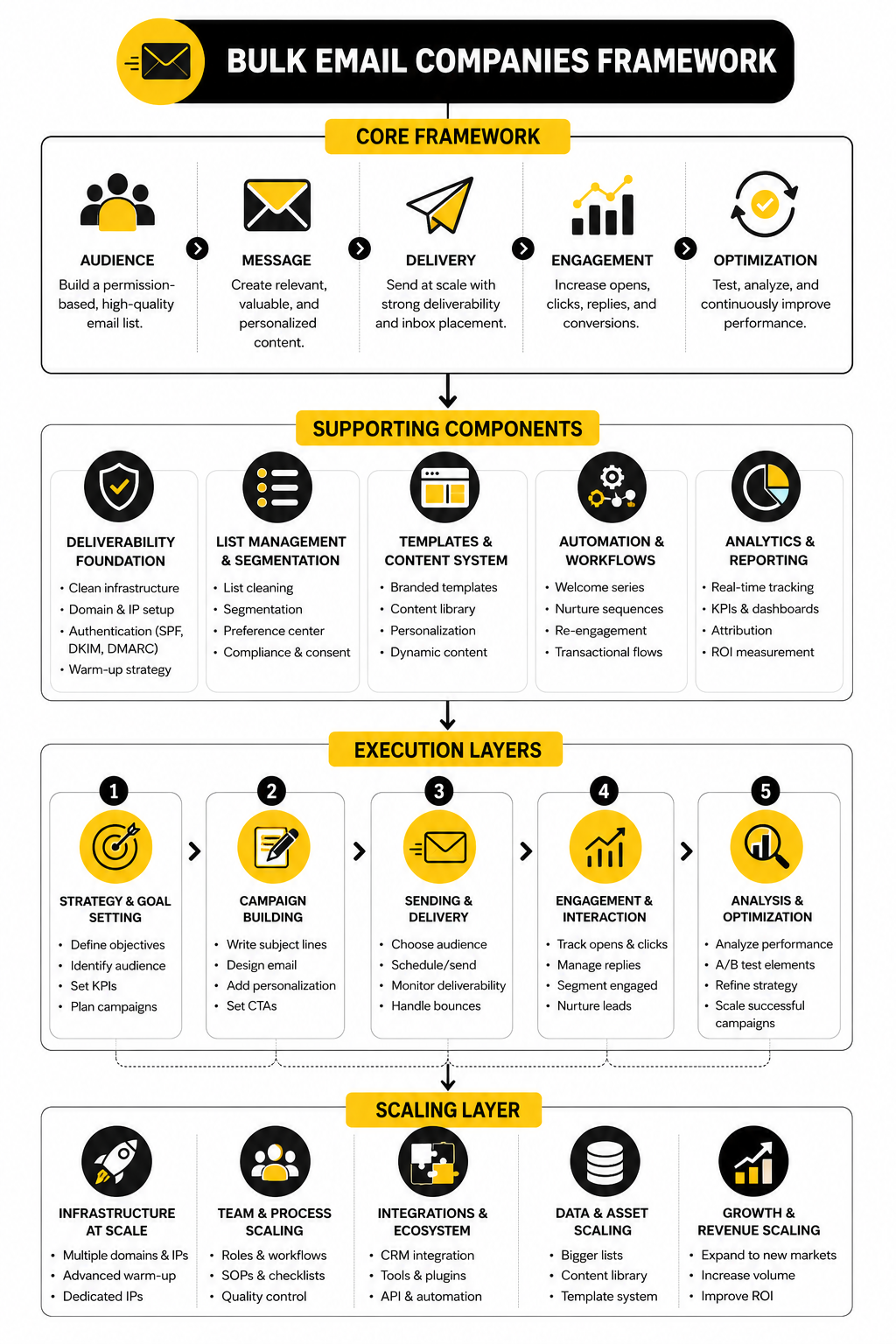
The Bulk Email Platform Framework
A useful way to compare bulk email companies is to look at five layers: audience, infrastructure, automation, conversion, and reporting. If one layer is weak, the whole system suffers. This framework keeps the decision practical instead of turning it into a random feature comparison.
The first layer is audience management. This includes contact imports, tags, segments, custom fields, consent status, suppression lists, and cleanup tools. If your audience data is messy, your campaigns will be messy too. Strong audience management lets you separate buyers from leads, engaged subscribers from inactive contacts, and high-intent prospects from people who should not be emailed again.
The second layer is sending infrastructure. This covers authentication support, sender domains, dedicated or shared IP options, bounce handling, unsubscribe processing, throttling, and reputation protection. Gmail and Yahoo’s sender rules made this layer impossible to ignore. Any serious platform should help you configure SPF, DKIM, and DMARC correctly, even if the exact setup happens inside your domain host.
The third layer is automation. Basic bulk sending is only the beginning. Most businesses need welcome sequences, abandoned cart recovery, lead nurturing, re-engagement campaigns, onboarding flows, sales follow-up, event reminders, or customer education. Platforms like GoHighLevel fit teams that want CRM, funnels, automations, and client management in one place, while tools like Brevo or Moosend can be a better fit for teams that mainly need email marketing and automation.
The fourth layer is conversion support. Email rarely works alone. You may need landing pages, forms, checkout pages, booking pages, chat widgets, surveys, or funnels. A funnel-focused business may care about a platform like ClickFunnels, while a landing-page-heavy ecommerce team may care about tools like Replo. The key question is not “Can it send email?” The better question is “Can it support the action I want people to take after they click?”
The fifth layer is reporting and optimization. Opens are less reliable than they used to be because of privacy changes, so serious teams look beyond vanity metrics. Clicks, conversions, revenue, replies, unsubscribes, spam complaints, bounce rates, segment performance, and automation drop-off points tell a clearer story. A good bulk email company makes those signals easy to read and act on.
This framework also explains why there is no single “best” bulk email company for everyone. A local agency may need white-label CRM features. A Shopify brand may need ecommerce triggers and revenue attribution. A B2B service business may need pipeline automation. A newsletter publisher may need simple publishing, clean segmentation, and strong deliverability at a fair price.
The rest of this guide will use that framework to evaluate the category properly. First, we will break down the core components that separate reliable bulk email companies from tools that only look good on the pricing page. Then we will match platform types to business models, walk through professional implementation, and finish with practical buying advice and FAQ.
Core Components Every Serious Bulk Email Company Should Have
A bulk email platform is only useful if it protects the list, improves the message, and gives the sender enough control to scale without guessing. That means the real evaluation starts below the surface. Templates and pricing matter, but they are not the foundation.
The best bulk email companies usually have the same core components, even when they package them differently. They help you manage contacts cleanly, authenticate sending domains, automate follow-up, measure behavior, and stay compliant. If a platform is weak in one of those areas, you will eventually feel it in lower engagement, slower execution, or worse deliverability.
This is where a lot of buyers make the wrong decision. They compare monthly email limits before they compare list quality tools. They compare template libraries before they compare segmentation. They compare the lowest visible price before they understand what happens when their contact list, sending volume, or automation needs grow.
Contact Management That Keeps Your List Clean
Contact management is the first serious test. A bulk email company should make it easy to import subscribers, map fields correctly, tag people based on behavior, segment by engagement, and suppress people who should not receive future campaigns. If your platform treats every contact like a flat row in a spreadsheet, it will limit what you can do later.
A strong contact system lets you separate new leads, customers, inactive subscribers, high-value buyers, webinar registrants, abandoned checkout users, and newsletter readers. That matters because every group needs a different message. Sending the same campaign to everyone might feel efficient, but it usually creates weaker clicks, more unsubscribes, and less useful data.
List hygiene also belongs here. Mailgun’s 2025 deliverability research found that staying out of spam was the top deliverability challenge for senders, followed by list hygiene and bounce reduction Mailgun State of Email Deliverability. That tells you something important: cleaning the list is not boring backend work. It is one of the main ways you protect future revenue.
Good bulk email companies should help you spot hard bounces, repeated soft bounces, inactive contacts, risky imports, duplicate records, and people who have not engaged in a long time. They should also make unsubscribes permanent unless someone clearly opts back in. That sounds basic, but when lists get large and teams move fast, basic protections become very valuable.
Authentication and Sender Reputation Controls
Authentication is no longer optional for serious senders. Your platform should support the technical setup required to prove that your business is allowed to send from your domain. At minimum, that usually means SPF, DKIM, and DMARC support, plus clear instructions for DNS setup.
This matters because mailbox providers are tightening expectations for bulk senders. Google’s sender requirements say bulk senders should authenticate mail, support easy unsubscribe, avoid sending unwanted messages, and keep spam rates low Google email sender guidelines. Yahoo’s sender guidance also emphasizes authentication, domain alignment, complaint reduction, and clean infrastructure Yahoo sender best practices.
A platform cannot magically give you a good reputation if your list is low quality or your content is unwanted. But it can give you the tools to behave like a trustworthy sender. That includes bounce handling, suppression lists, domain verification, unsubscribe management, throttling, and sometimes dedicated IP options for larger senders.
Be careful with dedicated IPs, though. They are not automatically better. A dedicated IP can help high-volume senders who have consistent sending patterns, but it can hurt smaller senders who cannot maintain enough volume to build a stable reputation. For many businesses, a reputable shared infrastructure with strong compliance enforcement is safer than owning an IP they do not know how to warm up properly.
Segmentation That Goes Beyond Basic Lists
Segmentation is where bulk email starts becoming real marketing. A basic list lets you send to people. A proper segmentation system lets you send to people based on who they are, what they did, what they bought, what they ignored, and where they are in the customer journey.
This is one reason the phrase bulk email companies can be misleading. The goal is not to blast more people. The goal is to send more relevant email at scale. A platform with strong segmentation lets you create smaller, more carefully audiences instead of treating your entire database as one giant target.
Useful segmentation options include:
This is also where many businesses outgrow beginner tools. At first, it is enough to send a newsletter to one list. Later, you need to exclude recent buyers from a discount campaign, follow up with people who clicked but did not buy, remove inactive subscribers from regular sends, and route hot leads into a sales pipeline. If the platform cannot handle that cleanly, your marketing starts getting messy.
Automation That Matches the Buyer Journey
Automation is one of the biggest reasons to use a serious bulk email platform instead of a basic sender. A good automation system turns repeated follow-up into a controlled workflow. It helps you welcome new subscribers, educate prospects, recover missed opportunities, and stay in touch without manually writing every message.
The important part is that automation should match the buyer journey. A person who just downloaded a guide does not need the same sequence as someone who abandoned checkout. A customer who bought yesterday does not need the same offer as someone who has been inactive for six months. The more specific the trigger, the more useful the automation becomes.
For agencies and service businesses, GoHighLevel can make sense because email automation connects with CRM records, sales pipelines, forms, calendars, funnels, and client accounts. For creators or lean digital businesses, Systeme.io may be appealing because it combines email, funnels, courses, and simple automation in one system. For teams that want email and multichannel marketing without building a heavier CRM stack, Brevo is often worth comparing.
The mistake is buying automation just because the feature exists. What matters is whether your team can actually build, edit, test, and understand the workflows. A powerful automation builder that nobody uses is not an asset. A simpler one that your team executes every week may produce better results.
Campaign Creation and Testing Tools
The campaign builder still matters, but not because emails need to look fancy. Most businesses need a builder that helps them create clean, mobile-friendly messages quickly. The best campaign tools make it easy to write, preview, personalize, test, and send without breaking formatting or waiting on a developer.
Testing is especially important. You should be able to preview desktop and mobile layouts, send test emails, check links, review personalization fields, and confirm unsubscribe placement before a campaign goes out. Larger teams may also need approval workflows, brand templates, content blocks, and user permissions.
A/B testing can help, but only when the test is meaningful. Testing two subject lines on a tiny list will not teach much. Testing a clear offer difference, audience segment, send time, or call-to-action can be more useful when there is enough volume to read the result responsibly.
Do not obsess over design at the expense of clarity. A plain email with a strong reason to click can outperform a beautiful email with no clear point. The platform should support good creative work, but it should not tempt you into adding noise just because the editor has a lot of widgets.
Reporting That Shows Business Impact
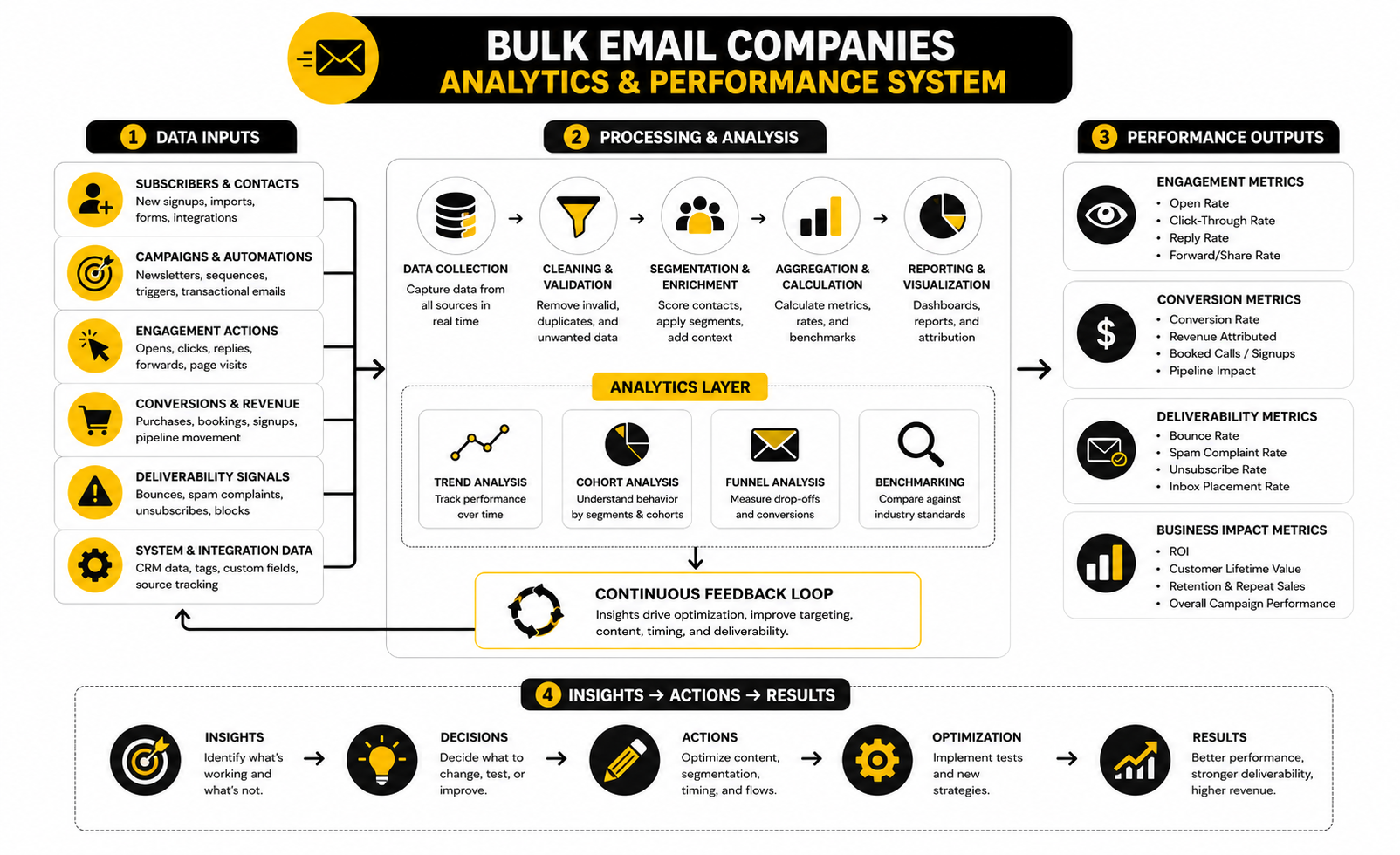
Reporting should help you make decisions, not just admire dashboards. Open rate, click rate, bounce rate, unsubscribe rate, complaint rate, conversion rate, revenue, replies, and automation performance all tell different parts of the story. A serious bulk email company should make those signals easy to understand.
Open rates are useful, but they are not enough on their own. Privacy features and image-loading behavior can make opens less precise than many marketers assume. That is why clicks, purchases, booked calls, replies, and pipeline movement often matter more.
This is also where platform fit becomes obvious. Ecommerce teams need revenue attribution and product-level behavior. Agencies need client reporting and account-level visibility. B2B teams need CRM movement and lead-stage reporting. Newsletter operators need subscriber growth, engagement, churn, and sponsor performance.
If the reporting does not connect to the outcome you care about, the platform will make you busy instead of more carefully. The best bulk email companies help you answer simple but important questions: Who engaged? What did they click? What converted? What should we stop sending? What should we improve next?
Compliance Features That Reduce Risk
Compliance is not the exciting part of email marketing, but ignoring it is reckless. A bulk email platform should make it easy to include sender identity, unsubscribe links, consent records, suppression lists, and preference management. These are not premium luxuries. They are basic operating requirements.
The FTC’s CAN-SPAM guidance explains that commercial emails need accurate header information, truthful subject lines, a clear way to opt out, and prompt honoring of opt-out requests FTC CAN-SPAM compliance guide. European and UK rules can be stricter, especially around consent, so businesses that operate internationally need to be even more careful. The platform should support compliance workflows, but your business still needs responsible policies.
Good compliance features also improve marketing quality. When subscribers can manage preferences, you may save people who would otherwise unsubscribe completely. When consent is captured clearly, your team can segment with more confidence. When suppression rules are enforced, you reduce accidental sends to people who already opted out.
This is one reason cheap bulk sending tools can be risky. If a platform makes it easy to upload questionable lists, hide unsubscribe options, or send without proper authentication, that is not a growth shortcut. It is a warning sign.
Integrations With the Rest of the Stack
Email rarely operates alone. Your platform may need to connect with your website, CRM, checkout system, calendar, form builder, landing page tool, help desk, analytics platform, or ad accounts. The smoother those connections are, the easier it becomes to send timely and relevant campaigns.
For example, a service business may want form submissions to trigger a follow-up sequence and create a CRM opportunity. A creator may want a purchase to start an onboarding sequence. An ecommerce brand may want abandoned checkout behavior to trigger a recovery flow. Those use cases depend on integrations as much as they depend on email design.
This is where all-in-one platforms and specialist tools separate. An all-in-one system can reduce duct tape because key pieces already live together. Specialist tools can be stronger in one area, but they may require more integrations to work as a complete marketing system.
Neither approach is automatically better. The right choice depends on how your business operates. If your team wants fewer moving parts, an all-in-one may be worth the tradeoff. If your team already has a mature stack, a focused email platform with strong integrations may be cleaner.
How to Compare Bulk Email Companies by Business Model
Once the core components are clear, the next step is matching the platform to the way your business actually makes money. This is where most comparisons online become too generic. A creator, ecommerce brand, local agency, SaaS company, and service business may all search for bulk email companies, but they are not buying the same outcome.
The right question is not “Which email platform has the most features?” The right question is “Which platform supports the workflow that creates revenue here?” If a tool fits your business model, the system feels simple even when the backend is powerful. If it does not fit, every campaign starts needing workarounds.
This section turns the comparison into a practical decision process. You are not trying to find the flashiest dashboard. You are trying to find the platform that helps your team capture leads, manage consent, segment intelligently, send consistently, follow up automatically, and measure the result that matters.
For Agencies and Client-Based Businesses
Agencies need more than email sending. They usually need client accounts, CRM pipelines, forms, calendars, funnels, automations, reporting, and sometimes white-label options. A standard newsletter tool can work for simple campaigns, but it often becomes limiting once the agency needs to manage follow-up across multiple clients.
This is where GoHighLevel deserves attention. It is built around the agency and service-business model, so email is part of a broader system that can include CRM records, SMS, booking flows, funnels, pipeline stages, and client sub-accounts. That matters because the agency is not just sending newsletters; it is usually trying to turn leads into appointments, appointments into sales conversations, and sales conversations into revenue.
The decision comes down to operational control. If your agency wants to centralize client marketing inside one platform, an all-in-one system can reduce the number of tools you need to manage. If your agency already has a mature stack and only needs campaign sending, a focused email platform may be cleaner. Do not buy complexity for status. Buy it only when it removes real friction.
For Ecommerce Brands
Ecommerce teams should compare bulk email companies based on customer behavior, not just campaign volume. The platform needs to understand purchases, abandoned carts, product interest, repeat buying, discounts, VIP segments, and post-purchase education. A generic email sender can announce a sale, but it may struggle to run lifecycle marketing properly.
The most useful ecommerce email setup usually includes welcome flows, abandoned cart messages, browse abandonment, customer win-back campaigns, product education, replenishment reminders, and loyalty segmentation. These campaigns work best when they are connected to store behavior. Without that connection, the team ends up guessing who should receive what.
Ecommerce brands should also think carefully about landing pages and conversion pages. If the email is sending traffic to a product page that does not explain the offer well, the campaign will underperform. A page builder like Replo can fit teams that want more control over high-converting ecommerce pages without waiting on heavy development cycles.
For Creators, Coaches, and Digital Product Sellers
Creators and digital product sellers usually need simplicity, speed, and a clean path from audience to offer. They may need newsletters, lead magnets, automated nurture sequences, checkout pages, course access, webinars, and simple funnels. The platform should help them publish and sell without turning the business into a technical project.
For this group, Systeme.io can be a practical fit because it combines email marketing, funnels, automations, products, and courses in one place. That kind of setup is especially useful when the business does not have a large technical team. The fewer disconnected tools you need, the faster you can test offers.
A funnel-first seller may also compare ClickFunnels, especially when the sales process depends on landing pages, order forms, upsells, and campaign-specific funnels. Email still matters, but in this model the page sequence often carries a large part of the conversion work. The best setup is the one that keeps the subscriber journey clear from opt-in to purchase.
For SaaS and B2B Service Companies
SaaS and B2B service companies should look at email through the lens of lead quality, product education, sales readiness, and retention. A bulk campaign may generate awareness, but the real value usually comes from nurture sequences, onboarding flows, product usage triggers, renewal reminders, and sales handoff. The platform needs to support that longer journey.
A B2B buyer rarely moves from first email to purchase in one step. They may read a guide, attend a webinar, compare options, talk to a team member, and then return weeks later. That means the email system must work with CRM data, lead scoring, lifecycle stages, and sales activity.
For this reason, CRM compatibility matters more than a massive template library. A B2B team should know which contacts are leads, active opportunities, customers, churn risks, and reactivation targets. If the email platform cannot read or update that lifecycle information, marketing and sales will drift apart.
For Local Businesses
Local businesses need practical follow-up. They may not need advanced enterprise features, but they do need appointment reminders, review requests, missed-call follow-up, seasonal promotions, referral campaigns, and customer reactivation. The best platform is the one the business can actually use every week.
A local gym, clinic, home service company, med spa, real estate office, or repair shop usually needs email to work alongside SMS, phone calls, calendars, forms, and pipeline tracking. This is why all-in-one systems often make sense in local business marketing. The email campaign is not isolated; it is part of the customer communication flow.
For local service operators or agencies serving local clients, GoHighLevel can be useful because it connects email with appointment booking, CRM workflows, automation, and client management. The key is to keep the setup simple at first. A local business does not need twenty automations on day one. It needs a few reliable flows that prevent leads from slipping through the cracks.
Professional Implementation: Setup, Migration, Deliverability, and Automation
Choosing the platform is only half the work. Implementation is where the decision becomes real. A strong platform can still fail if the setup is rushed, the list is dirty, the domain is unauthenticated, or the automations are built without a clear customer journey.
The implementation process should be deliberate. You are building a sending system that protects your reputation and supports revenue, not just importing contacts and pressing send. This is especially important when moving from one platform to another because a migration can quietly break forms, tags, automations, unsubscribe records, and reporting if nobody maps the system carefully.
The good news is that professional implementation does not need to be complicated. It just needs to be sequenced correctly. Do the foundational work first, then build campaigns on top of it.
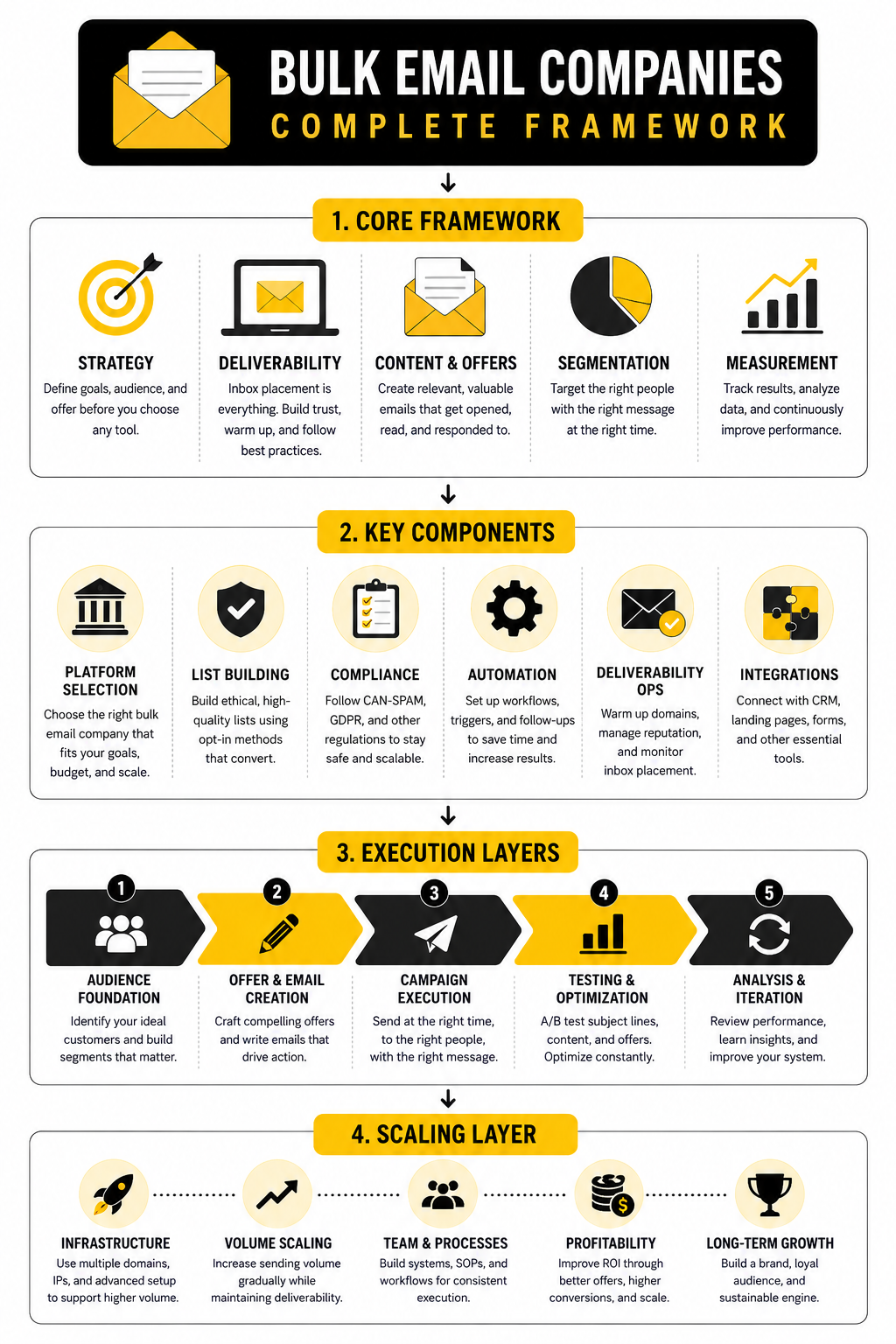
Step 1: Define the Business Outcome
Start with the outcome before you touch the software. Are you trying to generate booked calls, sell products, increase repeat purchases, onboard customers, revive inactive leads, publish a newsletter, or manage campaigns for clients? Each goal requires a different platform setup.
This step matters because most bulk email companies can technically send campaigns, but not all of them are equally good at supporting the outcome behind the campaign. A booked-call business needs forms, calendars, lead routing, and sales reminders. An ecommerce brand needs purchase behavior and product-triggered flows. A creator needs audience growth, launch sequences, and clean offer delivery.
Write the primary outcome in plain language. For example, “turn new lead magnet subscribers into booked consultations” is better than “send weekly emails.” The first version tells you what to build. The second only tells you what activity to perform.
Step 2: Audit the Existing List
Before migrating or launching, look at the list honestly. Where did the contacts come from? When did they opt in? What did they expect to receive? Who has engaged recently? Who has bounced, unsubscribed, complained, or gone inactive?
This audit protects deliverability. Google’s sender guidance tells senders to avoid unwanted messages and keep spam rates low, with a clear warning to stay below 0.10% and avoid reaching 0.30% or higher in Postmaster Tools Google sender guidelines. Yahoo also tells senders to keep complaint rates low and support easy unsubscribe Yahoo sender best practices. Those requirements make list quality a business issue, not just a technical issue.
Do not move every contact blindly. Segment active subscribers, recent buyers, new leads, unengaged contacts, unsubscribes, hard bounces, and questionable imports before the migration. If a contact should not receive email, do not carry that risk into the new platform.
Step 3: Map Fields, Tags, and Segments
A clean migration depends on structure. Before importing contacts, decide which fields, tags, lists, and segments need to exist in the new system. This prevents the classic mess where every old list gets dumped into the new platform with no logic.
Map the data around how the business will actually use it. You may need fields for customer type, lead source, product purchased, signup date, region, lifecycle stage, or sales owner. You may need tags for webinar attendees, lead magnet downloads, VIP customers, trial users, booked calls, or inactive subscribers.
Keep the structure simple enough for the team to maintain. Too many tags become noise. Too few tags make segmentation weak. The best structure gives you enough detail to send relevant emails without forcing everyone to decode a messy internal language.
Step 4: Configure Authentication Before Sending
Do not send serious volume until authentication is in place. This usually means setting up SPF, DKIM, and DMARC records for the sending domain. Your email platform should provide the DNS values, but the actual records are normally added wherever your domain is managed.
This step is not optional anymore. Google and Yahoo both require stronger authentication practices for bulk senders, and domain alignment is now a basic trust signal. A 2025 academic study of SPF records across 12 million domains found that while SPF adoption is growing, many configurations still contain errors or overly broad permissions that weaken protection SPF configuration study.
Use a sending domain that matches the brand and business context. Avoid sudden high-volume sending from a fresh domain. If you are moving platforms, warm the setup gradually instead of blasting the full list on day one. The goal is to look consistent, legitimate, and wanted.
Step 5: Rebuild Essential Automations First
Do not rebuild every old automation at once. Start with the flows that protect revenue and customer experience. These are usually welcome sequences, lead follow-up, abandoned cart or missed opportunity flows, customer onboarding, sales handoff, and unsubscribe or preference workflows.
Each automation should have one job. A welcome sequence should orient the subscriber and guide them toward the next step. A sales nurture flow should build trust and move qualified leads closer to action. A reactivation flow should identify who still wants to hear from you and suppress people who do not engage.
This is where platform choice becomes visible. If you are using GoHighLevel, you may connect email with pipeline movement, appointment booking, and SMS reminders. If you are using Brevo, you may focus more on email campaigns, marketing automation, and contact segmentation. The platform should match the workflow, not force the workflow to match the platform.
Step 6: Test Every Entry Point
Before sending traffic into the system, test the places where contacts enter. Forms, popups, checkout integrations, webinar registrations, calendar bookings, lead magnets, API connections, and manual imports should all be checked. A broken entry point creates missing contacts, wrong tags, duplicate records, or failed automations.
Testing should follow the contact journey, not just the form submission. Submit a test lead and check whether the contact record is created correctly. Confirm the right tags or fields are applied. Verify the welcome email sends. Click the links. Test the unsubscribe link. Check whether the contact exits or enters the right automation.
This is not glamorous work, but it prevents expensive mistakes. A campaign can look perfect on the surface while the backend quietly fails to segment, suppress, or follow up. Implementation quality shows up in the details.
Step 7: Launch in Controlled Batches
A controlled launch is safer than a big-bang send. Start with the most engaged segment first, then expand gradually. This helps establish positive engagement signals and gives you time to catch issues before the full list is involved.
Monitor bounces, complaints, unsubscribes, clicks, replies, and conversions after each batch. If negative signals spike, pause and diagnose before sending more. It is better to slow down than to damage domain reputation with avoidable mistakes.
This is especially important after migrating platforms or changing sending domains. Mailbox providers notice sudden changes in volume, infrastructure, and engagement. A patient rollout gives the new setup a better chance to build trust.
Step 8: Review Results and Tighten the System
Implementation is not finished after the first send. The first few campaigns should teach you what needs fixing. Look for weak segments, low-click messages, high-unsubscribe offers, broken links, confusing automations, and contacts who should be suppressed.
Review performance by audience and purpose. A newsletter, sales campaign, onboarding sequence, and reactivation flow should not be judged the same way. Each one has a different job, so each one needs the right success metric.
The best operators treat bulk email as a system they improve over time. They clean lists, refine segments, simplify automations, test offers, and watch deliverability signals. That is how bulk email companies become useful business infrastructure instead of just another monthly software bill.
Statistics and Data
Data is useful only when it changes decisions. Too many teams use email analytics as a scoreboard after the campaign is already over. Better teams use the numbers as a control panel while the system is still improving.
This matters when comparing bulk email companies because different platforms make different metrics easier to see. Some tools are strong at campaign reporting. Some are better at ecommerce attribution. Others are better at pipeline tracking, agency dashboards, or automation-level reporting. The best choice is not the platform with the most charts. It is the platform that shows the few numbers your team can actually act on.
Email benchmarks also need context. A high open rate does not automatically mean a campaign made money. A low unsubscribe rate does not automatically mean people care. A strong click rate from the wrong audience can still produce weak revenue. The numbers matter when you connect them to audience quality, message relevance, deliverability, and the business outcome behind the send.
Open Rate Shows Attention, Not Revenue
Open rate is usually the first number people check, but it should not be treated as the final verdict. It can tell you whether the sender name, subject line, timing, and audience relationship are creating enough interest for people to open. That is useful, especially when comparing campaigns sent to similar segments.
The problem is that open tracking is imperfect. Privacy features, image loading, mailbox behavior, and bot activity can distort the number. That does not make open rate useless, but it does mean you should not build your whole strategy around it.
Industry benchmarks prove why context matters. Mailchimp’s benchmark data shows that open and click performance vary significantly by industry, which means a “good” number for one business may be average or weak for another Mailchimp email marketing benchmarks. Brevo’s 2025 benchmark report also breaks performance down by region, sector, and channel, which reinforces the same point: email performance should be judged against the audience and business model, not a random universal average Brevo marketing benchmark.
The action is simple. Use open rate to diagnose attention, not profit. If opens are weak across an engaged segment, test the subject line, sender name, preview text, timing, or list expectation. If opens are strong but clicks are weak, the problem is probably not the subject line.
Click Rate Shows Message Relevance
Click rate is usually more useful than open rate because it measures action. It tells you whether the email made people interested enough to move from the inbox to the next step. For most businesses, this is where performance starts getting real.
A click can mean different things depending on the campaign. In a newsletter, it may show content interest. In ecommerce, it may show product intent. In a B2B nurture sequence, it may show buying research. In a local service campaign, it may show appointment or quote intent.
This is why bulk email companies should make click reporting easy to segment. You need to know who clicked, what they clicked, and what happened afterward. A single campaign-level click rate is not enough if your list contains leads, customers, inactive contacts, and high-value buyers.
The action is to use click behavior to improve segmentation and follow-up. People who click pricing, booking, product, demo, or consultation links should not be treated the same as people who click a general blog post. Clicks are intent signals. Good platforms help you turn those signals into better timing, better offers, and better automation.
Conversion Rate Shows Whether the Campaign Did Its Job
Conversion rate is where email performance connects to business reality. A conversion might be a purchase, booked call, demo request, form submission, reply, trial activation, renewal, or event registration. The right conversion depends on the purpose of the campaign.
This is the metric that often exposes weak strategy. A campaign can get opens and clicks but still fail if the offer is unclear, the landing page is weak, the audience is wrong, or the next step feels too heavy. Email does not operate in isolation. It carries attention into the rest of the funnel.
For ecommerce and funnel-based businesses, this is why the page after the click matters so much. If your email is strong but the landing page is slow, confusing, or generic, the campaign will leak revenue. Tools like ClickFunnels or Replo can make sense when the conversion path needs dedicated pages, offers, checkout flows, or campaign-specific landing experiences.
The action is to judge each campaign by the job it was supposed to do. A nurture email may not create immediate sales, but it should increase qualified interest. A launch email should drive revenue. A reactivation email should identify who still wants to hear from you. Measure the right outcome, then improve the weakest step.
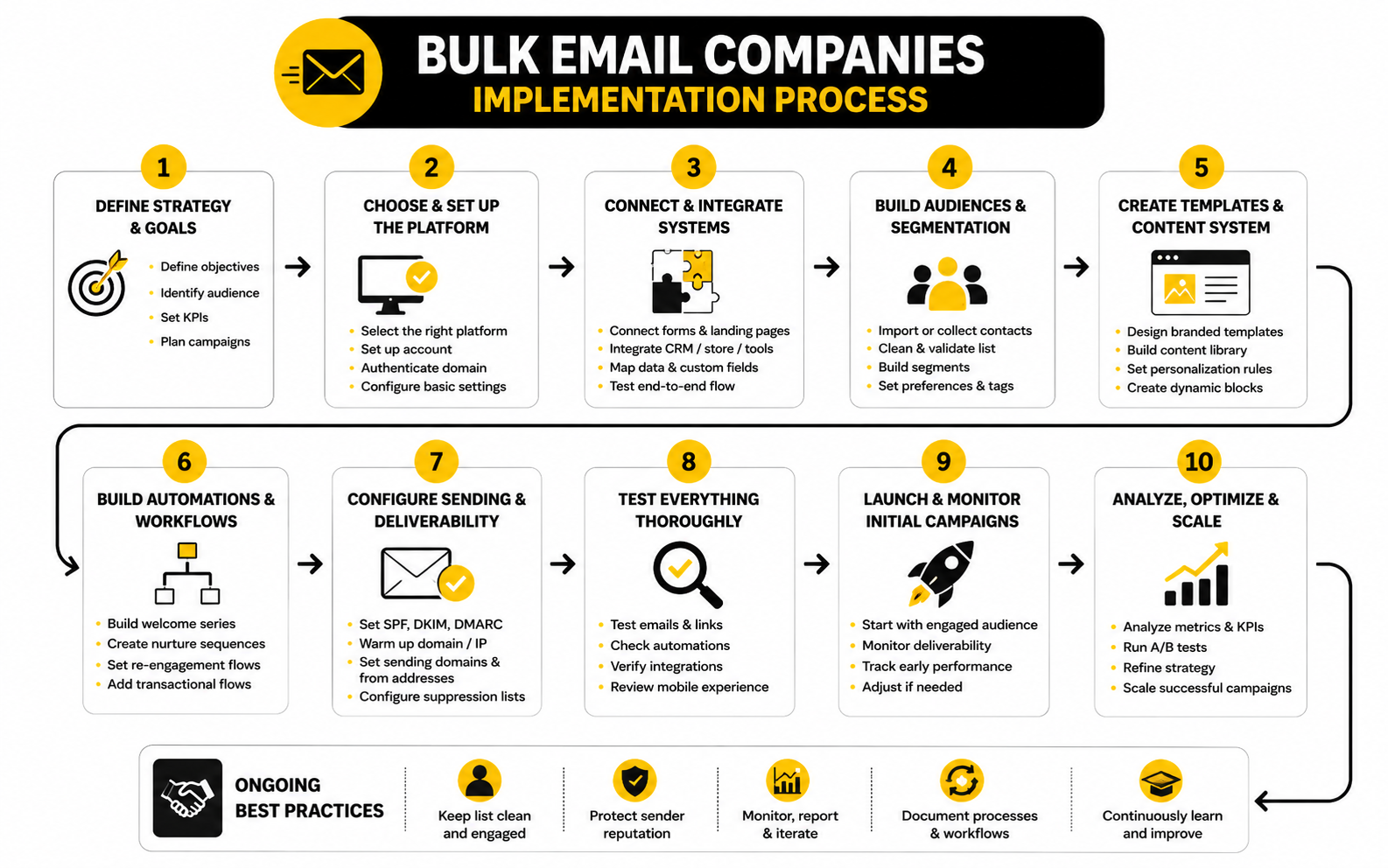
Deliverability Metrics Show Whether the System Is Healthy
Deliverability metrics tell you whether your email system is earning trust. These include bounce rate, spam complaint rate, inbox placement, domain reputation, authentication status, unsubscribe behavior, and engagement trends. They are not as exciting as revenue screenshots, but they protect the entire channel.
Google’s sender guidance tells bulk senders to keep spam rates reported in Postmaster Tools below 0.10% and avoid ever reaching 0.30% or higher Google sender guidelines. Yahoo’s sender best practices also tell senders to authenticate mail, keep complaint rates low, and stay below a 0.3% spam rate Yahoo sender best practices. Those numbers are small for a reason. A tiny percentage of unhappy recipients can create a real deliverability problem at scale.
Mailgun’s State of Email Deliverability research also shows that many senders still underuse deeper deliverability monitoring, with only 13% using inbox placement testing in its 2025 report Mailgun State of Email Deliverability. That is a big gap. Many businesses are watching campaign metrics while missing whether emails are actually reaching the inbox consistently.
The action is to monitor deliverability before there is a crisis. If bounce rates rise, clean the list. If complaints rise, check consent, targeting, frequency, and message expectations. If engagement drops across the same audience, review sending cadence, content relevance, and whether inactive contacts should be reduced or suppressed.
Bounce Rate Separates List Quality From Campaign Quality
Bounce rate helps you understand whether your list is technically healthy. A hard bounce usually means the address is invalid or cannot receive mail. A soft bounce may point to temporary issues, but repeated soft bounces should still be watched.
This metric is especially important during migration, list imports, or reactivation campaigns. If you upload an old list and immediately send to everyone, bounce problems can appear fast. That can hurt sender reputation before your new platform even has a chance to perform.
Bulk email companies should automatically handle hard bounces and make bounce reporting easy to understand. You should not need to manually hunt through campaign data to protect your sender reputation. The system should help you identify risky segments before they damage future sends.
The action is to treat bounce rate as a list-quality warning. If bounces are high, do not keep sending and hope it improves. Pause, segment, validate where appropriate, remove bad addresses, and review how the list was collected in the first place.
Unsubscribes Are Not Always Bad
Unsubscribes can feel negative, but they are not always a problem. Sometimes an unsubscribe is simply a person cleaning up their inbox. That is better than the same person ignoring every campaign or marking the email as spam.
The real issue is the pattern. A normal unsubscribe rate after a clear campaign is different from a sudden spike after a confusing offer, aggressive frequency increase, or poorly targeted send. When unsubscribes rise, the question is not “How do we stop people from leaving?” The better question is “Did we send the wrong message to the wrong people too often?”
Preference centers can help here. Some subscribers do not want to leave completely; they just want fewer emails or different topics. If the platform supports preference management, you may keep more valuable subscribers while still respecting their inbox.
The action is to read unsubscribes as feedback. If people leave after a specific type of campaign, improve targeting or reduce frequency. If inactive subscribers leave during a reactivation campaign, that may be a healthy cleanup. Not every smaller list is a worse list.
Complaint Rate Is the Metric You Cannot Ignore
Spam complaints are more serious than unsubscribes. When someone marks an email as spam, they are telling the mailbox provider the message was unwanted. At scale, that signal can damage deliverability quickly.
This is why permission and expectation matter so much. If people do not remember signing up, if the content does not match what they expected, or if the frequency suddenly increases, complaints can rise. The platform can help with suppression and authentication, but the sender is responsible for sending wanted email.
Complaint rate should influence campaign decisions immediately. If a segment complains at a higher rate than others, stop sending to that segment until you understand why. If a certain campaign type creates complaints, rewrite the message, change the offer, or remove that audience from the send.
The action is blunt: protect the channel. Revenue from one aggressive campaign is not worth damaging inbox access for future campaigns. Good email marketing compounds only when subscribers and mailbox providers continue to trust the sender.
Automation Reporting Shows Where the Journey Breaks
Automation reporting is different from one-off campaign reporting. A campaign report tells you how one send performed. Automation reporting tells you where people move, stall, click, convert, unsubscribe, or drop out across a sequence.
This is especially important for welcome flows, lead nurture, onboarding, abandoned cart, reactivation, and sales follow-up. If email one performs well but email three loses people, the issue may be the transition. If people click but do not convert, the problem may be the landing page or offer. If people stop engaging after purchase, the onboarding sequence may not be useful enough.
The best bulk email companies make automation analytics clear at each step. You should be able to see performance by message, trigger, branch, delay, and outcome. Without that visibility, automation becomes a black box.
The action is to improve automations one weak point at a time. Do not rewrite the entire sequence because one metric looks off. Find the step where attention, clicks, or conversions drop, then fix that specific part.
Revenue and Pipeline Metrics Keep Email Honest
Email teams should connect analytics to revenue or pipeline whenever possible. This does not mean every email must sell directly. It means the email program should support a measurable business outcome over time.
For ecommerce, that might mean revenue per recipient, repeat purchases, average order value, and recovered carts. For agencies and service businesses, it might mean booked appointments, qualified leads, pipeline value, show-up rate, and closed deals. For creators, it might mean launch revenue, course purchases, paid community signups, or webinar registrations.
This is where a platform like GoHighLevel can be useful for service businesses and agencies because email activity can connect with CRM stages, opportunities, calendars, and follow-up workflows. A lighter email platform may report campaign clicks well, but it may not show whether those clicks became booked calls or sales opportunities. That difference matters when email is part of a sales process.
The action is to define the money metric before the campaign launches. If the goal is appointments, track appointments. If the goal is customer retention, track repeat purchases or renewals. If the goal is education, track progression to the next meaningful step.
Benchmarks Are Starting Points, Not Targets
Benchmarks are helpful because they give you a reference point. They are dangerous when teams treat them like universal goals. Your list source, industry, offer, brand trust, send frequency, audience age, and business model can all change what a healthy number looks like.
A small list of qualified buyers can outperform a massive list of cold or inactive contacts even if the smaller list produces less impressive vanity metrics. A niche B2B newsletter may have a different click pattern than an ecommerce flash sale. A customer onboarding sequence should not be judged the same way as a promotional campaign.
Use benchmarks to spot obvious problems, not to copy someone else’s scorecard. If your engagement is far below similar businesses, investigate the list, offer, content, and deliverability. If your numbers are above average but revenue is weak, the issue may be conversion after the click.
The action is to build your own baseline. Track performance by segment and campaign type for several sends, then improve against your own history. External benchmarks help you orient. Internal benchmarks help you grow.
The Metrics That Deserve Weekly Attention
A practical analytics system does not need to be complicated. Most teams should review a small set of metrics weekly and a deeper set monthly. The goal is to notice problems early and make better campaign decisions without drowning in dashboards.
The weekly view should include:
The monthly view should go deeper into list growth, inactive subscribers, automation performance, deliverability trends, top campaigns, weak campaigns, and segment-level revenue. This is where you make structural decisions. You may decide to clean inactive subscribers, rebuild a welcome flow, change send frequency, improve landing pages, or move a segment into a different automation.
The best analytics habit is simple: pair every number with an action. If a metric does not help you decide what to keep, stop, fix, or test, it may not need attention right now. Bulk email companies give you data, but the business wins by turning that data into better decisions.
Advanced Tradeoffs Before You Scale
By this point, the platform should not be judged only by features, dashboards, or campaign results. The harder question is whether the system can scale without creating hidden problems. Growth exposes weaknesses that were easy to ignore when the list was smaller.
This is where bulk email companies start to separate sharply. Some platforms are excellent for early-stage sending but become restrictive when segmentation, attribution, or automation complexity increases. Others are powerful from the beginning but require more setup discipline, better data hygiene, and clearer ownership inside the team.
Scaling email is not just sending more. It means keeping permission clear, data useful, deliverability healthy, workflows understandable, and reporting tied to revenue. If volume grows but the system gets harder to trust, you are not scaling. You are making the mess bigger.
The All-in-One vs Specialist Platform Decision
The all-in-one platform gives you convenience. It can combine CRM, funnels, forms, email, SMS, calendars, payments, landing pages, and automations under one roof. That can be a huge win for agencies, local businesses, creators, and lean teams that do not want to maintain a stack full of disconnected tools.
The specialist platform gives you depth. It may do fewer things, but it can be stronger in campaign management, ecommerce triggers, deliverability controls, analytics, or enterprise integrations. That can be better for teams with a mature tech stack and clear internal processes.
The tradeoff is control versus simplicity. A platform like GoHighLevel can make sense when the business wants CRM, automation, funnels, appointments, and client management together. A platform like Brevo can make sense when the business wants email marketing, automation, transactional messaging, and multichannel campaign tools without adopting a heavier agency-style operating system.
The Hidden Cost of Cheap Sending
Low pricing can be attractive, especially when the contact list is growing. But cheap sending is not automatically efficient. If the platform saves money on the subscription but costs time in manual work, weak reporting, poor integrations, or deliverability problems, the real cost is higher than it looks.
A cheap plan can also become expensive when the business hits limits. Some platforms restrict automation steps, segmentation, users, reporting, landing pages, support, or monthly sends. Others scale pricing sharply as contacts grow. You need to evaluate the cost at the size you expect to reach, not only the cost today.
The better way to compare cost is by business outcome. If a more expensive platform helps the team capture more qualified leads, follow up faster, prevent missed opportunities, or attribute revenue clearly, the higher subscription may be justified. If the advanced features will sit unused, a leaner platform is more carefully.
Do not buy the cheapest bulk email company just because the monthly bill looks friendly. Buy the platform that keeps the whole system profitable. Sometimes that means paying more. Sometimes it means refusing complexity you do not need.
When Dedicated Infrastructure Makes Sense
Dedicated infrastructure can sound impressive, but it is not a magic upgrade. A dedicated IP or advanced sending setup can help high-volume senders with consistent volume, strong list quality, and clear deliverability practices. It can hurt smaller or inconsistent senders who cannot maintain a stable sending pattern.
Mailbox providers look for trust signals over time. If your sending volume spikes suddenly, if your complaint rate rises, or if your engagement drops, dedicated infrastructure will not save you. It may actually make the problem more visible because the reputation is concentrated around your own sending behavior.
Shared infrastructure can be safer for many smaller businesses because the platform manages reputation across many senders and enforces rules that protect the pool. Dedicated infrastructure becomes more reasonable when you have enough volume, technical confidence, and deliverability monitoring to manage it responsibly.
This is a decision to make after reviewing volume, cadence, list quality, complaint history, and business risk. If the platform pushes dedicated infrastructure as a default upgrade without explaining the responsibilities, be careful. Infrastructure only helps when the sender is ready for it.
Vendor Lock-In and Data Portability
Vendor lock-in is not always obvious on day one. It usually appears later, when you want to move platforms, rebuild reporting, export automation data, change your CRM, or separate one business unit from another. The more deeply your email platform touches the business, the more important portability becomes.
Before committing, check how easily you can export contacts, fields, tags, segments, unsubscribes, campaign results, automation history, and purchase or pipeline data. Some data may export cleanly. Some may not. That matters because your list is not just a marketing asset; it is part of the operating memory of the business.
This is especially important for agencies. Client data should remain clean, separate, and portable. If an agency builds everything in a way that cannot be handed over, audited, or migrated, it creates future risk for both the agency and the client.
A good platform choice does not mean you plan to leave. It means you avoid being trapped. Strong operators document forms, automations, tags, custom fields, integrations, and suppression rules so the system can be understood later by someone who was not there when it was built.
Permission Quality Beats List Size
Large lists look impressive, but permission quality is what keeps the channel healthy. A smaller list of people who clearly opted in and still engage is usually more valuable than a massive list of uncertain contacts. This is one of the most important scaling lessons in email.
Permission quality affects deliverability, engagement, complaints, and conversion. If people do not remember signing up, they are more likely to ignore, unsubscribe, or complain. If they joined for one topic and receive something unrelated, engagement drops. If they were imported from a weak source, the risk compounds.
Google’s sender guidance tells bulk senders to avoid unwanted messages and keep spam rates low, while Yahoo’s best practices also emphasize complaint control, authentication, and compliant sending behavior Google sender guidelines Yahoo sender best practices. That is not just technical advice. It is a reminder that mailbox providers reward wanted mail.
Scaling should make consent clearer, not blurrier. Use better forms, clearer expectations, confirmed preferences when appropriate, and separate segments for different types of interest. The goal is not to email everyone you can. The goal is to email the people who are most likely to value the message.
AI Can Help, But It Cannot Fix Bad Strategy
AI features are showing up across bulk email companies, and some of them are genuinely useful. AI can help draft subject lines, summarize segments, generate campaign ideas, personalize copy, build workflow suggestions, and speed up repetitive production. That can save real time.
But AI cannot fix a weak offer, a dirty list, unclear positioning, or poor segmentation. If the input is wrong, the output will still be wrong. Faster campaign creation does not help if the campaign is going to the wrong audience.
The better use of AI is operational support. Let it help with first drafts, variations, summaries, and internal planning. Keep the strategy, audience logic, approval, and compliance decisions in human hands. Email is too close to revenue and reputation to run on autopilot without judgment.
AI is most useful when the team already understands the customer journey. Then it can help improve speed and consistency. Without that foundation, it just helps you send more average email faster.
Multichannel Follow-Up Changes the Platform Decision
Email is powerful, but it is not always enough by itself. Many businesses need email to work with SMS, chat, calls, retargeting, forms, calendars, and sales workflows. That changes how you should compare platforms.
A lead who fills out a consultation form may need an instant email, a text reminder, a calendar link, a sales notification, and a CRM stage update. A customer who clicks a product link may need a follow-up offer, a retargeting audience, or a support sequence. A webinar registrant may need reminders across multiple channels.
This is where all-in-one systems can have an advantage. If you use GoHighLevel, the email flow can connect with SMS, pipeline movement, calls, calendars, and client reporting. If your business uses separate specialist tools, the same workflow may still be possible, but it will depend more heavily on integrations.
The strategic question is simple: does email need to trigger action somewhere else? If yes, compare bulk email companies based on workflow connectivity, not just campaign sending. The more connected the journey, the more important the backend becomes.
Compliance Gets Harder as the Business Grows
Small teams often treat compliance as a checkbox. Larger teams cannot afford that. As the business grows, more people touch the email program, more data enters the system, more campaigns go out, and more regions may be involved.
That means the platform should support clear permissions, role-based access, approval processes, suppression lists, consent records, unsubscribe management, and audit-friendly workflows. It should also make it hard for a team member to accidentally send to people who opted out. Human error becomes more likely as more people get involved.
The FTC’s CAN-SPAM guidance explains core commercial email requirements in the United States, including accurate header information, truthful subject lines, opt-out handling, and honoring unsubscribe requests promptly FTC CAN-SPAM compliance guide. Businesses operating in stricter regions need to account for additional consent and privacy obligations. A platform should make responsible sending easier, but the business still owns the policy.
This is one reason permission workflows should be designed early. Do not wait until the list is huge to clean up consent, preferences, and suppression logic. Build the habits while the system is still manageable.
Scaling Requires Ownership, Not Just Software
The most underrated email scaling issue is ownership. Someone needs to own the health of the system. Not just the campaigns, not just the copy, and not just the software subscription. The system.
That owner should understand list quality, deliverability, segmentation, automation logic, reporting, integrations, compliance basics, and business goals. They do not need to be a technical genius, but they do need to know how the pieces connect. Without ownership, the system slowly becomes a pile of old tags, broken automations, duplicated segments, and campaigns nobody fully understands.
This is especially true when several people create emails. Sales wants follow-up. Marketing wants newsletters. Customer success wants onboarding. Leadership wants promotions. Without governance, subscribers get too many disconnected messages and the data becomes unreliable.
A simple operating rhythm fixes a lot. Review metrics weekly, clean segments monthly, audit automations quarterly, document major changes, and keep one clear source of truth for naming conventions. The platform matters, but the operating discipline matters just as much.
Red Flags When Comparing Bulk Email Companies
Some red flags are obvious, like poor support or confusing pricing. Others are more subtle. A platform can look polished and still be a bad fit if it encourages risky sending, hides important limits, or makes migration painful.
Watch for these warning signs:
The biggest red flag is any company that makes bulk sending feel consequence-free. Email does not work that way anymore. If a tool encourages you to upload questionable lists and blast aggressively, it is not protecting your business.
The Strategic Choice Comes Down to Fit
The best platform is the one that fits your business model, team capacity, growth stage, and risk tolerance. A solo creator does not need the same system as a local agency. An ecommerce brand does not need the same analytics as a B2B sales team. A newsletter operator does not need the same pipeline features as a service business.
This is why comparison tables only go so far. They can show features, but they cannot understand your workflow. The real decision comes from mapping your audience, offers, follow-up process, technical needs, reporting requirements, and internal ownership.
Use the earlier framework as a filter. If the platform handles audience management, sending infrastructure, automation, conversion support, and reporting in a way that matches your business, it belongs on the shortlist. If it misses one of those areas in a way that matters to your revenue model, keep looking.
Bulk email companies are not interchangeable. The right one becomes part of your growth system. The wrong one becomes another tool your team has to fight.
Recommended Bulk Email Companies, Buying Advice, and FAQ
The final decision should feel practical, not theoretical. By now, the pattern is clear: bulk email companies are not interchangeable. The right platform depends on your list quality, workflow, business model, automation needs, conversion path, reporting requirements, and ability to manage deliverability responsibly.
A good shortlist should include only tools that support the way your business actually grows. If your revenue comes from booked calls, prioritize CRM, calendars, pipeline automation, and follow-up. If your revenue comes from ecommerce, prioritize behavioral triggers, product data, revenue attribution, and landing page quality. If your revenue comes from content, courses, or digital products, prioritize simple funnels, clean automation, and fast publishing.
The smartest move is to choose a platform you can operate consistently. A powerful system that nobody maintains will decay. A simpler system that your team understands can produce better results because it gets used correctly every week.
Best Fit by Use Case
For agencies, local businesses, and service teams that need CRM, funnels, email, SMS, calendars, pipeline automation, and client management in one place, GoHighLevel is one of the strongest fits. It makes the most sense when email is part of a broader sales and follow-up system. It is not just about sending campaigns; it is about moving leads through a process.
For creators, coaches, and digital product sellers who want email, funnels, automations, checkout, and courses without building a complex stack, Systeme.io is worth comparing. It fits lean businesses that need to launch quickly and keep the system manageable. The tradeoff is that larger or more specialized teams may eventually want deeper reporting or integrations elsewhere.
For small and mid-sized businesses that want email marketing, automation, transactional messaging, and multichannel options, Brevo is a practical option. Brevo’s 2025 benchmark resources also show how performance varies by channel, region, and industry, which is useful for teams that want broader marketing context instead of judging email in isolation Brevo marketing benchmark. It works best when the team wants a balanced marketing platform rather than a heavy agency CRM.
For businesses where the email campaign is tightly connected to sales pages, funnels, order forms, upsells, and launch sequences, ClickFunnels can be a strong fit. It is most useful when conversion pages are central to the strategy. Email matters, but the funnel experience after the click becomes just as important.
For ecommerce teams that need more control over campaign landing pages and product storytelling, Replo can support the conversion side of the email system. It is not a replacement for the email platform itself. It becomes useful when the biggest leak is the page experience after subscribers click.
The Final Buying Checklist
Before choosing a platform, run the decision through a simple checklist. This prevents you from buying based on a demo that looks good but does not fit your actual workflow. It also keeps the conversation focused on business outcomes instead of random features.
Use this checklist before committing:
The best answer is usually obvious after this exercise. A platform either supports the way your business grows or it does not. Do not force a tool into a workflow it was never designed to handle.
What are bulk email companies?
Bulk email companies are platforms that help businesses send email campaigns, newsletters, automated sequences, transactional messages, or promotional emails to larger groups of contacts. The better ones do more than send volume. They also help with contact management, segmentation, authentication, unsubscribe handling, reporting, and automation.
The term can cover many types of tools. Some platforms are built for newsletters, some for ecommerce, some for agencies, and some for all-in-one sales funnels. That is why choosing one requires more than comparing how many emails you can send per month.
Are bulk email companies legal?
Bulk email companies are legal when used responsibly and in line with applicable email laws. The issue is not bulk sending itself. The issue is whether the sender has proper permission, identifies itself honestly, includes an unsubscribe mechanism, honors opt-out requests, and avoids deceptive practices.
In the United States, the FTC’s CAN-SPAM guidance says businesses must avoid misleading headers and subject lines, identify commercial messages where required, include a valid physical postal address, and honor opt-out requests within 10 business days FTC CAN-SPAM compliance guide. Other regions may require stricter consent rules, so international senders need to be especially careful. A platform can support compliance, but the business is still responsible for how it uses the system.
What is the difference between bulk email and spam?
Bulk email is a sending method. Spam is unwanted, misleading, abusive, or improperly permissioned email. A company can send bulk email responsibly to subscribers who asked to hear from it, and another company can send a smaller number of emails irresponsibly.
The difference comes down to permission, relevance, identity, unsubscribe handling, and complaint behavior. If people understand why they are receiving the email and can easily opt out, the sender is operating in a healthier place. If people are surprised, annoyed, misled, or trapped, the sender is creating spam risk.
Which bulk email company is best for agencies?
Agencies usually need more than email campaigns, so GoHighLevel is often a strong fit. It combines CRM, automations, funnels, calendars, SMS, pipeline management, and client account structure. That makes it useful when the agency is managing lead generation and follow-up for multiple clients.
A focused email platform can still work if the agency only handles newsletters or simple campaigns. But once client work includes sales pipelines, booked calls, reminders, reporting, and multi-step follow-up, an all-in-one system can reduce operational friction. The best choice depends on whether the agency needs campaign sending or a complete client marketing system.
Which bulk email company is best for creators?
Creators often need simple funnels, lead magnets, email sequences, digital products, checkout, and course delivery. Systeme.io can fit that model because it keeps many of those pieces in one platform. That helps creators launch without stitching together too many tools.
A creator with a more advanced content operation may eventually want a specialized newsletter platform, CRM, or analytics stack. But for many early and mid-stage creators, simplicity matters more than enterprise-level flexibility. The right platform should help the creator publish, nurture, sell, and deliver without creating a technical bottleneck.
Which bulk email company is best for ecommerce?
Ecommerce brands should prioritize platforms that connect email behavior with store behavior. The most important features are customer segmentation, purchase triggers, abandoned cart flows, product recommendations, revenue attribution, and lifecycle campaigns. A general sender may be fine for basic promotions, but ecommerce usually needs deeper customer data.
The page after the click matters too. If subscribers click but do not buy, the issue may be the offer, product page, landing page, or checkout flow. Tools like Replo can support ecommerce teams that need stronger landing pages connected to campaign traffic.
How much do bulk email companies cost?
Pricing varies by platform, contact count, monthly sending volume, features, users, automation limits, and support level. Some platforms charge mostly by contacts. Others charge by email volume, feature tier, or account structure. This is why the cheapest starting price can be misleading.
The more carefully comparison is the cost at your expected scale. A plan that looks cheap today may become expensive once you add more contacts, users, automations, or reporting features. Also consider time cost. A cheaper platform that creates manual work may cost more than a higher-priced platform that saves hours every month.
What metrics should I track when using bulk email companies?
The most important metrics are open rate, click rate, conversion rate, bounce rate, unsubscribe rate, spam complaint rate, revenue or pipeline movement, and automation performance. Each metric answers a different question. Open rate shows attention, click rate shows interest, conversion rate shows business outcome, and deliverability metrics show system health.
Do not treat every campaign the same. A newsletter, reactivation campaign, abandoned cart flow, and sales nurture sequence should each have different goals. The platform should make it easy to connect performance to the actual purpose of the email.
What spam complaint rate is too high?
For Gmail senders, Google’s public sender guidance says to keep spam rates below 0.10% and avoid ever reaching 0.30% or higher in Postmaster Tools Google sender guidelines. Yahoo’s sender guidance also points to complaint control and recommends staying below a 0.3% spam rate Yahoo sender best practices. These are not numbers to casually approach.
If complaints rise, pause and investigate. Review the list source, consent quality, targeting, subject line, offer, frequency, and unsubscribe visibility. Complaint rate is one of the clearest signals that recipients do not want what you are sending.
Do I need a dedicated IP for bulk email?
Most smaller senders do not need a dedicated IP right away. A dedicated IP can help larger senders with consistent volume, strong engagement, and disciplined deliverability practices. But it can hurt senders who do not have enough volume or consistency to build and maintain reputation.
Shared infrastructure can be better for many businesses because the platform manages the sending environment and reputation standards. Dedicated infrastructure becomes more relevant when volume is high, sending patterns are stable, and the team can monitor deliverability properly. Do not buy it just because it sounds more professional.
How often should I clean my email list?
You should review list health regularly, not only when performance drops. For most businesses, a monthly review of inactive contacts, bounces, unsubscribes, and engagement trends is a good starting rhythm. Larger senders may need closer monitoring.
Cleaning the list does not always mean deleting everyone who has not clicked recently. It means separating active subscribers, cooling segments, inactive contacts, customers, and risky addresses so you can send appropriately. The goal is to protect reputation while keeping valuable relationships alive.
Can I use purchased lists with bulk email companies?
Purchased lists are risky and often violate platform policies. Even when a list looks targeted, the recipients usually did not directly ask to receive email from your business. That creates higher risks of complaints, unsubscribes, spam placement, and account problems.
Responsible email marketing is built on permission and expectation. People should understand why they are receiving your emails. If they do not, the list may create more damage than opportunity.
What is the most important feature in a bulk email platform?
The most important feature is not one single button. It is the combination of segmentation, deliverability support, automation, and reporting. Those four areas determine whether the platform can send relevant email, protect reputation, follow up intelligently, and show what is working.
If forced to choose one priority, start with list and audience management. Bad contact data weakens everything else. Even the best automation builder will underperform if the audience structure is messy.
Should I choose an all-in-one platform or a dedicated email tool?
Choose an all-in-one platform when email needs to work closely with CRM, funnels, calendars, SMS, sales pipelines, client accounts, or checkout workflows. This is common for agencies, local businesses, service companies, creators, and teams that want fewer tools. GoHighLevel, Systeme.io, and ClickFunnels can each fit different versions of that need.
Choose a dedicated email or marketing platform when your stack is already mature and you need stronger specialization in campaigns, segmentation, deliverability, or integrations. The best choice depends on how much of your customer journey the email platform needs to control. More control is useful only when your team can manage it.
How do I know when I have outgrown my current email platform?
You have probably outgrown your platform when the team relies on manual workarounds, cannot segment the way it needs to, cannot connect email performance to revenue, or cannot audit automations clearly. You may also feel it when integrations become fragile, reporting becomes shallow, or support cannot help with deliverability and migration issues.
Do not migrate just because another tool looks exciting. Migrate when the current platform is blocking a real business workflow. A careful migration can improve the system, but a rushed migration can create broken forms, lost tags, duplicate contacts, and damaged deliverability.
What is the safest way to start with bulk email?
Start with a clean, permission-based list and a simple sending plan. Authenticate your domain, import only contacts you should email, create clear segments, build one or two important automations, and send to engaged subscribers first. Then expand gradually.
The safest approach is controlled growth. Watch bounces, complaints, unsubscribes, clicks, and conversions as you increase volume. Bulk email works best when trust compounds over time.
Build a stronger local presence with BAAM AI
Turn your website, Google profile, social channels, and AI visibility into one growth engine
Most businesses do not need more random marketing activity. They need a consistent presence system that helps the right people find them, trust them, and take action. BAAM AI brings strategy, local SEO, website updates, Google Maps visibility, social content, AI-search readiness, media production, and reporting into one practical monthly engine.
If you want your marketing to keep working after the campaign ends, start with a free BAAM AI presence audit. See how your business shows up today and where the fastest visibility wins are at BAAM AI.