
BAAM AI Blog
Best Emailing Service: A Practical Framework for Choosing the Right Platform
The best emailing service is not the one with the longest feature list. It is the one that helps your emails reach the inbox, makes your campaigns easier to manage, connects cleanly with your business systems, and...
The best emailing service is not the one with the longest feature list. It is the one that helps your emails reach the inbox, makes your campaigns easier to manage, connects cleanly with your business systems, and gives you reliable data on what is actually working. That sounds simple, but it is where many businesses make the wrong choice.
Email is still one of the most durable marketing channels because it is owned, direct, and measurable. Global digital behavior keeps changing, but email remains deeply embedded in how people work, shop, learn, subscribe, and buy; the Digital 2025 Global Overview Report shows how crowded the broader digital environment has become, which makes dependable owned channels even more valuable. At the same time, inboxes are stricter than they used to be, and choosing a tool without thinking about deliverability, automation, segmentation, and compliance is a fast way to waste money.
This guide is built for business owners, marketers, creators, agencies, SaaS teams, ecommerce brands, and service businesses that want a practical answer. Not a generic list. Not a “top 10” ranking that ignores context. The real goal is to help you understand what makes an emailing service good for your specific business model, then choose with confidence.
Why the Best Emailing Service Still Matters
Email matters because it sits closer to revenue than most marketing channels. Social platforms can change reach overnight, paid ads can become expensive fast, and search traffic can move after an algorithm update. A well-managed email list gives you a direct line to people who already gave you permission to contact them.
That does not mean every email platform is equally useful. The difference between a basic newsletter tool and a serious emailing service shows up in the details: authentication, segmentation, automation depth, reporting, integrations, list hygiene, and the ability to support your next stage of growth. A small creator might need simple broadcasts and landing pages, while a service business may need CRM pipelines, booking flows, SMS, and follow-up automation through a broader platform like GoHighLevel.
Deliverability is also no longer optional. Google’s sender guidelines now emphasize authentication through SPF, DKIM, and DMARC, along with other sender requirements that affect whether emails land in the inbox or get filtered away by Gmail systems (Google Workspace Admin Help). Sinch Mailgun’s recent research found that nearly 18% of emails fail to reach the inbox, which means a platform can look good on the surface while quietly costing you revenue if the sending foundation is weak (Sinch).
The Decision Framework for Choosing an Emailing Service
The best emailing service should be judged through a framework, not a popularity contest. A platform can be excellent for ecommerce and still be the wrong choice for a consultant. Another tool can be perfect for newsletters but frustrating for a sales team that needs CRM visibility and multi-step follow-up.
Start with the business outcome you need. If your main goal is sending newsletters, prioritize editor quality, list growth tools, templates, and simple reporting. If your goal is sales follow-up, you need automation, CRM integration, tagging, contact history, and reliable triggers. If your goal is ecommerce revenue, you need behavior-based flows, product recommendations, abandoned cart emails, and clean integration with your store.
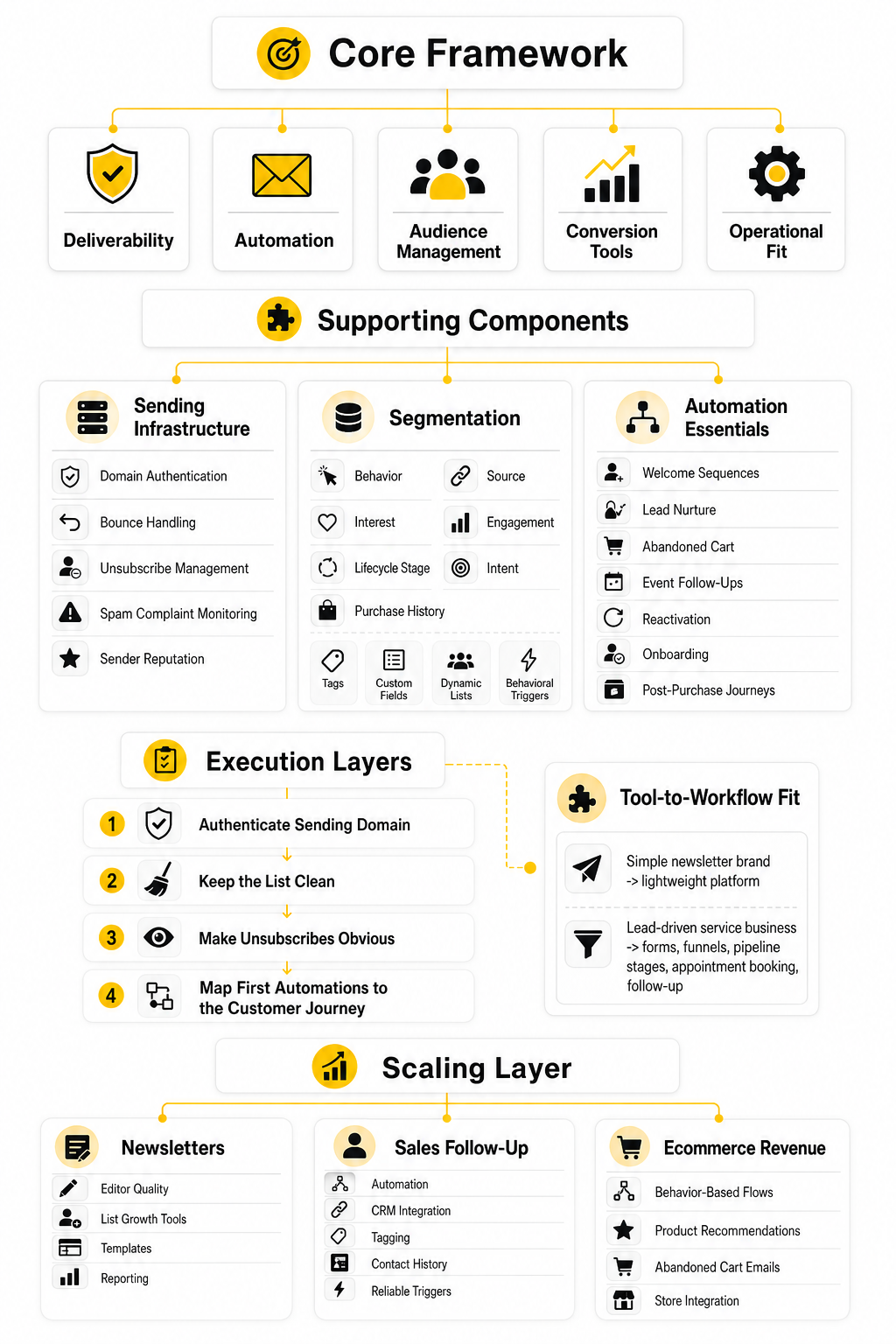
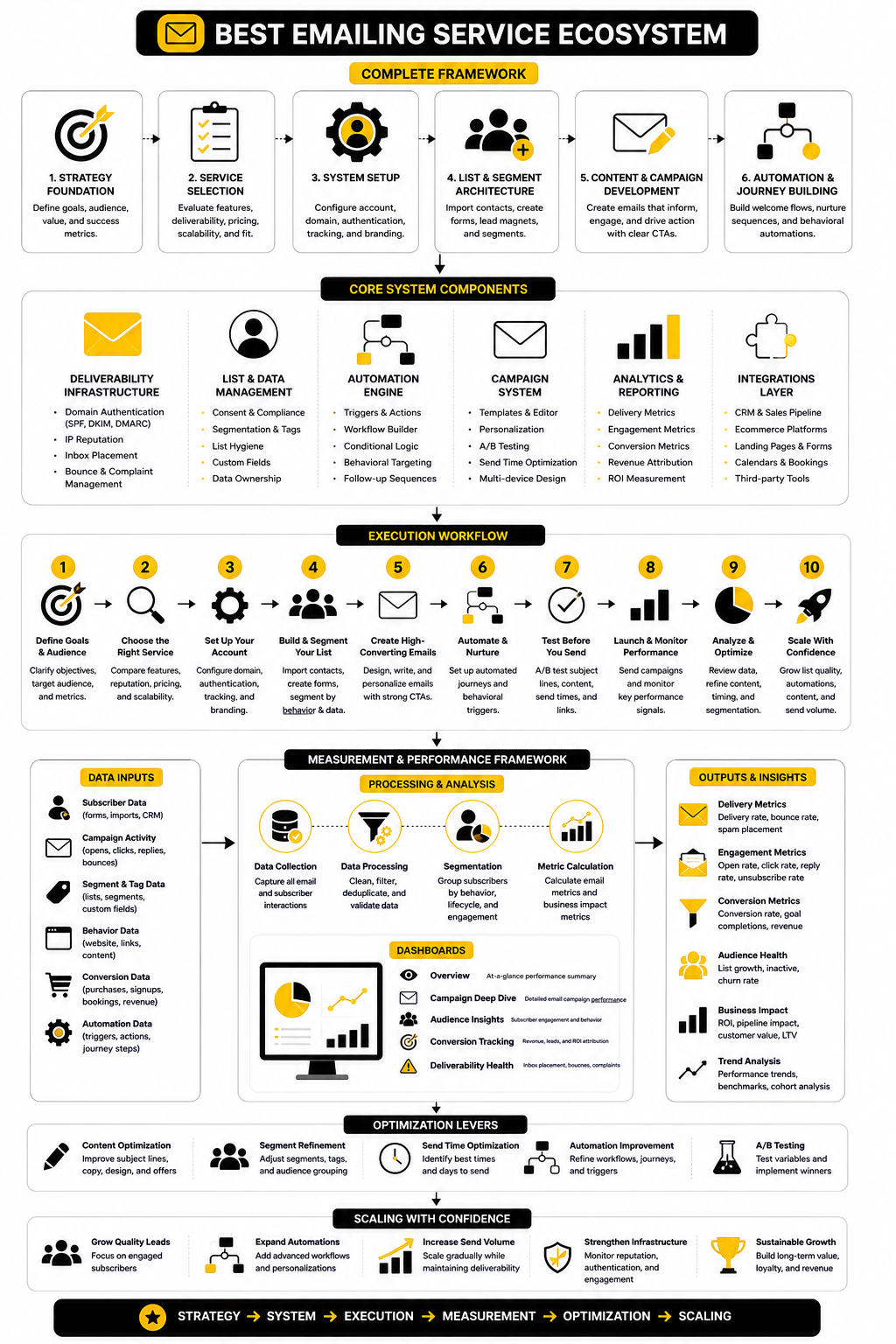
A practical framework looks at five areas: deliverability, automation, audience management, conversion tools, and operational fit. Deliverability answers whether people receive your emails. Automation answers whether the platform can send the right message at the right time. Audience management answers whether you can segment and personalize without creating chaos. Conversion tools answer whether the service helps you turn attention into leads or sales. Operational fit answers whether your team can actually use the platform without needing a full-time specialist for every change.
Core Components Every Serious Email Platform Needs
A serious emailing service needs strong sending infrastructure first. This includes domain authentication, bounce handling, unsubscribe management, spam complaint monitoring, and clear guidance for maintaining sender reputation. Without that foundation, better templates and clever subject lines will not save the campaign.
The next core component is segmentation. Good email marketing is not about blasting everyone with the same message. It is about grouping contacts by behavior, interest, lifecycle stage, purchase history, source, engagement, and intent so the message feels relevant instead of random. This is why platforms with tagging, custom fields, dynamic lists, and behavioral triggers usually outperform tools that only manage static lists.
Automation is the third major component. The best emailing service should handle welcome sequences, lead nurture flows, abandoned cart reminders, event follow-ups, reactivation campaigns, onboarding emails, and post-purchase journeys. Litmus reports that 35% of companies see email ROI of 36:1 or more, but that kind of return usually comes from systems that are measured, tested, and automated rather than one-off campaigns sent whenever someone remembers (Litmus).
Professional Implementation Starts Before You Send
Professional email implementation begins before the first campaign goes out. The sending domain should be authenticated, the list should be clean, the unsubscribe process should be obvious, and the first automations should be mapped around the customer journey. Skipping this setup is one of the biggest reasons businesses blame the platform when the real issue is poor implementation.
A strong setup also includes the right match between tool and workflow. A simple newsletter brand may be fine with a lightweight email platform, while a lead-driven service business may get more leverage from an all-in-one system that connects forms, funnels, pipeline stages, appointment booking, and follow-up. For businesses that want email marketing without building a complicated stack, Brevo is often worth evaluating because it combines email campaigns with automation and customer communication tools in a more accessible package.
The rest of this guide will build from that foundation. First, we will define the decision framework in more detail. Then we will break down the technical and strategic components that separate a decent emailing service from a platform you can confidently build around.
The Decision Framework for Choosing an Emailing Service
Choosing the best emailing service starts with one uncomfortable truth: most platforms look similar until you try to run a real business through them. They all promise campaigns, automations, templates, analytics, and better customer communication. The difference appears when you need clean segmentation, reliable deliverability, useful reporting, and a workflow your team can actually maintain.
The right decision is not “Which tool is famous?” It is “Which tool fits the way we acquire leads, sell, follow up, and retain customers?” A creator, ecommerce store, local service business, agency, SaaS company, and course seller all need email, but they do not need the same email system.
That is why this framework focuses on fit before features. A platform can have impressive automation and still be wrong if it slows you down. Another platform can look simple and still be perfect if your email strategy is mainly newsletters, nurture sequences, and a few high-converting landing pages.
Start With Your Business Model
Your business model should shape your software choice before pricing does. If you sell services, you usually need lead capture, appointment booking, CRM visibility, pipeline follow-up, and reminders. In that case, an all-in-one platform like GoHighLevel can make more sense than stitching together separate tools for forms, email, SMS, calendars, and deal tracking.
If you sell digital products, templates, coaching, memberships, or low-ticket offers, the funnel and checkout experience matter more. You need an emailing service that can connect with opt-in pages, sales pages, order forms, and automated follow-up without turning every campaign into a technical project. Tools like ClickFunnels and Systeme.io fit naturally into that world because email is tied closely to the funnel.
If you run a more traditional small business, ecommerce brand, or newsletter-driven operation, the best emailing service may be one that keeps campaigns simple but still gives you automation, segmentation, and professional sending tools. Brevo and Moosend are worth comparing when you want dedicated email marketing features without immediately committing to a heavier sales platform.
Decide What the Emailing Service Must Actually Do
A good platform should solve your current problem without blocking your next stage of growth. That means you need to define your must-have jobs before looking at feature tables. Otherwise, you will get pulled toward shiny tools that look powerful but do not match your daily workflow.
For most businesses, the core jobs are straightforward. You need to collect subscribers, organize them, send useful emails, automate follow-up, measure performance, and protect deliverability. If the platform does those things cleanly, it deserves attention.
The mistake is treating every advanced feature as equally important. You may not need predictive AI, advanced attribution, or complex branching logic on day one. But you absolutely need reliable list management, easy campaign creation, clean unsubscribe handling, domain authentication support, and reporting that helps you make better decisions.
Match the Tool to Your Customer Journey
The best emailing service should support the journey from first contact to repeat purchase. That journey usually starts with a form, quiz, lead magnet, checkout, booking page, webinar registration, or product purchase. From there, the email platform should help you continue the conversation without forcing you to manually chase every lead.
For a service business, that might mean a lead fills out a form, receives an instant confirmation, gets a helpful follow-up sequence, books a call, and moves into a pipeline. For a creator, it might mean someone downloads a free guide, receives a welcome sequence, gets invited to a paid product, and later joins a higher-value offer. For an ecommerce brand, it might mean a visitor joins a discount list, abandons a cart, receives product education, and gets post-purchase recommendations.
This is where platform fit becomes obvious. A lightweight newsletter tool can be perfect for content distribution but weak for sales operations. A CRM-heavy platform can be excellent for agencies and local businesses but feel too much for a creator who only needs clean broadcasts and a few automated sequences.
Evaluate Deliverability Before Design
Email design matters, but deliverability matters more. A beautiful campaign is useless if it lands in spam or never reaches the inbox. Before you choose a tool because the templates look good, check how the platform supports authentication, list hygiene, bounce handling, unsubscribe management, and sender reputation.
You should also look at how much control the platform gives you over sending practices. Can you authenticate your domain properly? Can you remove inactive subscribers easily? Can you segment engaged contacts from cold contacts? Can you monitor performance without guessing?
This is especially important as mailbox providers become stricter. The best emailing service should make healthy sending behavior easier, not harder. If a platform hides the basics or makes authentication confusing, that is a warning sign.
Check Automation Depth Without Overcomplicating It
Automation is where email becomes a business asset instead of a repetitive task. A solid emailing service should let you build welcome sequences, nurture campaigns, reactivation flows, event reminders, abandoned cart follow-ups, and customer onboarding emails. The goal is not to create a giant maze; the goal is to make sure the right people receive the right message at the right moment.
Simple automation is often enough in the beginning. A welcome sequence, a lead nurture flow, and a basic sales follow-up can do a lot of work. The danger is buying a platform because it can build complex workflows you will never actually use.
That said, you do not want to outgrow your system too quickly. Look for triggers, conditions, tags, custom fields, and behavior-based segmentation. These features give you room to improve without forcing a platform migration the moment your marketing gets more serious.
Look at Integrations Like a Real Operator
Integrations are not a bonus feature. They decide whether your email platform becomes part of your business system or another isolated login. Your emailing service should connect cleanly with the tools where leads, purchases, bookings, and customer data already live.
For example, a funnel-first business may care about how email connects with sales pages and checkout flows. A service business may care more about CRM records, appointment reminders, pipeline stages, and missed-call follow-up. A content-led brand may need forms, landing pages, social scheduling, and newsletter publishing to work together without constant manual exports.
This is also where practical tools around the edges can help. If you use social content to grow your email list, Buffer can support the traffic side of the system. If you rely on forms, surveys, or intake flows, Fillout can help capture better lead data before it moves into your email follow-up.
Understand Pricing Beyond the Monthly Fee
Pricing can be misleading because many email platforms charge based on contacts, sends, features, seats, or a combination of all three. A plan that looks cheap at 500 contacts can become expensive once your list grows. Another plan that looks more expensive may save money if it replaces several separate tools.
Do not compare pricing only by the lowest advertised plan. Compare the cost at the list size you expect to reach over the next 12 months. Then check which features are locked behind higher tiers, especially automation, segmentation, reporting, landing pages, support, and multi-user access.
Also consider migration cost. Moving lists, tags, automations, forms, and templates later can be painful. Paying slightly more for the right emailing service now can be cheaper than rebuilding your system after the wrong tool starts limiting growth.
Choose for Execution, Not Impressiveness
The best emailing service is the one you will actually use well. That means the interface matters, the workflow matters, and the learning curve matters. A technically powerful system can still underperform if your team avoids using it because every change feels risky.
Execution also depends on how fast you can launch and improve. Can you create a form without waiting on a developer? Can you edit an automation without breaking the whole journey? Can you read the reports and understand what to change next?
This is the practical filter that keeps the decision grounded. Pick a platform that supports your strategy, protects your sending reputation, and makes consistent execution easier. That combination beats a bloated feature list almost every time.
Core Components Every Serious Email Platform Needs
A serious email platform is not just a place to write messages. It is the system that controls how subscribers enter your world, how they are organized, what they receive, when they receive it, and how you measure the result. When you are comparing tools, this is where the real evaluation starts.
The best emailing service should make the fundamentals easy without hiding the important controls. You want a tool that is simple enough to use every week, but structured enough to support proper segmentation, automation, compliance, and reporting. If the platform only feels good during the free trial but becomes messy once you add real campaigns, it is not the right long-term choice.
This section breaks the platform down into the components that actually matter. Not every business needs the most advanced version of each component on day one. But every business needs a clear path for using these pieces properly as the list grows.
Contact Capture and List Growth
Everything starts with how people join your list. A good emailing service should give you reliable forms, landing pages, embedded signups, integrations, and source tracking so you know where subscribers came from. If list growth depends on clunky forms or disconnected pages, your follow-up strategy starts with weak data.
The capture experience should also match the promise you make to the subscriber. If someone joins for a free guide, discount, webinar, consultation, or waitlist, the confirmation and first email should feel immediate and relevant. That first moment sets expectations, and it is often where trust is either built or quietly lost.
For funnel-driven businesses, this is why email should not be treated as a separate afterthought. A tool like ClickFunnels can be useful when the opt-in page, sales page, checkout, and email follow-up need to work together as one conversion path. For simpler lead capture, Fillout can help collect cleaner information before those contacts move into your email system.
Segmentation and Subscriber Organization
A growing list becomes valuable only when you can organize it. Segmentation lets you separate new leads from customers, engaged readers from inactive contacts, buyers from non-buyers, and different interests from each other. Without that structure, every campaign becomes a general announcement to everyone, which usually means weaker engagement.
The best emailing service should support tags, custom fields, lists, segments, and behavior-based rules. These controls let you send more relevant emails without manually rebuilding audiences every time. They also help protect deliverability because engaged contacts can be treated differently from people who have stopped opening or clicking.
Good segmentation does not need to be complicated. Start with the basics: source, customer status, interest, engagement, and lifecycle stage. Once those are in place, you can add more detail based on products, services, lead magnets, webinar attendance, consultations, or purchase behavior.
Campaign Creation and Content Workflow
Campaign creation should feel smooth because consistency matters. If writing, formatting, testing, and scheduling an email feels painful, you will send less often or rush the process. That is a problem because email works best when your audience hears from you with useful, relevant messages over time.
A strong platform should offer a clean editor, reusable templates, mobile previews, personalization fields, link checks, test sends, and scheduling. These are not flashy features, but they save time and prevent embarrassing mistakes. The easier it is to create quality campaigns, the more likely you are to keep the channel active.
Content workflow also matters when multiple people are involved. If your business has a writer, founder, designer, assistant, or client reviewing emails, look for permissions, approvals, drafts, and version clarity. The more people touching the process, the more your emailing service needs to reduce confusion instead of adding to it.
Automation and Customer Journey Logic
Automation is where email stops being a manual broadcast channel and becomes a system. The goal is not to build the most complex workflow possible. The goal is to create reliable follow-up that responds to subscriber behavior, purchase intent, and customer stage.
A practical automation setup usually starts with a welcome sequence, lead nurture sequence, sales follow-up, abandoned cart or booking reminder, post-purchase sequence, and reactivation campaign. These flows cover the moments where timing matters most. If a platform cannot handle those cleanly, it will limit your growth quickly.
The best emailing service should give you triggers, delays, conditions, branches, tags, and goal-based exits. That means someone can receive the right next email based on what they did, not just where they sit on a calendar. For businesses that sell through consultations, pipelines, and repeat follow-up, GoHighLevel is worth considering because automation can connect email with CRM activity, appointments, text reminders, and sales stages.
Deliverability and Sender Reputation Controls
Deliverability is the invisible layer that decides whether your work gets seen. A platform should help you authenticate your domain, manage bounces, monitor complaints, handle unsubscribes, and keep your sending practices healthy. Google’s sender requirements continue to emphasize SPF, DKIM, DMARC, low spam rates, and easy unsubscribe handling, which makes deliverability a core buying criterion rather than a technical side issue.
Yahoo’s sender guidance also keeps pressure on senders to make promotional email easier to unsubscribe from and safer for recipients. That matters because major inbox providers are not just evaluating the platform you use; they are evaluating your sending behavior, your domain reputation, and how recipients respond to your messages. A weak setup can damage performance even if the email copy is good.
This is why list hygiene belongs inside the process. Remove invalid addresses, suppress hard bounces, watch inactive segments, and avoid blasting cold contacts forever. If your emailing service makes those tasks difficult, you will eventually pay for it through lower engagement and weaker inbox placement.
Reporting and Revenue Visibility
Reporting should help you make decisions, not just admire numbers. Open rates, click rates, unsubscribes, bounces, spam complaints, conversions, and revenue attribution all tell different parts of the story. A good emailing service helps you see which emails create movement, not just which subject lines got curiosity.
Open rates are useful, but they should not be treated as the only truth. Privacy changes, image loading behavior, and inbox differences can make opens less precise than many marketers assume. Clicks, replies, purchases, bookings, form submissions, and pipeline movement are often more useful indicators of whether email is driving business results.
For ecommerce and funnel businesses, revenue reporting is especially important. You want to know which campaigns and automations produce sales, which segments respond, and where the journey breaks. Without that visibility, you are guessing.
Professional Implementation: Setup, Deliverability, and Compliance
Once you know which components matter, implementation becomes the next priority. This is where a lot of businesses make the same mistake: they buy the tool, import the list, send a campaign, and only think about structure after something breaks. Professional implementation avoids that by setting up the foundation before volume increases.
The best emailing service cannot fix a messy strategy by itself. You still need clean data, clear permission, authenticated sending, thoughtful segmentation, and a basic operating rhythm. Software gives you the controls, but the process determines whether those controls produce results.
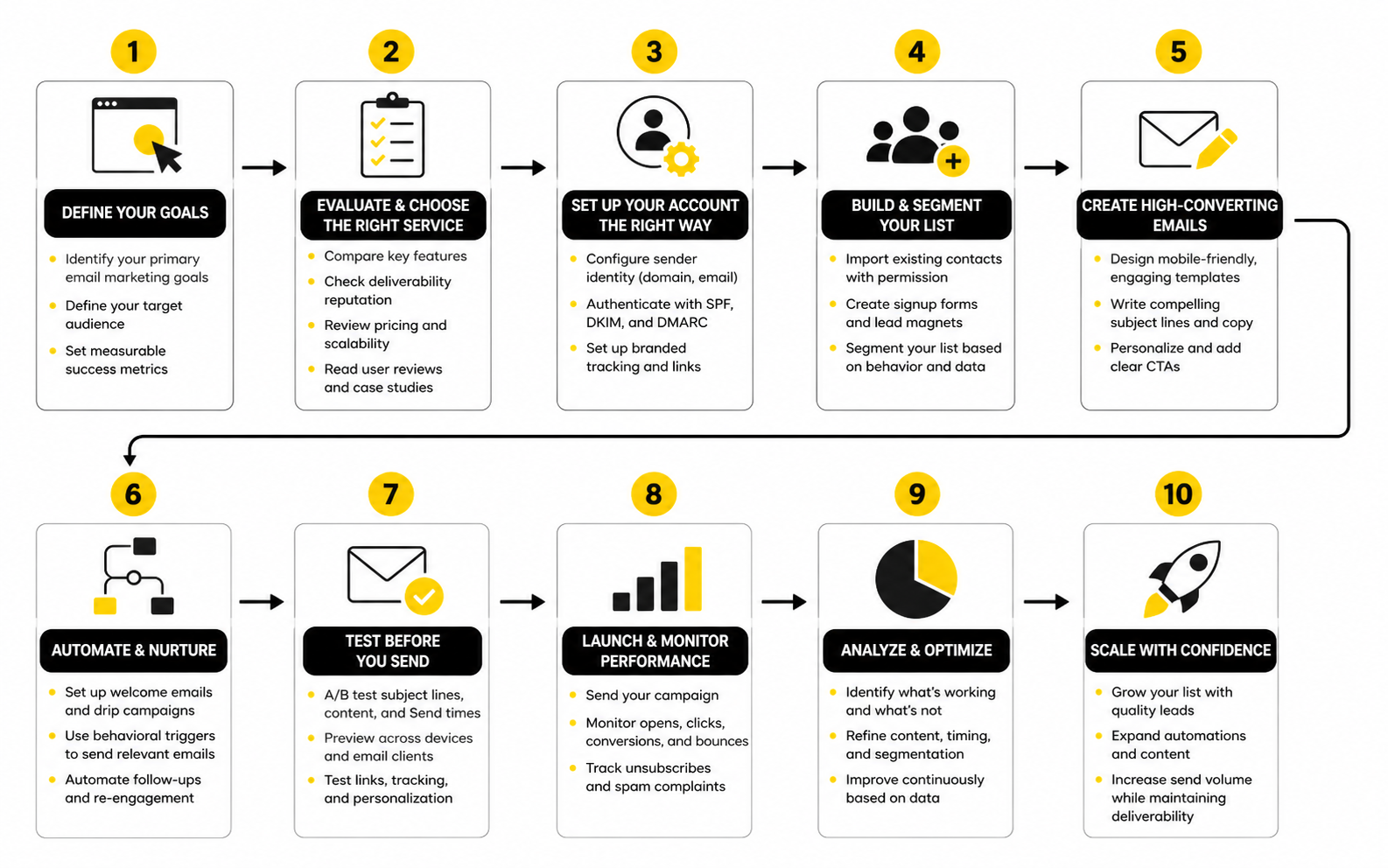
A practical setup should move in order. First, prepare the sending foundation. Then organize contacts. Then build core automations. Then launch campaigns. Then measure and improve based on behavior.
Step 1: Prepare the Sending Foundation
Start by setting up the domain you will use for marketing email. This means configuring SPF, DKIM, and DMARC, then confirming that your platform recognizes the domain as authenticated. Do not skip this because it feels technical; it directly affects whether inbox providers trust your messages.
Next, decide which email addresses will be used for campaigns, replies, transactional messages, and internal alerts. A real reply address is usually better than a no-reply address because it signals that subscribers can interact with your business. It also helps you catch objections, questions, and buying signals that would otherwise disappear.
Finally, review unsubscribe and consent settings before sending. Promotional emails should make it easy for people to leave the list, and your system should process opt-outs reliably. This is not just a compliance checkbox; it protects your sender reputation and keeps the list healthier.
Step 2: Clean and Structure Your Contact Data
Before importing contacts, clean the data. Remove obvious junk, duplicates, role-based addresses when appropriate, old cold contacts, and people who never clearly opted in. A smaller list with real permission is more valuable than a large list that damages your reputation.
Then map your fields properly. Names, email addresses, phone numbers, lead source, customer status, interests, purchase history, and lifecycle stage should go into the right places. If the data enters the platform in a messy way, every automation and segment becomes harder to trust.
This is also the right moment to create your first tags and segments. Keep them simple at the start. Use labels that your future self will understand six months from now, because vague tags become a problem fast.
Step 3: Build the First Essential Automations
Your first automations should support the moments where timing is most important. A welcome sequence should confirm the subscriber made the right choice and introduce the next step. A nurture sequence should educate and build trust before asking for a bigger commitment.
For sales-led businesses, follow-up automation should connect with booking or pipeline activity. If someone requests a consultation, downloads a buying guide, or clicks a high-intent link, the system should help your team respond quickly. That is where CRM-connected platforms can create a real operational advantage.
For product-led businesses, the first priority may be abandoned cart reminders, onboarding, post-purchase education, and review requests. Keep the flow focused on helping the customer move forward. Automation should feel useful, not like pressure disguised as personalization.
Step 4: Create a Campaign Rhythm
Campaign rhythm is how you stay visible without becoming annoying. You do not need to email every day unless your audience expects it and your content earns that frequency. You do need a consistent schedule that your team can maintain.
Start with one dependable campaign type. That might be a weekly newsletter, a product education email, a monthly promotion, a case-study-style breakdown, or a useful tip connected to your offer. Once that rhythm works, layer in more targeted campaigns for specific segments.
Consistency also helps you read the data better. If you send randomly, performance is harder to interpret. If you send with a clear rhythm, you can compare topics, timing, segments, and offers more confidently.
Step 5: Measure, Improve, and Prune
Implementation does not end after launch. Review performance regularly and look for patterns. Which emails get clicks? Which automations create bookings or purchases? Which segments are disengaged? Which subject lines attract curiosity but fail to convert?
Use that data to improve the system in small steps. Rewrite weak emails, split large segments, remove unnecessary automation steps, and test clearer calls to action. The goal is not constant tinkering; the goal is steady improvement based on evidence.
Pruning is part of that process. Inactive contacts cost money, lower engagement averages, and can hurt deliverability over time. A professional email system includes reactivation attempts, then suppression or removal when people remain unengaged.
Statistics and Data
Measurement is where the best emailing service proves whether it is helping the business or just sending messages. A nice editor, clean templates, and impressive automation builder are useful, but they do not matter much if you cannot see what happens after the email goes out. The goal is not to collect more numbers; the goal is to understand which numbers should change your decisions.
Email data becomes useful when it is tied to a question. Did the email reach the inbox? Did the right people open or click? Did those clicks create bookings, purchases, replies, demos, signups, renewals, or pipeline movement? If the platform cannot help you answer those questions, it is giving you activity reporting instead of performance reporting.
Benchmarks can help, but only when you use them carefully. A generic open rate benchmark does not tell you whether your business is healthy. It gives you a rough comparison point, while your own trendline tells you whether your strategy is improving or slipping.
The Metrics That Actually Matter
The first metric layer is delivery and deliverability. Delivery means the receiving server accepted the email, while deliverability is about whether the message reached the inbox instead of spam or another filtered location. That distinction matters because a campaign can look “delivered” in your dashboard while still failing to appear where subscribers actually pay attention.
Inbox placement is one of the clearest signals here. Validity’s 2025 deliverability benchmark emphasizes inbox placement rate as a more accurate deliverability measure than basic delivery because it separates inbox visibility from spam-folder placement. That should influence how you evaluate any emailing service: if it only shows basic sent, delivered, opened, and clicked numbers, you may not be seeing the full risk.
The next layer is engagement. Opens, clicks, click-to-open rate, unsubscribes, spam complaints, replies, and conversions all show how people respond after receiving the message. Open rates can still be useful for directional testing, but clicks and downstream actions usually tell you more about real intent.
Benchmarks Are Starting Points, Not Targets
Benchmarks help you understand whether your numbers are wildly outside normal ranges, but they should not become the strategy. HubSpot’s 2025 benchmark roundup shows that email performance varies heavily by industry, with examples like B2B services, nonprofits, and SaaS showing different open, click-through, bounce, and unsubscribe ranges. That variance is exactly why copying another business’s “good” number can send you in the wrong direction.
MailerLite’s 2025 benchmark data is also useful because it is built from a large campaign base and reports medians across industries and regions. Median data can be more practical than averages because extreme performers do not distort the picture as much. Still, even a strong benchmark cannot tell you whether your offer, audience, timing, list quality, or customer journey is working.
Use benchmarks as a diagnostic tool, not a scoreboard. If your clicks are far below peers, your offer, email body, segment, or call to action may be weak. If unsubscribes spike, your promise and message may be misaligned. If bounces rise, your acquisition sources and list hygiene need attention.
ROI Is the Metric Most Teams Underbuild
Email has a reputation for strong return on investment, but many teams are still not set up to prove it. Litmus reports that 35% of companies see email ROI of 36:1 or more, which is a strong reminder that email can be a serious revenue channel when it is measured properly. The catch is that ROI does not magically appear inside a dashboard unless the system connects campaigns, contacts, conversions, and revenue.
Recent reporting on Sinch Mailgun’s Email Impact Report 2026 highlights the same gap from a different angle: fewer than half of organizations can reliably track email ROI, even though 60% of companies that do measure it report returns above $10 for every $1 spent. That matters because a business can be sending email every week and still be flying blind. Activity is not the same as attribution.
The practical takeaway is simple. The best emailing service for your business should make it possible to connect email performance to the actions you care about. For ecommerce, that may be purchases and repeat orders. For service businesses, it may be booked calls and closed deals. For creators, it may be product sales, webinar attendance, community signups, or membership upgrades.
Build a Simple Email Analytics System
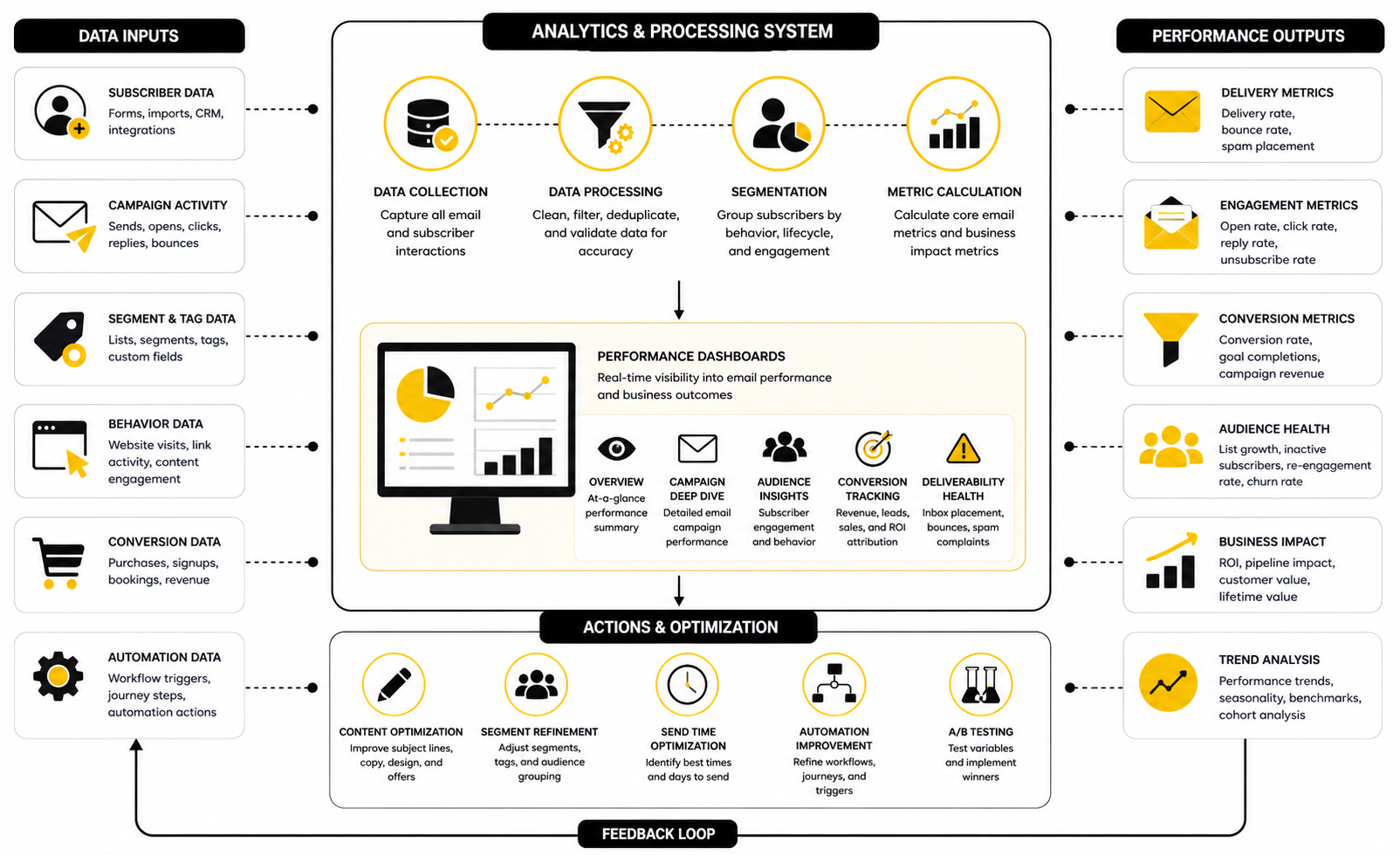
You do not need an enterprise analytics stack to make better decisions. You need a clean measurement loop that tells you what happened, why it may have happened, and what to change next. Keep the system simple enough that you actually review it.
A practical email analytics system has four layers:
This structure prevents you from overreacting to one metric. A high open rate with weak clicks may mean the subject line created curiosity but the email did not create action. A low open rate with high conversions may mean the audience was smaller but more qualified. A high click rate with low sales may point to a landing page, checkout, offer, or sales follow-up issue rather than an email issue.
What Open Rates Can and Cannot Tell You
Open rates are useful, but they are not perfect. Privacy changes, image loading, inbox behavior, and automated systems can affect whether an open is recorded accurately. That means open rate should be treated as a directional signal, not a final answer.
Open rate is still helpful when comparing similar campaigns to similar audiences over time. If your weekly newsletter usually opens around one range and suddenly drops, something changed. It might be the subject line, sender name, send time, audience quality, deliverability, or the topic itself.
The wrong move is optimizing only for opens. A dramatic subject line that gets attention but does not connect to the email body can hurt trust. The better move is to use open rate as the first clue, then look at clicks, replies, conversions, unsubscribes, and complaints before deciding whether the email really worked.
Clicks Show Intent More Clearly
Clicks are stronger than opens because they show that someone took a visible action. A click means the subscriber saw enough value, curiosity, or urgency to leave the inbox and move somewhere else. That makes click data one of the most useful signals for improving campaigns and segments.
But not all clicks are equal. A click on a blog post, pricing page, checkout link, booking page, or support article tells a different story. The best emailing service should make it easy to see which links attract attention and which segments are taking those actions.
Use click behavior to improve follow-up. If someone clicks a service page but does not book, they may need a case study, objection-handling email, or personal follow-up. If someone clicks product education repeatedly, they may be closer to buying than someone who only opens newsletters.
Unsubscribes and Complaints Protect the List
Unsubscribes are not automatically bad. A small, steady unsubscribe rate can mean people who are no longer interested are leaving cleanly instead of ignoring messages or marking them as spam. That is healthy for long-term list quality.
Spam complaints are different. Google’s sender guidance says senders should keep spam rates below 0.1% and avoid reaching 0.3% or higher. That is a serious threshold because complaints send a direct negative signal to mailbox providers.
If complaints rise, do not just blame the tool. Review your permission source, sending frequency, subject lines, content relevance, and unsubscribe visibility. The best emailing service should make compliance easy, but the business still has to send emails people recognize, expect, and value.
Revenue Attribution Needs Context
Revenue attribution is powerful, but it can also be misleading if you do not understand the model. Some platforms attribute revenue to the last email clicked. Others use view-through windows, first-click logic, last-click logic, or custom rules. That means two tools can report different revenue numbers for the same customer journey.
This is why you should focus on consistency more than perfection. Pick a measurement approach and use it the same way over time. The trend will often be more useful than the exact number.
For businesses using funnels, a platform like ClickFunnels can help connect opt-ins, sales pages, checkout steps, and follow-up. For service businesses that care about pipeline and booked appointments, GoHighLevel can be useful because email activity can sit closer to CRM stages and sales outcomes. For simpler campaign measurement, Brevo gives many businesses enough visibility without overcomplicating the stack.
Use Data to Decide the Next Action
The point of measurement is action. If your deliverability signals are weak, fix authentication, list quality, engagement, and sending practices before writing more campaigns. If clicks are weak, improve the offer, message clarity, segmentation, and call to action.
If clicks are strong but conversions are weak, the email may not be the problem. Look at the landing page, booking flow, checkout, pricing, proof, objections, or speed of follow-up. Email data is most useful when it helps you locate the bottleneck instead of guessing.
A practical weekly review can be simple. Look at delivery health, engagement, conversions, revenue, and one improvement to make before the next send. That rhythm keeps email from becoming random and turns your emailing service into a real decision-making system.
Best Emailing Service Options by Business Type
At this point, the decision should feel less like “Which email tool is best?” and more like “Which system fits the way this business grows?” That is the right question. The best emailing service for a newsletter creator may be completely wrong for a local agency, and the best tool for a funnel-heavy business may be overkill for a simple monthly broadcast.
This is where strategy matters more than software preference. You want the platform that supports your acquisition model, sales cycle, team capacity, data needs, and future growth. If the tool fights the way your business already works, it will create friction no matter how many features it has.
The smartest move is to choose based on operational fit. That means looking at your current workflow, your next 12 months of growth, and the risks you cannot afford to ignore. Email platforms are easy to start using, but painful to migrate once your automations, tags, landing pages, segments, and reporting are deeply connected.
For Service Businesses and Agencies
Service businesses usually need more than newsletters. They need lead capture, appointment booking, reminders, pipeline visibility, follow-up sequences, missed-call recovery, and sometimes SMS alongside email. In that world, the best emailing service is often part of a broader client acquisition and sales system.
That is why GoHighLevel makes sense for agencies, local businesses, consultants, and service providers that want email tied to CRM activity. The value is not just sending campaigns. The value is connecting forms, calendars, pipelines, automations, calls, texts, and follow-up in one place.
The tradeoff is complexity. A broader platform gives you more operational control, but it also requires a cleaner setup. If your business is not ready to define pipeline stages, contact sources, automations, and follow-up rules, the platform can become messy quickly.
For Funnel-Driven Businesses
Funnel-driven businesses care about conversion paths. The email system has to support opt-ins, landing pages, checkout flows, upsells, order confirmations, nurture sequences, and offer follow-up. If those pieces are disconnected, you lose visibility and create extra work.
For this use case, ClickFunnels is a strong fit when the funnel experience is central to the business. It helps keep the sales journey close to the follow-up journey, which matters when every step affects conversion. Systeme.io can also be a practical option for creators and smaller businesses that want funnels, email, and digital product delivery without stacking too many tools.
The strategic question is whether email is supporting a funnel or whether the funnel is only one part of a broader customer system. If most revenue comes from opt-in pages, sales pages, and automated offers, funnel-native software can be efficient. If sales depend more on consultation, pipeline management, or client follow-up, a CRM-first platform may be a better fit.
For Ecommerce and Product-Led Brands
Ecommerce brands need email to react to behavior. A shopper browsing a product, abandoning a cart, buying for the first time, or returning after months of silence should not receive the same message as everyone else. This is where segmentation, product data, and event-based automation become essential.
The best emailing service for ecommerce should support cart recovery, post-purchase education, win-back campaigns, product recommendations, review requests, and customer lifecycle segmentation. It should also make it easy to separate first-time buyers, repeat buyers, high-value customers, discount shoppers, and inactive customers. Without that structure, campaigns become too broad and revenue opportunities slip through.
Be careful with aggressive discount automation. Discounts can lift short-term conversions, but they can also train customers to wait. A stronger ecommerce email strategy mixes product education, social proof, replenishment timing, useful recommendations, and selective offers instead of relying on constant price cuts.
For Creators, Coaches, and Digital Product Sellers
Creators and coaches usually need speed, simplicity, and a clear path from audience to offer. They may not need enterprise reporting or complex CRM workflows at the beginning. They do need forms, landing pages, welcome sequences, product launches, webinar follow-up, and clean list segmentation.
A simple stack can work well here. A creator might use Systeme.io for email, funnels, and digital products, or use ClickFunnels when the sales journey needs more structured funnel control. If the creator is building an audience through social content, Buffer can support the traffic side while the emailing service handles the relationship.
The risk for creators is overbuilding. It is easy to spend weeks designing automations before proving the offer. Start with a clear lead magnet, a useful welcome sequence, one core offer, and a basic launch or nurture path. Add complexity only when the data shows where people are dropping off.
For B2B and SaaS Teams
B2B and SaaS email has a different rhythm. The buyer journey is often longer, multiple people may influence the decision, and product usage data can matter more than newsletter engagement. The best emailing service in this context must support lifecycle communication, onboarding, activation, retention, expansion, and sales handoff.
For SaaS, email should not only promote. It should help users reach value faster. That means onboarding emails, feature education, activation nudges, trial-expiration reminders, billing notices, renewal communication, and re-engagement flows. If the platform cannot connect user behavior to messaging, the team will miss important moments.
For B2B service or sales teams, CRM alignment becomes critical. Sales needs to know who clicked high-intent emails, who requested information, who booked a call, and who went cold. A disconnected emailing service can still send campaigns, but it will not give the sales team the context needed to follow up well.
Advanced Considerations Before You Commit
Once the basic fit is clear, look at the deeper tradeoffs. These are the details that do not always matter during the first week but become painful once the list grows. The wrong choice here can create hidden costs, lost data, deliverability issues, or a migration you did not plan for.
Advanced evaluation is not about being overly cautious. It is about avoiding preventable problems. Email is an owned channel, but only if your data, domain reputation, and customer relationships are protected.
A platform should make your business more resilient. If it creates lock-in without export options, hides key reporting, limits authentication support, or makes compliance difficult, that risk deserves attention before you commit.
Data Ownership and Portability
Your email list is one of your most important marketing assets. You should be able to export subscribers, tags, custom fields, suppression lists, engagement data, and campaign records when needed. If a platform makes basic data portability difficult, that is a serious red flag.
Portability matters because businesses evolve. You may start with a simple email platform and later need deeper CRM, ecommerce, or lifecycle automation. Migration is much easier when your data is clean, well-labeled, and exportable.
This is another reason to avoid messy tagging from the beginning. Random labels, duplicate fields, and unclear segments make future migration harder. Treat your data structure like an asset, not an afterthought.
Compliance and Consent Risk
Compliance is not the exciting part of email marketing, but it is one of the most important. Different regions apply different rules, including GDPR in the EU, CAN-SPAM in the United States, CASL in Canada, and privacy laws such as CCPA in California. The practical takeaway is simple: collect permission clearly, honor unsubscribes quickly, and avoid deceptive sending practices.
Your emailing service should support compliant forms, unsubscribe links, suppression lists, consent records, and preference management. It should also make it easy to avoid emailing people who opted out. If those basics are clunky, the platform creates unnecessary risk.
This also affects trust. People are more likely to stay subscribed when they understand why they are receiving your emails and can easily control the relationship. Compliance is not just legal protection; it is part of the customer experience.
Scaling Without Destroying Deliverability
Scaling email is not just sending more. It means sending more while preserving trust, relevance, and reputation. If you grow volume too quickly, import weak lists, or blast inactive subscribers, performance can drop fast.
A scaling plan should include gradual sending increases, engaged-contact prioritization, regular list cleaning, and separate strategies for cold or inactive contacts. It should also include monitoring for bounces, complaints, spam placement, and engagement decline. Google’s sender guidelines emphasize authentication and low spam rates for a reason: mailbox providers reward senders who behave predictably and respect recipients.
This is where the best emailing service should help you operate responsibly. It should make it easy to segment engaged contacts, suppress risky audiences, and maintain authentication. Growth is good, but uncontrolled sending can damage the channel you are trying to build.
AI Features Should Support Strategy, Not Replace It
Many email platforms now promote AI features for subject lines, copy, segmentation, send-time optimization, and workflow creation. These features can save time, especially when used for drafts, variations, summaries, and testing ideas. But AI does not understand your audience as well as real behavior data does.
Use AI to speed up execution, not to outsource judgment. A generated subject line still needs to match the promise of the email. A generated automation still needs to reflect the real customer journey. A generated segment still needs business logic behind it.
For businesses that want AI-assisted communication inside a broader sales and marketing platform, GoHighLevel’s AI tools may be worth exploring. The key is to use automation and AI where they reduce friction, not where they make the customer experience feel generic.
Support, Documentation, and Team Adoption
Support quality matters more than people expect. When deliverability, billing, integrations, or automation problems appear, you need fast answers. A cheap tool with poor support can become expensive the first time a launch, sales campaign, or onboarding flow breaks.
Documentation matters too. Clear help articles, onboarding resources, and training materials reduce dependence on support tickets. This is especially useful when a team member needs to edit campaigns, update automations, or troubleshoot an integration without waiting on one specialist.
Team adoption is the final filter. If the founder loves the tool but the team avoids using it, the system will fail. The best emailing service should be powerful enough for strategy and simple enough for regular execution.
When to Choose an All-in-One Platform
An all-in-one platform makes sense when the business benefits from having email, CRM, funnels, forms, calendars, automation, and reporting under one roof. This can reduce tool sprawl and make follow-up easier to manage. It is especially useful for agencies and service businesses that need a clear view of the customer journey.
The tradeoff is that all-in-one systems require disciplined setup. If you do not define naming conventions, pipeline stages, automation rules, and reporting needs, the platform can become cluttered. More features create more leverage, but also more responsibility.
Choose all-in-one when integration matters more than having the absolute best standalone tool in every category. For many service businesses, that is a good trade. For teams with highly specialized needs, a focused stack may still be better.
When to Choose a Dedicated Email Platform
A dedicated email platform makes sense when email is the main need and the surrounding workflow is already handled elsewhere. If you already have a CRM, ecommerce platform, analytics stack, or funnel builder, a focused emailing service can be cleaner. You avoid paying for features you will not use.
This approach is especially good for teams that care about campaign quality, segmentation, automation, and deliverability but do not need a full sales operating system. It can also make training easier because the tool has a narrower job. Simple does not mean weak when the platform is chosen for the right reason.
The risk is fragmentation. If your email platform does not communicate well with the rest of your stack, you can end up with disconnected customer data. Before choosing this path, make sure the integrations are reliable and the reporting still connects email activity to business outcomes.
The Biggest Mistakes to Avoid
Most bad email platform decisions come from rushing. People choose based on a free plan, a viral recommendation, a template gallery, or one feature they think they need. Then they discover the tool does not fit their business model.
Avoid these mistakes:
The best emailing service is not the one that looks most impressive in a comparison chart. It is the one that makes your marketing system easier to run, easier to measure, and easier to improve. That is the standard worth using before you commit.
Final Selection Checklist
The best emailing service is the one that fits your business model, supports your customer journey, and gives you enough control to improve over time. By now, the decision should be more practical than emotional. You are not trying to find the platform with the loudest marketing; you are choosing the system your business will depend on for communication, conversion, and retention.
Before you commit, compare tools against the way your business actually runs. Look at how leads enter, how buyers move forward, how your team follows up, and how performance gets measured. A tool that looks perfect in a comparison table can still be the wrong fit if it creates friction in your daily workflow.
Use this checklist as the final filter before choosing:
The right choice should feel clear after this exercise. If two tools are close, choose the one that reduces operational friction. Email is not just software; it is a working system your team has to maintain.
What is the best emailing service overall?
The best emailing service overall depends on what you are trying to do. A service business may need CRM, booking, pipelines, and automation in one platform, while a creator may need simple email sequences and funnel pages. The strongest choice is the one that fits your sales process, deliverability needs, automation depth, and team workflow.
What should beginners look for in an emailing service?
Beginners should look for easy campaign creation, simple list management, basic automation, clear reporting, and strong deliverability setup. The platform should make it easy to create forms, send welcome emails, and organize subscribers without needing a technical team. Starting simple is smart, but the tool should still give you room to grow.
Is an all-in-one platform better than a dedicated email platform?
An all-in-one platform is better when email needs to work closely with CRM, funnels, calendars, SMS, pipelines, or sales follow-up. A dedicated email platform is better when your main need is newsletters, segmentation, and campaign automation without a larger operating system. Neither option is automatically better; the right choice depends on how connected your marketing and sales workflow needs to be.
How important is deliverability when choosing an emailing service?
Deliverability is one of the most important factors because it affects whether subscribers actually see your emails. A platform should support domain authentication, bounce handling, complaint monitoring, unsubscribe management, and list hygiene. If deliverability is weak, better copy and design will not fix the core problem.
Do I need advanced automation right away?
You do not need advanced automation on day one, but you do need a platform that can grow with you. Start with a welcome sequence, a nurture sequence, and one or two key follow-up flows tied to your business model. Once those are working, you can add more advanced triggers, conditions, and customer journey logic.
Which emailing service is best for agencies and service businesses?
Agencies and service businesses often benefit from a platform that connects email with CRM, booking, pipelines, and follow-up automation. GoHighLevel is a strong fit when client acquisition, appointment setting, lead tracking, and sales follow-up need to live in one system. The key is setting it up cleanly so the extra features create leverage instead of clutter.
Which emailing service is best for funnels and digital products?
Funnel-driven businesses need email to connect with landing pages, checkout flows, upsells, and offer follow-up. ClickFunnels is useful when the funnel itself is the core sales engine, while Systeme.io can work well for creators and smaller businesses that want funnels, email, and digital products in a simpler package. Choose based on how much control, scale, and funnel depth you actually need.
How much should I spend on an emailing service?
You should spend enough to get reliable sending, the automation you need, and a workflow your team can maintain. The cheapest plan is not always the cheapest decision if it forces you into workarounds, disconnected tools, or a painful migration later. Compare pricing at your expected list size and feature level, not just the entry-level plan.
What metrics should I track every week?
Track delivery health, bounce rate, spam complaints, opens, clicks, unsubscribes, conversions, and revenue or pipeline movement. Do not obsess over one metric in isolation because each number only tells part of the story. The best emailing service should help you see the full path from send to business result.
Are open rates still useful?
Open rates are still useful as a directional signal, especially when comparing similar campaigns to similar audiences over time. They are not perfect because privacy features and inbox behavior can affect tracking accuracy. Use opens as an early clue, then judge performance through clicks, replies, conversions, unsubscribes, and revenue.
Should I clean my email list?
Yes, list cleaning is part of professional email marketing. Old, invalid, inactive, or low-quality contacts can hurt engagement, increase costs, and create deliverability problems. A smaller engaged list is usually more valuable than a large list that barely responds.
Can I switch emailing services later?
You can switch later, but migration becomes harder as your system grows. Contacts, tags, segments, automations, templates, forms, suppression lists, and reporting history may all need to move or be rebuilt. That is why it is worth choosing carefully before your email system becomes deeply connected to your business.
What is the biggest mistake people make when choosing an emailing service?
The biggest mistake is choosing based on surface-level features instead of business fit. A tool can look impressive and still fail because it does not match your sales process, customer journey, team capacity, or reporting needs. The best emailing service should make execution easier, not just look powerful in a demo.
How do I know when I have outgrown my current platform?
You have probably outgrown your platform when simple tasks start requiring hacks, manual exports, duplicate tools, or messy workarounds. Common signs include limited segmentation, weak automation, poor reporting, bad integrations, or difficulty connecting email to sales outcomes. When the platform starts slowing down growth instead of supporting it, it is time to evaluate alternatives.
Build a stronger local presence with BAAM AI
Turn your website, Google profile, social channels, and AI visibility into one growth engine
Most businesses do not need more random marketing activity. They need a consistent presence system that helps the right people find them, trust them, and take action. BAAM AI brings strategy, local SEO, website updates, Google Maps visibility, social content, AI-search readiness, media production, and reporting into one practical monthly engine.
If you want your marketing to keep working after the campaign ends, start with a free BAAM AI presence audit. See how your business shows up today and where the fastest visibility wins are at BAAM AI.