
BAAM AI Blog
Best Email Marketing Tools For Small Business
Choosing the best email marketing tools for small business is not about finding the platform with the longest feature list. It is about finding the tool that helps you collect leads, send useful emails, follow up...
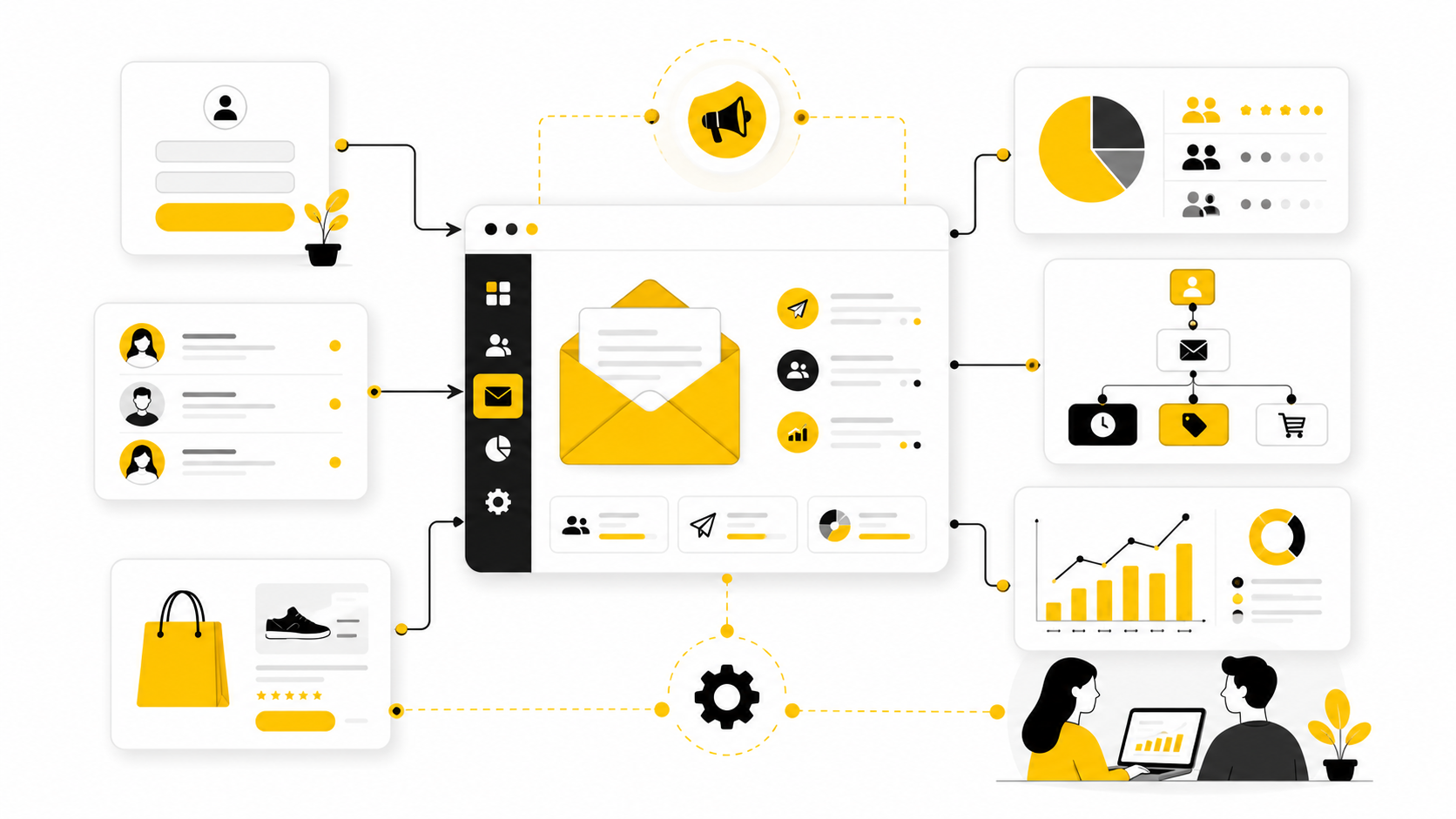
Choosing the best email marketing tools for small business is not about finding the platform with the longest feature list. It is about finding the tool that helps you collect leads, send useful emails, follow up automatically, and understand what is working without turning marketing into a second full-time job.
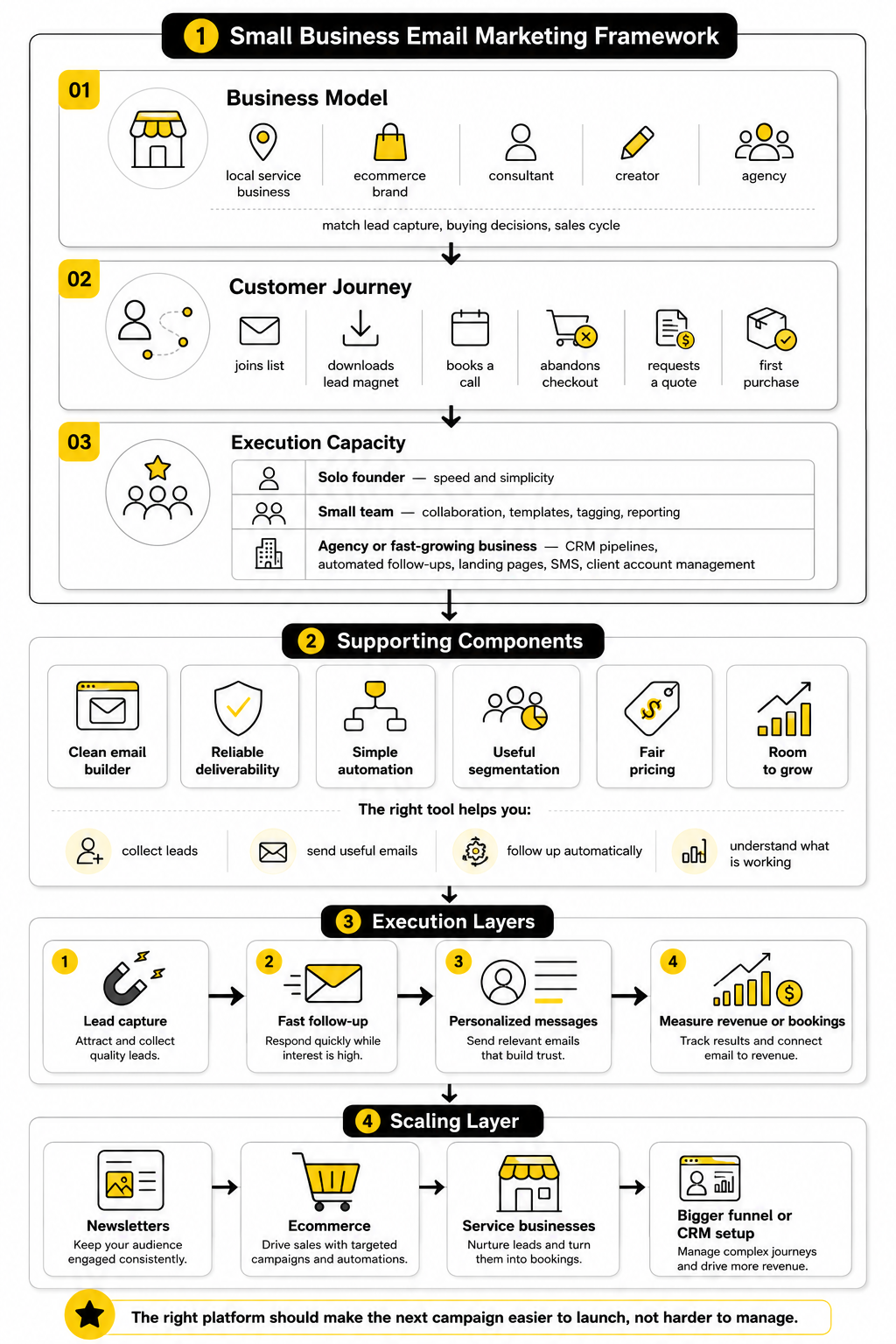
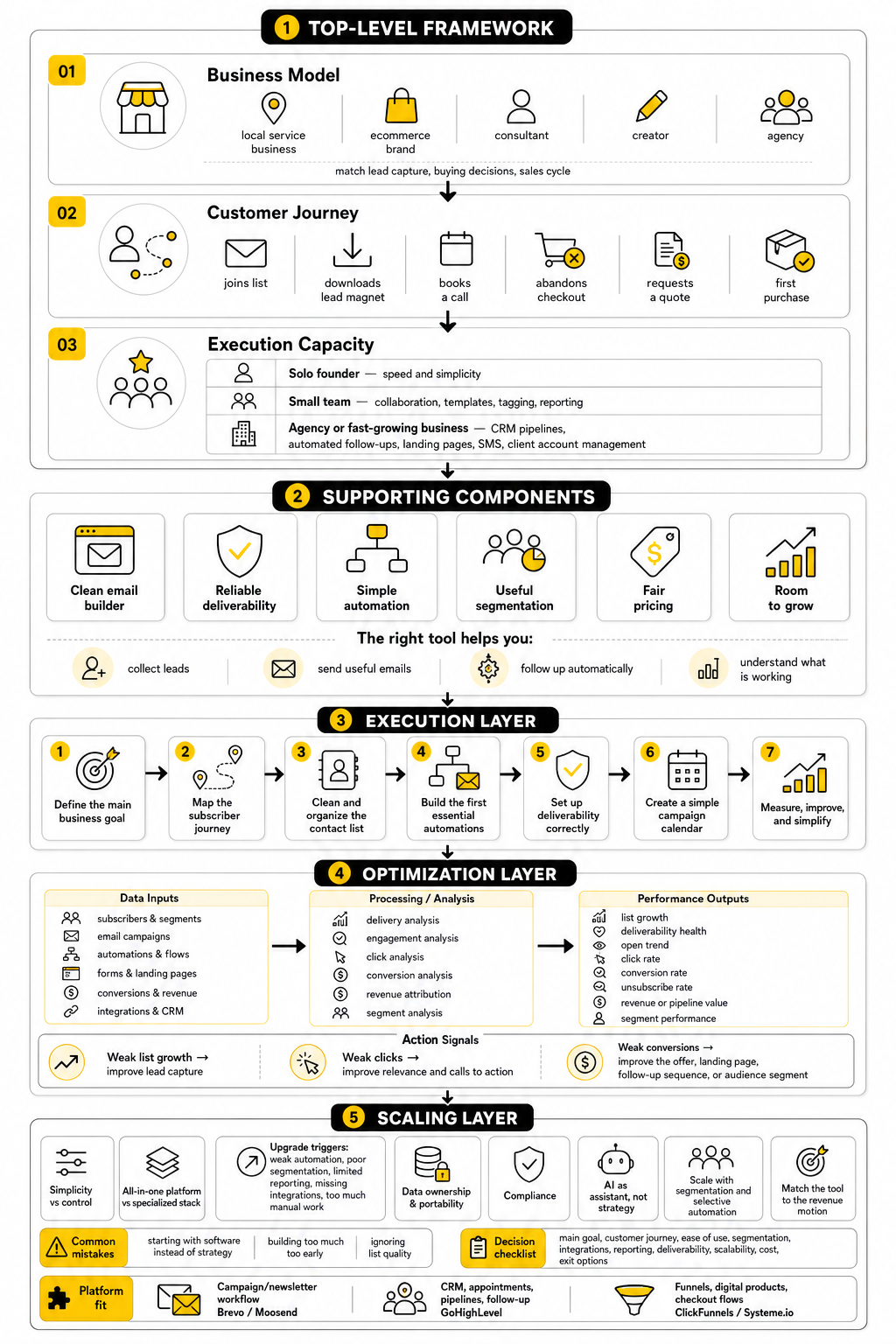
Small businesses usually do not need enterprise complexity. They need practical systems: a clean email builder, reliable deliverability, simple automation, useful segmentation, fair pricing, and enough room to grow. The right platform should make the next campaign easier to launch, not harder to manage.
This guide breaks the topic into a practical six-part structure so you can compare tools with a clear framework instead of chasing random feature comparisons. Some platforms are better for newsletters, some are better for ecommerce, some are better for service businesses, and some make more sense when email is part of a bigger funnel or CRM setup.
Why Email Marketing Tools Still Matter For Small Businesses
Email still matters because it gives small businesses a direct line to people who have already shown interest. Social platforms can change reach overnight, paid ads can get expensive quickly, and search traffic can fluctuate after algorithm updates. An email list is different because it becomes an owned audience that can be nurtured over time.
The tool you choose affects more than email design. It shapes how leads enter your system, how fast you follow up, how personalized your messages feel, and how easily you can measure revenue or bookings from campaigns. That is why a simple newsletter tool may be enough for one business, while another may need a broader system like GoHighLevel, Brevo, Moosend, or Systeme.io.
The biggest mistake is choosing based only on price. A cheap tool becomes expensive when it cannot support automation, segmentation, or the customer journey you actually need. A more complete platform can also be a poor choice when the team only needs a clean newsletter workflow and basic signup forms.
The Small Business Email Marketing Framework
A good framework starts with the business model. A local service business, ecommerce brand, consultant, creator, and agency all use email differently. The best email marketing tools for small business should match the way leads are captured, how buying decisions happen, and how long the sales cycle usually takes.
The next layer is the customer journey. You need to know what happens after someone joins your list, downloads a lead magnet, books a call, abandons a checkout, requests a quote, or buys for the first time. Without that journey, even a powerful platform becomes just another place to send one-off newsletters.
The final layer is execution capacity. A solo founder needs speed and simplicity. A small team may need collaboration, templates, tagging, and reporting. An agency or fast-growing business may need CRM pipelines, automated follow-ups, landing pages, SMS, and client account management inside one system.
Core Components Of A Strong Email Marketing Tool
A strong small business email platform should make list growth easy. That usually means embedded forms, landing pages, popups, integrations, and clean contact management. If people cannot join your list smoothly, the rest of the platform does not matter much.
It should also support basic automation without requiring a technical background. Welcome sequences, lead nurturing, abandoned-cart reminders, reactivation campaigns, and post-purchase follow-ups are the workflows most small businesses need first. Tools like Brevo and Moosend fit this type of need well because they focus on practical email marketing without forcing every business into an enterprise setup.
Finally, the platform should give you enough reporting to make better decisions. Open rates alone are not enough. You want to understand clicks, conversions, unsubscribes, audience growth, automation performance, and ideally how email connects to revenue, bookings, or sales calls.
Professional Implementation Starts Before You Pick The Tool
The smartest small businesses do not start by asking, “Which email tool is best?” They start by asking, “What do we need email to do for the business?” That question immediately narrows the field and prevents overbuying.
For example, a service business that needs lead capture, appointment follow-up, pipeline tracking, and automated reminders may be better served by GoHighLevel than by a newsletter-only platform. A lean startup selling digital products may prefer Systeme.io if funnels, email, and simple product delivery need to live together. A business focused mainly on newsletters and promotional campaigns may not need that much infrastructure at all.
The rest of this guide will compare the real options through that lens. Not “best” in a generic sense. Best for the business model, budget, team, customer journey, and level of automation you actually need.
Core Features Every Small Business Should Compare
The best email marketing tools for small business should be judged by what they help you do every week, not by how impressive their feature page looks. A small business usually needs to capture leads, organize contacts, send campaigns, automate follow-up, and see what is producing action. Anything beyond that is useful only when it supports those jobs.
Start with the basics because they decide how fast your team can move. The email editor should feel simple, the templates should look clean on mobile, and the contact database should be easy to understand. If creating one campaign takes three hours because the interface fights you, the tool is already slowing the business down.
Then look at what happens after someone joins your list. A good platform should let you trigger the right message based on behavior, not just blast everyone with the same update. That is where small businesses start getting real leverage from email instead of treating it like a digital flyer.
Ease Of Use And Campaign Creation
Ease of use sounds boring until you are the person trying to send a campaign at 9 p.m. before a product launch, seasonal offer, or client announcement. The tool should make it obvious how to create an email, preview it, test it, schedule it, and check performance afterward. Small businesses do not have time for software that requires a specialist for every small change.
The editor should support clean layouts, reusable blocks, personalization fields, and mobile previews. You want enough control to make emails feel on-brand without needing to design from scratch every time. This matters because consistency builds trust, and trust is what makes people open the next email.
Also pay attention to the quality of the workflow around the editor. Can you duplicate campaigns? Can you save templates? Can you quickly send a test email to yourself or a teammate? These small details sound minor, but they decide whether email marketing becomes a habit or another task everyone avoids.
Contact Management And Segmentation
Contact management is where many small businesses quietly lose money. They collect leads from forms, checkout pages, webinars, consultations, social media, and referrals, but all those people end up in one messy list. Once that happens, every campaign becomes less relevant because everyone receives the same message.
Segmentation fixes that by grouping contacts based on useful differences. A new lead should not always get the same email as a past buyer. A customer who clicked a pricing link should not be treated the same as someone who joined a newsletter six months ago and never engaged again.
This is one of the biggest reasons to compare tools carefully. Some platforms make tagging and segmentation easy, while others bury it behind confusing menus or higher pricing tiers. If your business depends on follow-up, offers, appointments, or repeat purchases, segmentation is not optional.
Automation That Saves Time Without Feeling Robotic
Automation is not about removing the human touch. Done properly, it helps a small business respond faster and more consistently than a busy owner or small team could manage manually. The goal is not to send more email for the sake of it; the goal is to send the right email when timing matters.
A practical automation setup might include a welcome sequence, a lead nurture sequence, an abandoned checkout flow, a review request, or a reactivation campaign for inactive contacts. These workflows can run quietly in the background while the team focuses on delivery, sales, and customer service. That is the real power of email marketing software.
For service businesses, automation often works best when email connects to booking, pipeline, and follow-up activity. A platform like GoHighLevel can make sense when email is part of a larger sales process rather than a standalone newsletter channel. For lean digital product sellers, Systeme.io can be a practical option when funnels, email, and simple product delivery need to work together.
Deliverability And Sender Reputation
Deliverability is the part nobody wants to think about until campaigns stop reaching inboxes. A beautiful email does nothing if it lands in spam, gets filtered into promotions, or never reaches the subscriber at all. That is why the platform’s sending infrastructure, authentication support, and compliance tools matter.
Small businesses should look for tools that support domain authentication, unsubscribe handling, bounce management, list hygiene, and clear guidance around sender reputation. These are not advanced technical extras. They are the foundation that helps your emails reach real people consistently.
The business also has responsibility here. Buying lists, over-emailing cold contacts, using misleading subject lines, or ignoring inactive subscribers can damage performance no matter which platform you choose. A good tool helps, but good sending habits protect the channel.
Forms, Landing Pages, And Lead Capture
Email marketing begins before the first email is sent. It starts with the signup experience, which is why forms and landing pages matter so much. If your tool makes it hard to create a clean opt-in page, connect a lead magnet, or embed a form on your website, list growth becomes slower than it needs to be.
For many small businesses, simple lead capture is enough. They need a newsletter form, a lead magnet page, a contact form, or a basic promotion page. Platforms like Moosend and Brevo are often attractive because they keep this workflow relatively straightforward.
Other businesses need more complete funnel control. If you sell coaching, courses, services, events, or digital offers, you may care more about landing pages, checkout pages, upsells, and follow-up sequences working together. In that case, tools like ClickFunnels or Systeme.io may fit better than a pure email platform.
Analytics That Actually Help You Decide
Analytics should help you answer practical questions. Which subject lines get attention? Which links get clicked? Which automations create leads, sales, bookings, or replies? Which segments are active, and which ones are dragging down performance?
Many small businesses get distracted by open rates, but open rates alone do not tell the full story. Clicks, conversions, unsubscribes, spam complaints, reply quality, and revenue impact are usually more useful. The best tool is the one that helps you connect email activity to business outcomes.
Do not choose a platform only because it has a pretty dashboard. Choose one that helps you make decisions faster. If the reports show what to improve next, the tool is doing its job.
Professional Implementation: How To Choose, Set Up, And Scale
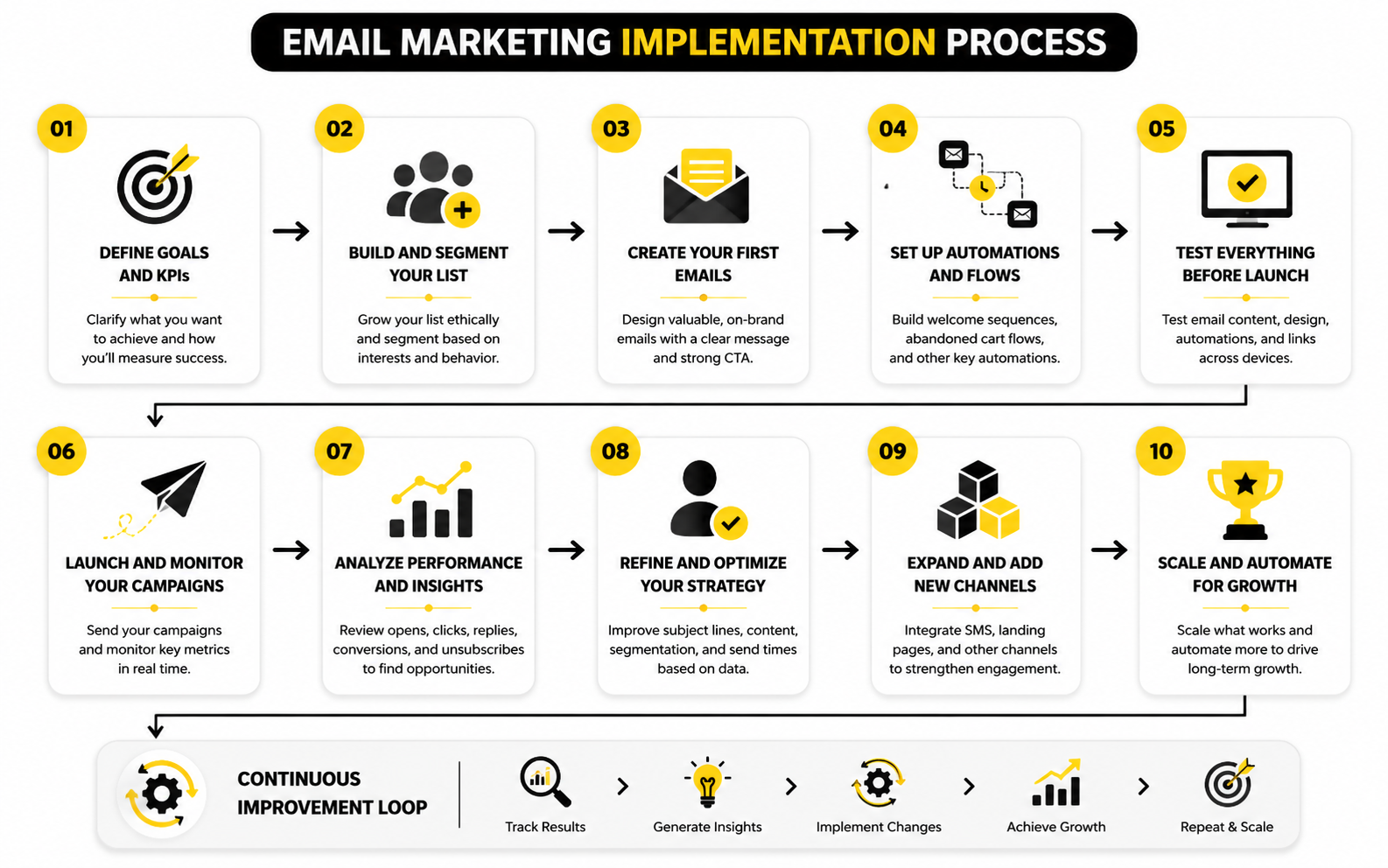
Choosing the best email marketing tools for small business becomes much easier when you stop comparing platforms in isolation. The real question is how the tool will fit into your daily marketing process. A good implementation turns email from a random campaign channel into a repeatable system for lead capture, follow-up, sales, retention, and learning.
The process should start simple. You do not need twenty automations, ten segments, and a complicated tagging structure on day one. You need a clean path from first contact to next action, and then you can improve it as real data comes in.
This is where many small businesses overcomplicate things. They buy a powerful platform, import a messy list, build too many workflows, and then wonder why email feels confusing. Start with one journey, make it work, and then expand.
Step 1: Define The Main Business Goal
Before you choose a platform, define what email needs to accomplish first. A restaurant may want repeat visits, a consultant may want booked calls, an ecommerce store may want more repeat purchases, and a local service business may want quote requests. These goals require different workflows, which means they may also require different tools.
For a simple newsletter and promotional campaign setup, a focused platform like Moosend or Brevo can be enough. For a business that needs email tied to pipelines, appointment reminders, sales conversations, and client follow-up, GoHighLevel may be a better fit. For a small digital product business that wants funnels, email, and checkout in one place, Systeme.io can be more practical than stacking several separate tools.
The goal also helps you avoid paying for features you will not use. If you only send one newsletter per month, advanced funnel logic may not matter yet. If your sales cycle depends on fast follow-up, then automation and CRM visibility matter a lot.
Step 2: Map The Subscriber Journey
The subscriber journey is the path someone takes after they join your list. This should be written out before you build anything inside the software. A simple journey might be: joins list, receives welcome email, gets useful education, sees a relevant offer, receives a reminder, and then either buys, books, or continues receiving value.
Mapping the journey forces you to think like the customer. What do they need to believe before they take action? What questions do they usually ask? What would make the next email feel helpful instead of pushy?
This step also prevents random automation. Instead of building workflows because the software allows them, you build only what supports the customer’s next decision. That is how email starts feeling strategic instead of noisy.
Step 3: Clean And Organize Your Contact List
A messy list creates messy results. Before importing contacts into a new platform, remove obvious duplicates, old invalid addresses, role-based addresses that do not belong on the list, and people who never gave clear permission. This is not glamorous work, but it protects deliverability and makes your reporting more honest.
Next, decide on a simple tagging or segmentation structure. Do not create dozens of tags just because you can. Start with practical labels such as lead source, customer status, interest, product purchased, appointment booked, or engagement level.
The key is to make segmentation useful for action. A tag should help you send a better message, trigger a more carefully workflow, or understand a meaningful behavior. If a tag does none of those things, it is probably clutter.
Step 4: Build The First Essential Automations
Most small businesses should start with a small set of essential automations. A welcome sequence is usually first because it sets expectations, introduces the brand, and points subscribers toward the next useful step. This sequence does not need to be long; it needs to be clear, helpful, and aligned with the reason someone joined.
After that, build one automation connected to revenue or sales activity. For ecommerce, that may be abandoned checkout or post-purchase follow-up. For service businesses, it may be quote follow-up, appointment reminders, missed-call follow-up, or a sequence that encourages a lead to book a consultation.
This is where tool choice becomes very practical. GoHighLevel is stronger when email needs to connect with CRM pipelines, SMS, calls, and appointment workflows. ClickFunnels is more relevant when the business is built around landing pages, offers, sales funnels, and follow-up after opt-ins or purchases.
Step 5: Set Up Deliverability Correctly
Deliverability should be handled before you send serious campaigns. That means authenticating your sending domain, setting up the required DNS records, using a real sender address, and making unsubscribe options clear. This is now basic professional email marketing, not a technical luxury.
You should also warm up new sending behavior carefully. Do not import an old list and blast everyone on the first day. Start with your most engaged contacts, send useful emails, and let positive engagement build before expanding volume.
Good deliverability is partly about software and partly about discipline. The platform can give you the infrastructure, but your sending habits determine the long-term reputation of your emails. Respect the inbox and the inbox is more likely to respect you back.
Step 6: Create A Simple Campaign Calendar
Once the core automations are running, build a realistic campaign calendar. Small businesses do not need to email daily unless the audience expects it and the content is genuinely valuable. A consistent weekly, biweekly, or monthly rhythm often works better than intense bursts followed by silence.
Your campaign calendar should balance value and promotion. Educational emails, customer stories, product updates, seasonal offers, event reminders, and helpful resources can all play a role. The mistake is only emailing when you want something from the subscriber.
The calendar also helps your team plan ahead. Instead of rushing campaigns at the last minute, you can prepare offers, content, landing pages, and follow-up sequences with more control. That makes the whole system calmer and more profitable.
Step 7: Measure, Improve, And Simplify
After campaigns and automations are live, review performance on a regular schedule. Look for patterns in clicks, replies, conversions, unsubscribes, and segment behavior. The goal is not to stare at dashboards all day; the goal is to decide what to improve next.
Improve one thing at a time. Test a clearer subject line, a stronger call to action, a shorter email, a better offer, or a more relevant segment. If you change too many things at once, you will not know what actually worked.
Also be willing to simplify. If an automation is not helping, remove it. If a segment is never used, delete it. The best email marketing tools for small business should make the system easier to run, not turn your marketing into a maze.
Statistics And Data
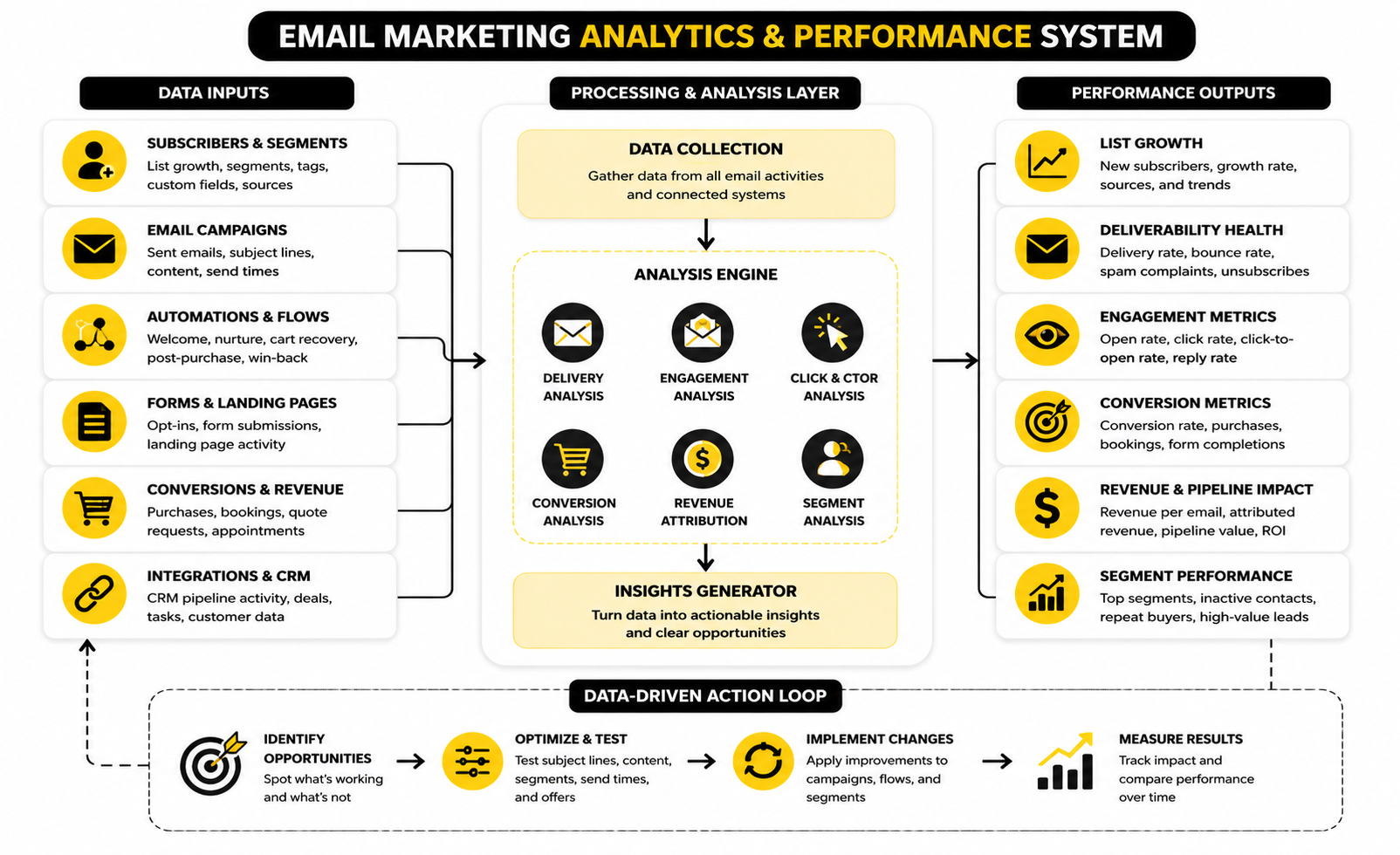
The numbers matter only when they help you make better decisions. Email benchmarks can show whether your campaigns are healthy, but they should not become a scoreboard you chase blindly. A small business with a lower open rate and strong sales can be in a better position than a business with high opens and no meaningful action.
This is especially important when comparing the best email marketing tools for small business. A platform’s analytics should not just show activity. It should help you understand whether your emails are reaching the inbox, attracting the right clicks, producing replies, creating sales, booking appointments, or bringing customers back.
Email performance also varies heavily by industry, list quality, offer type, sending frequency, and audience relationship. A local service business sending appointment reminders will not behave like an ecommerce store sending flash sales. Use benchmarks as reference points, not as universal rules.
Open Rate Shows Attention, But It Is Not The Whole Truth
Open rate tells you how many delivered emails were opened, but it is no longer a perfect signal. Privacy features, image loading behavior, inbox filtering, and automated opens can distort the number. That means open rate is useful for spotting trends, but dangerous when treated as the final measure of success.
Recent benchmark data from MailerLite showed an average open rate of 43.46% in 2025, while the DMA’s 2025 benchmarking report placed open rates at 35.9%. Those numbers are helpful because they show a rough performance range, but they also prove why context matters. Different datasets, industries, audience types, and measurement methods can produce very different “average” results.
For a small business, the practical move is simple. Watch your own open-rate trend over time instead of obsessing over one campaign. If opens fall suddenly, check subject lines, sender name, sending frequency, deliverability, and whether the audience still expects the emails you are sending.
Click Rate Is A Stronger Signal Of Real Interest
Click rate is usually more useful than open rate because it shows that someone did more than glance at the email. They were interested enough to visit a page, view an offer, book a call, read more, or take the next step. That is why every serious comparison of email tools should look at how clearly the platform reports clicks by campaign, link, segment, and automation.
The DMA’s 2025 benchmark report showed unique click rates reaching 2.3%, while MailerLite’s benchmark data showed an average click rate of 2.09% in 2025. These are not huge numbers, and that is the point. Email is often a game of small percentages multiplied across a qualified list.
If your click rate is weak, do not immediately blame the tool. First check whether the email has one clear call to action, whether the offer matches the segment, and whether the link is easy to find. A better platform can help you measure the issue, but the message still has to earn the click.
Conversion Rate Shows Whether Email Is Creating Business Results
Conversion rate is where email becomes a business channel instead of a vanity channel. A conversion could be a purchase, booking, quote request, demo call, webinar registration, review submission, or reply. The exact action depends on the business model.
This is where tools start to separate themselves. A newsletter platform may show campaign clicks clearly, but a more complete system like GoHighLevel can be more useful when email needs to connect with pipelines, appointments, missed-call follow-up, and sales activity. A funnel-focused business may care more about opt-in rates, checkout conversion, order bumps, and follow-up sequences inside a platform like ClickFunnels or Systeme.io.
The action here is to define conversions before launching campaigns. Do not wait until after a campaign runs to decide what success means. Every email should have a job, and the tool should make that job measurable.
Unsubscribes Are Feedback, Not Failure
Unsubscribes are not automatically bad. Some people should leave your list because they are no longer interested, no longer relevant, or not the right fit for your business. A healthy list is not the biggest possible list; it is the list most likely to engage and buy.
MailerLite’s benchmark data showed an average unsubscribe rate of 0.22% in 2025. If your unsubscribe rate is consistently much higher, the problem may be frequency, relevance, expectation mismatch, poor list source, or overly aggressive promotion. If it is extremely low but clicks are also weak, your list may be passive rather than loyal.
The best response is not to hide the unsubscribe link or make leaving difficult. That damages trust. Instead, tighten your signup promise, segment better, and send emails that match what people asked to receive.
Deliverability Determines Whether Analytics Are Even Reliable
Deliverability comes before performance. If emails do not reach the inbox, your open rates, click rates, and conversion rates become distorted. You may think the campaign failed creatively when the real issue was list quality, authentication, sender reputation, or spam filtering.
The DMA’s 2025 benchmarking report showed delivery rates rising to 98% in 2024, but delivery rate and inbox placement are not the same thing. Delivery means the receiving server accepted the message. Inbox placement asks whether the email actually landed where people are likely to see it.
This is why small businesses should choose tools that make sender authentication, bounce handling, unsubscribe management, and list hygiene easy to manage. Brevo and Moosend are practical choices for businesses that want straightforward campaign sending and automation. More advanced operations should also monitor engagement quality, spam complaints, inactive contacts, and domain reputation over time.
Revenue Per Email Helps You See The Real Value
Revenue per email is especially useful for ecommerce, digital products, paid communities, coaching, and offer-driven businesses. It shows how much revenue each email generates on average, which makes it easier to compare campaigns, flows, and promotions. A smaller list with strong revenue per email can outperform a large list that barely responds.
Email ROI remains strong, but the real lesson is not that every business automatically gets the same return. Litmus reported that in its 2025 State of Email data, 35% of marketing leaders received $10 to $36 for every $1 spent on email marketing, while 30% received $36 to $50. That range matters because it shows email can be extremely profitable when the strategy, audience, and measurement are solid.
For small businesses, the practical move is to track revenue or pipeline value from email whenever possible. If direct revenue is hard to measure, track proxy actions such as booked calls, quote requests, trial starts, consultation forms, or repeat visits. The closer your analytics get to money or sales opportunity, the more useful they become.
The Metrics Dashboard Small Businesses Actually Need
A good analytics system does not need to be complicated. It needs to show the few numbers that explain whether your email system is healthy and improving. Most small businesses can start with a simple weekly or monthly review instead of drowning in reports.
Track these metrics first:
The point is not to collect numbers. The point is to make decisions. If list growth is weak, improve lead capture. If clicks are weak, improve relevance and calls to action. If conversions are weak, improve the offer, landing page, follow-up sequence, or audience segment.
Benchmarks Should Guide Action, Not Create Panic
Benchmarks are useful when they help you ask better questions. They are not useful when they make you copy tactics from businesses with different audiences, offers, and sales cycles. A good benchmark tells you where to investigate, not what to blindly change.
If your open rate is below your industry average but conversions are strong, your list may simply be smaller and more selective. If your open rate is high but sales are poor, your subject lines may be creating curiosity without enough buying intent. If clicks are strong but conversions are weak, the issue may sit on the landing page or checkout page rather than inside the email tool.
This is why the best email marketing tools for small business are not just sending platforms. They are decision tools. They show you where attention turns into action, where action turns into revenue, and where the customer journey needs to be tightened.
Advanced Considerations Before You Commit
At this stage, the decision becomes less about finding “good software” and more about choosing the right operating model. Most serious email marketing tools can send campaigns, build automations, and show reports. The difference is how well they fit the way your business sells, serves customers, and grows.
This is where small businesses need to be honest. A simple tool is not automatically less professional, and a complex tool is not automatically more powerful for your situation. The best email marketing tools for small business are the ones your team can actually use consistently while still supporting the next stage of growth.
Do not choose a platform only for where your business is today. Choose for the next twelve to twenty-four months. You want room to grow, but not so much complexity that your team avoids using the system.
The Simplicity Versus Control Tradeoff
Simple platforms are attractive because they reduce friction. You can build campaigns quickly, manage contacts without much training, and launch basic automations without needing a specialist. For many small businesses, that is exactly what is needed.
The tradeoff is that simpler tools may become limiting when you need advanced segmentation, multi-step sales pipelines, detailed attribution, or deeper CRM workflows. That does not make them bad. It simply means they are better suited to businesses where email is mainly used for newsletters, promotions, nurture sequences, and customer updates.
More complete platforms give you more control, but they also require more discipline. GoHighLevel can be powerful for agencies, local service businesses, and teams that want CRM, email, SMS, booking, pipelines, and automation in one place. But if you only need to send two newsletters per month, that extra power may create more setup work than value.
All-In-One Platform Or Specialized Stack
An all-in-one platform can reduce tool sprawl. Instead of paying for separate landing pages, email software, CRM, forms, booking tools, and automation connectors, you can manage more of the customer journey in one system. That can make operations cleaner and reporting easier.
The downside is that all-in-one platforms are rarely best-in-class at every single function. A dedicated email tool may have a smoother newsletter editor. A dedicated landing page builder may offer more design flexibility. A dedicated CRM may provide deeper sales reporting.
The right choice depends on where complexity hurts you most. If your team is wasting time stitching tools together, an all-in-one system like Systeme.io, ClickFunnels, or GoHighLevel may be the cleaner move. If you already have strong systems in place, a focused email platform may fit better.
When To Upgrade From A Basic Email Tool
You do not need to upgrade just because your list gets bigger. You upgrade when your current platform blocks a business outcome. That might mean weak automation, poor segmentation, limited reporting, missing integrations, or a workflow that forces too much manual work.
A good trigger for upgrading is when leads are slipping through the cracks. If people fill out forms but do not get fast follow-up, if booked appointments are not nurtured, or if sales conversations are disconnected from email behavior, the tool may no longer match the business. At that point, a CRM-connected platform becomes more than a convenience.
Another trigger is when the team needs better visibility. If nobody can tell which campaign produced a call, which sequence generated revenue, or which segment deserves more attention, analytics are holding back growth. The tool should help you see the path from subscriber to customer.
Data Ownership And Portability
Small businesses often ignore data portability until they need to migrate. Then they discover their tags, custom fields, automations, templates, or reporting history are harder to move than expected. This creates unnecessary risk.
Before committing to a platform, check how easily you can export contacts, tags, custom fields, unsubscribes, and engagement data. You should also understand how integrations handle customer information. This matters because your list is a business asset, not just a database inside someone else’s software.
Portability does not mean you plan to leave. It means you are protecting your options. A serious email setup should be built so the business is not trapped by poor structure, unclear permissions, or messy data.
Compliance Is Not Optional
Email compliance is not just a legal checkbox. It affects trust, deliverability, and brand reputation. Small businesses should use clear opt-ins, honest subject lines, visible unsubscribe links, and accurate sender information.
The platform should make compliance easy. It should support unsubscribe handling, consent records, suppression lists, and proper sender authentication. If the tool makes these things difficult, that is a warning sign.
This also applies to imported contacts. Just because you have someone’s email address does not mean they should be added to your marketing list. Respecting permission is one of the simplest ways to protect long-term performance.
AI Features Are Useful, But They Are Not The Strategy
Many platforms now promote AI writing, send-time optimization, segmentation suggestions, and automated campaign ideas. These can save time, especially for small teams that struggle to produce consistent email content. Used well, AI can speed up drafts, brainstorm subject lines, and help repurpose existing content.
But AI does not know your positioning, customer objections, margins, sales process, or delivery capacity unless you guide it. It can generate words, but it cannot replace strategy. Bad offers, weak segmentation, and unclear calls to action do not become good just because AI helped write the email.
Use AI as an assistant, not as the decision-maker. The owner or marketer still needs to decide who the email is for, why it matters, what action it should drive, and how it fits the wider customer journey. That is where the money is.
Scaling Without Turning Email Into Noise
Scaling email does not mean sending more campaigns to more people. It means sending more relevant messages to better-defined groups. That is a very different mindset.
As the list grows, segmentation becomes more important. New subscribers, warm leads, active customers, repeat buyers, inactive contacts, and high-intent prospects should not always receive the same message. Relevance protects engagement and reduces list fatigue.
This is also where automation should become more selective. Add workflows only when they remove manual work or improve timing. If an automation does not improve the customer experience or help the business act faster, it probably does not need to exist.
The Hidden Cost Of Cheap Tools
The cheapest platform can look attractive at the beginning. That is fair. Small businesses need to watch cash flow, and there is no reason to overspend on software before the channel is useful.
But cheap becomes expensive when it creates manual work, weak reporting, poor integrations, or messy customer data. Saving a small amount each month does not help if the team loses hours rebuilding workarounds. It also does not help if missed follow-up costs real sales.
The better question is not “What is the cheapest email tool?” The better question is “Which tool gives us the most useful system at the lowest operational drag?” That is how you make a more carefully decision.
Match The Tool To The Revenue Motion
The strongest way to choose is to match the platform to how your business actually makes money. If revenue comes from consultations, quotes, appointments, or local services, prioritize CRM, pipeline visibility, reminders, and fast follow-up. If revenue comes from products or ecommerce, prioritize segmentation, post-purchase flows, abandoned-cart recovery, and product recommendations.
If revenue comes from digital products, courses, memberships, or coaching, prioritize funnels, checkout, onboarding, and nurture sequences. ClickFunnels and Systeme.io are more relevant in that world because the email system often needs to support the full offer path. If email is mostly for newsletters and customer updates, a simpler campaign-first tool can be the more carefully choice.
This is the practical filter. Do not ask which platform has the most features. Ask which platform supports the way money moves through your business with the least friction.
Final Recommendations, Mistakes To Avoid, And FAQ
The best email marketing tools for small business are not chosen by chasing the loudest brand, the cheapest plan, or the longest feature list. They are chosen by matching the tool to the business model, customer journey, team capacity, and revenue motion. That is the filter that keeps this decision practical.
If you want a clean campaign tool, prioritize ease of use, segmentation, automation, and reporting. If your sales process depends on leads, appointments, pipelines, and follow-up, look harder at systems like GoHighLevel. If your business sells through funnels, digital products, coaching offers, or checkout flows, ClickFunnels or Systeme.io may fit the operating model better.
The final decision should feel boringly clear. You should know what the tool will do, who will manage it, what workflows will be built first, and which metrics will prove it is working. If those answers are fuzzy, pause before buying anything.
Common Mistakes That Make Email Tools Feel Harder Than They Are
The first mistake is starting with software instead of strategy. A tool cannot fix a weak offer, unclear audience, poor signup promise, or messy customer journey. It can only execute the system you put inside it.
The second mistake is building too much too early. Small businesses often create complex automations before they have enough traffic, leads, or customer data to justify them. This creates confusion, breaks easily, and makes the platform feel more complicated than it needs to be.
The third mistake is ignoring list quality. A smaller engaged list is usually more valuable than a large list filled with cold, inactive, or poorly sourced contacts. If the list is weak, every metric gets harder to interpret and every campaign becomes less reliable.
A Practical Decision Checklist
Use this checklist before committing to a platform. It will not make the decision perfect, but it will stop you from choosing blindly. The goal is to find the simplest tool that supports the business outcome you actually need.
A good tool should pass most of this list without forcing awkward workarounds. If you need five extra apps just to make the basics function, that is a sign to rethink the choice. Software should reduce operational drag, not create a new job.
What is the best email marketing tool for small business?
The best tool depends on the type of business. A newsletter-focused business may only need a simple email platform with forms, segmentation, automation, and clean reporting. A service business may benefit more from GoHighLevel because email can connect with CRM pipelines, bookings, SMS, and follow-up workflows.
For digital products, courses, coaching, and funnel-based offers, Systeme.io or ClickFunnels may be more practical. For straightforward campaigns and automation, Brevo and Moosend are worth considering. The right answer is the platform that fits your sales process, not the one with the most features.
How much should a small business spend on email marketing software?
A small business should spend enough to run the channel properly without overbuying features it will not use. At the beginning, that may mean a lower-cost plan with basic forms, campaigns, and automations. As email starts driving sales, bookings, or repeat purchases, paying more for better automation and reporting can be justified.
The better way to think about cost is operational value. If a tool saves hours every month, prevents missed follow-ups, improves conversion tracking, or helps recover lost sales, it can pay for itself quickly. If it mostly adds complexity, even a cheap plan can become expensive.
Is email marketing still worth it for small businesses?
Yes, email is still worth it when it is used with permission, relevance, and a clear business goal. It gives small businesses a direct relationship with subscribers instead of relying only on social algorithms, paid ads, or marketplace traffic. That control matters more as customer acquisition gets more competitive.
The key is not to send random newsletters just to stay visible. Email works best when it supports a real customer journey. That could mean welcoming new leads, educating prospects, recovering abandoned carts, nurturing appointments, asking for reviews, or bringing past customers back.
What features should small businesses look for first?
Start with forms, contact management, campaign creation, segmentation, automation, deliverability support, and reporting. These are the core features that determine whether the platform can support real email marketing. Fancy extras are useful only after the basics are working.
The first automations should usually be simple. A welcome sequence, lead follow-up sequence, abandoned checkout flow, post-purchase sequence, or appointment reminder workflow is enough to start. Once those are performing, you can expand with more advanced segmentation and lifecycle campaigns.
Do small businesses need automation?
Yes, but they need useful automation, not complicated automation. Automation helps small businesses follow up faster and more consistently than a busy owner or small team could manage manually. It is especially valuable when timing affects sales, bookings, or customer experience.
The mistake is building workflows just because the tool allows it. Start with the moments where manual follow-up is slow, inconsistent, or easy to forget. Then build automations that solve those specific problems.
What is the difference between an email marketing tool and a CRM?
An email marketing tool helps you collect subscribers, send campaigns, build automations, and track email performance. A CRM helps you manage relationships, sales opportunities, customer records, pipelines, appointments, and follow-up activity. Some platforms combine both, while others focus more heavily on one side.
A pure email tool may be enough if your business mainly sends newsletters and promotions. A CRM-connected system becomes more important when leads need sales follow-up, quotes, consultation calls, appointment tracking, or multi-step relationship management. That is why service businesses often evaluate platforms differently from ecommerce or newsletter-first brands.
Should I choose an all-in-one platform or separate tools?
Choose an all-in-one platform when disconnected tools are slowing you down. If forms, landing pages, checkout, email, CRM, and appointments all need to work together, an integrated system can reduce friction. This is where GoHighLevel, Systeme.io, or ClickFunnels may make sense.
Choose separate tools when you already have strong systems and only need a focused email platform. Specialized tools can be smoother for specific jobs. The right choice depends on whether your biggest problem is missing features or too many disconnected workflows.
How often should a small business send emails?
The right frequency depends on the audience and the reason they joined. A weekly email can work well if it is useful, expected, and relevant. A monthly email may be enough for businesses with slower buying cycles or smaller content capacity.
The bigger issue is consistency. Sending three emails in one week and then disappearing for two months trains subscribers not to expect much from you. Pick a realistic rhythm and improve it over time.
What email metrics matter most?
The most useful metrics are list growth, delivery health, open trend, click rate, conversion rate, unsubscribe rate, and revenue or pipeline value. Open rate can show attention, but it should not be treated as the final measure of success. Clicks and conversions usually tell you more about whether the email actually worked.
For service businesses, booked calls, quote requests, replies, and pipeline movement may matter more than direct purchases. For ecommerce and digital products, revenue per email, abandoned-cart recovery, repeat purchase rate, and checkout conversion are more important. The best metrics are the ones connected to business outcomes.
When should a small business switch email platforms?
Switch when the current tool blocks growth or creates too much manual work. Common signs include weak automation, poor segmentation, limited reporting, unreliable integrations, difficult list management, or disconnected sales follow-up. Switching just because another tool looks trendy is usually a mistake.
Before moving, clean your list and document your current workflows. Export your contacts, tags, custom fields, suppression lists, and key templates where possible. A migration is much easier when your data is organized before the move starts.
Can AI replace email marketing strategy?
No. AI can help draft subject lines, outline campaigns, repurpose content, and speed up production. That is useful, especially for small teams with limited time.
But AI cannot replace positioning, offer strategy, customer insight, list quality, or a clear sales process. It can help you write the email, but it cannot decide what your business should say, to whom, and why it matters. Use AI to move faster, but keep strategy human.
What is the safest first setup for a small business?
The safest first setup is a lead capture form, a clear welcome sequence, one regular campaign rhythm, and one revenue-connected automation. That gives you a working system without creating unnecessary complexity. It also gives you enough data to see what subscribers actually respond to.
From there, add only what improves performance or saves time. Better segmentation, more advanced automations, landing pages, and CRM workflows can come later. Start lean, prove the channel, then scale the system.
Build a stronger local presence with BAAM AI
Turn your website, Google profile, social channels, and AI visibility into one growth engine
Most businesses do not need more random marketing activity. They need a consistent presence system that helps the right people find them, trust them, and take action. BAAM AI brings strategy, local SEO, website updates, Google Maps visibility, social content, AI-search readiness, media production, and reporting into one practical monthly engine.
If you want your marketing to keep working after the campaign ends, start with a free BAAM AI presence audit. See how your business shows up today and where the fastest visibility wins are at BAAM AI.