
BAAM AI Blog
AWeber Email: A Practical Guide To Building A List That Converts
AWeber email is not just about sending newsletters. Used well, it becomes the system that captures attention, earns trust, segments subscribers, and turns repeat communication into predictable revenue. That matters...
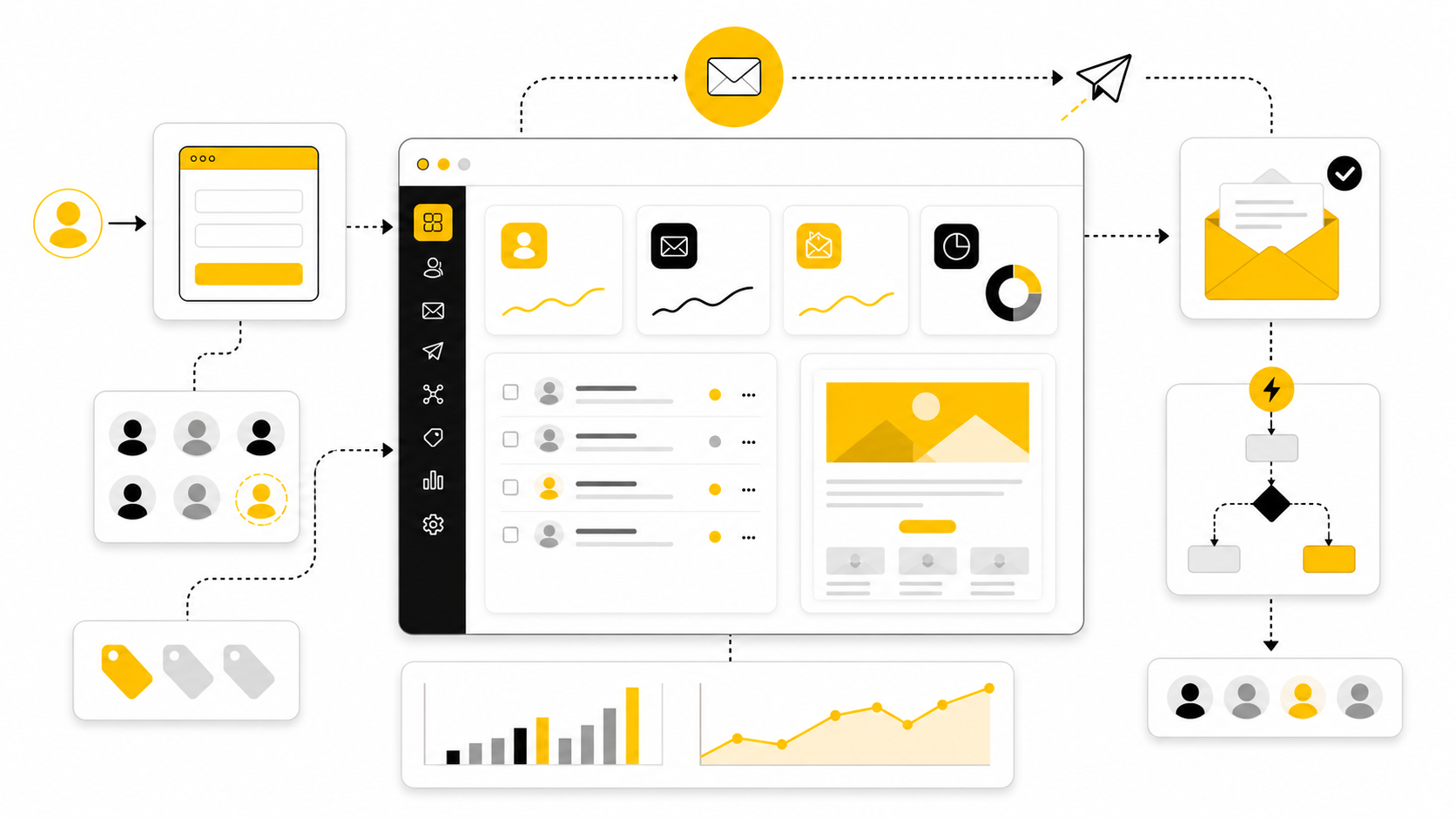
AWeber email is not just about sending newsletters. Used well, it becomes the system that captures attention, earns trust, segments subscribers, and turns repeat communication into predictable revenue. That matters because most small businesses do not lose because they lack ideas; they lose because they do not follow up consistently.
The mistake is treating email like a broadcast button. A strong AWeber setup gives each subscriber a clear path: opt in, get value, receive the right offer, and continue hearing from you without feeling spammed. this guide will walk through that system in six parts, starting with the big picture before moving into the practical build.
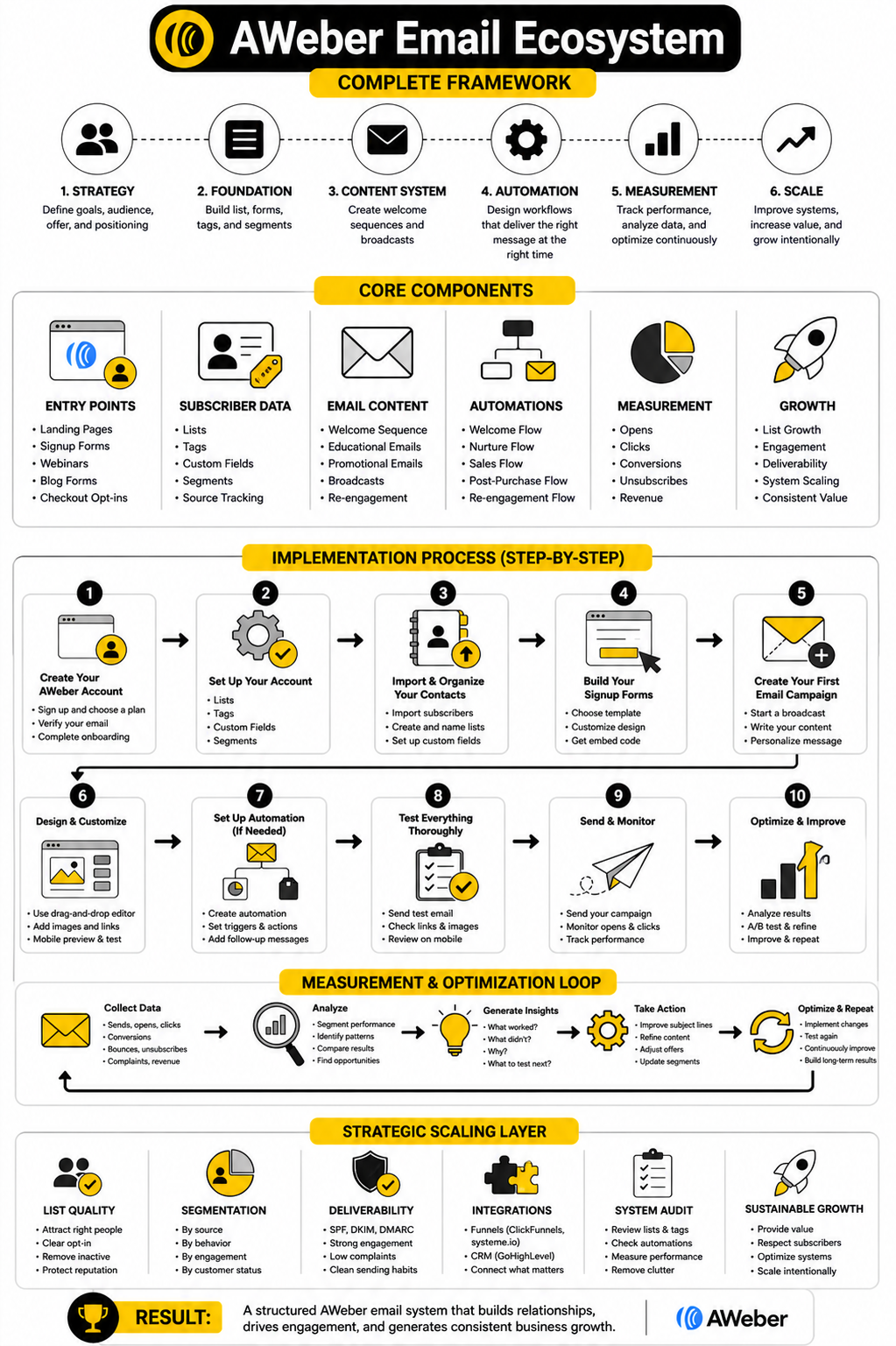
This guide is structured as one complete article split into six parts. Each section builds on the previous one, so the strategy does not feel like a random list of tips. By the end, you should understand what AWeber is good for, how to structure your email system, and when another tool may be a better fit.
Why AWeber Email Still Matters
Email still matters because it gives you a direct relationship with people who asked to hear from you. Social platforms can change reach, ad costs can rise, and search traffic can disappear after an algorithm update. Your list is not magic, but it is one of the few marketing assets you can keep improving over time.
AWeber fits this reality because it focuses on the practical parts of email marketing: signup forms, landing pages, broadcasts, automated campaigns, tagging, and list management. That makes it useful for creators, consultants, coaches, local businesses, ecommerce sellers, and lean teams that want a system they can actually operate. The value is not in having every advanced feature on earth; the value is in building a follow-up engine that does not collapse under its own complexity.
The key is to stop asking, “Can I send an email with this?” and start asking, “Can I build a subscriber journey with this?” A single broadcast can create a short spike, but a well-built sequence can keep working after the first send. That shift is where AWeber email becomes more than a newsletter tool.
The AWeber Email Framework
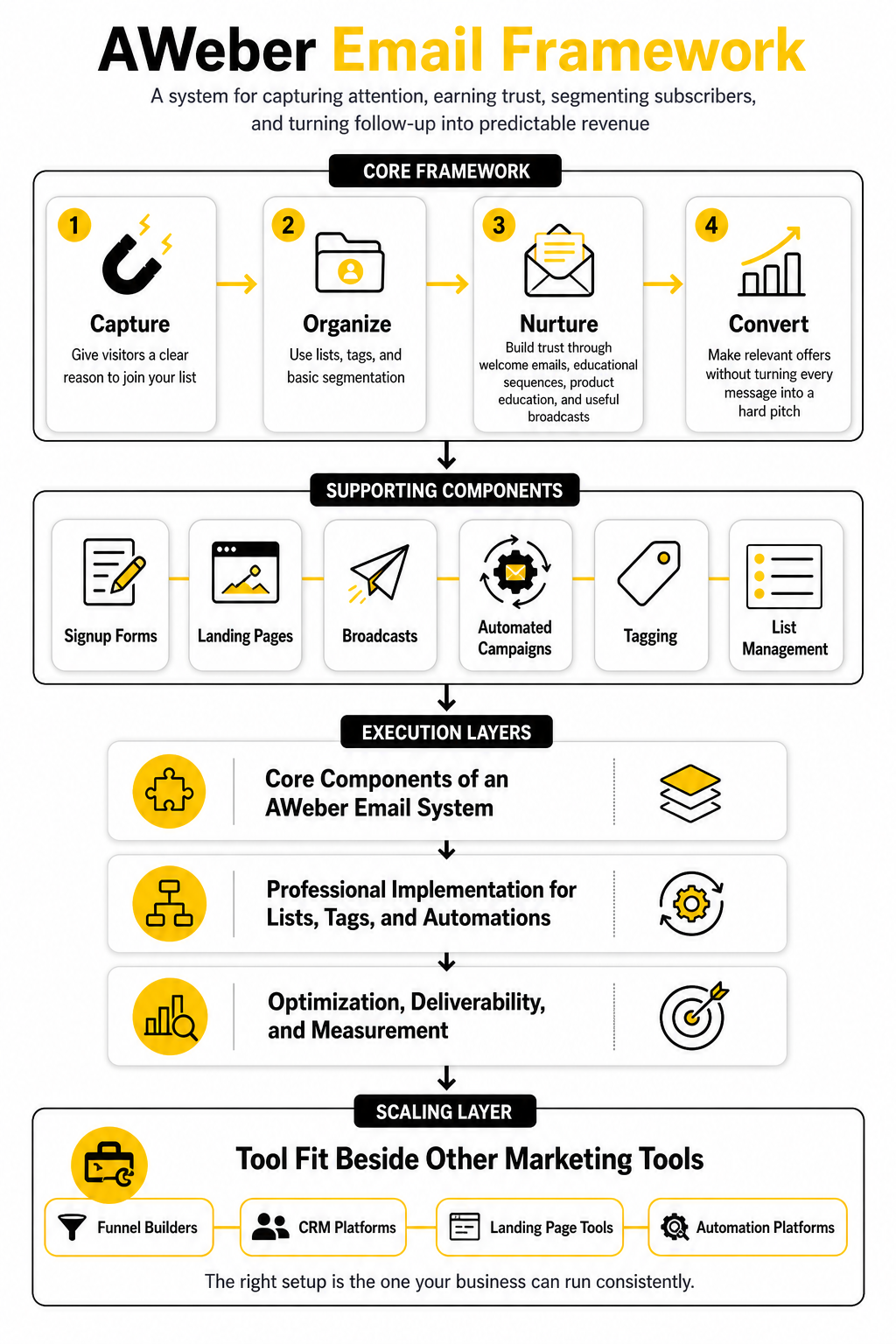
A good AWeber system has four layers: capture, organize, nurture, and convert. Capture means giving visitors a clear reason to join your list. Organize means using lists, tags, and basic segmentation so subscribers are not all treated the same.
Nurture is where trust gets built through welcome emails, educational sequences, product education, and useful broadcasts. Convert is where you make relevant offers without turning every message into a hard pitch. The best systems do not separate these layers; they connect them so every subscriber has a logical next step.
The framework also helps you avoid one of the biggest beginner mistakes: building automations before the offer and audience are clear. A complicated automation cannot fix a weak promise. Start with the subscriber’s problem, then use AWeber to deliver the right message at the right moment.
What Part 1 Sets Up For The Rest Of The Guide
This first part is the map. The next sections will move from strategy into the actual components that make an AWeber email system work. That means we will look at the pieces separately, then connect them into one professional implementation.
The goal is not to make email marketing sound complicated. The goal is to make the system clear enough that you can build it without guessing. Once the structure is right, the writing, automation, and optimization become much easier.
By the end of the full guide, you should know how to think about AWeber as a business tool, not just an email sender. You will also know where it fits beside other marketing tools, including funnel builders, CRM platforms, landing page tools, and automation platforms. That context matters because the right email setup is not the fanciest one; it is the one your business can run consistently.
The AWeber Email Framework
The cleanest way to think about AWeber email is as a simple subscriber journey, not a pile of disconnected features. Someone discovers you, joins your list, receives a useful first message, gets segmented based on interest or behavior, and then moves through a sequence that helps them make a decision. When that journey is clear, the software becomes much easier to use.
The framework has four practical stages: capture, organize, nurture, and convert. Capture brings the right people onto your list. Organize keeps them from getting treated like anonymous contacts. Nurture builds trust through relevant messages. Convert gives subscribers a natural next step when they are ready.
This matters because most weak email systems fail before the first campaign is even written. The offer is vague, the opt-in form is generic, the welcome email is delayed, and every subscriber gets the same message forever. AWeber can support a much better setup, but only if the strategy is clear before the automation is built.
Capture The Right Subscriber
The first job of an AWeber email system is not to collect as many addresses as possible. The first job is to attract people who actually care about the problem your business solves. A smaller list of qualified subscribers will usually beat a larger list full of people who joined for the wrong reason.
Your signup form should make a specific promise. Instead of saying “Join my newsletter,” explain what the subscriber will receive and why it is worth their attention. That could be a short guide, a discount, a checklist, a weekly insight, a private resource, or a practical email course.
AWeber gives you tools for signup forms and landing pages, but the tool is only the container. The real conversion lever is the promise. If the promise is weak, changing button colors will not save it.
Organize Subscribers Before You Scale
Once people join your list, the next step is organization. This is where tags, lists, and basic segmentation become important. You do not need a complicated system on day one, but you do need enough structure to understand why someone joined and what they are likely to need next.
For example, a creator might tag subscribers based on the lead magnet they requested. A consultant might separate prospects interested in strategy from people interested in implementation. A shop owner might segment customers, non-buyers, and people who clicked a specific product category.
The point is not to create complexity for the sake of it. The point is to avoid sending the same AWeber email to everyone when their intent is clearly different. Better organization makes every future campaign more relevant.
Nurture With A Clear First Sequence
The welcome sequence is where most email programs either build momentum or lose it. A subscriber is most aware of you right after they opt in, so the first few emails need to confirm they made the right decision. This is not the place for a lazy “thanks for subscribing” message and silence for three weeks.
A strong first sequence usually does three things. It delivers the promised resource, explains what the subscriber can expect, and starts building trust around the problem they want solved. The best emails feel useful even before they ask for anything.
For AWeber email campaigns, this sequence can be simple. Start with a delivery email, follow with one or two educational messages, then introduce a relevant offer or next step. Simple beats clever when the subscriber journey is new.
Convert Without Burning Trust
Conversion does not mean pushing an offer in every message. It means making the next step obvious when the subscriber is ready. That next step might be booking a call, buying a product, joining a paid newsletter, registering for a webinar, or replying with a question.
The conversion stage works best when the earlier stages have done their job. If subscribers joined for the right reason, received relevant content, and understand your point of view, your offer feels like a continuation instead of an interruption. That is the difference between helpful selling and desperate selling.
AWeber can support this with campaigns, broadcasts, tags, and behavior-based follow-up. But the real discipline is restraint. Send useful emails, make clear offers, and do not damage the list by treating every subscriber like a transaction.
Building The Framework Around One Main Goal
Before you build anything inside AWeber, choose the main goal of the email system. This sounds obvious, but it is where many businesses drift. They want subscribers, engagement, sales, referrals, reviews, webinar attendance, and customer education all at once, so the system becomes messy fast.
Pick the primary outcome first. If the goal is lead generation, your emails should move people toward a consultation, demo, or application. If the goal is ecommerce revenue, your emails should support product discovery, education, offers, and repeat purchases. If the goal is audience building, your emails should create habit, trust, and consistent attention.
AWeber email works better when each campaign has one job. One campaign welcomes. One campaign educates. One campaign sells. One campaign re-engages. When every campaign has a clear purpose, you can improve the system instead of guessing what went wrong.
Match The Opt-In To The Offer
The opt-in should naturally connect to the thing you eventually want to sell. If the lead magnet attracts people who are curious but not commercially relevant, your list will grow while revenue stays flat. That feels good in the dashboard and bad in the bank account.
A simple way to test this is to ask one question: would someone who wants this free resource also be a realistic buyer for the paid offer? If the answer is no, the opt-in is probably too broad. You may still get subscribers, but they will be harder to convert.
For example, a business selling email setup services should not attract people only looking for generic marketing quotes. It would be better to offer a checklist for setting up a welcome sequence, a guide to fixing list segmentation, or a simple audit framework. That kind of opt-in attracts people closer to the actual problem the business solves.
Keep The First Automation Lean
AWeber makes it possible to create automations, but the first version should stay lean. You are not trying to build a giant machine on the first attempt. You are trying to create a reliable path that proves people want the content and understand the offer.
A good starter automation might include five emails. The first delivers the promised resource. The second teaches one important concept. The third handles a common objection. The fourth gives proof or a useful comparison. The fifth presents the next step clearly.
Once that works, you can improve it with tags, branches, and behavior-based follow-up. Do not start with the advanced version. Start with the version you can actually write, launch, and measure.
Use Broadcasts To Stay Present
Automations are useful, but broadcasts keep the relationship alive. A broadcast is the email you send when you have something timely, useful, or commercially relevant to say. It might be a weekly lesson, a product update, a promotion, a new article, or a response to a common customer question.
The danger is sending broadcasts only when you want money. Subscribers notice that pattern quickly. If every email is a pitch, the list becomes less responsive over time.
A healthier rhythm mixes value and offers. Teach something practical, share a useful point of view, then make relevant offers when they fit. That rhythm keeps your AWeber email list warm without training people to ignore you.
Core Components Of An AWeber Email System
Once the framework is clear, the next step is turning it into a working system. This is where AWeber email moves from strategy into execution. You are no longer thinking only about what you want to send; you are building the path a subscriber will actually follow.
A professional setup does not need to be huge. It needs to be clean, intentional, and easy to maintain. The goal is to create a system where every form, tag, list, sequence, and broadcast has a reason to exist.
The core components are simple: an entry point, a subscriber record, a tagging structure, an automated sequence, a broadcast rhythm, and a measurement habit. When those pieces work together, AWeber becomes much more useful than a basic newsletter sender. It becomes the operating system for your email follow-up.
Start With One Clear Entry Point
The entry point is where someone joins your list. That might be a landing page, a signup form, a checkout opt-in, a webinar registration, a blog form, or a form embedded on your website. Keep the first version focused because too many entry points can create messy data before the list is even active.
Each entry point should answer one question: why should this person subscribe right now? The answer has to be specific enough to create action. “Get updates” is weak. “Get the weekly email that helps you improve your email marketing system in 10 minutes or less” is stronger because it tells the reader what they are getting.
For an AWeber email system, the entry point should also carry useful context into the rest of the setup. If someone joins through a landing page about welcome sequences, that should not be treated the same as someone who joined through a discount form. The first click tells you something, so use it.
Create A Simple Tagging System
Tags are where your system starts to become more carefully. A tag can show where someone joined, what they requested, what they clicked, what they bought, or what stage they are in. You do not need dozens of tags at the start, but you do need a naming system that will still make sense three months later.
Use tags that describe behavior or intent. For example, a subscriber might get a tag for downloading a checklist, joining from a specific landing page, clicking an offer, or completing a welcome sequence. That gives you a cleaner way to send future messages without guessing what the subscriber cares about.
Do not make tags so clever that only you understand them. Use names that are boring, clear, and consistent. A practical tag structure is easier to scale than a creative one.
Build The First Welcome Sequence
The first welcome sequence should do more than deliver the lead magnet. It should reset expectations, introduce your point of view, and guide the subscriber toward the next useful action. This is where the relationship starts, so the sequence should feel personal, useful, and calm.
A simple five-email sequence is enough for most first builds. The first email delivers the promised resource. The second email teaches one useful idea. The third email addresses a common mistake. The fourth email explains the opportunity or solution. The fifth email offers the next step.
The writing should sound like a human who understands the reader’s problem. Do not over-polish it until it feels like corporate wallpaper. A good AWeber email sequence should be clear, helpful, and easy to reply to.
Professional Implementation For Lists, Tags, And Automations
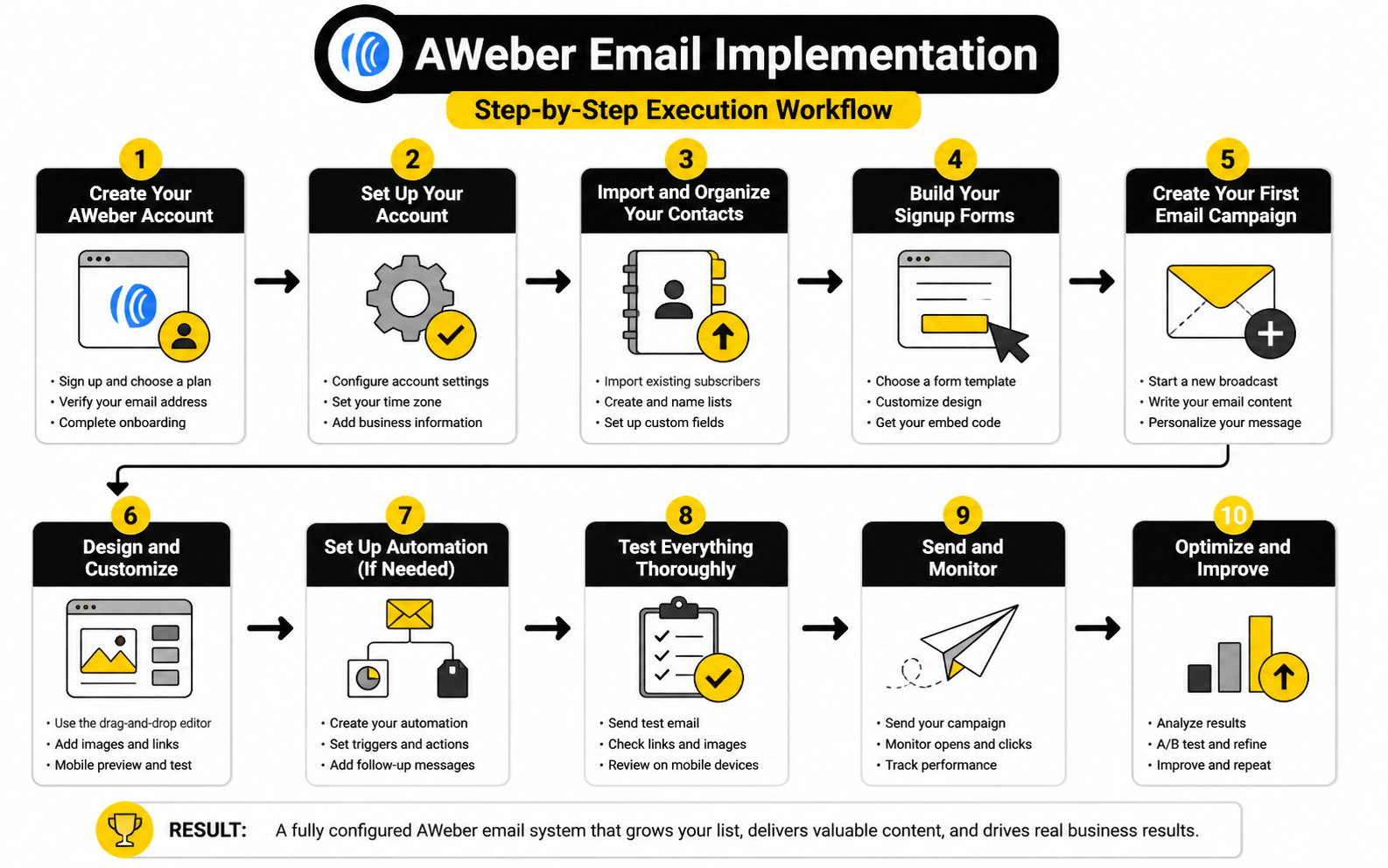
This is the part where the setup becomes tangible. A professional implementation is not about making the account look impressive. It is about making sure subscribers move through the system without confusion, duplicate messages, broken promises, or irrelevant campaigns.
Start by mapping the journey before touching the software. Write down where the subscriber enters, what tag they receive, what sequence starts, what offer appears, and what happens after they click or ignore it. That map prevents the most common implementation problem: building inside the tool without knowing the path.
Once the map is clear, build in layers. Create the list first, then the signup source, then the tag, then the automation, then the broadcast plan. This sequence keeps the system logical and makes troubleshooting much easier.
Step 1: Define The Subscriber Journey
Before you build anything, define the journey in plain language. A person joins because they want a specific resource or outcome. They receive the promised email immediately. Then they get a short sequence that helps them understand the problem, trust your approach, and choose the next step.
This journey should be written from the subscriber’s point of view, not from your dashboard’s point of view. The subscriber does not care that you have a list, a tag, and a workflow. They care that the emails feel relevant and arrive in a sensible order.
A good journey sounds simple when you explain it out loud. If you cannot explain it in a few sentences, the automation is probably too complicated. Simplify the path before you build it.
Step 2: Set Up The List With A Clear Purpose
Your list should have a clear business purpose. It might be a main newsletter list, a lead magnet list, a customer list, or a segment tied to a specific offer. The problem begins when every new idea gets a new list without a real reason.
In many cases, a cleaner approach is to use fewer lists and rely on tags for context. This keeps your subscriber management easier and reduces the chance of sending duplicate or conflicting messages. It also makes reporting more useful because the system is not split into unnecessary silos.
Name the list clearly so future you understands it instantly. Avoid names that depend on campaign nicknames or temporary promotions. A simple list name beats a clever one every time.
Step 3: Connect The Form Or Landing Page
After the list is ready, connect the form or landing page. This is where the promise and the technical setup meet. The form should match the offer, and the confirmation experience should make the subscriber feel like they did the right thing.
Keep the form short unless you truly need more information. Every extra field adds friction. In most cases, name and email are enough, and sometimes email alone is better if speed matters more than personalization.
The form should also apply the right tag at signup. This is important because the tag can start the correct workflow and preserve the subscriber’s original intent. Without that context, your AWeber email system becomes less precise over time.
Step 4: Write The Automation Before You Build It
Write the emails before building the automation. This prevents you from creating a beautiful workflow with weak messages inside it. The automation structure matters, but the words are what the subscriber actually experiences.
Each email should have one job. Do not cram three lessons, two offers, and a personal update into the same message. One idea per email makes the sequence easier to read and easier to improve later.
Once the emails are written, build the workflow around them. Set the trigger, add the timing, place the messages, and check the exit conditions. Then test the sequence like a real subscriber.
Step 5: Test The Full Path
Testing is not optional. Subscribe through the actual form, confirm that the tag is applied, check that the first email arrives, and make sure the timing between messages works as intended. A system that looks right inside the dashboard can still feel broken from the subscriber’s side.
Read the emails on mobile, not just desktop. Most subscribers will not experience your message inside your email editor. They will see it in a crowded inbox, often while distracted, so the subject line, first few lines, and call to action need to work fast.
Also test what happens after a click. If the email points to a booking page, sales page, product page, or resource, the link needs to work and the next page needs to match the promise. Broken continuity kills trust quickly.
Step 6: Add Broadcasts After The Automation Works
Do not rush into frequent broadcasts before the foundation is working. If the welcome sequence is broken, every broadcast sends more people into a weak experience. Fix the core journey first, then add regular campaigns on top.
Once the sequence works, create a broadcast rhythm you can sustain. Weekly is strong if you have something useful to say every week. Twice a month is better than starting weekly and disappearing after three sends.
Your broadcast calendar should include a mix of education, insight, promotion, and relationship-building. The best AWeber email strategy is not just automated follow-up. It is automated follow-up plus consistent human presence.
Optimization, Deliverability, And Measurement
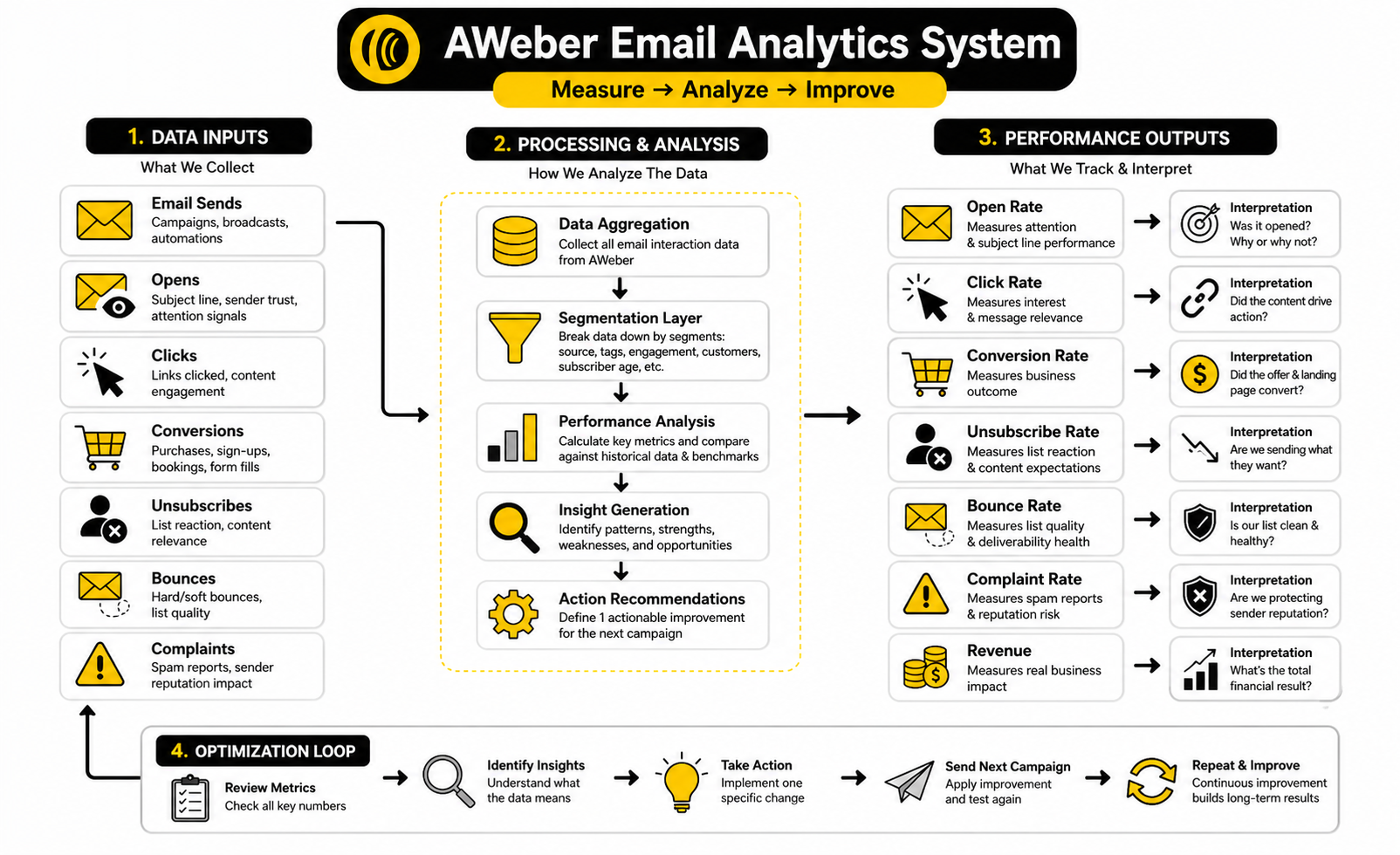
AWeber email performance should be measured like a business system, not like a popularity contest. Opens, clicks, unsubscribes, bounces, complaints, replies, conversions, and revenue all tell you something different. The mistake is staring at one number and pretending it explains the whole campaign.
Open rate can show whether the subject line, sender name, and list relationship are strong enough to earn attention. Click rate shows whether the email created enough interest to move someone to the next step. Conversion rate shows whether the landing page, offer, timing, and audience match were strong enough to produce a result.
The real value comes from reading these numbers together. A high open rate with weak clicks usually means the subject line worked but the message or offer did not. A low open rate with strong clicks can mean the offer is relevant to the people who do open, but the subject line or deliverability needs work. A high click rate with poor sales often points to a landing page, pricing, trust, or offer problem rather than an email problem.
Statistics And Data
Benchmarks are useful, but only when they are treated as context. They should not become the goal. Your AWeber email system is judged by whether it reaches the right people, creates useful engagement, and drives the business outcome you actually care about.
Recent benchmark data shows how much performance can vary by industry, list quality, and campaign type. HubSpot’s email benchmark roundup shows open rates and click-through rates changing significantly across sectors, while MailerLite’s benchmark data breaks performance down by industry, region, and campaign behavior. That is why a single “good open rate” number is too shallow to guide serious decisions.
Email is still worth measuring seriously because it remains one of the strongest owned marketing channels. Litmus reports that 35% of companies see email ROI of 36:1 or more, which explains why teams continue investing in email even while inboxes get more crowded. The lesson is not “email always works.” The lesson is that email works when the list, message, offer, and measurement loop are strong enough to support each other.
Deliverability is the part many beginners ignore until it hurts them. Validity’s 2025 deliverability research makes the point clearly: even strong campaigns lose value if they never reach the inbox. For AWeber email users, this means performance is not just about copywriting. Authentication, list hygiene, engagement, complaint rates, bounce rates, and sending behavior all affect what your subscribers actually see.
The Metrics That Actually Matter
Start with the metrics that connect directly to the subscriber journey. Open rate helps you understand attention. Click rate helps you understand message-to-offer alignment. Conversion rate helps you understand whether the campaign produced the intended action.
Unsubscribe rate is not automatically bad. Some unsubscribes are healthy because they remove people who were never going to engage or buy. The problem is a sudden spike after a specific campaign, because that usually signals a mismatch between what people expected and what you sent.
Bounce rate needs close attention because it affects list quality and deliverability. A clean list protects your sender reputation. If invalid addresses, old contacts, or low-quality imports start piling up, your future campaigns can suffer even when the content is good.
How To Read Open Rates Without Overreacting
Open rates are helpful, but they are not perfect. Privacy features, image loading behavior, mailbox filtering, and device differences can affect how opens are counted. Treat open rate as a directional signal, not absolute truth.
If opens drop across every campaign, look at deliverability, sender reputation, list quality, and subject line patterns. If opens drop only for one email, the problem is probably the topic, subject line, timing, or audience fit. Do not rebuild your whole AWeber email system because one broadcast underperformed.
The better move is to compare similar emails against each other. Compare welcome email one against future versions of welcome email one. Compare promotional broadcasts against other promotional broadcasts. Benchmarks are useful, but your own historical data is usually more useful once you have enough sends to see patterns.
How To Interpret Clicks
Clicks are stronger than opens because they show action. A subscriber clicked because something in the email made them curious enough to leave the inbox. That does not mean they are ready to buy, but it does mean the message created intent.
Low clicks can come from several problems. The email might not have a clear call to action. The offer might not match the segment. The message might be too long, too vague, or too focused on you instead of the reader’s problem.
Strong clicks with weak conversions tell a different story. In that case, the email may be doing its job, but the destination is leaking trust or clarity. Check the landing page headline, page speed, offer match, pricing, proof, form friction, and mobile experience before blaming the email.
Build A Simple Measurement Loop
A practical analytics system does not need to be complicated. It needs to be consistent. For every important AWeber email campaign, track the same core numbers so you can compare performance over time.
Use a simple review loop:
That last step matters. Data without a decision is just dashboard decoration. Every campaign should teach you something specific about your list, your offer, or your message.
Segment Performance Before Changing Everything
Averages can hide the truth. Your total campaign click rate might look average, but one segment may be highly engaged while another barely reacts. If you only look at the overall number, you may change the wrong thing.
Segment performance by source, tag, subscriber age, customer status, and previous behavior. A subscriber who joined yesterday should not always be judged the same way as someone who has been inactive for nine months. A customer should not always receive the same interpretation as a cold prospect.
This is where the tagging work from earlier starts paying off. If your AWeber email setup tracks how people joined and what they clicked, your analytics become more useful. You can stop asking, “Did the list like this?” and start asking, “Which part of the list responded, and why?”
Watch Revenue, Not Just Engagement
Engagement matters, but revenue tells the harder truth. An email can get plenty of opens and clicks while producing no meaningful business result. That does not make it useless, but it does mean you need to understand its role.
Some emails are designed to build trust. Some are designed to educate. Some are designed to sell. You should not judge every email by immediate revenue, but you should know which emails are supposed to create revenue and whether they are doing it.
For sales-focused campaigns, track the full path from send to click to conversion. If you use a funnel builder or broader CRM, tools like GoHighLevel, ClickFunnels, or systeme.io can help connect email traffic to landing pages, bookings, checkout flows, and follow-up. The important thing is not the tool itself. The important thing is seeing what happens after the click.
Improve One Variable At A Time
Optimization gets messy when you change too many things at once. If you change the subject line, email body, offer, segment, send time, and landing page at the same time, you will not know what caused the result. That makes the next decision weaker.
Change one meaningful variable when possible. Test a clearer subject line. Test a stronger call to action. Test a shorter email. Test a more specific segment. Then compare the outcome against a similar previous campaign.
This is how AWeber email performance improves without guesswork. You send, measure, learn, and adjust. Not dramatically. Consistently.
Know When A Number Is Warning You
Some numbers should trigger immediate attention. A sudden rise in bounces can mean list quality problems. A sudden rise in unsubscribes can mean the message did not match expectations. A sudden drop in opens across multiple sends can point to deliverability or sender reputation issues.
Complaints matter even more. If people mark your emails as spam, mailbox providers can treat future campaigns more harshly. That is why clear consent, relevant content, and easy unsubscribe options are not just compliance details. They protect the long-term health of your email channel.
The smartest marketers do not wait until the list is damaged. They watch the signals early and respond before the system gets worse. That is the difference between managing email like a campaign and managing it like an asset.
Strategic Tradeoffs Before You Scale
Once the basic AWeber email system is working, the next challenge is not adding more. The next challenge is deciding what deserves to be added. Scaling email too early can create a system that looks advanced but becomes harder to manage, harder to measure, and easier to break.
Every new form, tag, automation, segment, integration, and offer adds operational weight. That is fine when the weight creates leverage. It is a problem when the account becomes a maze and nobody can explain why half the campaigns exist.
The smart move is to scale from proof, not excitement. If one welcome sequence is converting, improve it before building five more. If one segment clearly outperforms another, use that insight before creating a complicated branching workflow. Growth should make the system sharper, not noisier.
Simplicity Beats Automation Theater
Automation theater is when a business builds complicated workflows to feel sophisticated. There are branches, conditions, tags, delays, and triggers everywhere, but the actual subscriber experience is average. That is not strategy. That is decoration.
AWeber email automation should remove manual work and improve relevance. If an automation does neither, question whether it belongs. A simple sequence that sends the right message at the right time is better than a complex workflow that nobody monitors.
The easiest test is this: can you explain the automation in plain English without opening the dashboard? If not, it is probably too complicated. Clean systems are easier to optimize because the cause and effect are visible.
When To Use One List Versus Multiple Lists
List structure is one of the biggest strategic decisions inside an email platform. Multiple lists can make sense when audiences are genuinely separate, such as different brands, unrelated offers, or distinct permission contexts. But using a new list for every lead magnet usually creates more problems than it solves.
A leaner approach is often better: keep one main list and use tags to identify source, interest, customer status, and engagement. That lets you understand subscriber behavior without scattering people across too many containers. It also makes it easier to avoid duplicate messaging.
The tradeoff is discipline. If you rely on tags, your naming system has to be consistent. Random tags become just as messy as random lists, so write down your naming rules before the account gets busy.
Segment Only When The Message Changes
Segmentation is powerful, but only when it changes what you send. If two segments receive the same email, same offer, same timing, and same call to action, they may not need to be separate segments yet. Segmentation should make the subscriber experience more relevant, not just make the dashboard look more advanced.
A useful segment usually changes at least one of four things: the message, the offer, the timing, or the suppression rule. For example, customers should not always receive the same pitch as prospects. New subscribers may need context before a hard offer. Cold subscribers may need a re-engagement message before regular broadcasts continue.
This is where an AWeber email strategy becomes more mature. You stop segmenting because you can and start segmenting because it improves the next decision. That shift keeps the system practical.
Protect Deliverability While Growing
Growth can damage deliverability if it is handled carelessly. Importing old contacts, buying lists, sending sudden high-volume campaigns, or emailing people who never gave clear permission can hurt sender reputation. Email is not just about what you send; it is also about how mailbox providers interpret your sending behavior.
Authentication matters here. SPF, DKIM, and DMARC help receiving mail servers verify that messages are connected to the domain they claim to come from, which is why resources like Cloudflare’s explanation of SPF, DKIM, and DMARC are worth understanding before scaling. This may feel technical, but it directly affects whether your emails have a fair chance of reaching the inbox.
List quality matters just as much. A smaller engaged list is usually more valuable than a large list full of dead contacts. If your AWeber email system keeps sending to people who never open, click, reply, or buy, you may be paying for subscribers who are also weakening your performance signals.
Know The Risk Of Over-Promotion
The fastest way to train subscribers to ignore you is to make every email a pitch. Offers are necessary, but constant urgency gets old quickly. If every subject line screams, every discount is “last chance,” and every email pushes the same next step, trust erodes.
The risk is not only unsubscribes. Some people stay subscribed but mentally check out. That silent disengagement can be worse because the list looks bigger than the real audience.
Use promotion with intent. Launch when there is a reason. Make offers when they fit the journey. Give value between asks so subscribers do not feel like the only time you show up is when you want money.
Build Suppression Rules Into The System
Suppression is one of the most underrated parts of email strategy. It simply means choosing who should not receive a message. That can be just as important as choosing who should receive it.
For example, a person who already bought should usually be excluded from the same purchase pitch. Someone in the middle of a welcome sequence may not need every broadcast. A subscriber who just clicked a high-intent offer may deserve a more focused follow-up instead of a generic newsletter.
Suppression protects relevance. It also protects trust because subscribers are less likely to receive messages that feel careless. As the system grows, suppression rules help keep AWeber email campaigns from overlapping in awkward ways.
Plan For Integrations Before You Need Them
AWeber can sit inside a broader marketing stack, but integrations should have a clear job. Do not connect tools just because integration is available. Connect them when data needs to move, actions need to trigger, or reporting needs to become more complete.
If the email list supports a sales funnel, connecting it with a funnel builder like ClickFunnels or an all-in-one platform like systeme.io can make the path from opt-in to offer easier to manage. If the business needs CRM, pipelines, bookings, and multi-channel follow-up, GoHighLevel may fit better around the email layer. The point is not to stack tools randomly; the point is to make the customer journey easier to run.
Before adding any integration, define what data should move and why. A purchase might add a customer tag. A booking might stop a sales sequence. A form submission might start a specific follow-up path. Clear rules prevent tool sprawl.
Decide What AWeber Should Not Do
A mature strategy includes boundaries. AWeber email can handle list growth, broadcasts, automations, landing pages, signup forms, and subscriber management. But it may not be the best place to manage every part of a complex sales operation.
For example, deep pipeline management, advanced sales team workflows, multi-location agency operations, and heavy CRM reporting may need a broader system. That does not make AWeber weak. It simply means the email platform should play the role it is best suited for.
This matters because forcing one tool to do everything usually creates ugly workarounds. Use AWeber where it gives you speed and clarity. Use other tools where the business needs a different type of infrastructure.
Audit The System Before Adding More
Before scaling, audit what already exists. Look at every list, form, tag, automation, broadcast template, landing page, and integration. If you cannot explain why something exists, it may be clutter.
A practical audit should answer five questions:
This audit does not need to be dramatic. It just needs to be honest. A clean AWeber email account is easier to improve, easier to delegate, and easier to trust.
Scale Around The Subscriber Experience
The subscriber experience should stay at the center as the system grows. More campaigns do not automatically create more value. More segmentation does not automatically create more relevance. More automation does not automatically create more revenue.
Ask what the subscriber feels at each stage. Did they get what they requested? Do the emails arrive in a logical order? Are the offers relevant to their behavior? Is it easy to unsubscribe if they are no longer interested?
That last point is important. Permission-based marketing only works when permission is respected. The long-term win is not squeezing one more click out of the list. The long-term win is building an email system people are willing to keep receiving.
Tool Fit, Alternatives, And FAQ
AWeber email makes the most sense when you want a focused email marketing system that is practical to build, easy to maintain, and strong enough for serious list growth. It is especially useful when your main needs are signup forms, landing pages, newsletters, tags, segments, welcome sequences, and regular broadcasts. That is a solid fit for creators, consultants, small businesses, ecommerce brands, coaches, educators, and lean marketing teams.
It may not be the best fit when email is only one small piece of a much larger sales operation. If you need advanced pipelines, sales team workflows, booking automation, call tracking, reputation management, and multi-channel follow-up in one place, a broader platform like GoHighLevel may be a better fit. If your priority is building funnels and checkout flows around offers, ClickFunnels or systeme.io may sit more naturally around the sales process.
The point is not that one tool wins for everyone. The point is fit. AWeber is strongest when email is the center of the relationship, and other tools can support the journey around it when the business model needs more infrastructure.
What is AWeber email used for?
AWeber email is used to collect subscribers, send newsletters, build automated campaigns, create signup forms, publish landing pages, and organize contacts with lists, tags, and segments. In practical terms, it helps a business stay in touch with leads and customers without manually writing every follow-up from scratch. The best use case is not just “sending emails,” but building a repeatable communication system that moves people from interest to trust to action.
Is AWeber good for beginners?
AWeber can be a good fit for beginners because the core workflow is straightforward: create a list, add a form, write emails, and send campaigns. That makes it easier to start than platforms that assume you already understand complex automation logic. Beginners should still avoid building too much too soon, because even simple tools become messy when the strategy is unclear.
Can I build automations with AWeber?
Yes, AWeber supports automated campaigns that can send emails based on subscriber actions and timing. For most small businesses, that is enough to build welcome sequences, lead magnet delivery, onboarding flows, simple sales sequences, and re-engagement campaigns. The key is to map the journey first, then build the automation around a clear subscriber path.
What should my first AWeber email sequence include?
Your first sequence should include a delivery email, a useful educational email, a message that handles a common problem or mistake, a trust-building email, and a clear next step. That gives the subscriber immediate value while also showing how you think. Keep it focused because the first sequence should create clarity, not overwhelm.
How often should I send emails through AWeber?
The right frequency depends on your audience, offer, and ability to send something genuinely useful. Weekly can work well if you have a strong point of view and enough useful material. Twice a month is better than forcing weekly emails that feel thin, repetitive, or rushed.
What is the difference between broadcasts and campaigns in AWeber?
Broadcasts are one-time emails sent to a list or segment, while campaigns are automated sequences that run based on triggers and timing. A broadcast is useful for newsletters, launches, announcements, promotions, and timely updates. A campaign is better for predictable follow-up, such as welcome emails, lead magnet delivery, customer onboarding, or re-engagement.
Should I use tags or multiple lists in AWeber?
Use tags when subscribers belong to the same overall audience but have different interests, behaviors, or stages. Use separate lists when the audiences, brands, or permission contexts are genuinely different. For most growing businesses, fewer lists with cleaner tags will be easier to manage than creating a new list for every campaign.
How do I improve AWeber email open rates?
Start with sender trust, subject lines, list quality, and consistency. People open emails when they recognize the sender and expect the message to be worth their time. If open rates decline across several sends, review deliverability, authentication, inactive subscribers, and whether your recent emails matched the reason people subscribed.
How do I improve AWeber email click rates?
Clicks improve when the email has one clear idea and one clear next step. The reader should understand what the link is, why it matters, and what they will get after clicking. If opens are strong but clicks are weak, the problem is often message relevance, offer clarity, email structure, or a call to action that is too vague.
How do I know if my AWeber email system is working?
AWeber email is working when subscribers enter through the right forms, receive the right sequence, engage with relevant messages, and take the business action you designed the system to support. Do not judge it only by open rates. Look at delivery, clicks, replies, conversions, unsubscribes, complaints, revenue, and subscriber quality together.
Does AWeber help with landing pages?
Yes, AWeber includes landing page tools that can support lead magnets, simple signup pages, and focused subscriber entry points. This is useful when you want to launch a list-building page without building a full website. For more advanced funnel design, checkout flows, upsells, and conversion paths, a dedicated funnel platform may still be a better choice.
Is AWeber enough for a full marketing stack?
AWeber can be enough when your main marketing need is email list growth, regular communication, and basic automation. It may not be enough if your business needs deeper CRM functionality, sales pipelines, booking systems, advanced attribution, or heavy multi-channel automation. The right answer depends on whether email is the core system or one part of a larger revenue operation.
What should I avoid when using AWeber?
Avoid importing low-quality contacts, sending to people who did not clearly opt in, building too many lists, creating unclear tags, and sending promotional emails without value between them. Also avoid changing too many variables at once when optimizing performance. The businesses that win with email usually keep the system clean, respect the subscriber, and improve one layer at a time.
When should I switch from AWeber to another platform?
Consider switching when the business has outgrown the role AWeber is meant to play. If you need advanced CRM, complex sales automation, deep ecommerce flows, multi-location agency tools, or sophisticated funnel infrastructure, another platform may fit better. But do not switch just because another tool looks more exciting; switch when the current system is clearly limiting execution.
What is the best way to start with AWeber email?
Start with one clear offer, one signup page, one list, a simple tagging structure, and one welcome sequence. Then send consistent broadcasts and measure what happens. Once that foundation works, you can add segmentation, additional automations, integrations, and more advanced reporting without turning the account into a mess.
Build a stronger local presence with BAAM AI
Turn your website, Google profile, social channels, and AI visibility into one growth engine
Most businesses do not need more random marketing activity. They need a consistent presence system that helps the right people find them, trust them, and take action. BAAM AI brings strategy, local SEO, website updates, Google Maps visibility, social content, AI-search readiness, media production, and reporting into one practical monthly engine.
If you want your marketing to keep working after the campaign ends, start with a free BAAM AI presence audit. See how your business shows up today and where the fastest visibility wins are at BAAM AI.