
BAAM AI Blog
Automated Campaigns: A Practical Framework For Turning Marketing Into A Repeatable Growth System
Automated campaigns are not just scheduled emails, chatbot replies, or a few follow-up messages sitting inside a CRM. At their best, they are structured systems that move people from interest to action using timing...
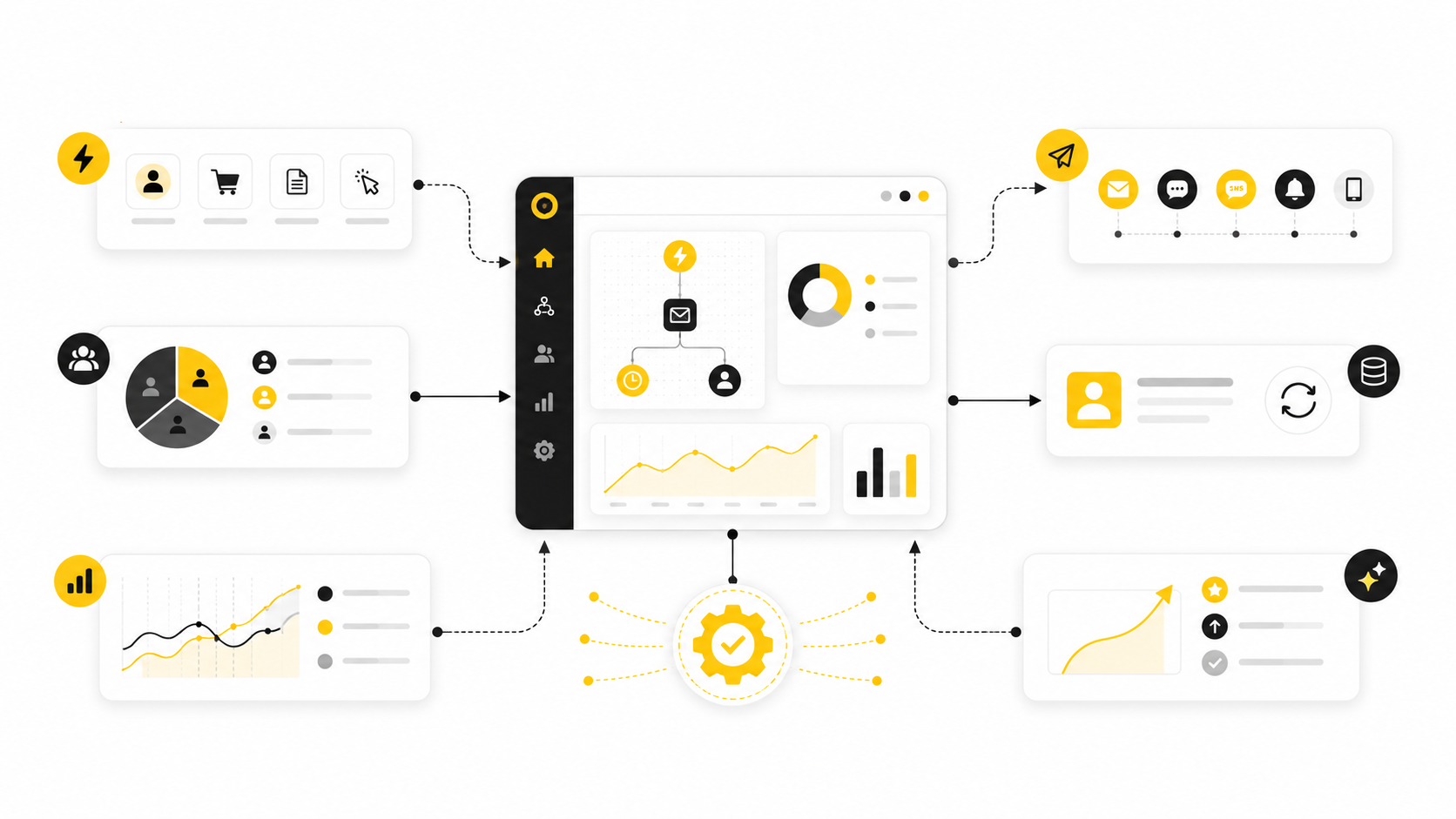
Automated campaigns are not just scheduled emails, chatbot replies, or a few follow-up messages sitting inside a CRM. At their best, they are structured systems that move people from interest to action using timing, context, segmentation, and useful content. The point is not to remove the human from marketing. The point is to stop making humans manually repeat work that software can handle better.
That distinction matters because automation has become easy to start and surprisingly easy to damage. A business can connect a form, send a welcome sequence, add a retargeting audience, and push leads into a pipeline in an afternoon. But without strategy, that same setup can become noisy, irrelevant, and expensive. Automated campaigns only work when they are built around the customer journey, not around the tool.
The better way to think about automated campaigns is simple: they are repeatable customer journeys triggered by real behavior. Someone downloads a guide, abandons a checkout, books a call, clicks a pricing page, replies to a message, or stops engaging. Each action should help the system decide what to send next, what not to send, when to alert a person, and when to pause.
Marketing teams are moving in this direction because the old manual model does not scale well. Salesforce’s latest State of Marketing research is based on insights from nearly 4,500 marketing leaders worldwide, and the pattern is clear: marketers are focused on AI, data, personalization, and more responsive customer experiences. IBM’s 2024 State of Salesforce research also shows the gap most companies face: while 97% of Salesforce customers collect diverse types of data, only 24% use it to transform customer experiences. That is the real automation problem. Most businesses do not need more messages. They need better systems for using the signals they already have.
this guide will treat automated campaigns as a growth system, not a software feature. We will look at why they matter, how the framework works, what components are essential, and how professional teams implement automation without turning their marketing into spam. The goal is practical: build campaigns that feel timely, useful, and commercially sharp.
Why Automated Campaigns Matter Now
Automated campaigns matter because attention is harder to earn, harder to keep, and easier to lose. A person might discover your brand through search, social, a referral, a webinar, a short-form video, or a comparison page before they ever speak to sales. If your follow-up depends on someone remembering to manually send the right message at the right time, you will miss opportunities.
The practical advantage of automation is consistency. Every lead can receive a timely response, every customer can get relevant onboarding, every abandoned cart can trigger a recovery path, and every sales conversation can be supported by the right reminders. That does not mean every person should receive the same sequence. It means the business should have a reliable system for deciding what each person receives next.
The bigger advantage is learning. When automated campaigns are structured properly, each journey creates feedback. You can see which triggers create qualified leads, which segments convert faster, which offers create friction, and which messages are being ignored. That makes automation more than a delivery mechanism. It becomes a measurement system for how people actually move through your funnel.
This is also why tool choice matters, but only after the strategy is clear. Platforms like GoHighLevel, ManyChat, Brevo, and Buffer can all support different parts of an automated campaign system. The mistake is starting with the platform and then forcing the customer journey to fit it. Start with the journey, then choose the stack that can execute it cleanly.
The Automated Campaigns Framework
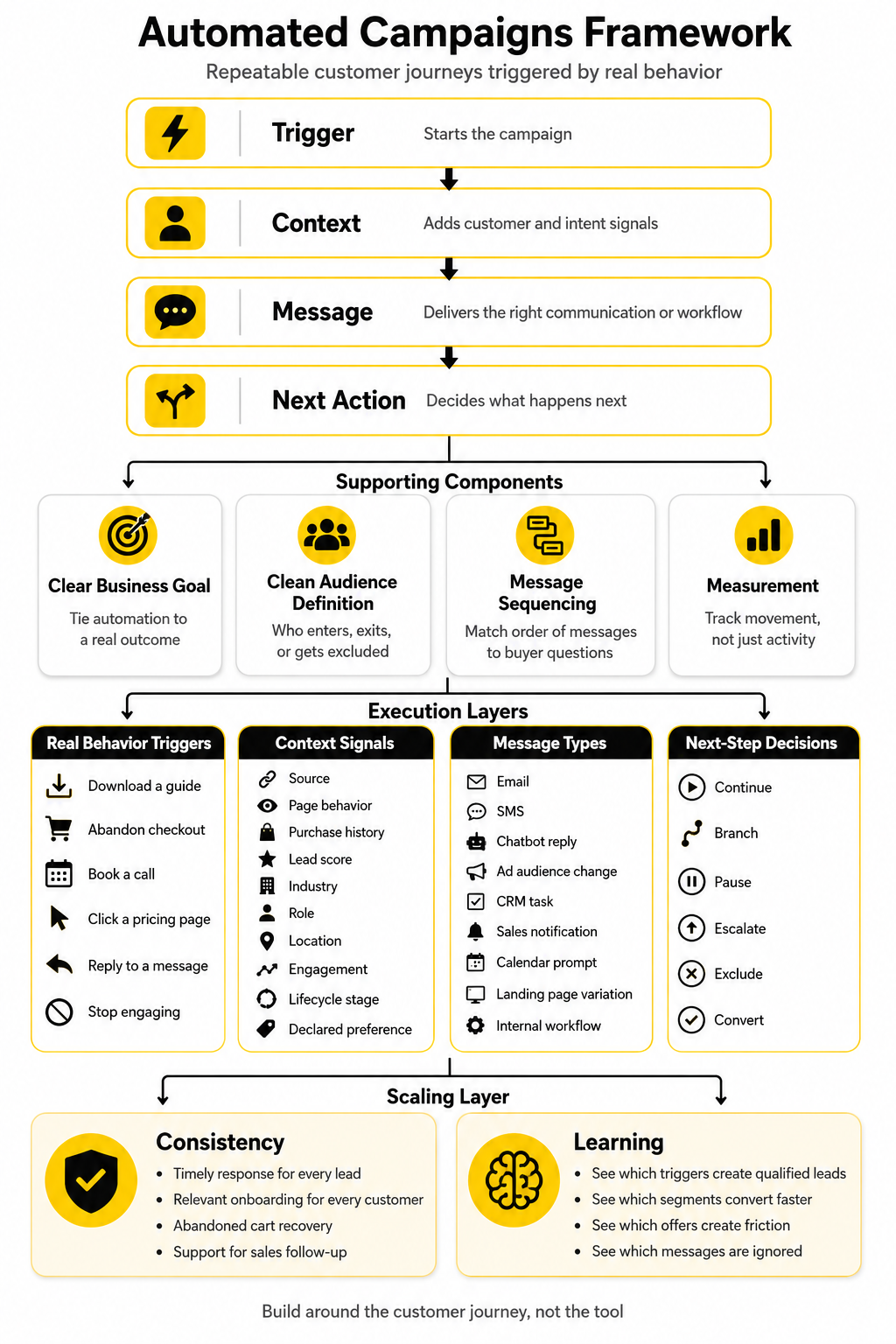
A strong automated campaigns framework has four layers: trigger, context, message, and next action. The trigger starts the campaign, but it should never be the whole strategy. A form submission tells you someone raised their hand. It does not automatically tell you what they care about, how ready they are to buy, or whether they need education, proof, urgency, or a human conversation.
Context is where automation becomes useful. Context can include source, page behavior, purchase history, lead score, industry, role, location, engagement, lifecycle stage, or declared preference. A pricing-page visitor should not be treated exactly like someone who downloaded a beginner checklist. A returning customer should not receive the same nurture sequence as a cold lead.
The message is the visible part, but it is only one part of the system. It can be an email, SMS, chatbot reply, ad audience change, CRM task, sales notification, calendar prompt, landing page variation, or internal workflow. The best automated campaigns use messages only when they help the person move forward. Silence, suppression, and routing are sometimes just as important as sending.
The next action is what separates a real system from a simple sequence. After each interaction, the campaign should decide whether to continue, branch, pause, escalate, exclude, or convert. This is where many businesses leave money on the table. They build linear automations when the customer journey is not linear.
Core Components Of A High-Performing Automated Campaign
Every high-performing automated campaign starts with a clear business goal. That goal might be booking consultations, activating trial users, recovering abandoned checkouts, increasing repeat purchases, qualifying leads, reducing churn, or improving onboarding. Without a defined goal, automation becomes activity for its own sake. You end up celebrating sends, opens, and clicks instead of revenue, retention, and qualified conversations.
The second component is a clean audience definition. You need to know who enters the campaign, who should be excluded, and what conditions move someone from one stage to another. This sounds basic, but it is where many campaigns break. A lead who already booked a call should not keep receiving “book a call” reminders, and a customer who already purchased should not be pushed through a first-time buyer sequence.
The third component is message sequencing. Good sequencing does not mean sending more often. It means matching the order of messages to the buyer’s actual questions. Early messages may clarify the problem, middle messages may build trust, and later messages may reduce risk or create urgency. Each message should have a job.
The fourth component is measurement. Automated campaigns should track more than surface engagement. Opens and clicks are useful signals, but they are not the final truth. A professional setup connects campaign performance to pipeline movement, booked calls, purchases, retention, customer lifetime value, and unsubscribe or complaint behavior. If a campaign creates short-term conversions but damages trust, the numbers need to show that too.
Building Campaigns Around The Customer Journey
Automated campaigns work best when they are designed around what the customer is trying to do, not what the business wants to send. That sounds obvious, but it is the line most weak campaigns cross immediately. They start with “we need a welcome sequence” instead of asking what the person needs after they first discovers the brand.
A customer journey is not just awareness, consideration, and purchase written on a whiteboard. In real life, people compare options, get distracted, come back later, ask silent questions, hesitate at pricing, and sometimes need reassurance before taking the next step. Your automation should respect that behavior instead of forcing every person through the same rigid path.
The easiest way to build better automated campaigns is to map the moments where intent changes. A person who reads an educational article has different intent from someone who visits a demo page twice in one week. A person who starts checkout and leaves has different intent from someone who never reached the offer page. The campaign should respond to those differences with better timing, better content, and cleaner routing.
Start With The Entry Point
Every automated campaign begins with an entry point, and that entry point tells you something important. A lead magnet signup usually signals curiosity. A pricing-page form usually signals buying intent. A webinar registration might sit somewhere in the middle, depending on the topic and how close the offer is to the problem being discussed.
This is why you should not dump every lead into one master nurture sequence. When all leads receive the same automated follow-up, the campaign becomes generic almost immediately. The better approach is to create entry-point-specific paths that reflect why the person entered the system in the first place.
For example, a campaign that starts from a landing page built in ClickFunnels should connect the opt-in promise to the first few follow-up messages. If the landing page promised a checklist, the first message should deliver it clearly, then help the person use it. If the landing page promised a consultation, the next step should reduce booking friction, not send a long educational sequence that delays action.
Match Messages To Intent
Intent is the difference between automation that feels helpful and automation that feels annoying. Someone showing early interest usually needs clarity, education, and proof. Someone showing buying intent usually needs confidence, urgency, and a simple next step. Treating both people the same is where campaigns start to feel lazy.
A good automated campaign asks one practical question at each stage: what does this person probably need to believe or understand before moving forward? At the top of the journey, they may need to understand the problem more clearly. In the middle, they may need to compare approaches. Near the bottom, they may need pricing context, risk reduction, testimonials, onboarding details, or a direct conversation.
This is where segmentation becomes useful without becoming overcomplicated. You do not need twenty audience paths on day one. Start with a few meaningful differences, such as new lead versus returning lead, low intent versus high intent, buyer versus non-buyer, and active versus inactive. Those simple splits usually create a stronger foundation than a messy automation map nobody can maintain.
Use Behavior To Change The Path
The strongest automated campaigns do not just run on a timer. They react to behavior. If someone clicks a booking link, the campaign should not keep pushing generic education. If someone ignores three messages, the campaign may need to slow down, change the angle, or stop entirely.
Behavior-based automation is especially important because people rarely move in a straight line. A lead may read three emails, disappear for two weeks, visit the pricing page, and then reply to a later message. A customer may buy once, ignore onboarding, and then need a reminder before they become successful with the product. Good automation watches for these signals and adjusts.
This is where CRM-centered tools can help. A platform like GoHighLevel can connect forms, pipelines, messages, appointments, and follow-up logic in one place, which makes it easier to build campaigns around actual lead behavior. For smaller or simpler funnels, tools like Systeme.io can also support practical automated campaigns without making the setup heavier than it needs to be.
Build Around The Decision Point
Every customer journey has decision points, and those points deserve special attention. A decision point is where the person either moves closer to conversion or quietly drops away. It could be a booked call, checkout page, proposal review, free trial activation, demo request, upgrade prompt, renewal window, or abandoned cart.
The mistake is treating the decision point like just another step in the sequence. It is not. This is where the campaign needs to become sharper, more specific, and more useful. The message should answer the objections that usually appear at that exact moment.
For a checkout abandonment campaign, the issue may be trust, timing, price, or distraction. For a consultation booking campaign, the issue may be uncertainty about what happens on the call. For a free trial activation campaign, the issue may be that the user does not know what to do first. Each situation needs a different campaign, because each situation has a different barrier.
Connect Content To Campaign Logic
Content should not sit separately from automation. Every article, video, comparison page, guide, webinar, and case study can become part of the campaign logic if it supports a specific stage of the journey. The question is not “what content do we have?” The question is “which piece helps this person take the next step?”
This is where many businesses accidentally create clutter. They send every new lead a pile of resources because the resources exist. But more content does not automatically create more trust. Often, it creates more work for the reader.
A better system uses content with intent. A short explainer can help early-stage leads understand the problem. A comparison page can help middle-stage leads choose a direction. A booking reminder can help high-intent leads act before momentum fades. A post-purchase onboarding message can help customers get value faster, which protects retention and future revenue.
Keep Human Handoffs Clean
Automated campaigns should make human follow-up better, not replace it in every situation. When someone becomes sales-ready, the system should make that obvious. The handoff should include what they did, what they saw, what they asked for, and why they are worth contacting now.
This matters because bad handoffs waste the strongest signals in the funnel. If a salesperson only sees “new lead,” they have no useful context. If they see that the person downloaded a buyer guide, visited pricing, clicked the consultation page, and replied to a qualifying question, the conversation starts from a much stronger place.
The same idea applies after purchase. Automation can deliver onboarding, reminders, and helpful resources, but a human should still step in when the customer shows confusion, high value, or risk of churn. Professional automated campaigns do not remove judgment. They create better moments for judgment to happen.
Professional Implementation And Optimization
Implementation is where automated campaigns either become a real growth asset or turn into a fragile mess. Strategy alone is not enough. You need clean data, clear ownership, accurate triggers, useful content, working integrations, and a testing process that does not collapse the first time someone changes a form, offer, or sales pipeline.
The professional approach is to build automation in layers. You start with the journey and the commercial goal, then you define the data needed to support that journey. After that, you build the campaign logic, write the messages, connect the tools, test every path, and only then start optimizing based on real behavior.
This matters because most automation problems are not copywriting problems. They are process problems. The wrong person enters the campaign, the right person enters twice, the sales team never gets the notification, the booking link breaks, the suppression rule is missing, or the reporting does not connect activity to revenue.
Step 1: Define The Campaign Goal
Start with one measurable outcome. Not “nurture leads.” Not “stay top of mind.” Those are too vague to guide implementation. A useful goal sounds like “increase booked consultations from pricing-page visitors,” “recover abandoned checkouts,” “activate trial users,” or “turn first-time buyers into repeat customers.”
That goal determines the campaign structure. If the goal is booked calls, the automation needs strong qualification, calendar routing, reminders, and sales notifications. If the goal is onboarding, the automation needs usage prompts, education, support handoffs, and risk signals. If the goal is repeat purchase, the automation needs timing, segmentation, offer logic, and exclusion rules.
One campaign should not try to do everything. When the goal is too broad, the automation becomes too broad. Focus makes the campaign easier to build, easier to measure, and easier to improve.
Step 2: Map The Trigger And Exit Rules
The trigger decides who enters the campaign. The exit rules decide who should stop receiving it. Both are equally important, because a campaign that starts correctly but does not stop correctly will eventually annoy the people it was meant to help.
A trigger can be a form submission, tag, purchase, missed call, page visit, cart event, chatbot interaction, booked appointment, pipeline stage change, or inactivity window. The best trigger is not always the easiest one to set up. The best trigger is the one that reflects a meaningful change in intent.
Exit rules protect the customer experience. A person should leave a booking campaign after booking. A buyer should leave a sales nurture sequence after purchasing. An inactive subscriber may need to move into a re-engagement path instead of receiving the same message forever. This is not a small detail. It is what keeps automated campaigns from feeling careless.
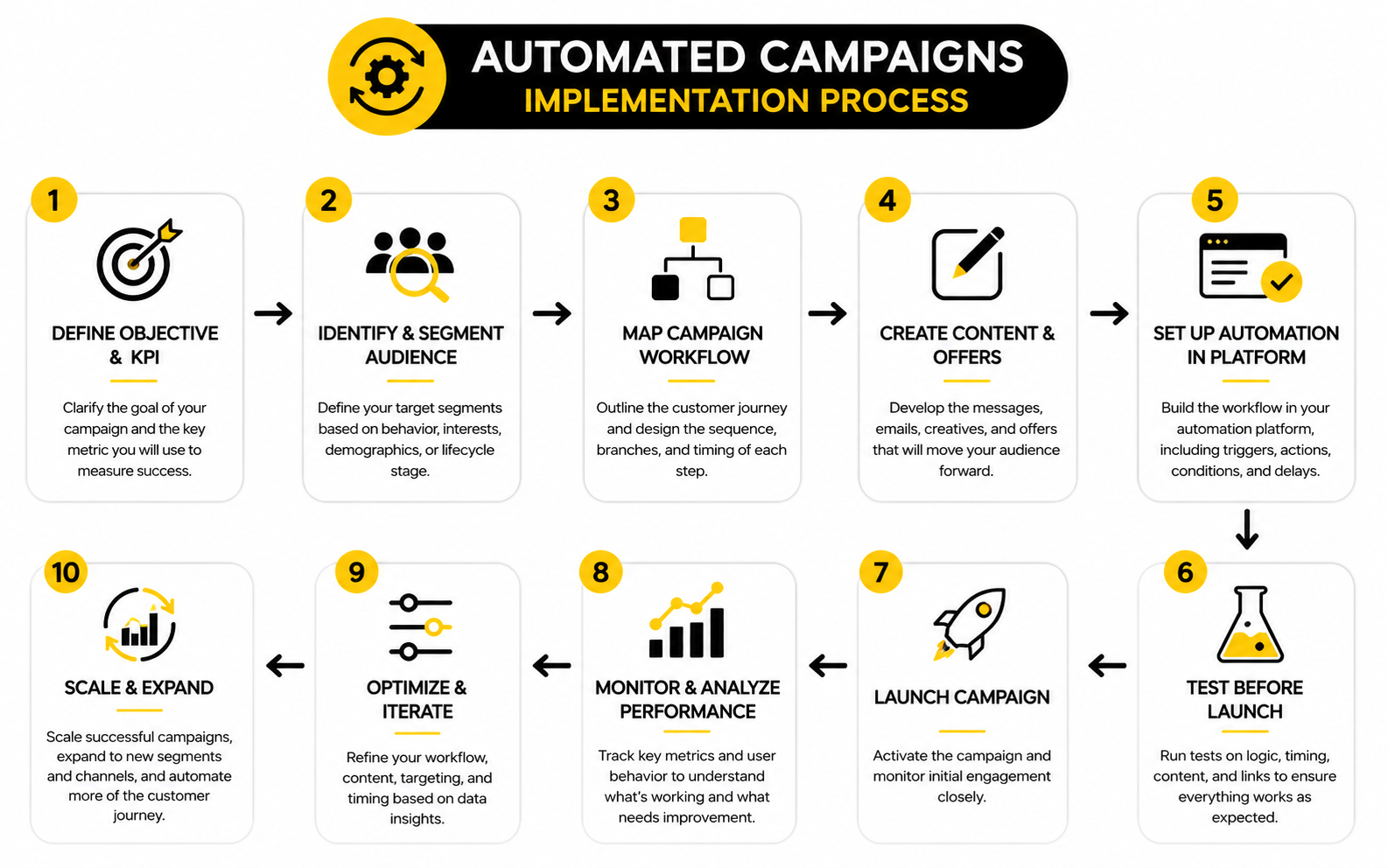
Step 3: Build The Campaign Logic Before Writing The Messages
Do not write the emails first. Do not build the workflow first. Map the logic first. This one habit prevents a lot of painful rebuilding later.
The campaign logic should show what happens when someone takes action, ignores a message, replies, books, buys, cancels, or becomes unqualified. It should also show wait times, suppression rules, owner notifications, lead scoring changes, and any branch that changes the next step. If you cannot explain the logic clearly, the automation is not ready to build.
A simple process map can be enough. You do not need a giant diagram. You need a clear view of the campaign path, the decision points, and the moments where the system should either continue, pause, escalate, or stop.
Step 4: Write Messages With One Job Each
Each message in an automated campaign should have one job. One message might deliver the promised asset. Another might explain the next step. Another might handle a common objection. Another might invite a reply, book a call, finish checkout, or complete setup.
The problem with weak automation copy is that it tries to do too much at once. One email gives a lesson, tells a backstory, lists five benefits, adds three testimonials, links to four resources, and ends with a vague call to action. That is not helpful. It is noise with formatting.
Good campaign copy is specific and timed to the stage of the journey. Early messages can be educational. Middle messages can build confidence. Late-stage messages should make action easier. The closer someone is to conversion, the more direct the message should become.
Step 5: Connect The Right Tools Without Overbuilding
Your tech stack should support the campaign, not become the campaign. A simple automated campaign might only need a form, email platform, landing page, calendar, and CRM. A more advanced setup may need chatbot automation, enrichment, lead scoring, ad audience syncing, call tracking, or customer data integrations.
For service businesses and agencies, GoHighLevel is often useful because it can bring funnels, messaging, calendars, pipelines, and automation into one operating system. For ecommerce-style landing pages, Replo can help teams build campaign-specific pages without relying on slow development cycles. For conversational flows on social and messaging channels, ManyChat can support automated replies, lead capture, and follow-up paths where chat is the natural entry point.
The key is not to collect tools. The key is to remove friction. If a tool does not improve targeting, execution, measurement, speed, or customer experience, it probably does not belong in the first version of the campaign.
Step 6: Test Every Path Before Launch
Testing is not optional. You need to test the happy path, the edge cases, and the failure points. Submit the form, click the links, reply to the message, book the call, cancel the call, complete the purchase, abandon the purchase, and confirm that the campaign responds correctly.
This is where teams often discover problems that would have been embarrassing in public. Tags do not apply. A delay is wrong. The wrong owner gets the task. A customer receives a lead nurture email. A booking reminder fires after the appointment. These issues are normal during testing, but they are expensive after launch.
Use a simple pre-launch checklist. Confirm the trigger, exit rules, links, personalization fields, mobile formatting, sender details, tracking, internal notifications, suppression logic, and reporting. Then run the campaign with a small audience before opening it fully.
Step 7: Optimize Based On Behavior, Not Opinions
Once the campaign is live, optimization should come from behavior. Look at where people enter, where they drop, what they click, what they ignore, what they reply to, and which paths create real outcomes. Do not rewrite everything because one person on the team dislikes a subject line.
Triggered and behavior-based messages often perform differently from broad scheduled sends because they are tied to a specific action or moment. Recent benchmark research from Acoustic found that automated and transactional emails triggered by customer actions saw higher click-through and click-to-open rates than general scheduled sends. That does not mean every triggered message is automatically good. It means timing and relevance give automation a serious advantage when the campaign is built properly.
Optimization should be disciplined. Change one meaningful thing at a time when possible. Improve the weakest step first. If people enter but do not click, review the offer and message. If people click but do not convert, review the page, booking flow, checkout, or sales handoff. If people convert but later churn, the problem may be onboarding, expectation-setting, or customer success.
Statistics And Data
Measurement is where automated campaigns become honest. A campaign can look polished, have clean copy, and still fail commercially if it does not move people toward the outcome that matters. That is why the data layer should not be treated as a reporting extra. It should be part of the campaign design from the beginning.
The goal is not to collect every possible metric. The goal is to understand which signals show progress, which signals show friction, and which signals are just noise. Automated campaigns create a lot of activity, so the measurement system has to separate movement from momentum.
Benchmarks can help, but they should not become the boss. Industry averages give you a reference point, not a strategy. Your campaign should be judged by whether it improves your own funnel, your own revenue, and your own customer experience.
Start With The Metrics That Match The Goal
Every campaign goal needs a matching measurement stack. A consultation campaign should track booked calls, show rates, qualified opportunities, sales conversations, and closed revenue. A checkout recovery campaign should track recovered orders, revenue per recovered customer, margin, refund rate, and unsubscribe behavior. An onboarding campaign should track activation, time to value, support tickets, retention, and upgrade movement.
This is where many teams get distracted. They obsess over open rates because they are easy to see. But an automated campaign with lower opens and higher qualified bookings can be more valuable than a campaign with high opens and weak sales outcomes.
The practical rule is simple: measure the behavior closest to the business result. Engagement metrics help diagnose the path. Revenue and retention metrics tell you whether the path is worth scaling.
Read Benchmarks As Context, Not Targets
Benchmarks are useful when they help you spot obvious underperformance. If your click-through rate is far below comparable campaigns, you may have a relevance, offer, timing, or deliverability problem. If your unsubscribe rate jumps after a new sequence goes live, the campaign may be over-sending, targeting poorly, or making a promise the reader does not care about.
Recent benchmark reports keep pointing to the same larger pattern: automated and behavior-based campaigns usually perform best when they are tied to clear customer intent. Acoustic’s 2025 benchmark research highlights the importance of comparing open rates, click-through rates, unsubscribes, and other engagement signals against industry and regional norms in order to understand where a campaign is strong or weak. The useful takeaway is not “copy the average.” The useful takeaway is “know when your campaign is outside a reasonable range, then investigate why.”
Email benchmark data also changes heavily by industry, list quality, offer type, and campaign purpose. GetResponse’s benchmark research shows that average email performance varies across countries and industries, which is exactly why generic numbers can mislead you if you treat them as universal rules. A newsletter, abandoned cart flow, sales follow-up, and onboarding campaign should not all be expected to behave the same way.
Track The Full Funnel, Not Just The Message
Automated campaigns are often judged too narrowly. The email platform shows opens and clicks, the CRM shows pipeline activity, the checkout system shows purchases, and the calendar shows bookings. If those systems are not connected, nobody sees the full story.
A proper analytics setup follows the person from entry point to outcome. It shows where they came from, what triggered the campaign, which messages they received, which actions they took, when sales became involved, and what happened commercially. Without that view, optimization becomes guesswork.
This is especially important when automated campaigns use several channels. A lead might enter through a form, receive an email, click an SMS reminder, book through a calendar link, and close after a sales call. If each tool reports separately, the campaign looks fragmented. If the data is connected, you can see the journey.
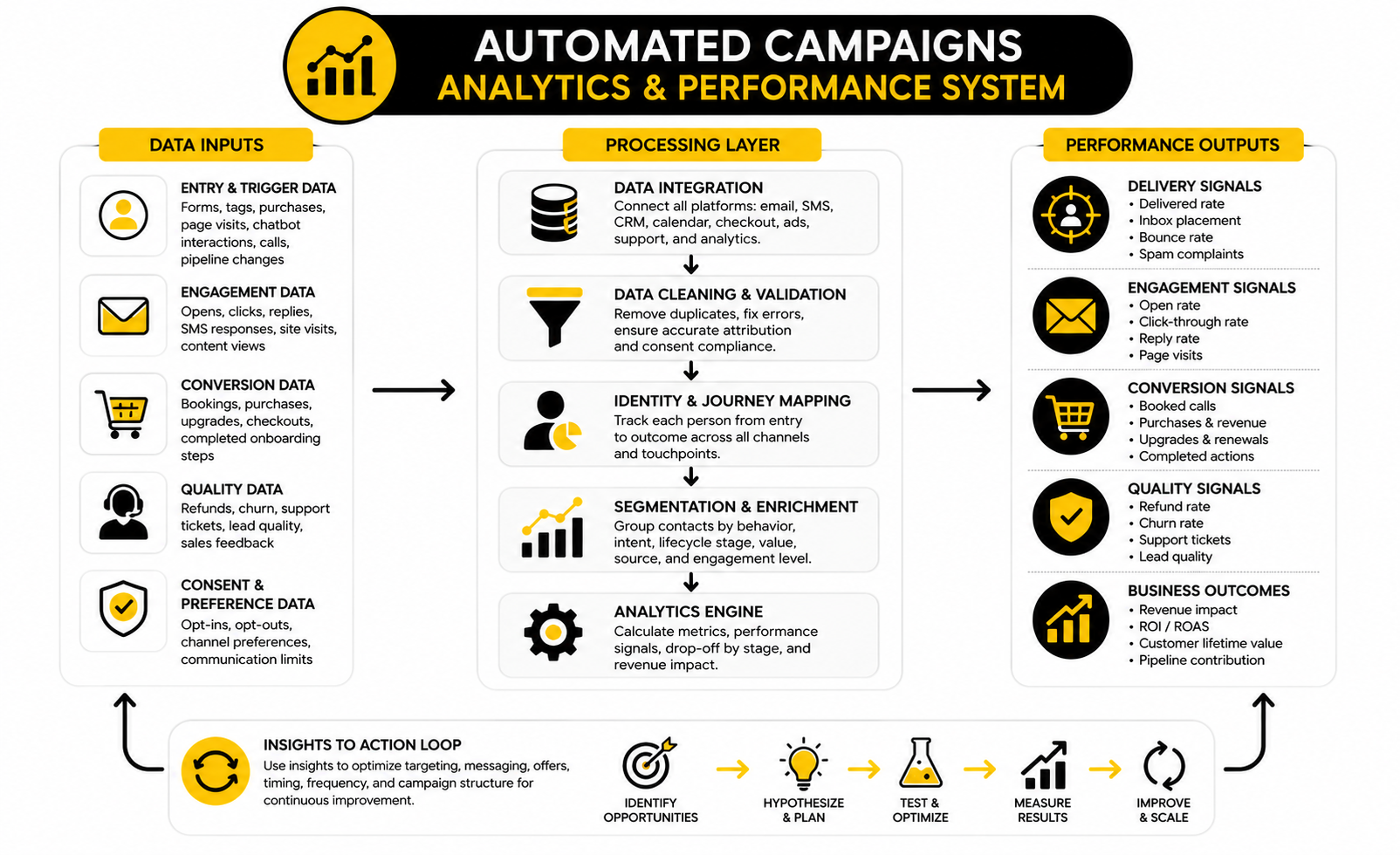
Watch For Performance Signals That Actually Mean Something
Good campaign data answers better questions. Are high-intent leads moving faster than low-intent leads? Are booked calls showing up? Are people replying with buying questions or support confusion? Are customers completing onboarding? Are unsubscribes concentrated in one segment? These questions are more useful than simply asking whether the campaign got a “good” open rate.
Performance signals usually fall into four groups. First, there are delivery signals such as bounce rate, spam complaints, and deliverability issues. Second, there are engagement signals such as opens, clicks, replies, and page visits. Third, there are conversion signals such as bookings, purchases, upgrades, renewals, and completed onboarding steps. Fourth, there are quality signals such as refund rate, churn, support load, lead quality, and sales feedback.
The strongest automated campaigns improve more than one signal at the same time. They do not just create clicks. They create cleaner movement through the funnel. If a campaign increases clicks but sends unqualified people to sales, the data should force you to fix the targeting, not celebrate the traffic.
Measure Drop-Off By Stage
Drop-off tells you where the campaign is leaking. If people enter the campaign but do not engage, the entry promise or first message may be weak. If people click but do not convert, the landing page, offer, checkout, calendar, or sales handoff may be the problem. If people convert but do not stick, the issue may be expectation-setting or onboarding.
This is why each stage needs its own diagnostic question. At the entry stage, ask whether the right people are entering. At the engagement stage, ask whether the message matches their intent. At the decision stage, ask whether the next step feels easy and credible. At the retention stage, ask whether the customer is getting value quickly enough.
Do not treat drop-off as failure by default. Drop-off can be useful if the campaign is filtering out poor-fit leads. The real question is whether the right people are dropping or the wrong people are dropping.
Use Segments To Find The Truth
Averages hide problems. A campaign might look fine overall while one segment performs terribly and another performs extremely well. If you only look at the blended number, you will not know what to fix or where to scale.
Segment performance by source, offer, lifecycle stage, buyer type, geography, device, lead score, product interest, and engagement level when those fields are available. You do not need to slice the data into a hundred tiny groups. You need enough segmentation to see whether the campaign is serving different people appropriately.
This is where first-party data becomes valuable. Salesforce’s State of Marketing research is built on insights from nearly 4,500 marketing leaders worldwide, and the broader direction is clear: marketing teams are putting more emphasis on data, personalization, and connected customer experiences. Automated campaigns only benefit from that shift when the data is clean enough to make better decisions.
Turn Reporting Into Action
Reporting is only useful if it changes what you do next. If a message has strong clicks but weak conversions, improve the destination or the offer. If a sequence has strong early engagement but poor late-stage action, tighten the decision-stage messaging. If unsubscribes spike after a specific email, review the promise, audience, timing, and tone.
The best optimization process is calm and systematic. Do not change five things at once unless the campaign is clearly broken. Improve the weakest point first, measure the result, and then move to the next bottleneck.
Automated campaigns are powerful because they create repeatable journeys. Measurement makes those journeys better over time. Without analytics, you are just sending more messages. With analytics, you are building a system that learns.
Advanced Considerations Before You Scale
Scaling automated campaigns is not the same as adding more sequences. In the early stage, a campaign can be managed with simple triggers, a few segments, and a clear follow-up path. As volume grows, the risk changes. The biggest problem is no longer whether the campaign exists. The biggest problem is whether the system stays accurate, relevant, compliant, and useful as more people move through it.
This is where automation maturity matters. A basic setup sends messages after actions. A mature setup controls frequency, prioritizes intent, protects deliverability, respects consent, routes opportunities, and keeps the customer experience coherent across channels. That difference becomes obvious once multiple campaigns start running at the same time.
The goal is not to build the most complex automation map possible. Complexity is not sophistication. Sophistication is knowing exactly which parts of the system need rules, which parts need human judgment, and which parts should stay simple.
Avoid Campaign Collisions
Campaign collisions happen when one person enters multiple automated campaigns that were built separately. They might receive a welcome sequence, a webinar reminder, a sales follow-up, a cart recovery message, and a newsletter in the same week. Each campaign might make sense on its own, but together they create a bad experience.
This is one of the first scaling problems to solve. You need a clear hierarchy for which campaigns take priority. A high-intent sales follow-up should usually outrank a general newsletter. A customer onboarding sequence should usually outrank a prospect nurture path. A support-related message should never be buried under promotional noise.
Frequency caps help, but they are not enough by themselves. You also need suppression rules, lifecycle stages, and campaign priority logic. When someone becomes a customer, they should stop receiving prospect messages. When someone books a call, they should stop receiving booking reminders. When someone is in a sensitive service or support moment, promotional automation should slow down or pause.
Protect Deliverability Before It Breaks
Deliverability is one of those problems people ignore until it becomes painful. A campaign can have strong copy and a good offer, but if the message does not reach the inbox, none of that matters. This is why list quality, sending behavior, authentication, engagement, and complaint rates need to be monitored before scaling volume.
Delivered does not always mean inboxed. Validity’s 2025 Email Deliverability Benchmark makes this distinction clearly: the delivered rate shown by an email service provider does not prove the message reached the inbox rather than spam or another filtered location. That matters because automated campaigns can quietly lose performance when inbox placement declines.
Scaling should therefore be gradual. Warm up sending domains carefully, remove invalid contacts, avoid scraping or purchased lists, and watch negative signals closely. If engagement drops while volume rises, do not simply send more. Fix targeting, clean the list, improve relevance, and reduce pressure before the damage spreads.
Make Consent And Preferences Operational
Consent should not live in a legal document nobody reads. It should be built into the automation system. If someone opts out of SMS, the campaign should not text them. If someone unsubscribes from marketing emails, the system should respect that immediately. If someone only wants product updates and not promotions, that preference should shape what they receive.
This is especially important when automated campaigns cross channels. Email, SMS, WhatsApp, chat, retargeting, and sales outreach can all have different consent expectations depending on the market and channel. Privacy guidance around GDPR, CCPA, and newer state-level privacy laws keeps reinforcing the same operational point: marketing teams need clear consent records, transparent data use, and reliable opt-out handling.
Do not treat compliance as a blocker. Treat it as quality control. A clean consent system protects trust, reduces complaints, and forces the campaign to focus on people who actually want to hear from you.
Decide Where AI Belongs
AI can make automated campaigns faster, but speed is not the same as quality. AI can help draft variations, summarize lead activity, classify replies, suggest next actions, personalize content blocks, and surface patterns in campaign data. Used well, it helps marketers move faster without losing strategic control.
Used badly, AI turns into a content firehose. More subject lines, more messages, more variations, more noise. That is dangerous because customer inboxes and feeds are already crowded, and generic automation is getting easier for everyone to produce.
The better approach is to use AI where it improves decision-making or reduces manual work. For example, AI can help summarize a lead’s activity before a sales call or identify which segments are underperforming. It can also support chatbot workflows through tools like Chatbase when the goal is to answer common questions and route people efficiently. But the campaign strategy still needs a human owner.
Keep Personalization Useful, Not Creepy
Personalization is powerful when it reduces friction. It is annoying when it shows off how much data you collected. A useful personalized message might reference the topic someone requested, the product category they viewed, or the next step they already started. A creepy message makes the person feel watched.
This is a real tradeoff. BCG’s work on personalization in the age of AI highlights how customer experience increasingly depends on better testing, better measurement, and more sophisticated personalization at scale. But scale only helps when the personalization feels relevant and respectful.
The practical rule is this: personalize around intent, not surveillance. Use behavior to make the next step more useful. Do not overload the message with every detail you know about the person. The best automated campaigns feel like good service, not like tracking dressed up as friendliness.
Build A Governance System
Once multiple people touch automation, governance becomes necessary. Someone needs to own naming conventions, campaign documentation, data fields, tags, templates, permissions, approvals, testing, and retirement rules. Without that, the system slowly becomes harder to trust.
Governance does not need to be bureaucratic. It can be a simple shared process. Every campaign should have an owner, a goal, an entry rule, an exit rule, a target audience, a measurement plan, and a review date. Every major change should be documented enough that another competent person can understand it later.
This is especially important for agencies, consultants, and teams managing several funnels at once. A platform like GoHighLevel can centralize a lot of execution, but it still needs human operating rules. Tools organize the work. They do not replace ownership.
Know When Not To Automate
Some moments should not be automated, or at least not fully. A high-value sales opportunity, a frustrated customer, a complex support issue, a sensitive account problem, or a major renewal conversation may need a real person. Automation can prepare the handoff, but it should not pretend to be empathy.
This is where strong teams show restraint. They use automation to catch signals, gather context, and reduce delays. Then they let humans handle the moments where judgment matters most.
That restraint is part of good marketing. Automated campaigns should make the customer journey smoother, not colder. When the system knows when to stop and when to involve a person, the whole experience feels more professional.
Automated Campaigns FAQ And Final Checklist
By this point, automated campaigns should feel less like a collection of tools and more like an operating system for customer movement. The campaign starts with intent, uses data to choose the next step, sends only what helps, measures the result, and improves over time. That is the full ecosystem.
The final check is simple. Can the campaign explain why someone entered, what they should receive next, when they should stop, what outcome matters, and who owns the result? If the answer is unclear, the automation is not ready to scale.
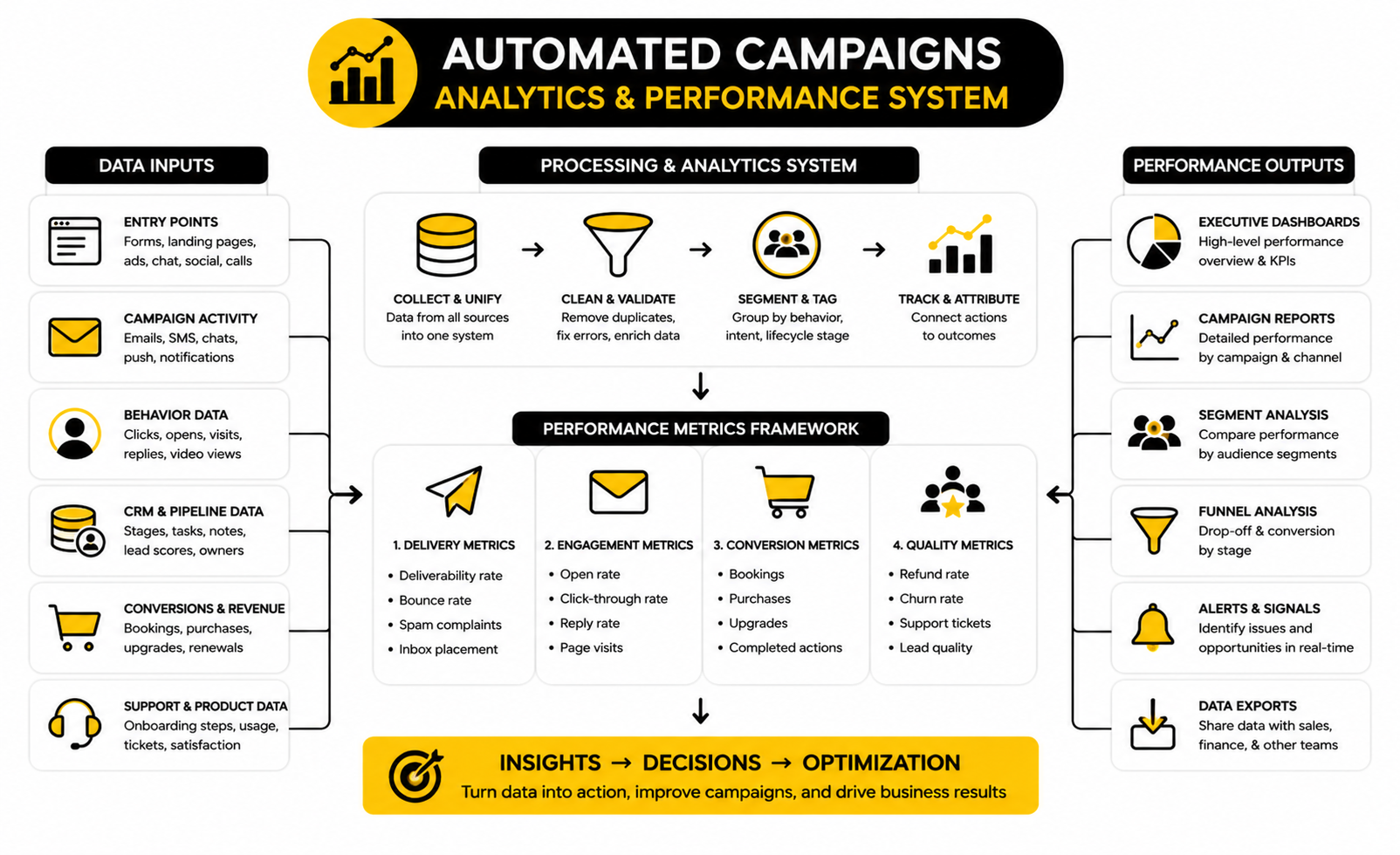
Final Campaign Checklist
Use this checklist before launching or expanding any automated campaign.
What Are Automated Campaigns?
Automated campaigns are structured marketing or customer journeys that run based on triggers, rules, timing, and behavior. They can include email, SMS, chat, ads, CRM updates, sales tasks, onboarding messages, and internal notifications. The important part is not the channel. The important part is that the campaign responds to what a person did and helps them take the next logical step.
How Are Automated Campaigns Different From Email Sequences?
An email sequence is usually a fixed set of emails sent over time. An automated campaign can include email, but it can also branch, pause, route leads, update CRM records, notify sales, change segments, and trigger different journeys based on behavior. A sequence is often linear. A strong automated campaign is more adaptive.
What Is The Best First Automated Campaign To Build?
The best first campaign is usually the one closest to revenue or customer success. For many businesses, that means a lead follow-up campaign, abandoned checkout campaign, booking reminder campaign, or new customer onboarding campaign. Do not start with the most complex idea. Start with a campaign where the trigger is clear, the audience is obvious, and the outcome is easy to measure.
How Many Messages Should An Automated Campaign Include?
There is no perfect number. The right length depends on the goal, the buying cycle, the channel, and the level of intent. A high-intent booking campaign might only need a few direct reminders, while a long B2B nurture campaign may need a deeper sequence with education, proof, and sales handoff logic. The better question is whether each message has a clear reason to exist.
How Often Should Automated Campaigns Send Messages?
The send frequency should match urgency and context. A checkout recovery campaign can usually move faster than a long-term nurture campaign because the buyer just showed immediate intent. A re-engagement campaign should usually be slower and more careful because the person has already become inactive. Frequency should be controlled by lifecycle stage, channel, and response behavior, not by guesswork.
What Metrics Matter Most For Automated Campaigns?
The most important metrics are the ones tied to the campaign goal. For sales campaigns, track booked calls, qualified opportunities, close rate, and revenue. For ecommerce campaigns, track recovered revenue, conversion rate, average order value, refunds, and repeat purchase behavior. For onboarding campaigns, track activation, product usage, support friction, retention, and upgrades.
Why Do Automated Campaigns Fail?
Automated campaigns usually fail because the strategy is too vague, the audience is poorly defined, or the campaign keeps sending after the person’s context has changed. Other common problems include weak triggers, missing exit rules, bad deliverability, broken links, poor handoffs, and reporting that only measures clicks instead of outcomes. Most failures are not caused by automation itself. They are caused by unclear thinking before the automation is built.
Should Small Businesses Use Automated Campaigns?
Yes, but small businesses should keep them simple. A small team does not need a massive automation architecture. It needs reliable follow-up, clean lead capture, appointment reminders, basic segmentation, and simple post-purchase or onboarding journeys. Tools like Systeme.io, Brevo, and GoHighLevel can support different levels of campaign complexity depending on the business model.
When Should A Human Take Over From Automation?
A human should take over when judgment, empathy, negotiation, or complex problem-solving matters. That includes high-value sales conversations, frustrated customers, custom proposals, sensitive support issues, and serious retention risks. Automation can prepare the handoff by collecting context and alerting the right person. It should not pretend to handle every situation alone.
How Do You Keep Automated Campaigns From Feeling Spammy?
Make them relevant, permission-aware, and easy to leave. Use clear triggers, meaningful segmentation, honest subject lines, useful timing, and clean unsubscribe options. The FTC’s CAN-SPAM guidance reinforces the need for truthful commercial email practices and clear opt-out handling, while Google’s sender guidance emphasizes authentication, avoiding unwanted mail, and making unsubscribe easy for bulk senders. Good automation should feel like a helpful follow-up, not a trap.
Do Automated Campaigns Need AI?
No, but AI can help when it is used carefully. AI can speed up drafting, summarize lead activity, classify replies, identify weak segments, and support chat-based routing. It should not replace the strategy, consent rules, offer logic, or human judgment behind the campaign. AI makes a good system faster, but it can make a weak system louder.
How Often Should Automated Campaigns Be Reviewed?
Review active campaigns at least monthly when they are tied to revenue, lead generation, or onboarding. High-volume campaigns may need weekly checks, especially during launch or after major offer changes. Look for broken links, rising unsubscribes, deliverability problems, weak conversion points, and campaign collisions. A campaign that is not reviewed eventually becomes outdated.
What Is The Biggest Mistake To Avoid?
The biggest mistake is building automated campaigns around what the business wants to say instead of what the customer needs next. That leads to over-sending, irrelevant messages, and weak conversion. Start with the journey, map the decision points, and only automate what genuinely improves the experience. That is how automation becomes a growth system instead of a noise machine.
Build a stronger local presence with BAAM AI
Turn your website, Google profile, social channels, and AI visibility into one growth engine
Most businesses do not need more random marketing activity. They need a consistent presence system that helps the right people find them, trust them, and take action. BAAM AI brings strategy, local SEO, website updates, Google Maps visibility, social content, AI-search readiness, media production, and reporting into one practical monthly engine.
If you want your marketing to keep working after the campaign ends, start with a free BAAM AI presence audit. See how your business shows up today and where the fastest visibility wins are at BAAM AI.