
BAAM AI Blog
Abandoned Cart Email Mailchimp: Complete Strategy Guide for Recovery
Every ecommerce business hits the same frustrating wall: customers add products to their cart, get close to buying… and then disappear. Not just a few of them either—cart abandonment regularly sits around 70% or...
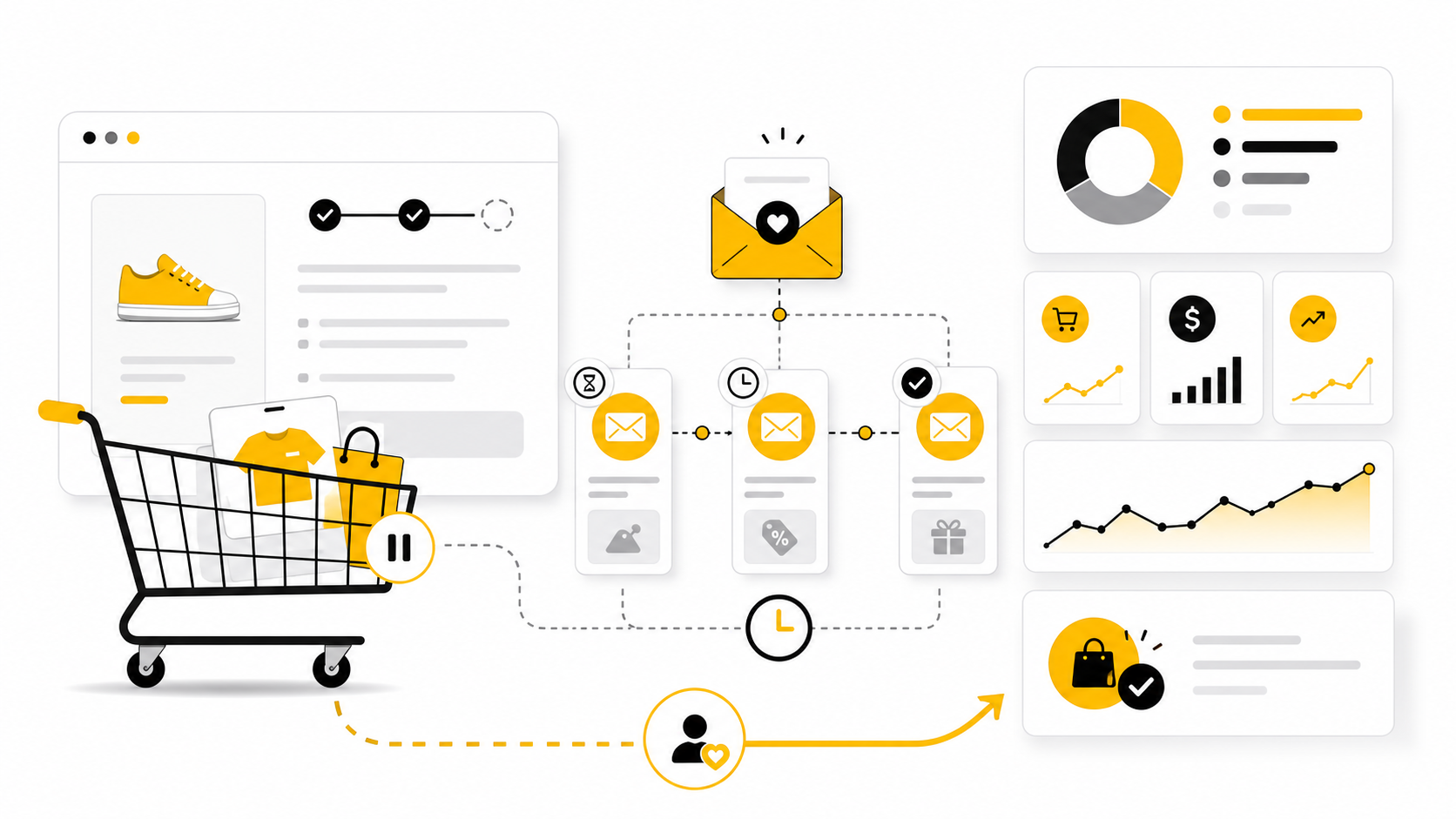
Every ecommerce business hits the same frustrating wall: customers add products to their cart, get close to buying… and then disappear. Not just a few of them either—cart abandonment regularly sits around 70% or higher across industries, meaning most of your potential revenue quietly slips away before checkout.
But here’s where things get interesting. When you implement a proper abandoned cart email Mailchimp strategy, those “lost” customers are not actually lost. Recovery emails consistently deliver some of the highest engagement in all of email marketing, with open rates often exceeding 40% and meaningful conversion impact when timed correctly.
This isn’t just a nice-to-have automation. For many brands, abandoned cart flows become one of the top revenue drivers in the entire marketing stack. Mailchimp itself reports that abandoned cart email series can generate dramatically higher order rates per recipient compared to standard campaigns.
So the real question isn’t whether you should use abandoned cart emails—it’s whether you’re using them correctly.
Why Abandoned Cart Emails Matter More Than You Think
Most people underestimate how much money sits inside abandoned carts. When someone leaves without buying, it’s easy to assume they lost interest. In reality, the data tells a different story.
A large percentage of users abandon carts because of friction—not because they don’t want the product. Unexpected costs, complicated checkout flows, or simple distractions are among the biggest reasons people drop off. That means the intent is still there. It just needs to be reactivated.
This is exactly where abandoned cart emails outperform almost every other channel. These emails target users who already showed buying intent, which is why they consistently deliver higher open rates, click-through rates, and conversions than general campaigns. In fact, sending the first email within a short window after abandonment can recover a meaningful portion of lost revenue.
Even more importantly, without follow-up, most customers never come back on their own. Research shows that a large majority of abandoners won’t return unless prompted, which turns abandoned cart email into a critical recovery mechanism rather than just an optimization tactic.
When you look at it this way, abandoned cart emails are not about chasing users. They’re about finishing a transaction that already started.
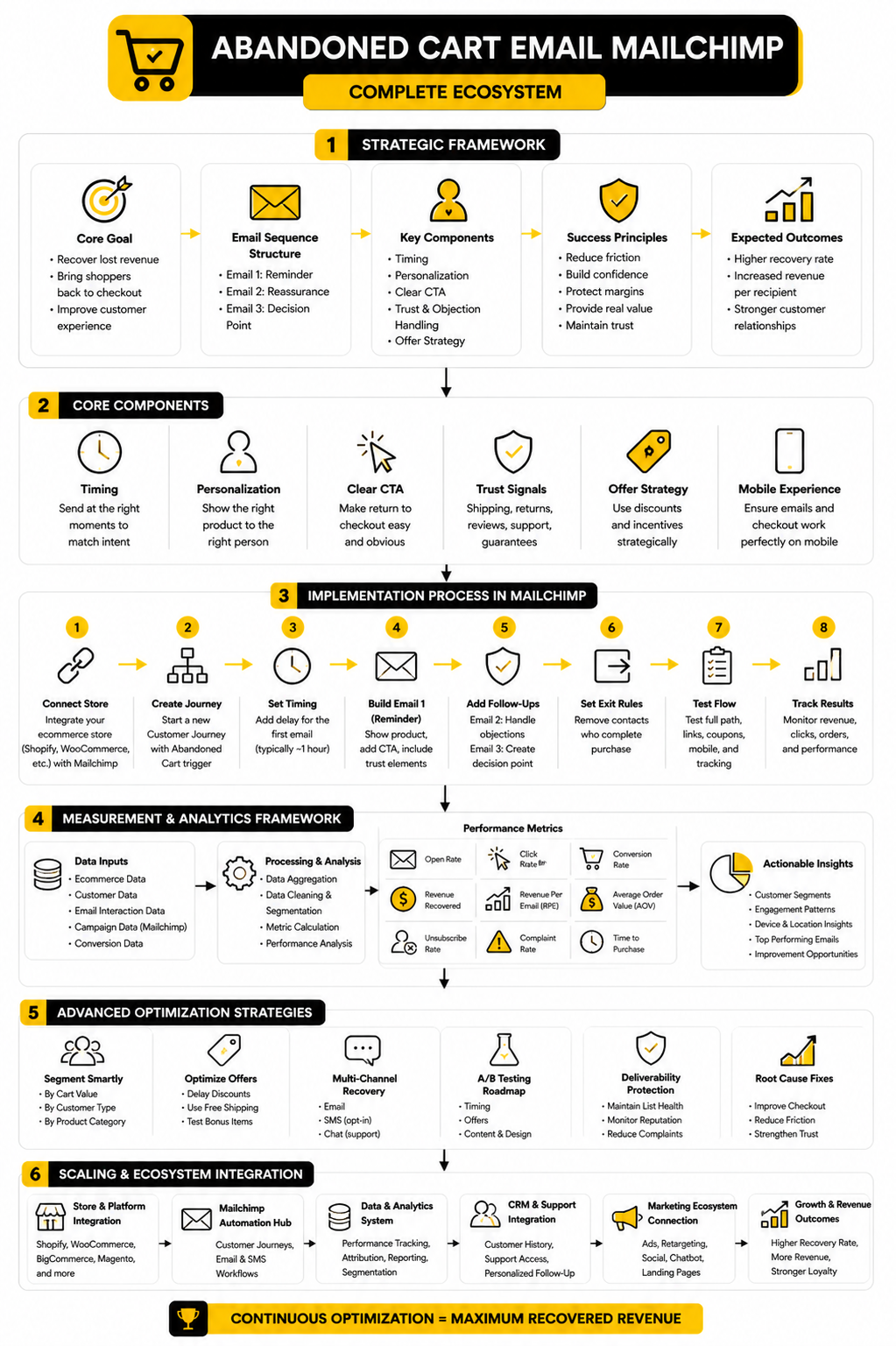
Abandoned Cart Email Mailchimp Framework Overview
To make this work consistently, you need a system—not just a single reminder email. This is where Mailchimp becomes powerful, because it allows you to automate a structured recovery sequence instead of relying on one-off messages.
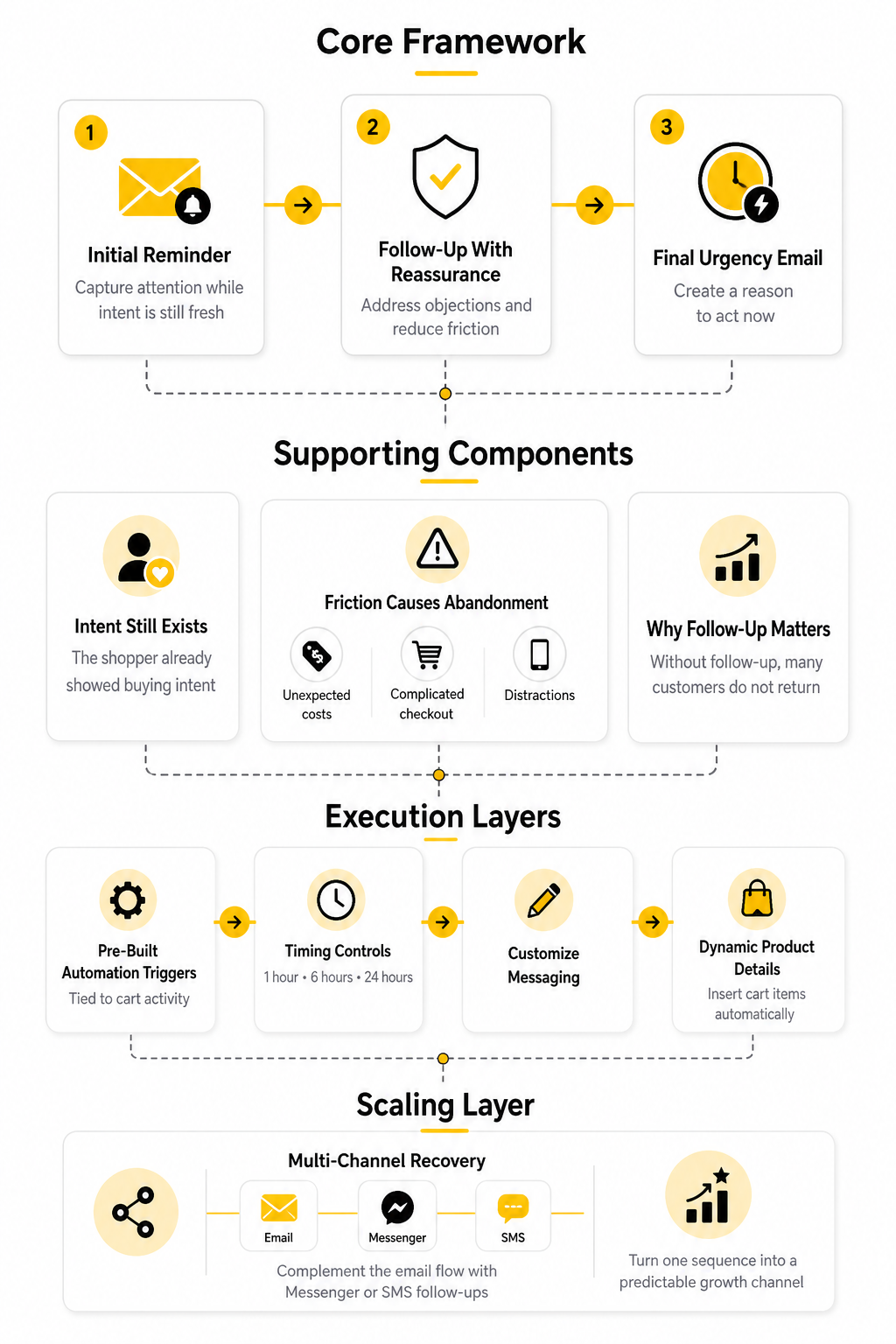
At a high level, the framework behind a successful abandoned cart email Mailchimp setup follows a simple progression. You’re not just reminding the user—you’re guiding them back through a decision process that was interrupted.
The structure typically looks like this:
This sequence works because it aligns with how people actually behave. The first email reconnects them with their original intent. The second helps resolve hesitation. The third introduces urgency, which often becomes the tipping point for conversion.
Mailchimp makes this framework easy to deploy with pre-built automation triggers tied directly to cart activity. You can define timing (such as 1 hour, 6 hours, or 24 hours after abandonment), customize messaging, and dynamically insert product details into each email.
If you want to go beyond basic email, tools like ManyChat can complement your strategy with Messenger or SMS follow-ups, creating a multi-channel recovery system that dramatically increases your chances of converting high-value carts.
The key takeaway here is simple: one email might recover some revenue, but a structured sequence is what turns abandoned carts into a predictable growth channel.
Core Components of a High-Converting Email Sequence
A strong abandoned cart email Mailchimp sequence is not built around “Hey, you forgot something” repeated three times. That gets lazy fast. The best sequences move the customer through a clear path: reminder, reassurance, decision.
The goal is to meet the shopper where they are emotionally. They were interested enough to add the product to the cart, but something stopped them before checkout. Your job is not to pressure them. Your job is to remove the reason they paused.
That means each email needs a specific job. If every message says the same thing, you are wasting the sequence. If every message pushes a discount, you are training customers to abandon carts on purpose. The smartest abandoned cart flow protects margin while still recovering revenue.
The First Email Should Be Fast and Simple
The first email should arrive while the product is still fresh in the customer’s mind. Mailchimp lets you build this through an abandoned cart trigger in a Customer Journey, which starts the automation when a connected ecommerce store detects that someone left items behind without completing the purchase (Mailchimp abandoned cart automation).
Keep this email clean. Show the product, remind them what they picked, and make the return path obvious. This is not the moment for a long brand manifesto, a massive coupon, or five different calls to action.
The best first email usually includes:
This email is about momentum. The customer already did the hard part by choosing the product. Don’t make them think again from scratch.
The Second Email Should Handle Objections
The second email has a different job. If the customer ignored the first message, there may be hesitation. This is where you address friction without sounding defensive.
Cart abandonment is often caused by practical issues, not lack of interest. Extra costs, forced account creation, delivery concerns, and checkout friction remain major reasons shoppers leave before buying, and Baymard’s ongoing research keeps the average abandonment rate near seven out of ten carts (Baymard cart abandonment research).
So the second email should reduce uncertainty. If shipping is fast, say it clearly. If returns are easy, explain that briefly. If your product has strong reviews, this is the right place to use social proof.
A useful second email might focus on:
This is where a lot of brands get the tone wrong. They either beg for the sale or immediately discount the product. A better approach is to make the customer feel confident enough to finish what they already started.
The Third Email Should Create a Decision Point
The third email is where urgency can help, but only if it is real. Fake urgency is easy to smell. Customers are not stupid, and pretending that every cart is “almost gone forever” damages trust over time.
Use urgency when there is a genuine reason to act. That could be low inventory, an expiring cart, a limited-time bonus, or a deadline for delivery before a specific date. If you use an incentive, make it strategic rather than automatic.
Automated emails tend to perform well because they are tied to behavior, not broad guessing. Omnisend’s 2025 ecommerce report found that abandoned cart, welcome, and browse abandonment automations were the top three automation types sent and together drove most automated orders, which reinforces why these flows deserve serious attention rather than a set-and-forget template (Omnisend 2025 ecommerce marketing report).
The final abandoned cart email should answer one question: why should the customer come back now? If there is no reason, create value instead of pressure. Offer help choosing a size, clarify delivery, or remind them what they’re getting.
Product, Timing, and Personalization Matter More Than Clever Copy
Clever copy can help, but it will not save a weak recovery flow. The basics matter more. The right product needs to appear in the email, the timing needs to match buyer intent, and the checkout link needs to work without friction.
Mailchimp’s abandoned cart tools are useful because they can pull store activity into the automation, including cart details, when your ecommerce integration is connected properly. That gives you the foundation for relevant follow-up instead of generic reminders. Relevance is the whole game here.
Personalization does not need to be complicated. Start with the item they left behind, the customer’s first name if you have it, and a checkout path that feels direct. Then build from there with segmentation based on cart value, customer type, or product category.
For example, a returning customer with a high-value cart does not need the same message as a first-time visitor abandoning a low-cost item. One may need reassurance and white-glove support. The other may need speed, clarity, and a simple reason to finish.
Your Offer Strategy Should Protect Your Margins
Discounts can recover sales, but they can also quietly destroy profitability. This is one of the biggest mistakes in abandoned cart email strategy. Brands see a short-term lift and ignore the long-term behavior they are creating.
If customers learn that abandoning a cart always gets them 10% off, some will wait for the discount every time. That means your automation is no longer just recovering revenue. It is teaching people to pay less.
A better offer strategy is layered. Start without a discount. Add reassurance first. Save incentives for later emails, higher-margin products, first-time buyers, or carts above a profitable threshold.
You can also use non-discount incentives:
This matters because abandoned cart email is not just a conversion tool. It is also a positioning tool. If your emails feel cheap, desperate, or automatic, customers notice. If they feel useful, timely, and easy to act on, they can strengthen trust while still driving sales.
How to Set Up Abandoned Cart Emails in Mailchimp
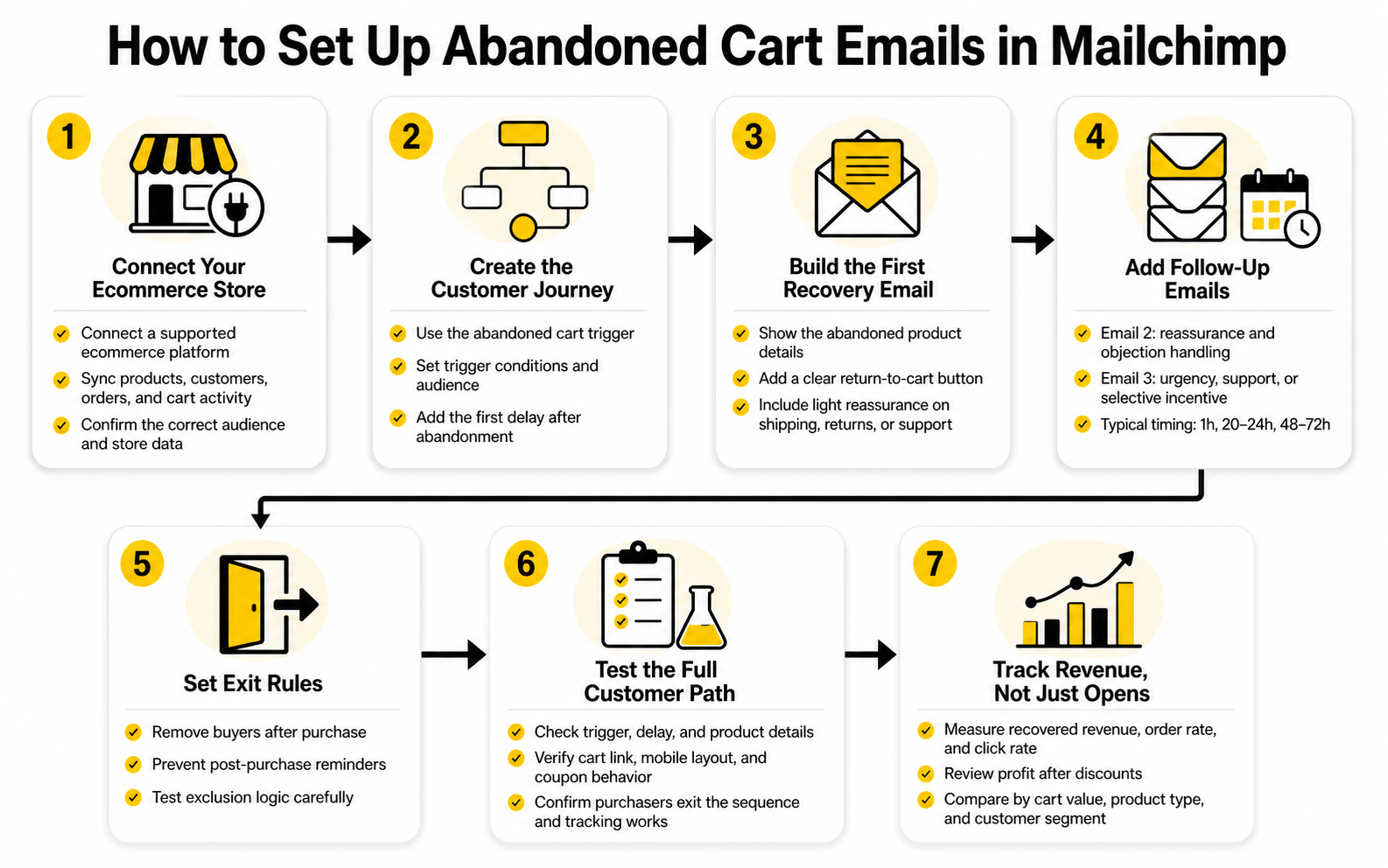
Once the strategy is clear, implementation becomes much easier. The mistake is jumping straight into Mailchimp and building emails before the store data, timing, content, and measurement are ready. A good abandoned cart email Mailchimp setup starts with the ecommerce connection, then moves into automation logic, email design, testing, and performance review.
This part matters because abandoned cart emails depend on behavior-based triggers. If Mailchimp cannot detect the cart event correctly, the most beautiful email in the world will not fire at the right time. Before you write a single subject line, make sure the technical foundation is clean.
Step 1: Connect Your Ecommerce Store Correctly
Mailchimp needs access to your store data before it can send abandoned cart emails. That means your ecommerce platform must be connected through a supported integration or custom API setup. For most stores, this usually means connecting Shopify, WooCommerce, BigCommerce, Magento, or another compatible platform.
Do not rush this step. Check that products, customers, orders, and cart activity are syncing correctly inside Mailchimp before you build the journey. If the sync is incomplete, your abandoned cart automation may miss contacts, show the wrong product details, or fail to exclude people who already purchased.
After the integration is active, confirm that Mailchimp can identify the audience tied to your store. This matters because the abandoned cart trigger needs the correct audience, store, and customer data to work together. If you manage multiple stores or audiences, double-check the selection carefully.
Step 2: Create the Abandoned Cart Customer Journey
In Mailchimp, the modern way to build this is usually through Customer Journeys. Start by creating a new journey and choosing the abandoned cart trigger. This tells Mailchimp to enter a contact into the flow when they leave checkout without completing the order.
The trigger conditions are important. You should decide whether the journey starts after any abandoned cart, only after a minimum cart value, or only for specific product categories. A simple store can start broad, but a store with different product margins should think more carefully.
Once the trigger is selected, add a delay before the first email. A common starting point is roughly one hour after abandonment, because the intent is still fresh but the customer has had enough time to be genuinely inactive. For higher-consideration products, you may test a longer delay, but do not wait so long that the customer forgets why they wanted the product.
Step 3: Build the First Recovery Email
The first email should be direct, visual, and easy to act on. Use Mailchimp’s ecommerce content blocks to pull abandoned product details into the email when your integration supports it. This keeps the message relevant without manually creating different emails for every product.
Your first email should include a clear return-to-cart button. Do not send people to the homepage and make them rebuild the cart. The whole point is to reduce effort.
A simple structure works best:
Keep the design focused. The customer does not need your full product catalog in this email. They need the easiest possible path back to the item they already wanted.
Step 4: Add Follow-Up Emails With Different Angles
After the first email, build the rest of the sequence around intent and hesitation. The second email should not be a duplicate of the first one. It should give the customer another reason to feel comfortable completing the purchase.
For example, the second email can focus on trust. Mention return policy, reviews, product benefits, customer support, or delivery expectations. If your products require sizing, compatibility, setup, or customization, this is where helpful guidance can make the difference.
The third email should create a decision point. That does not automatically mean offering a discount. Use a coupon only when it makes sense for your margins, customer type, or cart value.
A practical three-email timing structure might look like this:
This is a starting point, not a universal law. Your product price, buying cycle, and customer behavior should shape the final timing.
Step 5: Set Exit Rules So Buyers Stop Receiving Reminders
This is non-negotiable. If someone comes back and buys, they should leave the abandoned cart sequence. Nothing feels more careless than receiving “complete your purchase” emails after you already paid.
Mailchimp’s ecommerce automation logic can remove or prevent contacts from continuing when the purchase condition is met, but you still need to test it. Place a test order, abandon a test cart, complete the purchase, and make sure the journey behaves correctly. Do not assume.
This also matters for customer experience. Abandoned cart emails are supposed to feel helpful and timely. If they keep firing after purchase, they feel broken.
Step 6: Test the Full Customer Path Before You Turn It On
Testing is not just sending yourself a preview email. You need to test the full path from cart creation to email delivery to checkout return. That means acting like a real customer and checking each step.
Before publishing the journey, test these points:
This is where you catch the problems that quietly kill revenue. A broken button, missing product image, or confusing checkout link can ruin an otherwise solid automation.
Step 7: Track Revenue, Not Just Opens
Open rates are useful, but they are not the main goal. The real measurement is recovered revenue, order rate, click rate, and profit after discounts. If your abandoned cart email Mailchimp sequence gets attention but does not bring people back to checkout, the flow needs work.
Track each email separately. The first email may drive the most clicks, while the second or third may influence more hesitant buyers. Looking at the full sequence gives you a better view than judging one email in isolation.
You should also compare performance by cart value, product type, and customer segment. A flow that works well for low-ticket impulse purchases may not work the same way for expensive products. Once the basic setup is running, segmentation becomes the next lever.
Statistics and Data That Actually Matter
The point of measurement is not to collect impressive numbers. It is to decide what to change next. An abandoned cart email Mailchimp sequence should be judged by whether it brings qualified shoppers back to checkout profitably, not by whether one email gets a flashy open rate.
Start with the size of the opportunity. The average documented online cart abandonment rate sits around 70.22%, based on Baymard’s review of 50 separate ecommerce studies (Baymard cart abandonment research). That number is useful because it tells you abandoned carts are normal, not a sign that your store is broken.
But it also creates a dangerous trap. If you only compare your store to a global average, you may miss the real issue. A 70% abandonment rate on a low-friction, low-ticket product might be a warning sign, while the same rate on a high-consideration product may be completely expected.
Benchmarks Are Starting Points, Not Targets
Benchmarks help you understand whether your flow is in the right zone, but they should not become your strategy. Klaviyo’s abandoned cart benchmark data showed an average abandoned cart flow open rate of 50.5%, click rate of 6.25%, and placed order rate of 3.33% across the flows it analyzed (Klaviyo abandoned cart benchmarks). Those numbers are useful because they show how much stronger cart recovery emails can be than standard campaigns.
Still, the better question is not “Are we above average?” The better question is “Which part of our flow is underperforming?” A high open rate with weak clicks points to subject lines that create interest but email content that fails to move people. A strong click rate with weak purchases points to a checkout, price, shipping, or trust issue after the email does its job.
This is why performance should be read as a chain. Each metric tells you where the leak might be. If you treat every weak result as a copywriting problem, you will waste time rewriting emails when the real problem may be delivery cost, slow checkout, or a broken cart link.
The Core Metrics to Track in Mailchimp
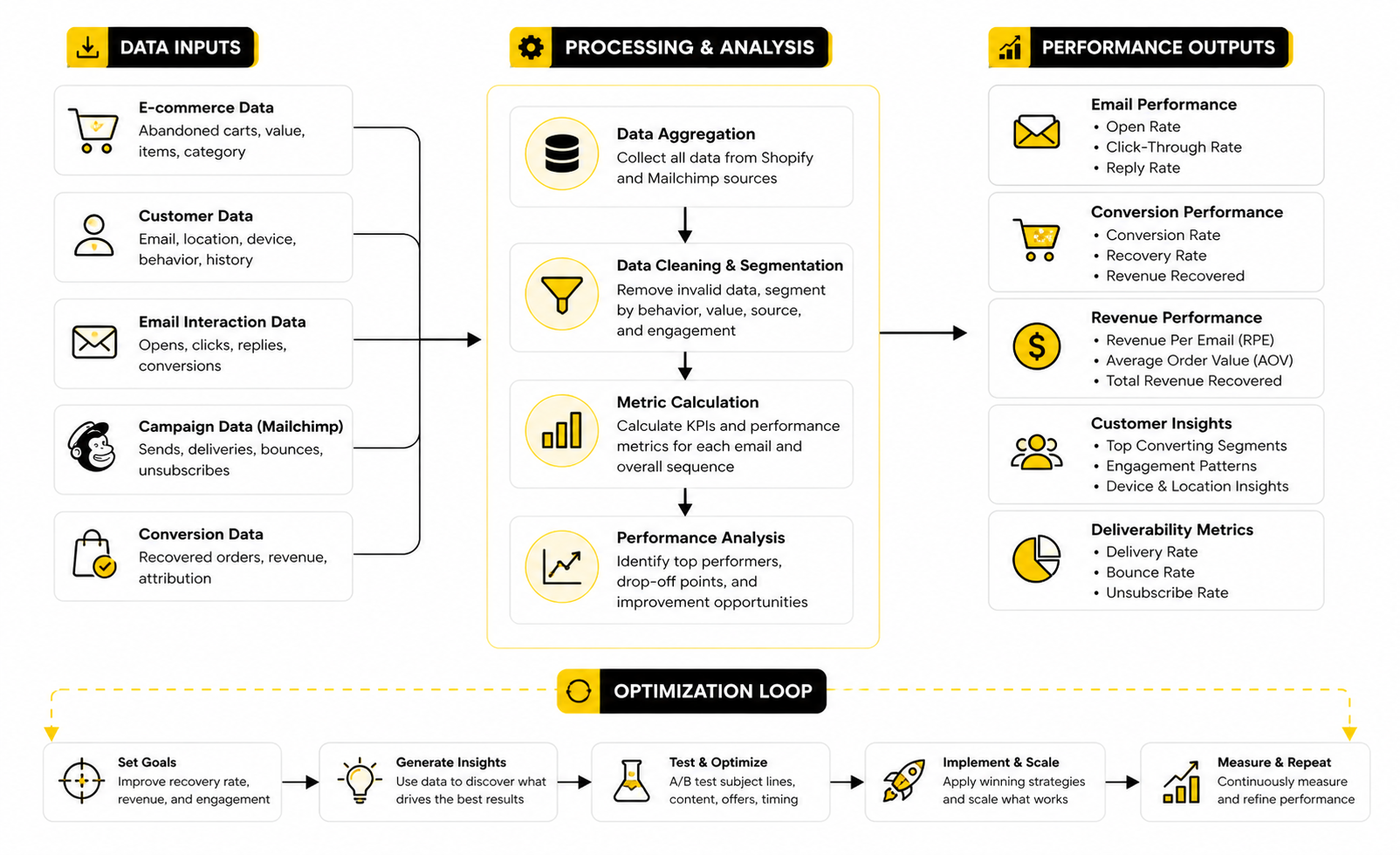
Inside Mailchimp, you should track the abandoned cart sequence at both the journey level and the individual email level. Looking only at the full journey can hide which email is doing the heavy lifting. Looking only at individual emails can hide how the whole sequence works together.
The most useful metrics are:
Do not treat these metrics equally. Revenue, placed order rate, and profit matter more than opens. Opens are directional, especially because privacy changes can make open tracking less reliable across inboxes and devices.
Revenue Per Recipient Shows the Quality of the Flow
Revenue per recipient is one of the cleanest metrics for abandoned cart emails. It tells you how valuable the automation is for each person who enters it. Klaviyo’s benchmark report found abandoned cart flows had the highest average revenue per recipient among the flow types it measured, at $3.65, with the top-performing 10% reaching $28.89 (Klaviyo abandoned cart benchmarks).
That does not mean your abandoned cart email Mailchimp flow must hit those exact numbers. Different platforms, industries, price points, attribution windows, and customer bases produce different results. But the concept is powerful: a flow can have fewer sends than a campaign and still create more meaningful revenue.
If your revenue per recipient is low, break the problem down. It could mean the trigger fires too late, the email copy is unclear, the checkout link is weak, the cart value is low, or too many people in the flow were never serious buyers. The number is the signal; the diagnosis comes from the surrounding metrics.
Click Rate Tells You Whether the Email Is Doing Its Job
Click rate is the bridge between email interest and checkout action. If people open but do not click, the email is not creating enough reason to return. That usually means the message is too vague, the product block is weak, the call to action is buried, or the customer’s main objection has not been addressed.
A practical way to read click performance is by email position. The first email should usually get the strongest intent-based clicks because the cart is still fresh. The second email may get fewer clicks, but those clicks can be more thoughtful if it handles hesitation well.
The final email should be judged carefully. If it has a high click rate only when you add a heavy discount, you need to check profitability before calling it a win. A flow that recovers orders while destroying margin is not optimized. It is just expensive.
Conversion Rate Reveals Whether the Checkout Still Works
Placed order rate is where the truth shows up. If the email gets clicks but orders stay low, the issue is usually beyond the email. That is when you look at checkout speed, shipping costs, payment options, mobile experience, trust signals, and whether the cart is preserved correctly.
Baymard’s checkout research consistently points to friction as a major driver of abandonment, including extra costs and checkout complexity (Baymard cart abandonment research). That matters because email cannot fully compensate for a poor checkout experience. It can bring people back, but the store still has to close the sale.
This is where abandoned cart data becomes more than email data. It becomes conversion research. If customers return from the email and still do not buy, your next test may belong on the checkout page, not inside Mailchimp.
Automated Revenue Should Be Compared Against Campaign Revenue
Abandoned cart emails often send to fewer people than newsletters, but they are more intent-driven. Omnisend’s 2025 ecommerce marketing report analyzed 24 billion emails, 230 million SMS messages, and 413 million push notifications sent in 2024, showing how much modern ecommerce revenue now depends on automated lifecycle messaging rather than only broad campaigns (Omnisend 2025 ecommerce marketing report). The lesson is simple: automation volume may look small, but its revenue impact can be oversized.
This matters when you report performance. A campaign might generate more total revenue because it goes to a larger list. An abandoned cart flow may generate stronger revenue per recipient because every recipient showed direct buying intent.
You need both views. Total revenue tells you the business impact. Revenue per recipient tells you the quality of the automation.
What the Numbers Should Make You Do Next
Data is only useful when it creates action. If your first email has weak opens, test the subject line, sender name, and timing. If opens are strong but clicks are weak, improve the product block, call to action, and objection handling.
If clicks are strong but purchases are weak, inspect the checkout path. Test the cart restoration link, mobile checkout, shipping visibility, payment options, and discount code behavior. Do not keep rewriting the email while the actual leak sits after the click.
A simple decision framework works well:
This is the professional way to manage abandoned cart performance. You do not guess. You find the weakest step, fix that step, then measure again.
Advanced Optimization and Scaling Strategies
Once your abandoned cart email Mailchimp flow is live and measured properly, the next step is not adding more emails just because you can. More messages do not automatically mean more revenue. The better move is to make the recovery system more carefully, more selective, and more profitable.
This is where strategy starts to matter more than setup. A basic abandoned cart flow treats every shopper almost the same. A mature flow recognizes that a first-time visitor with a $25 cart, a returning customer with a $300 cart, and a wholesale buyer comparing options should not receive identical follow-up.
Segment by Cart Value Before You Segment by Everything Else
Cart value is one of the most practical ways to improve abandoned cart performance. It tells you how much effort, incentive, and follow-up the opportunity deserves. A low-value cart may only justify a simple reminder sequence, while a high-value cart can justify stronger reassurance, support, or a carefully controlled offer.
This also protects your margins. If you give the same discount to every abandoned cart, you may recover more orders while making less money. The goal is not just more conversions. The goal is profitable recovered revenue.
A simple segmentation model can work like this:
You do not need an overcomplicated segmentation map on day one. Start with cart value and customer status. Those two variables usually create more useful differences than broad demographic assumptions.
Use Discounts as a Scalpel, Not a Hammer
Discounts are powerful, but they are also addictive. If your audience learns that abandoning a cart triggers a coupon, you create a behavior loop that slowly trains buyers to wait. That can look like a win in Mailchimp while quietly damaging your average order value.
A more advanced approach is to delay incentives until the flow has tried non-discount recovery first. The first email can simply restore the cart. The second can remove friction. The final email can introduce a conditional offer only when it makes sense.
This is especially important if you sell products with thin margins, paid acquisition costs, or frequent repeat purchase behavior. In those cases, a discount is not just a conversion tool. It changes the economics of the customer.
Better incentive rules include:
The cleanest rule is simple: never launch an abandoned cart discount without knowing the margin impact. If you cannot explain why the offer is profitable, it should not be automatic.
Align the Flow With the Customer’s Buying Stage
Not every abandoned cart means the same thing. Some shoppers are ready to buy and got distracted. Others are comparing prices, checking shipping costs, waiting for payday, or showing the cart to someone else before deciding.
This is why your sequence should not rely on one emotional trigger. Urgency works for some buyers. Reassurance works for others. Education works for products that require more thought.
For higher-consideration products, the second and third emails may need to explain value more clearly. That could mean showing product benefits, answering common pre-purchase questions, or linking to a helpful guide. For impulse products, shorter copy and faster checkout recovery may perform better.
This is also where landing page quality matters. If the product page does not answer key objections, the abandoned cart sequence has to work too hard. Tools like Replo can help ecommerce teams build sharper product and campaign pages when the issue is not the email but the page customers return to after clicking.
Add SMS or Chat Carefully
Email is usually the foundation, but abandoned cart recovery does not have to stop there. Mailchimp’s abandoned cart flow options can include email or SMS workflows when the right store and consent setup are in place, which makes it possible to build a more direct recovery path for shoppers who have opted in (Mailchimp abandoned cart automation). The key phrase is opted in.
SMS can work well because it is immediate, but it can also feel intrusive if abused. Use it for high-intent moments, not every tiny cart. Keep the message short, helpful, and clearly connected to the abandoned checkout.
Chat can also be useful when hesitation is caused by questions. A customer who is unsure about sizing, compatibility, delivery, or product fit may not need a coupon. They may need a quick answer. For stores that use conversational recovery, ManyChat can be useful when Messenger or Instagram automation fits the customer journey.
The risk is channel overload. If someone gets an email, a text, a chatbot message, and a retargeting ad within an hour, your brand starts to feel desperate. Coordinate the channels so they support each other instead of shouting over each other.
Protect Deliverability as the Flow Scales
Abandoned cart emails are highly relevant, but they still affect your sender reputation. If the flow becomes too aggressive, sends to poor-quality contacts, or creates high complaint rates, your deliverability can suffer. That hurts more than the abandoned cart flow because it can reduce inbox placement across your broader email program.
As you scale, watch negative signals closely. Unsubscribes, spam complaints, bounces, and low engagement tell you when the flow is becoming too pushy or poorly targeted. Strong revenue does not excuse bad list hygiene.
Mailchimp gives you reporting beyond basic opens and clicks, and its abandoned cart feature is positioned around recovering shoppers who left before checkout while helping you track marketing impact (Mailchimp abandoned cart emails). Use that reporting to monitor both revenue and list health. A flow that recovers sales today but damages deliverability tomorrow is not a win.
Good deliverability habits include:
This is unglamorous work, but it matters. The inbox is earned. Treat it that way.
Build a Testing Roadmap Instead of Random Experiments
Most abandoned cart testing is too random. Someone changes a subject line one week, adds a discount the next, then redesigns the email without knowing what actually caused the result. That is not optimization. That is noise.
Build a testing roadmap around the biggest leverage points first. Start with timing, offer strategy, product block clarity, and checkout return path. These usually matter more than tiny copy changes.
A practical testing order looks like this:
Keep tests clean. Change one major variable at a time whenever possible. If you change timing, offer, design, and copy all at once, you may improve results but you will not know why.
Think Beyond Recovery and Fix the Cause
The most advanced abandoned cart strategy is not just recovering more carts. It is reducing unnecessary abandonment in the first place. Recovery emails are valuable, but they should also teach you what is wrong with the buying experience.
If customers keep abandoning after seeing shipping costs, make shipping clearer earlier. If they return from emails but still do not buy, inspect checkout friction. If high-value carts need heavy discounts to convert, revisit pricing, value communication, or trust signals.
This is where abandoned cart data becomes a growth diagnostic. It shows where buyers hesitate. Then your job is to decide whether the fix belongs in Mailchimp, on the product page, in checkout, or in the offer itself.
For funnel-heavy businesses, tools like ClickFunnels or GoHighLevel may make sense when the cart recovery problem is part of a broader sales funnel, lead capture, or follow-up system rather than a simple ecommerce checkout. The tool choice should follow the business model. Do not switch platforms because it sounds advanced; switch only when the current setup limits the recovery strategy you actually need.
The big idea is this: abandoned cart email should not live in isolation. It should connect to your checkout experience, offer strategy, customer support, segmentation, and lifecycle marketing. When those pieces work together, the flow stops being a patch for lost sales and becomes part of a much stronger revenue system.
Common Mistakes and How to Avoid Them
Even a well-built abandoned cart email Mailchimp flow can underperform if the system around it is messy. The most common problems are not complicated. They are usually basic mistakes repeated for too long: weak timing, unclear offers, broken cart links, bad segmentation, and too much pressure.
The fix is to treat abandoned cart recovery as part of the full buying experience. The email brings people back, but the product page, checkout, payment options, shipping clarity, and follow-up logic still have to do their jobs. When everything works together, the flow feels helpful instead of pushy.
Do Not Make Every Email About a Discount
Discounting too early is one of the easiest ways to damage your own strategy. If the first email immediately offers money off, customers learn that waiting pays. That may increase short-term recovery, but it can reduce margin and train repeat visitors to abandon carts intentionally.
A better approach is to earn the sale before you discount it. Start with a reminder, then reassurance, then only use incentives when they are tied to clear logic. That logic might be cart value, first-time buyer status, product margin, or a deadline that actually matters.
This is where discipline matters. A discount should solve a specific conversion problem. It should not cover up weak positioning, unclear shipping, or a checkout experience that needs work.
Do Not Ignore Consent and Compliance
Abandoned cart emails are automated, but they are still marketing messages. You need to respect email consent, unsubscribe rules, data privacy, and any SMS-specific requirements if you expand into text messaging. Mailchimp’s abandoned cart Customer Journey setup supports email and SMS workflows for ecommerce stores, but the brand still owns the responsibility for using those channels properly (Mailchimp abandoned cart Customer Journey).
This becomes even more important as the recovery system scales. A small flow might seem harmless, but a poorly controlled sequence can annoy customers quickly. The more personal and immediate the channel, the more careful you need to be.
Good compliance is not just legal hygiene. It also protects trust. Customers who feel respected are more likely to come back, even if they do not buy on the first reminder.
Do Not Let the Flow Run Without Maintenance
Set-and-forget automation sounds efficient, but it is risky. Products change, prices change, shipping rules change, coupons expire, integrations break, and customer behavior shifts. If nobody reviews the flow, it can quietly become inaccurate.
At minimum, review your abandoned cart sequence monthly. Check product blocks, links, coupon codes, mobile rendering, exclusion rules, and reporting. Then review deeper performance quarterly, especially if your store has seasonal demand or frequent promotions.
This is also when you should compare the flow against your broader marketing calendar. If a customer abandons a cart during a major sale, your abandoned cart email should not contradict the active promotion. Consistency makes the brand feel professional.
What is an abandoned cart email in Mailchimp?
An abandoned cart email in Mailchimp is an automated message sent to a shopper who adds products to their cart but leaves before completing checkout. It works through ecommerce store data connected to Mailchimp, allowing the platform to trigger a follow-up based on cart behavior. The goal is to bring the shopper back while their purchase intent is still active.
Does Mailchimp have abandoned cart emails?
Yes, Mailchimp supports abandoned cart emails through ecommerce automations and Customer Journeys. You can create a flow that triggers when a connected store detects an abandoned cart, then send one or more follow-up messages. The exact options available can depend on your store integration, Mailchimp plan, and whether you are using email, SMS, or both.
How many abandoned cart emails should I send?
Most stores should start with two or three abandoned cart emails. One email is often too limited because it only catches the easiest recoveries. More than three can work in some cases, but only when the messages are meaningfully different and the unsubscribe or complaint rate stays healthy.
When should the first abandoned cart email send?
A practical starting point is around one hour after abandonment. That is usually soon enough to catch the shopper while the product is still fresh, but not so fast that the message feels strange. High-ticket or considered purchases may need different timing, so test based on your buying cycle.
What should the first abandoned cart email say?
The first email should be simple and direct. Remind the shopper what they left behind, show the product clearly, and give them an obvious way back to checkout. Keep the message focused because the goal is not to resell the entire brand; it is to restore momentum.
Should I include a discount in abandoned cart emails?
Not automatically. Discounts can help recover sales, but they can also train customers to abandon carts and wait for a coupon. Start with non-discount reminders and reassurance, then test incentives later in the sequence when they make sense for your margins.
Why are people abandoning carts in the first place?
People abandon carts for many reasons, including extra costs, checkout friction, delivery concerns, comparison shopping, distraction, and lack of trust. Baymard’s checkout research keeps showing that friction and unexpected costs play a major role in abandonment behavior (Baymard checkout abandonment research). That is why abandoned cart emails should not only remind people, but also reduce the hesitation that made them leave.
What is a good abandoned cart email open rate?
A good open rate depends on your industry, list quality, sender reputation, and timing. Abandoned cart emails often perform better than standard campaigns because they are based on recent purchase intent. Still, open rate is only a surface metric; recovered revenue, click rate, and placed order rate matter more.
What should I track in Mailchimp?
Track recovered revenue, click rate, placed order rate, revenue per recipient, unsubscribes, complaints, and discount usage. Opens can help diagnose subject line performance, but they should not be the main success metric. If people click but do not buy, inspect the checkout experience instead of only rewriting the email.
Can Mailchimp send abandoned cart SMS messages?
Mailchimp’s abandoned cart Customer Journey documentation describes email and SMS workflows for contacts who do not complete checkout, where SMS is available and properly configured (Mailchimp abandoned cart Customer Journey). SMS should only be used with proper consent and careful frequency control. It can be effective, but it feels much more personal than email, so abuse it and customers will notice.
Do abandoned cart emails work for digital products?
Yes, abandoned cart emails can work for digital products, but the message should fit the buying context. Digital buyers may need reassurance around access, refund policy, bonuses, compatibility, or what happens immediately after purchase. Since delivery friction is lower, the hesitation is often about trust, value, or timing.
Do abandoned cart emails work for services?
They can, but service-based carts usually need a more consultative approach. Instead of pushing checkout alone, the sequence may need to answer questions, offer a call, explain the next step, or reduce perceived risk. For service funnels, a broader follow-up system such as GoHighLevel can make sense when abandoned cart recovery is part of lead nurturing, booking, CRM, and sales pipeline management.
What is the biggest mistake with abandoned cart email Mailchimp flows?
The biggest mistake is treating the flow like a template instead of a revenue system. A template may remind people, but a system connects timing, segmentation, checkout quality, incentives, reporting, and customer experience. That is how abandoned cart recovery becomes predictable instead of random.
How often should I optimize the flow?
Review basic performance every month and run deeper optimization every quarter. Check whether links, product blocks, coupons, exit rules, and tracking still work correctly. Then use performance data to decide whether to test timing, offers, segmentation, or checkout improvements next.
Build a stronger local presence with BAAM AI
Turn your website, Google profile, social channels, and AI visibility into one growth engine
Most businesses do not need more random marketing activity. They need a consistent presence system that helps the right people find them, trust them, and take action. BAAM AI brings strategy, local SEO, website updates, Google Maps visibility, social content, AI-search readiness, media production, and reporting into one practical monthly engine.
If you want your marketing to keep working after the campaign ends, start with a free BAAM AI presence audit. See how your business shows up today and where the fastest visibility wins are at BAAM AI.